
Einführung
Vielen Dank für Ihren Einkauf.asing the Aiwa 14-inch Portable Media Player Travel Kit. This device is designed to provide versatile entertainment on the go, allowing you to enjoy DVDs, CDs, and other media without relying on internet connectivity. This manual provides essential information for setting up, operating, and maintaining your portable media player.
Sicherheitshinweise
Bitte lesen Sie vor der Verwendung dieses Produkts alle Sicherheitshinweise sorgfältig durch. Bewahren Sie diese Bedienungsanleitung zum späteren Nachschlagen auf.
- Setzen Sie das Gerät weder Regen, Feuchtigkeit noch extremen Temperaturen aus.
- Vermeiden Sie, das Gerät in der Nähe von Wärmequellen oder in direktem Sonnenlicht aufzustellen.
- Use only the provided power adapters (AC/DC and car adapter) to charge the device.
- Versuchen Sie nicht, das Gerät zu zerlegen oder zu verändern. Überlassen Sie alle Wartungsarbeiten qualifiziertem Fachpersonal.
- Handle discs carefully to prevent scratches or damage.
- Sorgen Sie beim Betrieb des Geräts für ausreichende Belüftung.
Packungsinhalt
Überprüfen Sie, ob alle Artikel in Ihrem Paket vorhanden sind:
- Aiwa 14-inch Portable Media Player (Main Unit)
- Fernbedienung
- Kabelgebundene Kopfhörer
- Schützende Tragetasche
- AC/DC-Netzteil
- Kfz-Netzadapter (12V)
- Bedienungsanleitung
Produkt überview
Familiarize yourself with the components and controls of your portable media player.
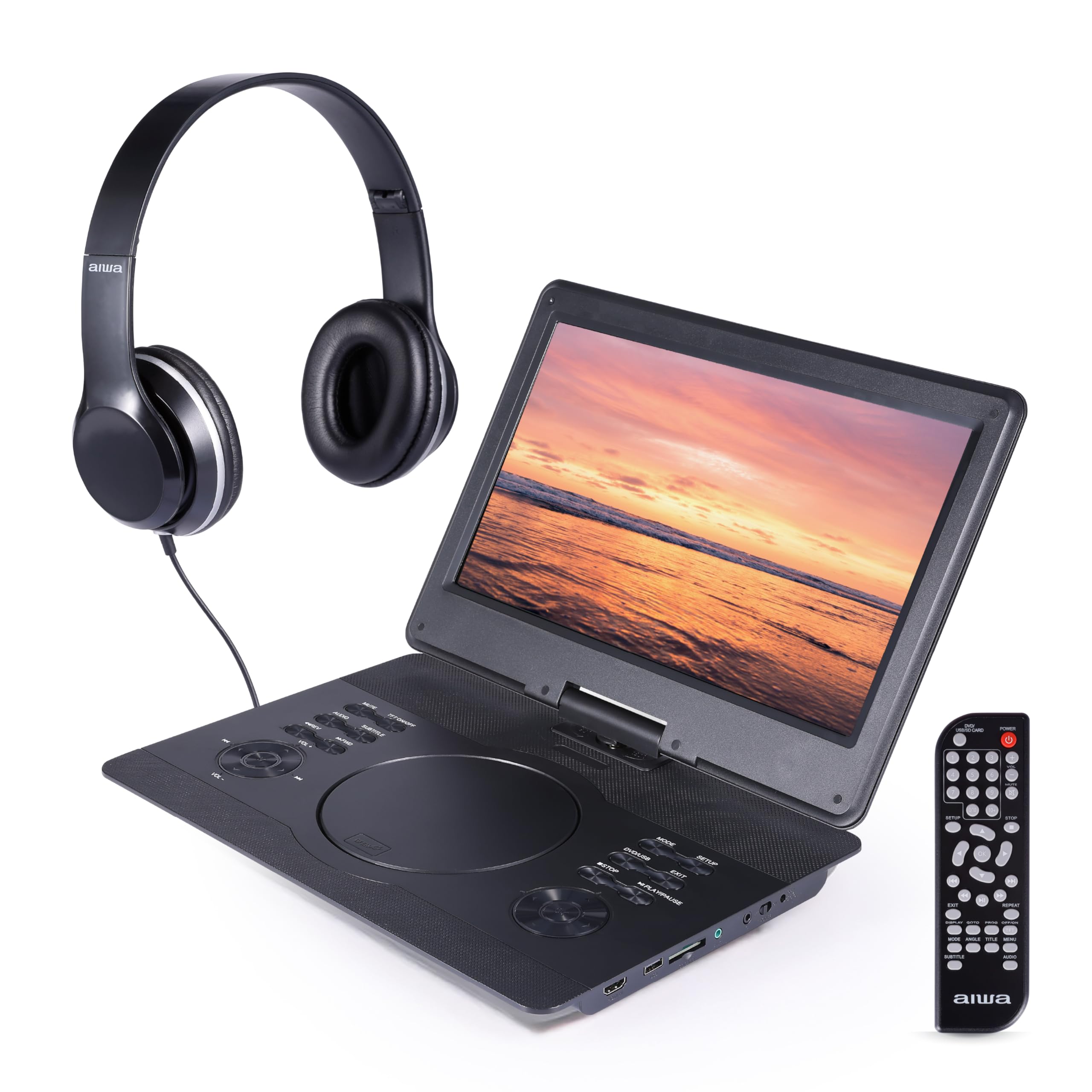
Abbildung 1: Front view of the Aiwa Portable Media Player with included remote control.

Abbildung 2: Seite view showing the open disc tray and headphone connection.
Hauptgerät Merkmale:
- 14-inch Swiveling LCD Screen: Bietet Flexibilität viewing angles and can fold flat.
- Disc-Fach: Zum Einlegen von DVDs und CDs.
- Bedientasten: Play/Pause, Stop, Skip, Volume, Menu, Setup, Mode, etc.
- Eingebaute Stereolautsprecher: Zur Audiowiedergabe ohne Kopfhörer.
- HDMI-Eingang: Connect external devices like gaming consoles or streaming sticks.
- USB-Anschluss: Zum Abspielen von Medien von USB-Sticks.
- SD-Kartensteckplatz: For playing media from SD memory cards.
- Kopfhöreranschluss: Zum privaten Hören.
- Leistungsaufnahme: For connecting AC/DC or car adapters.

Abbildung 3: The screen can swivel and fold flat for compact use.
Aufstellen
1. Laden des Akkus
- Connect the AC/DC power adapter to the DC IN port on the player and then to a wall outlet.
- Die Ladeanzeige leuchtet auf. Eine vollständige Ladung dauert in der Regel 2–3 Stunden.
- Alternatively, use the car power adapter to charge the device in a vehicle.
2. Ein-/Ausschalten
- Zum Einschalten halten Sie die LEISTUNG Taste am Gerät oder auf der Fernbedienung.
- Halten Sie zum Ausschalten die Taste gedrückt LEISTUNG erneut die Taste.
3. Kopfhörer anschließen
- Plug the included wired headphones into the KOPFHÖRER Jack auf der Seite des Spielers.
- The built-in speakers will automatically mute when headphones are connected.
4. Using the Carrying Bag

Abbildung 4: The included carrying bag for transport and protection.
- Place the media player and its accessories into the protective carrying bag for safe transport.
Betrieb
1. Disc Playback (DVD/CD)
- Öffnen Sie die Abdeckung des Disc-Fachs.
- Legen Sie eine DVD oder CD vorsichtig mit der beschrifteten Seite nach oben auf die Spindel.
- Close the disc tray cover firmly.
- Der Player erkennt die Disc automatisch und startet die Wiedergabe oder zeigt das Disc-Menü an.
- Use the control buttons on the unit or remote (Play/Pause, Stop, Skip, Menu, etc.) to navigate and control playback.
2. Wiedergabe von USB-/SD-Karten
- Stecken Sie einen USB-Stick in den USB-Anschluss oder eine SD-Karte in den SD-Kartensteckplatz.
- Drücken Sie die MODUS button on the unit or remote to select USB or SD mode.
- Navigieren Sie durch Ihren files mit den Richtungstasten und drücken SPIELEN/EINGABE to select and play media.
3. HDMI-Eingang
- Connect an external device (e.g., gaming console, streaming stick) to the HDMI IN port on the player using an HDMI cable (not included).
- Drücken Sie die MODUS button on the unit or remote to select HDMI input.
- The player's screen will display the content from the connected HDMI device.
4. Bildschirmeinstellung

Abbildung 5: The screen can be swiveled and tilted for optimal viewing.
- The screen can swivel up to 180 degrees and tilt for various viewwinkeln.
- It can also be folded flat against the base unit, transforming the device into a tablet-like form factor.
5. Lautstärkeregelung
- Stellen Sie die Lautstärke mit den Lautstärke+ Und vol- buttons on the unit or the remote control.
Wartung
Reinigen des Geräts
- Wischen Sie den Bildschirm und die Außenflächen mit einem weichen, trockenen, fusselfreien Tuch ab.
- Bei hartnäckigen Flecken leicht dampReinigen Sie das Tuch mit Wasser oder einem milden, nicht scheuernden Reinigungsmittel.
- Verwenden Sie keine aggressiven Chemikalien oder Scheuermittel, da diese die Oberfläche beschädigen können.
- Keep the disc tray and ports free of dust and debris.
Lagerung
- When not in use, store the player in its protective carrying bag in a cool, dry place.
- Vermeiden Sie die Lagerung in Bereichen mit extremen Temperaturen oder hoher Luftfeuchtigkeit.
Fehlerbehebung
Sollten Sie auf Probleme stoßen, konsultieren Sie bitte die folgenden häufigen Probleme und Lösungen:
| Problem | Mögliche Ursache | Lösung |
|---|---|---|
| Kein Strom | Battery depleted; Power adapter not connected or faulty. | Charge the battery using the AC/DC or car adapter. Ensure connections are secure. |
| Disc wird nicht abgespielt / Fehlermeldung „Keine Disc“ | Die Disc wurde falsch eingelegt; die Disc ist verschmutzt oder zerkratzt; das Disc-Format ist inkompatibel. | Ensure disc is inserted label-side up. Clean the disc. Try a different disc. Verify disc is DVD/CD/VCD format. |
| Kein Ton | Lautstärke zu niedrig; Kopfhörer angeschlossen; Stummschaltung aktiviert. | Increase volume. Disconnect headphones if using speakers. Check if mute is active on remote. |
| Schlechte Bildqualität | Disc quality; Screen viewing angle; Low resolution content. | Ensure disc is clean and undamaged. Adjust screen angle. Note that native resolution is 800x480. |
| Fernbedienung funktioniert nicht | Batteries depleted; Obstruction between remote and player; Remote sensor blocked. | Replace remote batteries. Ensure clear line of sight to the player's IR sensor. |
Technische Daten
| Besonderheit | Detail |
|---|---|
| Marke | Aiwa |
| Modellnummer | AI7017-BLK-T37-6 |
| Bildschirmgröße | 14 Zoll |
| Anzeigetyp | LCD |
| Native Auflösung | 800 x 480 |
| Medientypunterstützung | DVD, CD, CD-R, DVD-R, VCD, USB, SD Card |
| Konnektivität | HDMI Input, USB Port, SD Card Slot, Headphone Jack |
| Audio | Built-in Stereo Speakers, Headphone Output |
| Stromquelle | Rechargeable Battery, AC/DC Adapter, Car Adapter (12V) |
| UPC | 021331134455 |
Garantieinformationen
This product is covered by a limited manufacturer's warranty. Please refer to the warranty card included in your package or contact customer support for details regarding warranty terms and conditions.
Kundenservice
For technical assistance, troubleshooting, or warranty inquiries, please contact Aiwa customer support. Contact information can typically be found on the product packaging or the official Aiwa webWebsite.