
1. Produktüberschreitungview
The Edifier CC300 is a professional Bluetooth 6.0 communicator headset designed for reliable and high-quality audio communication in various professional environments. It features AI-enhanced dual-microphone noise filtering, a 30mm dynamic driver for clear sound, and multiple connectivity options for versatile use.
2. Packungsinhalt
- Edifier CC300 Headset
- USB-C-Dongle
- USB-A auf USB-C Ladekabel
- Bedienungsanleitung
3. Produktmerkmale
The Edifier CC300 headset is engineered for comfort and performance, featuring a lightweight design and a flexible microphone arm.

Abbildung 3.1: Edifier CC300 Headset with included USB-C dongle and charging cable.

Abbildung 3.2: Seite view of the Edifier CC300 Headset with the microphone arm extended.

Abbildung 3.3: The microphone arm can rotate 240 degrees for flexible positioning on either the left or right side.
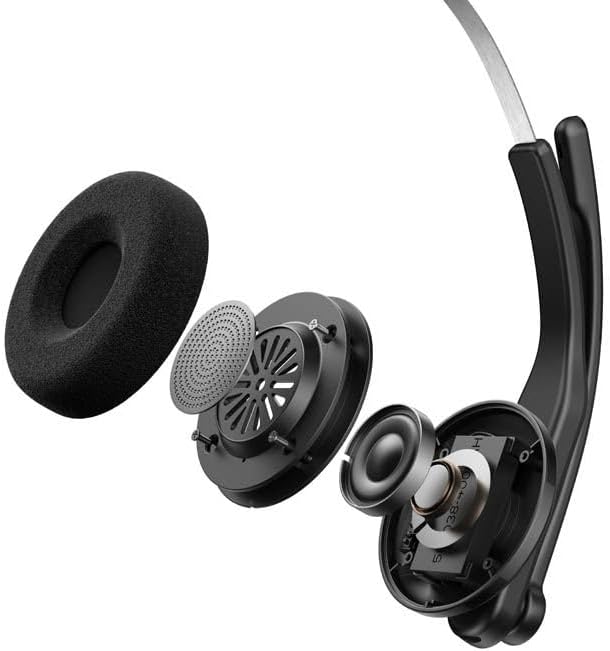
Abbildung 3.4: Explodierte view showing the internal components of the earcup, including the 30mm dynamic driver.
4. Einrichtung
4.1 Erstaufladung
Before first use, fully charge the headset using the provided USB-A to USB-C cable. Connect the USB-C end to the headset and the USB-A end to a power source (e.g., computer USB port or wall adapter). The charging indicator light will show the charging status.
4.2 Ein-/Ausschalten
- So schalten Sie das Gerät ein: Halten Sie den Ein-/Ausschalter gedrückt, bis die Kontrollleuchte aufleuchtet.
- So schalten Sie das Gerät aus: Halten Sie den Ein-/Ausschalter gedrückt, bis die Kontrollleuchte erlischt.
4.3 Tragen des Headsets
Adjust the headband for a comfortable fit. The microphone arm can be rotated 240 degrees to be positioned on either the left or right side of your face. Position the microphone approximately 2-3 cm from your mouth for optimal voice pickup.
5. Bedienungsanleitung
The Edifier CC300 features intuitive controls for managing calls and audio playback.

Abbildung 5.1: Diagram illustrating the control buttons and their functions on the Edifier CC300 Headset.
5.1 Tastenfunktionen
| Aktion | Funktion |
|---|---|
| Press and hold (Power Button) | Ein-/Ausschalten |
| Press 1x (Mute Button) | Activate/Deactivate Mute (during calls) |
| Press 1x (Volume Up) | Lautstärke erhöhen |
| Press and hold (Volume Up) | Nächster Titel |
| Press and hold (Volume Down) | Lautstärke verringern |
| Press 1x (Volume Down) | Vorheriger Titel |
| Press 1x (Call Button) | Play/Pause Audio; Answer/End Call |
| Press and hold (Call Button) | Anruf ablehnen |
| Press 2x (Call Button) | Wahlwiederholung der letzten Nummer |
6. Konnektivitätsoptionen
The Edifier CC300 offers three versatile connection methods:
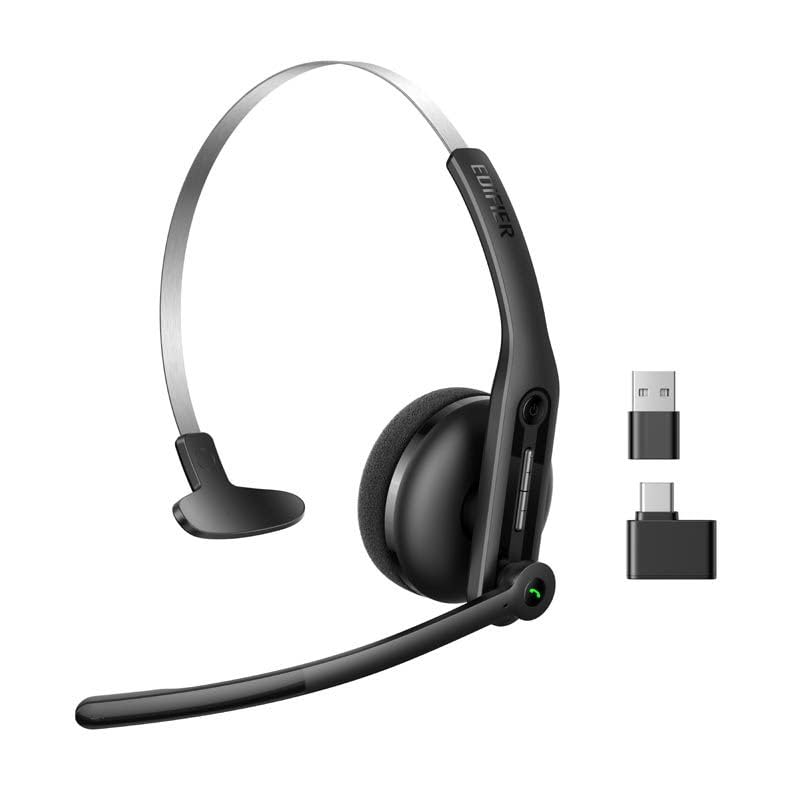
Abbildung 6.1: Visual representation of the three connectivity options: Bluetooth, USB-C dongle, and wired USB-A.
6.1 Bluetooth-Verbindung
- Stellen Sie sicher, dass das Headset eingeschaltet ist und sich im Kopplungsmodus befindet (Kontrollleuchte blinkt).
- On your device (smartphone, laptop), enable Bluetooth and search for "EDIFIER CC300".
- Select the headset to pair. Once connected, the indicator light will turn solid blue.
6.2 USB-C Dongle Connection
- Plug the provided USB-C dongle into an available USB-C port on your computer.
- Power on the headset. It will automatically connect to the dongle for a stable, low-latency connection.
6.3 Wired USB-A Connection
- Connect the headset to your computer using the provided USB-A to USB-C cable.
- The headset will function as a wired audio device, providing zero interference.
7. Akku und Aufladen
The CC300 headset is designed for extended use with a long-lasting battery.
- Akkulaufzeit: Up to 72 hours for audio playback, or 36 hours for talk time.
- Ladezeit: Ungefähr 1.5 Stunden für eine vollständige Aufladung.
- Ladeanzeige: Refer to the LED indicator on the headset for charging status.
To charge, connect the headset to a power source using the USB-A to USB-C cable.
8. Wartung
- Reinigung: Reinigen Sie das Headset mit einem weichen, trockenen Tuch. Verwenden Sie keine flüssigen Reiniger oder Sprays.
- Lagerung: Bewahren Sie das Headset an einem kühlen, trockenen Ort fern von direkter Sonneneinstrahlung und extremen Temperaturen auf.
- Feuchtigkeit vermeiden: Keep the headset away from water and high humidity to prevent damage.
- Vorsichtig handhaben: Vermeiden Sie es, das Headset fallen zu lassen oder starken Stößen auszusetzen.
9. Fehlerbehebung
9.1 Kein Ton oder schlechte Audioqualität
- Ensure the headset is powered on and properly connected (Bluetooth, dongle, or wired).
- Überprüfen Sie die Lautstärke sowohl am Headset als auch an Ihrem angeschlossenen Gerät.
- If using Bluetooth, ensure the headset is within range of your device.
- Versuchen Sie, sowohl das Headset als auch Ihr angeschlossenes Gerät neu zu starten.
9.2 Mikrofon funktioniert nicht
- Ensure the microphone is not muted (check the mute button).
- Verify that the headset is selected as the input device in your computer's or device's sound settings.
- Ensure the microphone arm is positioned correctly near your mouth.
9.3 Headset Not Pairing via Bluetooth
- Ensure the headset is in pairing mode (indicator light flashing).
- Schalten Sie Bluetooth auf anderen Geräten in der Nähe aus, um Störungen zu vermeiden.
- Entfernen Sie das Gerät aus der Bluetooth-Liste Ihres Geräts und versuchen Sie es erneut mit einer Kopplung.
10. Spezifikationen
| Besonderheit | Detail |
|---|---|
| Marke | Erbauer |
| Modellname | CC300 |
| Farbe | Schwarz |
| Konnektivitätstechnologie | Wireless (Bluetooth), Wired (USB-A), USB-C Dongle |
| Bluetooth-Version | 6.0 |
| Bluetooth-Protokolle | A2DP, AVRCP, HFP |
| Audio-Codec | SBC |
| Treibertyp | 30 mm dynamischer Treiber |
| Frequenzgang | 20Hz - 20KHz |
| Schalldruckpegel | 94 ± 3 dB(A) |
| Batteriekapazität | 400 mAh |
| Musikwiedergabezeit | Ca. 72 Stunden |
| Gesprächszeit | Ca. 36 Stunden |
| Ladezeit | Ca. 1.5 Stunden |
| Leistungsaufnahme | 5 V/500 mAh |
| Gewicht | 70 Gramm |
| Besondere Merkmale | AI-enhanced Dual-Mic Noise Cancellation |
| Kompatible Geräte | Mobile Phones, Desktops, Laptops |
11. Garantie und Support
11.1 Garantieinformationen
The Edifier CC300 Headset comes with a 1 Jahr Garantie from the date of purchase, covering manufacturing defects. Please retain your proof of purchase for warranty claims. The warranty does not cover damage caused by misuse, accidents, unauthorized modifications, or normal wear and tear.
11.2 Kundendienst
For technical assistance, troubleshooting, or warranty inquiries, please contact Edifier customer support through their official website or the contact information provided with your product packaging. You may also visit the Edifier Store auf Amazon für weitere Informationen.