
1. Einleitung
Thank you for choosing the FLEXISPOT ErgoX Max Ergonomic Office Chair. This manual provides essential information for the safe assembly, operation, and maintenance of your new chair. Please read it thoroughly before use and retain it for future reference.
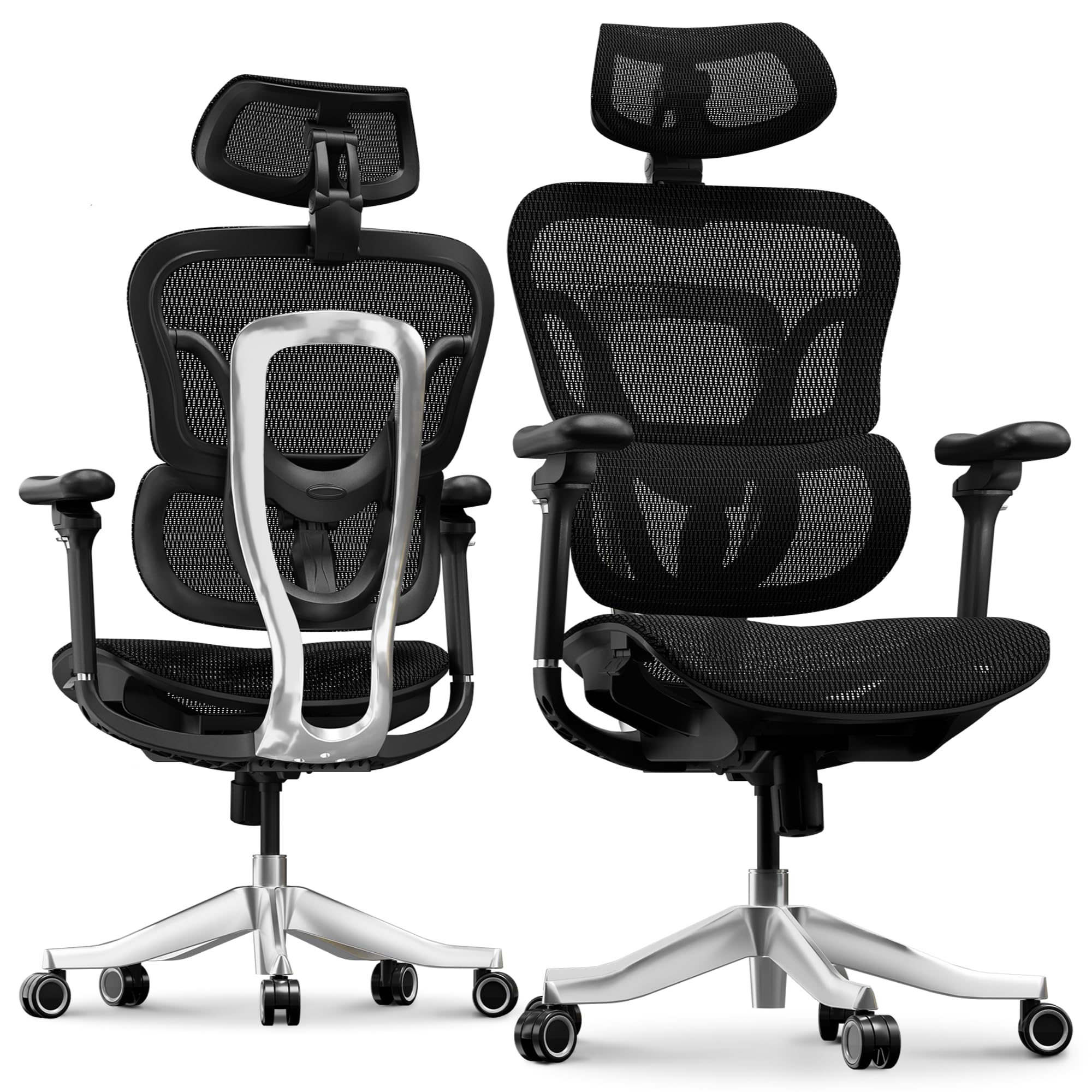
Image 1.1: The FLEXISPOT ErgoX Max Ergonomic Office Chair in a typical office environment.
2. Sicherheitshinweise
- Vor der Montage sicherstellen, dass alle Komponenten vorhanden und unbeschädigt sind.
- Befolgen Sie die Montageanleitung sorgfältig. Ziehen Sie die Schrauben nicht zu fest an.
- Stellen Sie sich nicht auf den Stuhl.
- Benutzen Sie den Stuhl nicht, wenn Teile fehlen, beschädigt oder abgenutzt sind.
- Halten Sie Kinder während der Justierung von beweglichen Teilen fern.
- Die maximale Belastbarkeit dieses Stuhls beträgt 300 kg (661 lbs). Diese Grenze darf nicht überschritten werden.
3. Packungsinhalt
The FLEXISPOT ErgoX Max chair package typically includes the following components:
- Armlehnen
- Kopfstütze
- Räder (Lenkrollen)
- Rückenlehne
- Sitz
- Benutzerhandbuch (dieses Dokument)
- Montagewerkzeuge (z. B. Inbusschlüssel)
- Aluminum Alloy Frame and Base components
4. Montageanleitung
Detailed step-by-step assembly instructions are provided in a separate guide included with your product packaging. Please refer to that guide for specific assembly procedures. Ensure all parts are securely fastened before using the chair.
5. Einstellungen und Funktionen
The ErgoX Max chair offers extensive adjustability to customize your seating experience for optimal comfort and ergonomic support.
5.1. 4D Adjustable Headrest
The headrest can be adjusted in four dimensions (height, angle, and depth) to provide continuous and effective support for your head and neck. Adjust it to align with the natural curve of your neck.

Image 5.1: Illustration of the 4D adjustable headrest, demonstrating various positions for neck support.
5.2. 5D Adjustable PU Armrests
The armrests offer five-dimensional adjustment for ultimate support. They can be moved up/down, forward/backward, pivoted inward/outward, and adjusted for width. Position them so your arms are comfortable and your shoulders are relaxed.

Image 5.2: Visual guide to the 5D adjustable PU armrests, highlighting their multi-directional movement.
5.3. 4D Adaptive Lumbar Support (BDLS)
The Bionic Dynamic Lumbar Support (BDLS) automatically adjusts to your posture, providing dynamic lower-back support. This feature helps reduce fatigue and improves sitting comfort during extended periods.

Image 5.3: Detail of the Bionic Dynamic Lumbar Support (BDLS) system, engineered for spinal alignment.
5.4. Einstellung der Sitztiefe
Adjust the seat depth to ensure proper leg support and circulation. There is a lever located under the seat to slide the seat pan forward or backward.
5.5. Backrest Height Adjustment
The backrest height can be adjusted to accommodate different user heights, ensuring the lumbar support is correctly positioned for your spine.
5.6. Reclining and Tilt-Lock Mechanism
The chair features a 3-position tilt-lock mechanism, allowing you to adjust and lock the backrest at various angles (e.g., 104°, 113°, 124°) for working, relaxing, or reclining. Use the lever under the seat to engage or disengage the tilt lock and adjust the recline tension.

Image 5.4: Illustration of the 3-position tilt-lock mechanism, showing different reclining angles.
5.7. Ausziehbare Fußstütze
An optional retractable footrest is integrated into the chair. Pull it out for a complete reclining and relaxation experience, or push it back in when not needed.
6. Pflege und Wartung
To ensure the longevity and appearance of your FLEXISPOT ErgoX Max chair, follow these care instructions:
- Reinigung: For the mesh material, dry clean only. For other surfaces, wipe with a soft, damp Tuch. Vermeiden Sie aggressive Chemikalien oder Scheuermittel.
- Inspektion: Überprüfen Sie regelmäßig alle Schrauben und Bolzen auf festen Sitz. Ziehen Sie sie gegebenenfalls nach.
- Rollen: The electroplated chrome casters are designed for smooth and silent mobility on various floor surfaces. Keep them free of debris.
- Vermeiden Sie direktes Sonnenlicht: Prolonged exposure to direct sunlight may cause fading of materials.
7. Fehlerbehebung
If you encounter any issues with your FLEXISPOT ErgoX Max chair, please refer to the following common solutions:
- Stuhl wackelt: Check that all assembly screws are securely tightened. Ensure the chair is on a flat, even surface.
- Anpassungen funktionieren nicht: Verify that no levers are jammed or obstructed. Ensure you are using the correct lever for the desired adjustment.
- Die Rollen laufen nicht reibungslos: Check for hair or debris caught in the casters and clean them if necessary.
Für weitere Unterstützung wenden Sie sich bitte an den FLEXISPOT-Kundendienst.
8. Spezifikationen
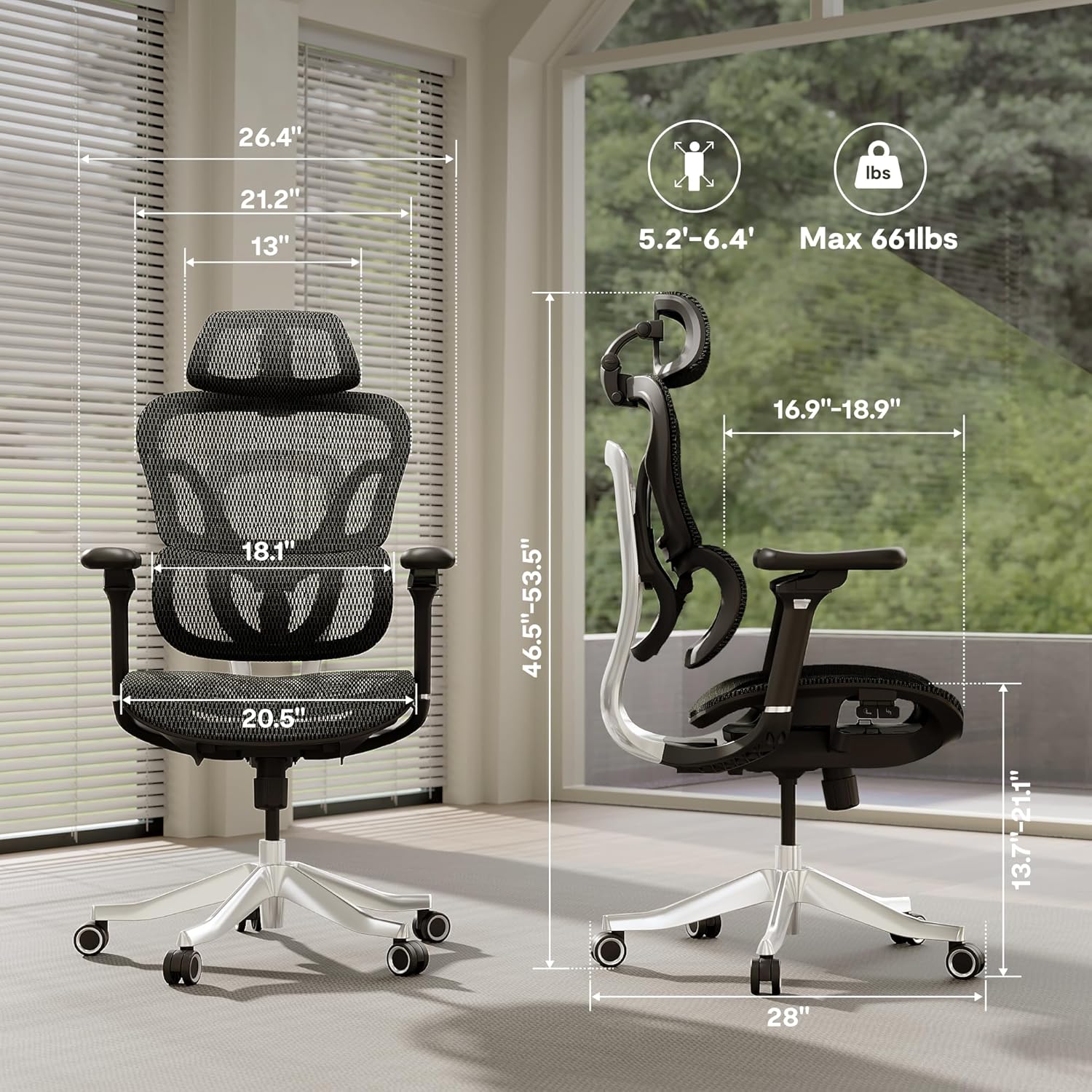
Image 8.1: Key dimensions of the FLEXISPOT ErgoX Max Ergonomic Office Chair.
| Besonderheit | Detail |
|---|---|
| Marke | FLEXISPOT |
| Modellname | Ergonomic Executive Chair (ErgoX Series) |
| Farbe | Breathable Black |
| Material | Nylon (Mesh seat and back) |
| Rahmenmaterial | Aluminum Alloy Frame & Reinforced Nylon |
| Produktabmessungen (T x B x H) | 27.95"T x 27.95"B x 53.5"H |
| Artikelgewicht | 46 Pfund |
| Maximalgewichtsempfehlung | 661 Pfund |
| Verstellbare Kopfstütze | 4D-einstellbar |
| Armlehnen | 5D-einstellbar |
| Lordosenstütze | 4D Adaptive (Bionic Dynamic Lumbar Support) |
| Anzahl der Liegepositionen | 3 (90-130° range) |
| Rollen | Electroplated Chrome, Mute Casters |
| Montage erforderlich | Ja |
| Empfohlene Verwendung | Drafting, Gaming, Office, Reading, Relaxing, Sleeping |
9. Garantie und Support
The FLEXISPOT ErgoX Max Ergonomic Office Chair comes with a 5-year warranty, as indicated by the manufacturer. Additionally, a 3-Year Protection Plan is available for purchase to extend coverage.
For warranty claims, technical support, or any inquiries, please contact FLEXISPOT customer service through their official webWebsite oder den Händler, bei dem das Produkt gekauft wurde.
