
1. Einleitung
Vielen Dank für Ihren Einkauf.asing the Audizio Laredo Bluetooth Turntable. This manual provides essential information for the safe and correct operation of your device. Please read it thoroughly before use and keep it for future reference.
Hauptmerkmale:
- Integrated HiFi speakers with 160W total power output.
- Bidirectional Bluetooth for wireless audio streaming (in and out).
- High-quality Audio Technica cartridge for precise playback.
- Supports 7, 10, and 12-inch vinyl records at 33 and 45 RPM.
- Adjustable counterweight on the aluminum tonearm.
- RCA Line Out for external ampVerstärker/Lautsprecher.
- AUX Input for connecting external audio sources.
- Elegant bamboo finish.
Was ist in der Box:
- Audizio Laredo Turntable Unit
- Bedienungsanleitung
- Netzteil
- 45 RPM Adapter for singles
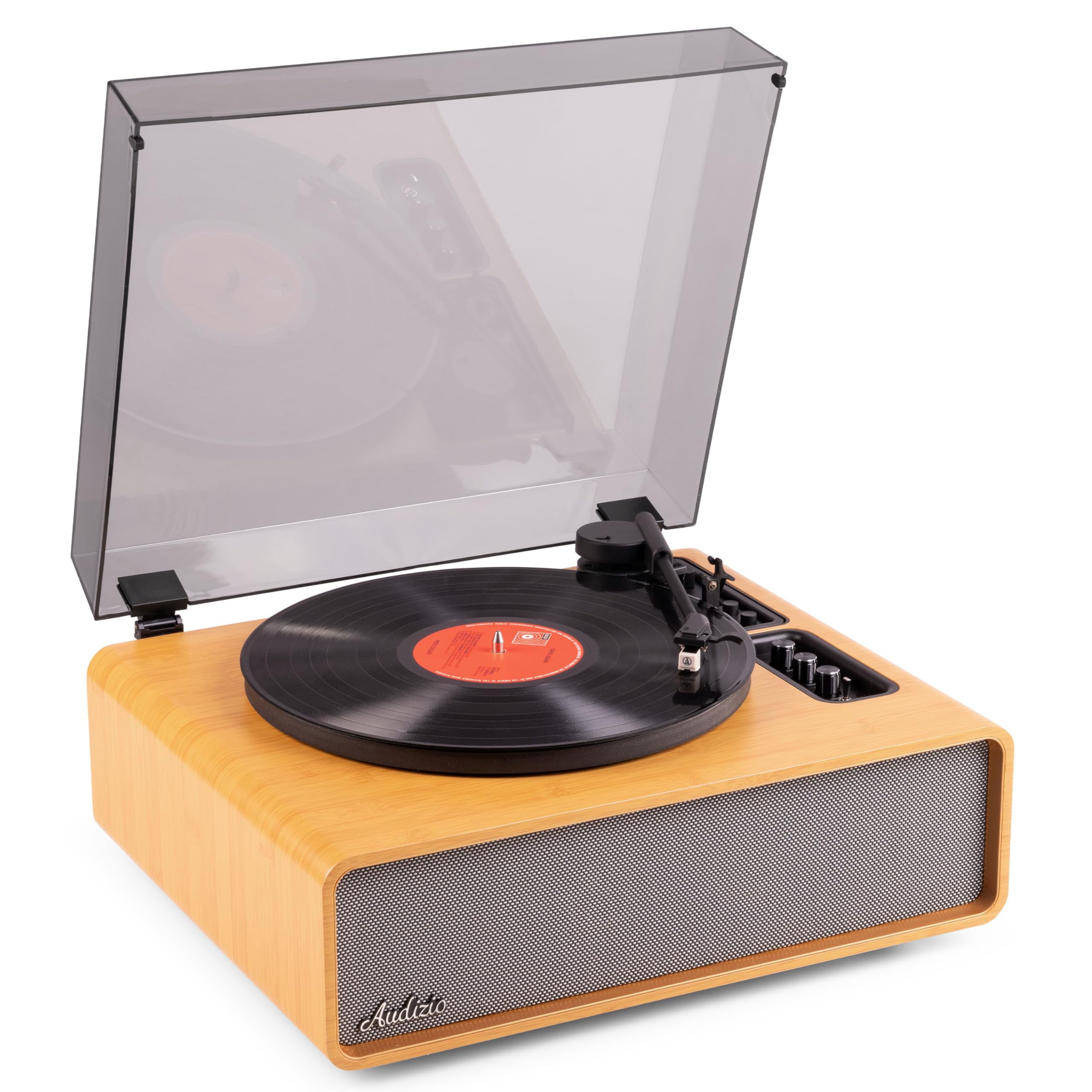
Figure 1.1: Audizio Laredo Turntable, overall view.
2. Sicherheitshinweise
Please read and follow these safety instructions carefully to prevent damage to the unit and ensure your safety.
- Um Brände oder Stromschläge zu vermeiden, setzen Sie das Gerät weder Regen noch Feuchtigkeit aus.
- Öffnen Sie nicht das casing. Im Inneren befinden sich keine vom Benutzer wartbaren Teile. Alle Wartungsarbeiten dürfen nur von qualifiziertem Fachpersonal durchgeführt werden.
- Stellen Sie das Gerät auf eine stabile, ebene Fläche, um ein Umfallen zu verhindern.
- Das Gerät sollte nicht direkter Sonneneinstrahlung, Wärmequellen oder übermäßigem Staub ausgesetzt werden.
- Sorgen Sie für ausreichende Belüftung rund um das Gerät. Blockieren Sie keine Belüftungsöffnungen.
- Verwenden Sie nur das mitgelieferte Netzteil.
- Trennen Sie das Gerät während eines Gewitters oder bei längerer Nichtbenutzung vom Stromnetz.
3. Produktüberschreitungview
Familiarize yourself with the components and controls of your Audizio Laredo turntable.
Hauptbestandteile:
- Teller: Unterstützt die Schallplatte.
- Tonarm: Hält die Patrone und den Stift.
- Tonabnehmer und Nadel: Reads the grooves of the record. (Audio Technica ATN-3600)
- Staubschutzhülle: Schützt Plattenteller und Tonarm vor Staub.
- Integrierte Lautsprecher: Zur direkten Audiowiedergabe.
- Bedienfeld: For power, volume, tone, and mode selection.
- Anschlüsse hinten: RCA Line Out, AUX In, Power Input.

Abbildung 3.1: Oben view of the turntable with key components visible.

Figure 3.2: Control Panel for volume, bass, and treble adjustments.

Figure 3.3: Audio Technica ATN-3600 Cartridge and Stylus.

Figure 3.4: Tonearm base with speed and auto-stop controls.

Figure 3.5: Rear connection panel.
4. Einrichtung
4.1 Auspacken
- Nehmen Sie den Plattenspieler vorsichtig aus der Verpackung.
- Remove all protective materials, including the stylus guard.
- Bewahren Sie die Verpackung für einen späteren Transport oder eine Lagerung auf.
4.2 Platzierung
- Place the turntable on a stable, level surface to prevent vibrations and ensure proper playback.
- Avoid placing the unit near strong magnetic fields, heat sources, or areas with high humidity.
4.3 Montage der Staubschutzhaube
- Align the hinges of the dust cover with the slots on the back of the turntable.
- Gently push down until the cover is securely in place.
- The dust cover can be removed for playback if desired.

Figure 4.1: Turntable with dust cover.
4.4 Stromanschluss
- Connect the power adapter to the DC IN port on the rear of the turntable.
- Plug the adapter into a suitable wall outlet (220V).
4.5 Tonarm- und Tonabnehmerkonfiguration
- The Audio Technica cartridge is pre-installed.
- The tonearm features an adjustable counterweight. Refer to the detailed instructions in the included manual for precise counterweight adjustment to optimize tracking force.
5. Bedienungsanleitung
5.1 Abspielen einer Schallplatte
- Place a vinyl record on the platter. If playing a 7-inch single, use the included 45 RPM adapter.
- Select the appropriate speed (33 or 45 RPM) using the speed selector switch near the tonearm base.
- Heben Sie den Tonarm vorsichtig mit dem Cueing-Hebel an.
- Position the tonearm over the desired track of the record.
- Senken Sie den Tonarm langsam mithilfe des Tonarmlifts ab. Die Nadel setzt die Schallplatte in Kontakt, und die Wiedergabe beginnt.
- Am Ende der Schallplatte stoppt die automatische Stoppfunktion die Rotation des Plattentellers. Heben Sie den Tonarm an und bringen Sie ihn in seine Ausgangsposition zurück.

Figure 5.1: Playing a vinyl record.
5.2 Bluetooth Operation (Bidirectional)
The Laredo turntable supports both Bluetooth input (receiving audio from a device) and Bluetooth output (sending audio to a Bluetooth speaker/headphones).
Bluetooth-Eingang (BT IN):
- Press the MODE/POWER button to select Bluetooth mode. The LED indicator will flash.
- On your smartphone or tablet, enable Bluetooth and search for 'Audizio Laredo'.
- Select the turntable to pair. Once connected, the LED will glow solid.
- You can now stream audio from your device to the turntable's integrated speakers.
Bluetooth Output (BT OUT):
- Stellen Sie sicher, dass sich Ihre Bluetooth-Kopfhörer oder Ihr Lautsprecher im Kopplungsmodus befinden.
- Set the BT OUT switch (located near the tonearm base) to 'ON'.
- The turntable will automatically search for and connect to the nearest Bluetooth audio device.
- Once connected, the audio from your vinyl record will be transmitted to your Bluetooth device.

Figure 5.2: Bidirectional Bluetooth functionality.
5.3 AUX-Eingang
- Connect an external audio device (e.g., MP3 player, CD player) to the AUX IN port on the rear of the turntable using a 3.5mm audio cable.
- Press the MODE/POWER button to select AUX mode.
- Audio from the external device will play through the turntable's speakers.
5.4 RCA-Line-Ausgang
- Um den Plattenspieler an ein externes Gerät anzuschließen amplifier or powered speakers, use an RCA cable (not included) to connect the LINE OUT ports on the rear of the turntable to the corresponding input on your audio system.
- Ensure the 'Speaker ON/OFF' switch on the rear is set to 'OFF' if you only want sound from external speakers.
5.5 Lautstärke- und Klangregelung
- Use the VOLUME knob on the control panel to adjust the overall playback volume.
- Adjust the BASS and TREBLE knobs to fine-tune the audio output to your preference.
6. Wartung
6.1 Reinigung des Geräts
- Wischen Sie die Staubschutzhaube und das Gehäuse mit einem weichen, trockenen Tuch ab.
- Verwenden Sie keine Scheuermittel, Wachse oder Lösungsmittel.
- For the platter, use a slightly damp Tuch abwischen und gründlich trocknen.
6.2 Pflege und Austausch der Stiftspitze
- Der Stift ist ein empfindliches Bauteil. Gehen Sie vorsichtig damit um.
- Clean the stylus regularly using a soft brush designed for stylus cleaning, brushing from back to front.
- A stylus typically lasts for approximately 300-500 hours of playback. If you notice a decrease in sound quality or increased skipping, it may be time to replace the stylus.
- Replacement styli (e.g., Audio Technica ATN-3600L or compatible) can be purchased from authorized dealers. Refer to the detailed instructions provided with the replacement stylus for installation.
7. Fehlerbehebung
If you encounter issues with your turntable, please consult the following table before contacting support.
| Problem | Mögliche Ursache | Lösung |
|---|---|---|
| Kein Strom | Netzteil nicht angeschlossen; Steckdose defekt. | Stellen Sie sicher, dass das Netzteil fest mit dem Gerät und einer funktionierenden Steckdose verbunden ist. |
| Kein Ton von den Lautsprechern | Volume too low; Speaker ON/OFF switch is OFF; Incorrect mode selected. | Increase volume; Set 'Speaker ON/OFF' switch to ON; Select correct input mode (Phono, BT IN, AUX). |
| Skipping records | Record is dirty or damaged; Stylus is worn or dirty; Turntable not level; Tracking force incorrect. | Clean record; Clean or replace stylus; Place turntable on a level surface; Adjust tonearm counterweight. |
| Probleme mit der Bluetooth-Kopplung | Device too far; Turntable not in pairing mode; Interference. | Ensure devices are within range; Re-enter pairing mode; Turn off other Bluetooth devices. |
| Klangverzerrung | Volume too high; Stylus worn; Record damaged. | Reduce volume; Replace stylus; Try a different record. |
8. Spezifikationen
Technical specifications for the Audizio Laredo Turntable.
| Besonderheit | Spezifikation |
|---|---|
| Modellname | Laredo (101.537) |
| Abmessungen (L x B x H) | 43.2 x 43.2 x 21 cm (17 x 17 x 8.3 Zoll) |
| Produktgewicht | 7.65 kg |
| Material | Wood (Bamboo finish) |
| Rotationsgeschwindigkeiten | 33 U/min, 45 U/min |
| Patronentyp | Audio Technica (ATN-3600) |
| Motortyp | Riemenantrieb |
| Signalformat | Analog |
| Integrierte Lautsprecher | Yes, 160W total output |
| Bluetooth-Version | 5.4 (Bidirektional) |
| Konnektivität | Bluetooth (In/Out), RCA Line Out, AUX In |
| Stromquelle | Kabelgebundene Elektrik |
| Bandtage | 220 Volt |
| Kompatible Geräte | Speakers, Headphones, Smartphone, Tablet |
9. Garantie und Support
9.1 Garantieinformationen
This Audizio Laredo Turntable comes with a 2 Jahr Garantie from the date of purchase. This warranty covers manufacturing defects and faults under normal use. It does not cover damage caused by misuse, accidents, unauthorized modifications, or normal wear and tear (e.g., stylus wear).
Bitte bewahren Sie Ihren Kaufbeleg für Garantieansprüche auf.
9.2 Kundendienst
If you have any questions, require technical assistance, or need to make a warranty claim, please contact your retailer or visit the official Audizio webWebsite mit Supportressourcen und Kontaktinformationen.
Official Audizio WebWebsite: www.audizio.com