
1. Einleitung
Vielen Dank für Ihren Einkauf.asing the EUHOMY 2.6kW Portable Spot Cooler. This manual provides essential information for the safe and efficient operation of your appliance. Please read it thoroughly before use and retain it for future reference.

Image 1.1: The EUHOMY 2.6kW Portable Spot Cooler unit.
2. Sicherheitshinweise
Um das Risiko von Bränden, Stromschlägen oder Verletzungen zu verringern, beachten Sie beim Betrieb dieses Geräts stets die grundlegenden Sicherheitsvorkehrungen.
- Stellen Sie sicher, dass das Netzteil mit der Lautstärke übereinstimmttage ist auf dem Typenschild angegeben.
- Betreiben Sie das Gerät nicht mit beschädigtem Kabel oder Stecker.
- Halten Sie das Gerät von Wasser und anderen Flüssigkeiten fern.
- Do not block air inlets or outlets. Maintain at least 50cm clearance from the front and rear, and 30cm from the sides.
- Always ensure the exhaust duct is properly installed to vent hot air outside the room.
- Ziehen Sie den Stecker aus der Steckdose, bevor Sie das Gerät reinigen oder Wartungsarbeiten durchführen.
- Dieses Gerät ist nicht für die Verwendung durch Personen mit eingeschränkten körperlichen, sensorischen oder geistigen Fähigkeiten bestimmt, es sei denn, sie werden beaufsichtigt.
3. Packungsinhalt
Überprüfen Sie, ob alle Artikel im Paket vorhanden sind:
- Spot Cooler Main Unit (1)
- Window Panels (4)
- Exhaust Duct (1)
- Ablaufschlauch (1)
- Exhaust Nozzle (1)
- Duct End Connector (1)
- Remote Control (1)
- Benutzerhandbuch (1)

Image 3.1: Included components of the EUHOMY Portable Spot Cooler.
4. Produktmerkmale
4.1. Powerful Cooling Performance
The EUHOMY Spot Cooler provides a powerful 2.6kW (60Hz) cooling capacity, capable of lowering room temperature by 5°C within 15 minutes. It is designed for effective cooling in areas up to 10 tatami (approximately 16.5 square meters), making it suitable for living rooms, bedrooms, garages, and warehouses.

Bild 4.1: Überview of cooling capabilities and specifications.
4.2. Three Operating Modes
This unit offers three versatile operating modes to suit various seasonal needs:
- Kühlmodus: Provides rapid cooling for hot environments.
- Entfeuchtungsmodus: Removes up to 28.98 liters of moisture per day, helping to maintain a comfortable humidity level between 40% and 60% RH, especially useful during rainy seasons.
- Gebläsemodus: Circulates air with two adjustable fan speeds (Weak/Strong) to provide ventilation.

Image 4.2: Three-in-one functionality for year-round comfort.
4.3. Intelligenter Schlafmodus
The smart sleep mode adjusts the set temperature gradually to ensure comfortable sleep. After 1 hour, the temperature increases by 1°C, and after 2 hours, it increases by another 1°C (total 2°C increase from initial setting). The unit then maintains this temperature, preventing overcooling or overheating during the night. This mode also reduces power consumption by approximately 25% over 8 hours compared to normal operation.
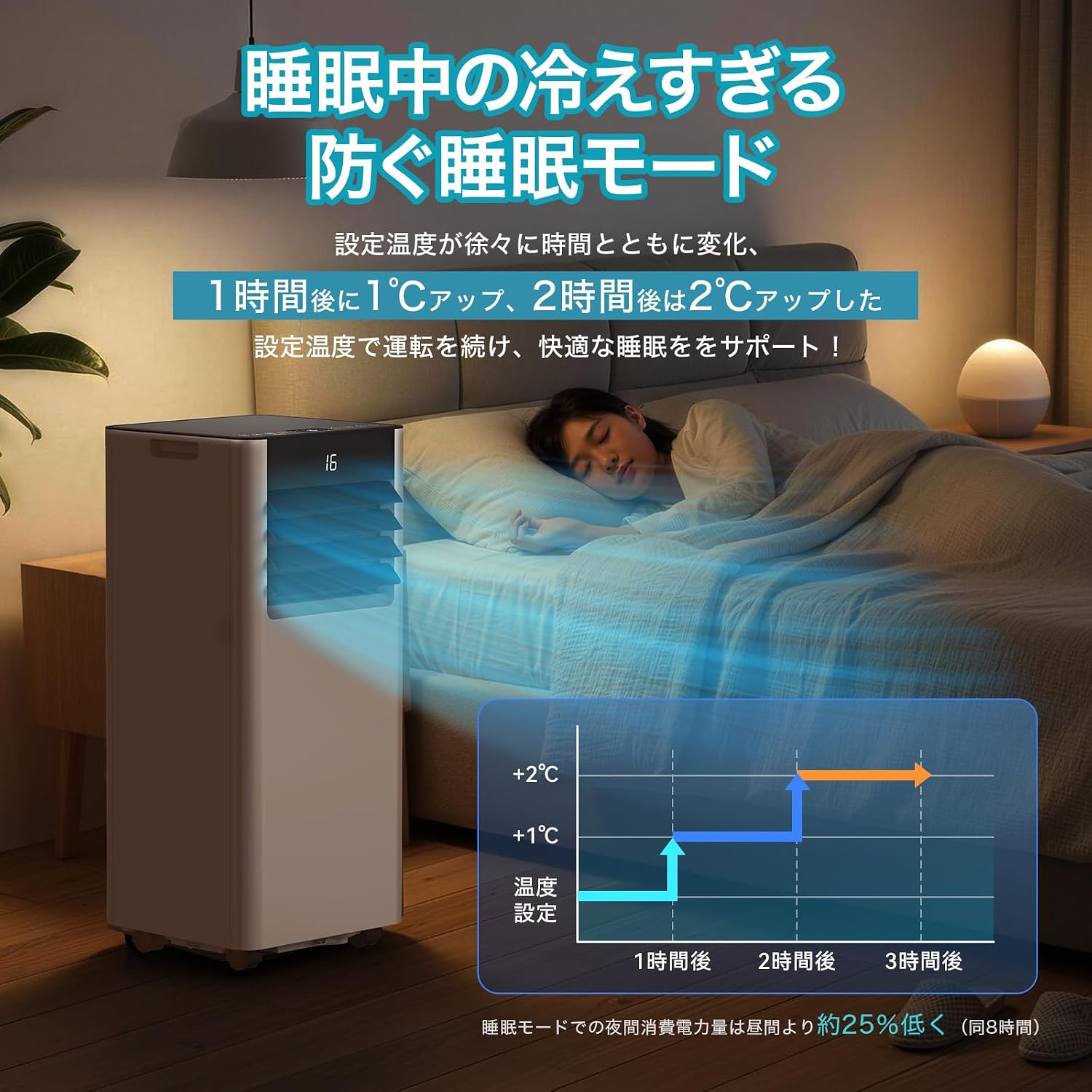
Image 4.3: Smart Sleep Mode for optimized overnight comfort and energy saving.
4.4. 24-Stunden-Timerfunktion
Set the unit to automatically turn on or off within a 1 to 24-hour period. This feature allows for efficient operation, ensuring the room is cooled before you arrive home or turns off after you leave, saving energy.
5. Einrichtung und Installation
The EUHOMY Spot Cooler is designed for easy installation without requiring professional construction. Follow these steps for setup:
5.1. Aufstellen des Geräts
Place the unit on a flat, stable surface. Ensure there is adequate clearance around the unit for proper airflow (at least 50cm from front/rear, 30cm from sides). The unit is equipped with casters for easy movement between rooms.
5.2. Window Panel Installation
Assemble the window panels according to your window size. The panels are adjustable from 50cm to 135cm to fit various window types (sliding or vertical sash windows). Secure the panels in the window frame using screws. The 2026 model includes four window panels for improved adaptability and sealing.

Image 5.1: Window panel installation guide.
5.3. Exhaust Duct Connection
Attach the exhaust duct to the unit's exhaust outlet and then connect the other end to the window panel. Ensure a secure connection to prevent hot air from re-entering the room. The improved exhaust duct design in the 2026 model enhances sealing performance by 50%.
6. Bedienung
The unit can be operated using the touch control panel on top of the unit or the included remote control.

Image 6.1: Control panel and remote control layout.
6.1. Ein-/Ausschalten
Drücke den Power Knopf (運転入/切) über das Bedienfeld oder die Fernbedienung, um das Gerät ein- oder auszuschalten.
6.2. Modusauswahl
Drücken Sie die Modus-Taste (モード) to cycle through Cooling (冷房モード), Dehumidifying (除湿モード), and Fan (送風モード) Modi.
6.3. Temperatureinstellung
In Cooling mode, use the Up (+) und runter (-) buttons to set the desired temperature between 16°C and 32°C.
6.4. Lüftergeschwindigkeitseinstellung
In Fan mode, press the Fan Speed button (風量) to select between Weak (弱) and Strong (強) airflow.
6.5. Timer-Einstellung
Drücken Sie die Timer-Taste (タイマー機能) to set the auto-on or auto-off time in 1-hour increments, from 1 to 24 hours.
6.6. Aktivierung des Schlafmodus
Press the Sleep button (睡眠) to activate the smart sleep mode for quiet and comfortable overnight operation.
6.7. Louver Adjustment
Manually adjust the vertical louvers to direct the airflow as desired.
7. Wartung
Regular maintenance ensures optimal performance and longevity of your spot cooler.
7.1. Entwässerung
The unit is designed with a non-drainage system for cooling mode, where condensed water is evaporated and expelled with the exhaust air. However, in high humidity conditions or during dehumidifying mode, significant water accumulation may occur. Connect the included drain hose to the drainage port for continuous drainage to prevent overflow.
7.2. Filterreinigung
Periodically clean the air filter to maintain air quality and unit efficiency. Refer to the detailed instructions in the printed user manual for filter removal and cleaning procedures.
7.3. Außenreinigung
Wischen Sie die Außenseite des Geräts mit einem weichen,amp Tuch. Verwenden Sie keine scharfen Chemikalien oder Scheuermittel.
8. Fehlerbehebung
Bevor Sie sich an den Kundendienst wenden, beachten Sie bitte die folgenden häufig auftretenden Probleme und Lösungen:
| Problem | Mögliche Ursache | Lösung |
|---|---|---|
| Das Gerät lässt sich nicht einschalten | Keine Stromversorgung; Netzkabel nicht eingesteckt; Schutzschalter ausgelöst. | Stromanschluss prüfen; Sicherungsautomat zurücksetzen. |
| Unzureichende Kühlung | Windows/doors open; Exhaust duct not properly installed; Air filter dirty; Room size too large. | Close windows/doors; Ensure duct is sealed; Clean air filter; Use in recommended room size. |
| Wasserleck | Drain hose not connected or blocked; Water tank full (if applicable). | Connect drain hose; Clear any blockages; Ensure continuous drainage in high humidity. |
| Gerät ist laut | Gerät steht nicht auf einer ebenen Fläche; Luftfilter verschmutzt; normales Betriebsgeräusch. | Place on a flat surface; Clean air filter; Some operating noise is normal for portable ACs. |
9. Spezifikationen
| Besonderheit | Detail |
|---|---|
| Marke | EUHOMIE |
| Modellnummer | OL-A016UC26N4 |
| Kühlleistung | 2.3kW (50Hz) / 2.6kW (60Hz) |
| Geltungsbereich | 8-10 Tatami |
| Temperatureinstellbereich | 16°C bis 32°C |
| Stromversorgung | 100V (50/60Hz) |
| Stromverbrauch der Kühlung | 750W (50Hz) / 800W (60Hz) |
| Entfeuchtungskapazität | 28.98 L/Tag |
| Geräuschpegel | 55dB (Operating Sound: 43dB) |
| Kältemittel | R-410A |
| Abmessungen des Geräts (T x B x H) | 30.3 x 28.95 x 67.3 cm |
| Stückgewicht | Ca. 20.5 kg |
| Controllertyp | Touch-Steuerung |

Abbildung 9.1: Detaillierte Produktspezifikationen und Abmessungen.
10. Garantie und Support
10.1. One-Year Quality Guarantee
This product comes with a one-year quality guarantee from the date of purchase. Please retain your proof of purchase for warranty claims.

Image 10.1: One-Year Quality Guarantee.
10.2. Kundendienst
For any questions regarding the product or delivery, please contact our customer support. You can reach us via email or inquiry. For inquiries after purchase, navigate to 'Order History' > 'Problem with order' > 'View profile' > 'Ask a question' or refer to the contact information in the Japanese instruction manual.

Image 10.2: Customer support contact options.