
WOLFANG WT01
WOLFANG WT01 4K 48MP Trail Camera User Manual
Modell: WT01
Einführung
This manual provides detailed instructions for the setup, operation, and maintenance of your WOLFANG WT01 4K 48MP Trail Camera. Please read this manual thoroughly before using the camera to ensure optimal performance and longevity.
Hauptmerkmale
- Ultra High Resolution: Captures 4K HD video and 48MP still images.
- Unsichtbare Nachtsicht: Equipped with 36/38 940nm anti-glare infrared LEDs for clear black and white night recordings without visible light.
- Optimal Waterproofing: IP66 rated design with a protective flap for the control screen and a sealed battery compartment, ensuring resistance to rain and harsh weather.
- Hohe Auslösegeschwindigkeit: Ultra-fast 0.3-second trigger speed with a 3-image burst mode and adjustable motion sensor.
- Benutzerfreundliche Oberfläche: Intuitive menu buttons and a USB-C interface for easy file Übertragung.
- Vielseitige Funktionen: Supports temperature detection, time-lapse recording, loop recording, drop protection, and password protection.
Packungsinhalt
Überprüfen Sie, ob alle Artikel im Paket vorhanden sind:
- WOLFANG WT01 Wildkamera
- Befestigungsgurt
- USB-C-Kabel
- Bedienungsanleitung
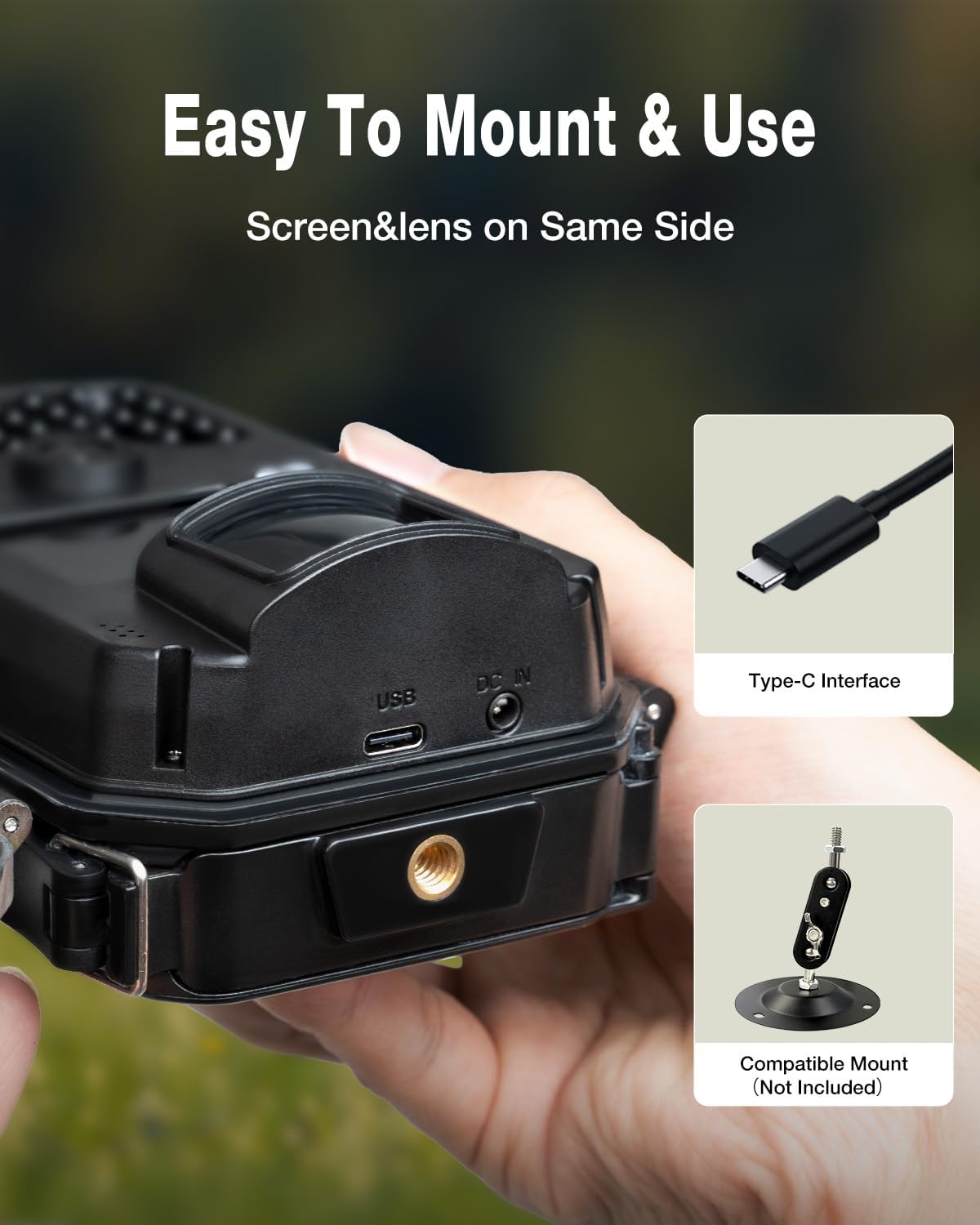
Image: Contents of the WOLFANG WT01 Trail Camera package.
Installationshandbuch
1. Installation des Netzteils
The camera requires 8 AA batteries for operation. Rechargeable 1.2V NI-MH batteries are recommended for extended use. Alternatively, the camera can be powered by an external 6V 1.5A power adapter (not included) via the DC IN port.
- Öffnen Sie die Kamera casing durch Entriegeln der seitlichen Clips.
- Suchen Sie das Batteriefach an der Unterseite der Kamera.
- Legen Sie 8 AA-Batterien ein und achten Sie dabei auf die richtige Polarität (+/-).
- Um die Wasserdichtigkeit zu gewährleisten, muss das Batteriefach fest verschlossen sein.
2. Installation der SD-Karte
Zum Speichern von Fotos und Videos wird eine Micro-SD-Karte (bis zu 32 GB, nicht im Lieferumfang enthalten) benötigt.
- With the camera powered off, locate the SD card slot inside the camera.
- Setzen Sie die Micro-SD-Karte so ein, dass die goldenen Kontakte zur Rückseite der Kamera zeigen, bis sie hörbar einrastet.
- Zum Herausnehmen die Karte vorsichtig drücken, bis sie herausspringt.
3. Montage der Kamera
The camera can be mounted using the provided strap or a compatible tripod mount (not included).
- Gurtbefestigung: Thread the strap through the slots on the back of the camera and secure it around a tree or post.
- Stativmontage: Use the 1/4-inch threaded insert at the bottom of the camera to attach it to a tripod or other mounting accessory.

Image: WOLFANG WT01 Trail Camera securely mounted on a tree.

Image: USB-C port and tripod mount on the WOLFANG WT01 Trail Camera.
4. Erstes Einschalten und Grundeinstellungen
- After installing batteries and SD card, switch the camera to the "SETUP" position.
- The internal LCD screen will activate. Use the menu buttons to navigate and adjust settings such as date, time, language, and recording mode.
- Format the SD card through the camera's menu for optimal performance.
Bedienungsanleitung
1. Aufnahmemodi
The WT01 offers several recording modes:
- Fotomodus: Nimmt Standbilder auf (bis zu 48 MP).
- Videomodus: Records video clips (up to 4K HD).
- Foto- und Videomodus: Nimmt ein Standbild und anschließend einen Videoclip auf.
- Zeitraffermodus: Captures images at set intervals to create a time-lapse sequence.
Wählen Sie im Kameramenü den gewünschten Modus aus.
2. Bewegungserkennung (PIR)
The camera uses a Passive Infrared (PIR) sensor to detect motion and trigger recordings.
- Auslösegeschwindigkeit: Die Kamera zeichnet sich durch eine ultraschnelle Auslösegeschwindigkeit von 0.3 Sekunden aus, um sich schnell bewegende Motive festzuhalten.
- Empfindlichkeit: Adjust the PIR sensor sensitivity (Low, Medium, High) in the settings menu to suit your environment and reduce false triggers.
- Burst-Modus: In Photo Mode, you can set the camera to take 1, 2, or 3 continuous shots per trigger.

Image: Demonstration of the camera's fast trigger speed capturing a deer.
3. Nachtsicht
The WT01 features 36/38 940nm infrared LEDs for discreet night recording.
- The 940nm LEDs emit no visible glow, making the camera undetectable to animals and humans in the dark.
- Night recordings are captured in clear black and white.

Image: The camera's 940nm no-glow infrared LEDs for night vision.

Image: Comparison of day (color) and night (black and white) image quality.
4. Zuviewing und übertragen Files
- Wiedergabe vor der Kamera: Switch the camera to "SETUP" mode and use the navigation buttons to review captured photos and videos on the internal LCD screen.
- USB-C Transfer: Connect the camera to a computer using the provided USB-C cable. The camera will appear as a removable disk, allowing you to copy files direkt.
- SD-Kartenleser: Nehmen Sie die SD-Karte aus der Kamera und stecken Sie sie in den SD-Kartenleser eines Computers, um darauf zuzugreifen. files.
Wartung
- Reinigung: Verwenden Sie ein weiches, trockenes Tuch, um die Kameralinse und die Kamera zu reinigen.asing. Vermeiden Sie scheuernde Reinigungs- und Lösungsmittel.
- Batteriemanagement: Replace batteries when the low battery indicator appears. For long-term storage, remove all batteries.
- Pflege der SD-Karte: Regularly format the SD card to prevent data corruption and ensure optimal recording performance. Back up important files vor der Formatierung.
- Abdichtung: Ensure all latches are securely closed and the battery compartment is sealed to maintain the IP66 waterproof rating.
Fehlerbehebung
| Problem | Mögliche Lösung |
|---|---|
| Die Kamera lässt sich nicht einschalten. | Check battery polarity. Ensure batteries are fully charged or replaced. Verify external power adapter (if used) is correctly connected and functional. |
| Schlechte Bild-/Videoqualität. | Clean the camera lens. Ensure sufficient lighting for day recordings. For night recordings, ensure objects are within the effective IR range. Check camera settings for resolution and quality. |
| Bewegungssensor wird nicht ausgelöst. | Adjust PIR sensitivity to a higher setting. Ensure there are no obstructions in front of the PIR sensor. Test the camera in different locations. |
| SD-Kartenfehler. | Ensure the SD card is correctly inserted. Format the SD card using the camera's menu. Try a different SD card (up to 32GB, Class 10 or higher recommended). |
| Kurze Akkulaufzeit. | Use high-quality alkaline or rechargeable 1.2V NI-MH batteries. Reduce the number of photos per trigger or video length. Consider using an external 6V 1.5A power source for permanent installations. |
Technische Daten
| Besonderheit | Detail |
|---|---|
| Marke | WOLFANG |
| Modellname | WT01 |
| Innen-/Außenbereich | Im Freien |
| Konnektivitätsprotokoll | USB-C |
| Montagetyp | Baumhalterung |
| Auflösung der Videoaufzeichnung | 4K |
| Anzahl der Artikel | 1 |
| Im Lieferumfang enthaltene Komponenten | 4K Wildlife Camera |
| Artikelabmessungen (LxBxH) | 14.5 x 10.5 x 6.8 cm |
| Batterien erforderlich | 8x AA (nicht im Lieferumfang enthalten) |
| Screen Capture Resolution | 4K |
| Videoaufnahmeformat | MP4 |
| UPC | 850067892557 |
| GTIN | 850067892557 |
Garantie und Support
WOLFANG bietet ein 2 Jahr Garantie for this product. For any questions, technical assistance, or warranty claims, please contact WOLFANG customer service:
- E-Mail: support.vc@wolfang.co
- WOLFANG is committed to resolving your issues promptly and to your satisfaction.
Ask a question about this manual
Ask about setup, troubleshooting, compatibility, parts, safety, or missing instructions. Manuals+ will review the question and use this page’s manual context to help answer it.