
Einführung
The Beatbot Sora 10 is a cordless robotic pool vacuum designed to efficiently clean the floor, walls, and waterline of your swimming pool. This manual provides essential information for the safe and effective operation, maintenance, and troubleshooting of your device.
Sicherheitshinweise
- Read all instructions carefully before using the Beatbot Sora 10.
- Stellen Sie sicher, dass der Ladeanschluss trocken ist, bevor Sie das Ladegerät anschließen.
- Betreiben Sie den Roboter nicht, wenn das Netzkabel oder der Stecker beschädigt ist.
- Halten Sie Kinder und Haustiere vom Poolbereich fern, solange der Roboter in Betrieb ist.
- Verwenden Sie ausschließlich das mitgelieferte Ladegerät und Zubehör.
- Do not attempt to repair the robot yourself. Contact customer support for assistance.
- Store the robot in a warm, dry place during off-season to protect the battery.
Lieferumfang
Prüfen Sie, ob alle Komponenten vorhanden sind:
- Beatbot Sora 10 Pool Vacuum Robot
- Ladeadapter
- Filterkorb (vorinstalliert)
- Bergungshaken
- Benutzerhandbuch (dieses Dokument)
Aufstellen
1. Aufladen des Roboters
Before first use, fully charge the Beatbot Sora 10. The titanium charging contacts ensure safe and fast charging. A full charge takes approximately 4.5 hours.
- Stellen Sie sicher, dass der Roboter vor dem Aufladen vollständig trocken ist.
- Schließen Sie den Ladeadapter an eine Steckdose an.
- Plug the charging cable into the robot's charging port.
- The indicator light will show charging status (refer to LED indicators section in the full manual for details).
2. App-Installation und -Kopplung
The Beatbot App allows for convenient control and monitoring of your pool cleaner.
- Download the Beatbot App from your device's app store.
- Öffnen Sie die App und folgen Sie den Anweisungen auf dem Bildschirm, um ein Konto zu erstellen oder sich anzumelden.
- Scan the QR code located on the robot to pair it with your app. The robot supports Wi-Fi (2.4G / 5G) and Bluetooth connectivity.
- Bestätigen Sie die Kopplung in der App.

Image: The Beatbot Sora 10 robot connected to a charger, with a smartphone displaying the Beatbot app interface for smart control and software updates.
3. Erstplatzierung
Once charged and paired, the robot is ready for deployment.
- Gently place the Beatbot Sora 10 into your pool.
- Ensure it sinks to the bottom before initiating a cleaning cycle.
Bedienungsanleitung
1. Reinigungsmodi
The Beatbot Sora 10 offers three smart cleaning modes accessible via the app:
- Bodenmodus: Reinigt nur den Poolboden.
- Standardmodus: Reinigt den Beckenboden, die Wände und die Wasserlinie.
- Energiesparmodus: Automatically cleans the pool floor every 48 hours for continuous maintenance.

Image: Screenshot of the Beatbot app showing the three cleaning modes: Floor Mode, Standard Mode, and ECO Mode.
2. Suction Power and Coverage
The HydroBalance Structure provides 6800 GPH suction power, effectively capturing large leaves, heavy sand, and debris without clogging. The 7800Ah battery allows for up to 300 minutes of continuous floor cleaning, covering up to 2,600 sq. ft. per charge.

Image: The Beatbot Sora 10 robot cleaning the pool floor, illustrating its 6800 GPH suction power picking up various debris like pollen, mud, leaves, algae, insects, and sand.
3. 3-Zone and Shallow-Water Platform Cleaning
The Sora 10 cleans the floor, walls, and waterline. It features specialized shallow-water cleaning capabilities, operating effectively in depths down to 12 inches, making it suitable for tanning ledges and sun shelves.

Image: Multiple Beatbot Sora 10 robots shown cleaning different zones of a pool: walls, waterline, floor, and a shallow platform area.
4. Smart Waterline Parking
At the end of a cleaning cycle, the robot automatically returns and parks itself at the waterline. It remains positioned for 10 minutes for easy retrieval, eliminating the need for heavy lifting or fishing it out from the deep end.
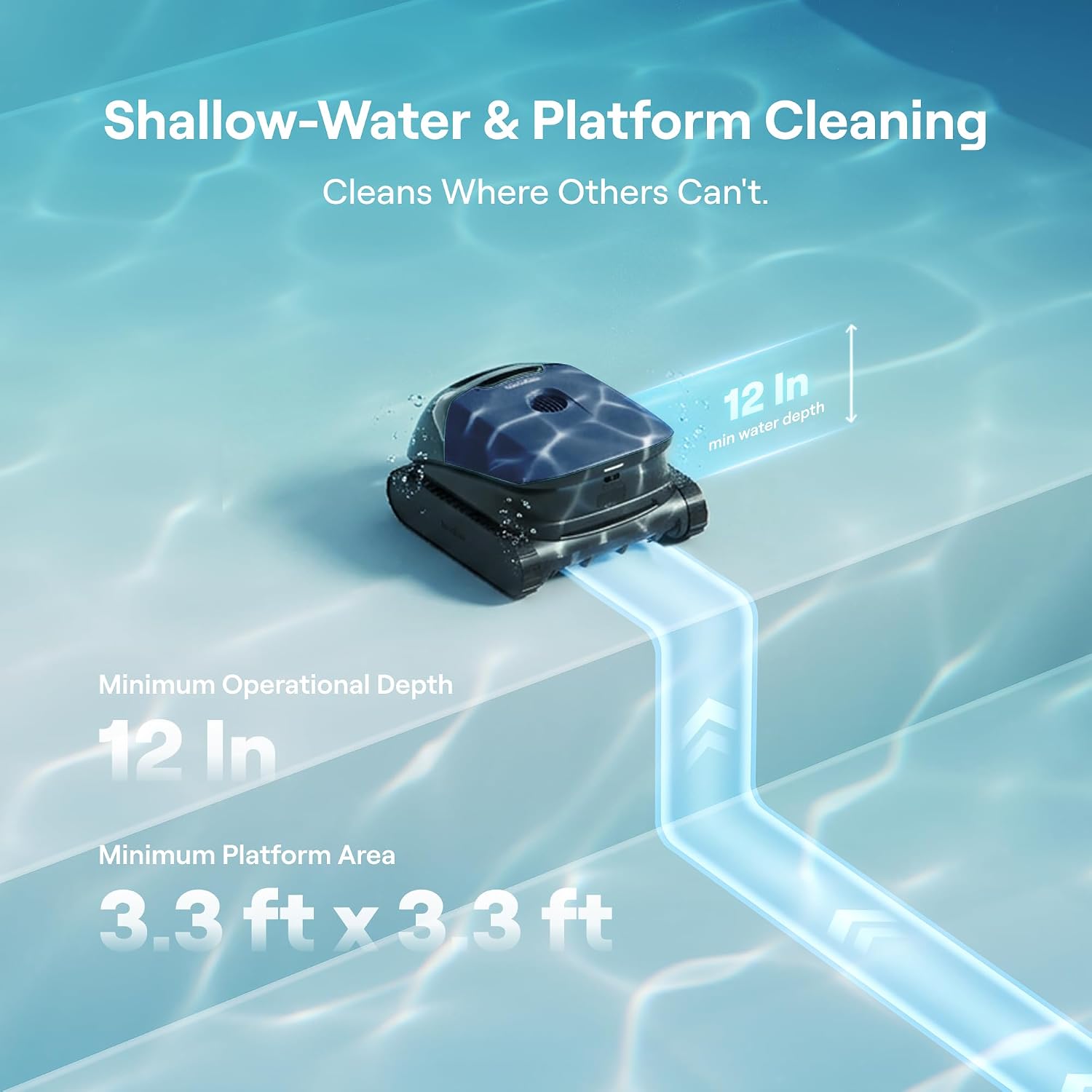
Image: The Beatbot Sora 10 robot positioned at the waterline, illustrating its automatic return and 10-minute parking feature for easy retrieval.
5. Intensive Wall & Waterline Cleaning
Dual front roller brushes provide superior traction for vertical wall climbing. The robot performs intensive scrubbing to remove stubborn stains and algae from the waterline and various pool surfaces.

Image: The Beatbot Sora 10 robot cleaning a pool wall, highlighting its intensive scrubbing action to remove oil, algae, and dirt.
6. SonicSense Obstacle Avoidance
Advanced ultrasonic sensors detect obstacles such as ladders, drains, and steps in real-time, ensuring smooth navigation and uninterrupted cleaning cycles.

Image: The Beatbot Sora 10 robot navigating around an obstacle in the pool, demonstrating its SonicSense obstacle avoidance technology.
7. Pool Surface and Type Compatibility
The Beatbot Sora 10 is designed for both above-ground and in-ground pools and is compatible with various surfaces including vinyl, concrete, fiberglass, mosaic tiles, and ceramic surfaces.

Image: Illustrations showing the Beatbot Sora 10 cleaning different pool surfaces: concrete, fiberglass, polyethylene, and ceramic tiles.
Wartung
1. Reinigung des Filterkorbs
The robot features an extra-large 5L debris basket with a 150 µm filter for daily debris. Regular cleaning of the filter basket is crucial for optimal performance.
- Entfernen Sie den Roboter aus dem Pool.
- Open the robot's cover to access the filter basket.
- Nehmen Sie den Filterkorb heraus und leeren Sie den angesammelten Schmutz.
- Spülen Sie den Filterkorb gründlich mit einem Gartenschlauch aus, um feine Partikel zu entfernen.
- Setzen Sie den sauberen Filterkorb wieder ein und schließen Sie den Deckel fest.
An optional 3 µm ultra-fine filter is available separately for microscopic particles like pollen and algae.

Image: The Beatbot Sora 10 robot with its transparent 5L debris basket visible, showing collected leaves, twigs, and insects.
2. Speicherung
For long-term storage, especially during winter, ensure the robot is clean, dry, and fully charged. Store it in a warm, dry environment to protect the battery and internal components from cold temperatures.
Fehlerbehebung
| Problem | Mögliche Ursache | Lösung |
|---|---|---|
| Roboter lässt sich nicht einschalten. | Schwache Batterie. | Laden Sie den Roboter vollständig auf. |
| Mangelhafte Reinigungsleistung. | Filterkorb verstopft. | Reinigen Sie den Filterkorb. |
| Roboter bleibt stecken. | Obstacle in pool. | Remove large obstacles from the pool. |
| Probleme mit der App-Verbindung. | Bluetooth/Wi-Fi interference or robot out of range. | Ensure robot is within range and restart app/robot. |
| Robot does not climb walls. | Low battery or dirty brushes. | Charge the robot. Clean the roller brushes. |
Technische Daten
| Besonderheit | Detail |
|---|---|
| Modellname | Sora 10 |
| Marke | Beatbot |
| Technische Daten | 43.18 x 38.1 x 27.94 cm |
| Gewicht | 19 kg |
| Stromquelle | Batteriebetrieben (kabellos) |
| Akku-Typ | 1 Lithium-Ionen (im Lieferumfang enthalten) |
| Batteriegewicht | 938 Gramm |
| Energiegehalt der Lithiumbatterie | 168.48 Wattstunden |
| Kontrollmethode | App |
| Saugleistung | 6800 GPH |
| Schuttkapazität | 5 Liter |
| Filterfeinheit | 150 µm (standard) |
| Max Floor Cleaning Runtime | 300 Minuten |
| Maximale Abdeckungsfläche | 2,600 Quadratfuß |
| Mindestwassertiefe | 12 inches (for shallow-water cleaning) |
| Farbe | Mitternachtsblau |
Garantie und Support
The Beatbot Sora 10 comes with a 2-Jahres-Schutzplan, ensuring long-term reliability. We also offer 30-day free returns and 365-day availability for customer support.
Kontaktinformationen:
- E-Mail: service@beatbot.com
- Telefon: +1 (833) 702-4399
For further assistance or to inquire about replacement parts and accessories, please contact our support team.