
1. Einleitung
Thank you for choosing the Baseus Bowie MC2 Air Open Ear Clip-on Earbuds. These earbuds are designed for comfortable, open-ear listening, featuring CloudComfort Air Cushions, 11mm drivers for enhanced bass, IP67 waterproofing, and up to 40 hours of playtime. This manual provides essential information for proper setup, operation, and maintenance of your device.
2. Lieferumfang
- Baseus Bowie MC2 Air Open Earbuds
- Kabelloses Ladecase
- USB-C-Ladekabel
3. Produktüberschreitungview
The Baseus Bowie MC2 Air earbuds feature an open-ear clip-on design for comfort and situational awareness. The compact charging case ensures portability and extended battery life.

Image: Baseus Bowie MC2 Air Open Earbuds and their compact charging case. The earbuds are shown in their charging slots within the case, highlighting their sleek design.
3.1 Design und Komfort
These earbuds are designed for all-day wear with a lightweight 4.9g per earbud and soft silicone CloudComfort air cushions to relieve ear pressure. The flexible C-ring adapts to various ear shapes for a secure, gentle clip-on fit.
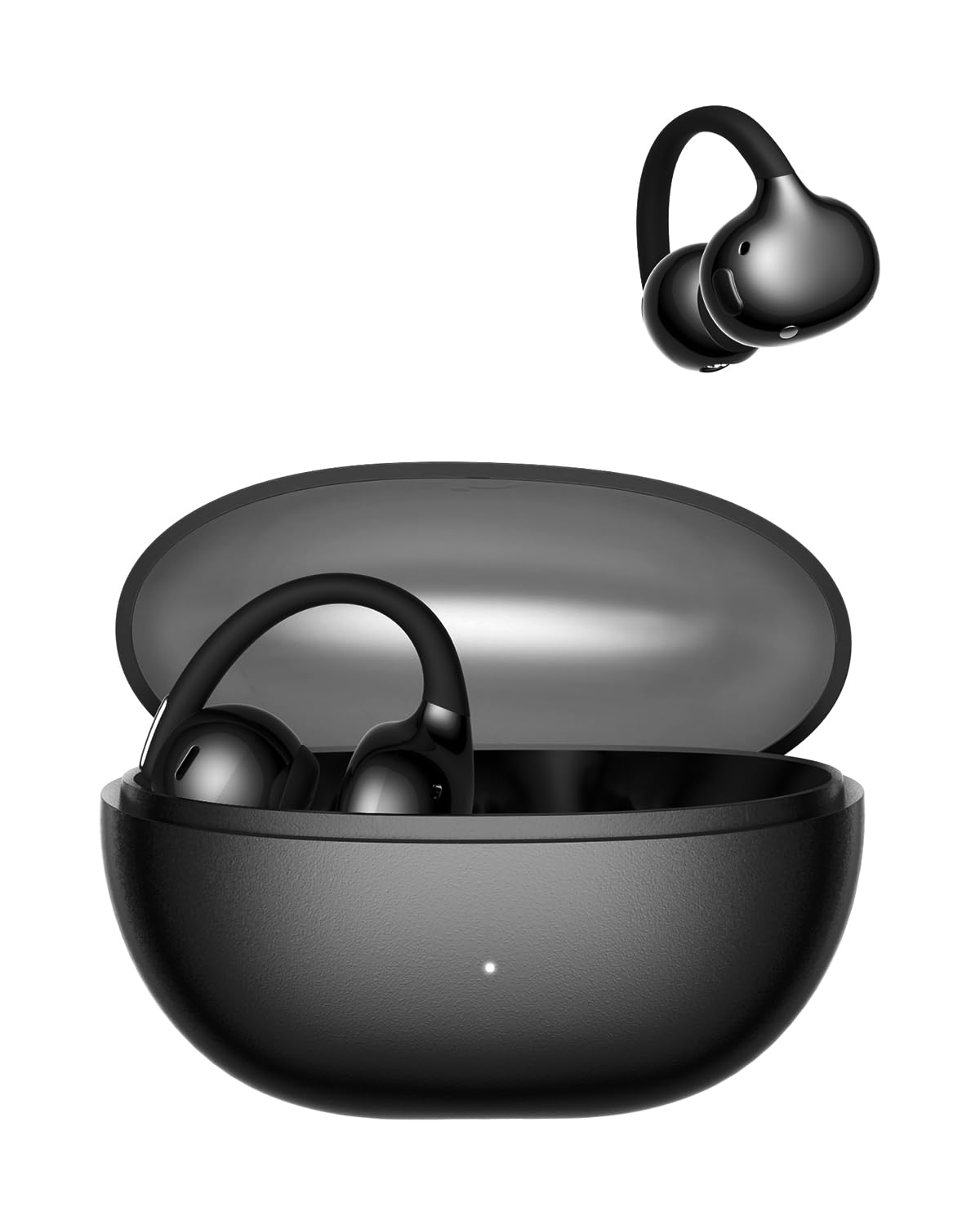
Image: A woman wearing the Baseus Bowie MC2 Air earbuds, demonstrating their discreet and stylish clip-on fit on the earlobe.

Image: A diagram illustrating the CloudComfort Air Cushion technology, showing the soft silicone material designed for pressure relief and a snug fit compared to standard designs.
3.2 Tragbarkeit
The ultra-slim charging case is lightweight and compact, making it easy to carry in a pocket or bag.

Image: The Baseus Bowie MC2 Air charging case being placed into a jeans pocket, illustrating its compact and portable design.
4. Einrichtung
4.1 Aufladen der Ohrhörer und des Ladecase
- Laden Sie das Gehäuse auf: Connect the provided USB-C charging cable to the charging port on the case and a power source. The LED indicator on the case will show charging status. A full charge takes approximately 2 hours.
- Laden Sie die Ohrhörer auf: Place the earbuds into their respective slots in the charging case. Ensure they are properly seated. The earbuds will begin charging automatically. The case provides up to 40 hours of total playtime with SuperBass 2.0 enabled. A quick 10-minute charge can provide 2 hours of playtime.
4.2 Koppeln mit einem Gerät
- Anfängliche Kopplung: Öffnen Sie das Ladeetui. Die Ohrhörer wechseln automatisch in den Kopplungsmodus.
- Bluetooth aktivieren: Aktivieren Sie Bluetooth auf Ihrem Gerät (Smartphone, Tablet, Laptop).
- Gerät auswählen: Suchen nach available Bluetooth devices and select "Baseus Bowie MC2 Air" from the list.
- Verbindung bestätigen: Sobald die Verbindung hergestellt ist, hören Sie eine akustische Benachrichtigung, und die Ohrhörer sind einsatzbereit.
- Wiederverbindung: Nach der ersten Kopplung verbinden sich die Ohrhörer automatisch mit dem zuletzt gekoppelten Gerät, sobald sie aus dem Ladecase genommen werden und Bluetooth auf dem Gerät aktiviert ist.
5. Bedienungsanleitung
5.1 Tragen der Ohrhörer
Gently clip the earbuds onto your earlobes. Adjust the flexible C-ring for a comfortable and secure fit. The open-ear design allows you to remain aware of your surroundings while enjoying audio.
5.2 Tastensteuerung
The Baseus Bowie MC2 Air earbuds feature physical button controls for reliable operation.
- Abspielen/Pause: Einmaliges Drücken auf einen der Ohrhörer.
- Nächster Titel: Double press on either the left or right earbud.
- Vorheriges Lied: Triple press on either the left or right earbud.
- Anruf annehmen/beenden: Einmaliges Drücken auf einen der Ohrhörer.
- Anruf ablehnen: Drücken und halten Sie einen der Ohrhörer.
- Sprachassistenten aktivieren: (Functionality may vary, refer to Baseus App for customization).
5.3 Soundfunktionen
Equipped with 11mm custom dynamic drivers and AI-powered SuperBass 2.0, these earbuds deliver crisp highs, rich detail, and enhanced bass. The AI-powered SuperBass 2.0 dynamically enhances low frequencies for an immersive listening experience.

Image: An illustration depicting the 'Bass-Heavy Punchy Sound' feature, with sound waves emanating from an earbud, emphasizing the deep bass provided by the 11mm drivers and SuperBass 2.0 technology.
5.4 Klare Anrufe
The 4-mic AI with matrix microphone array intelligently filters background noise and wind, ensuring your voice is captured clearly during calls.
5.5 Baseus Smart Connect App
For enhanced functionality and customization, download the Baseus Smart Connect application. The app allows for firmware updates, EQ adjustments, and personalized control settings. It also enables seamless switching between two connected devices.
6. Wartung
6.1 Reinigung
- Wischen Sie die Ohrhörer und das Ladecase mit einem weichen, trockenen, fusselfreien Tuch ab.
- Vermeiden Sie die Verwendung von Scheuermitteln, Lösungsmitteln oder Aerosolsprays.
- Für einen optimalen Ladevorgang muss sichergestellt sein, dass die Ladekontakte sauber und frei von Verunreinigungen sind.
6.2 Wasserbeständigkeit
The earbuds are IP67 water and sweat resistant, making them suitable for workouts and use in light rain. This rating means they are protected from dust and can withstand immersion in water up to 1 meter for 30 minutes. However, they are not designed for swimming or prolonged submersion in water. Ensure the earbuds are dry before placing them back in the charging case to prevent damage.
7. Fehlerbehebung
- Ohrhörer lassen sich nicht koppeln: Ensure earbuds are charged and in pairing mode. Turn off and on your device's Bluetooth. Try resetting the earbuds (refer to the Baseus App or product support for specific reset instructions).
- Kein Ton oder geringe Lautstärke: Check the volume level on both your device and the earbuds. Ensure earbuds are properly connected. Clean any debris from the earbud speakers.
- Probleme beim Aufladen: Verify the charging cable and power source are working. Ensure the charging contacts on both the earbuds and case are clean and dry.
- Button controls not responding: Ensure the earbuds are connected to your device. If specific controls like 'previous track' are inconsistent, check for firmware updates via the Baseus Smart Connect App, as updates can resolve such issues.
- Unterbrechungsverbindung: Keep the earbuds within range of your device. Avoid obstacles that may interfere with the Bluetooth signal.
8. Spezifikationen
| Marke | Baseus |
| Modellname | Baseus Bowie MC2 Air Open Earbuds |
| Platzierung des Ohrs | Offenes Ohr |
| Formfaktor | Open Ear, Clip-on |
| Bluetooth-Version | 6.0 |
| Impedanz | 14 Ohm |
| Audiotreibertyp | 11 mm dynamischer Treiber |
| Durchschnittliche Batterielebensdauer | 40 Stunden (mit Ladeetui) |
| Akkuladezeit | 2 Stunden (Fall) |
| Wasserbeständigkeit | IP67 wasserdicht |
| Steuerungstyp | Tastensteuerung |
| Kompatible Geräte | Handys, Desktop-Computer, Laptops, Tablets |
| Material | PC+ABS |
| Gewicht Tragetasche | 33.5 Gramm |
9. Garantie und Support
Informationen zur Garantie und zum Kundendienst finden Sie in der Ihrer Bestellung beiliegenden Dokumentation oder auf der offiziellen Baseus-Website. webSollten Sie auf Probleme stoßen, die in diesem Handbuch nicht behandelt werden, wenden Sie sich bitte an den Baseus-Kundendienst.