
Einführung
This manual provides essential information for the safe and efficient use of your Xiaomi 55-inch 4K UHD Smart Quantum MagiQ S Mini LED Google TV. Please read these instructions thoroughly before operating the device and retain them for future reference.
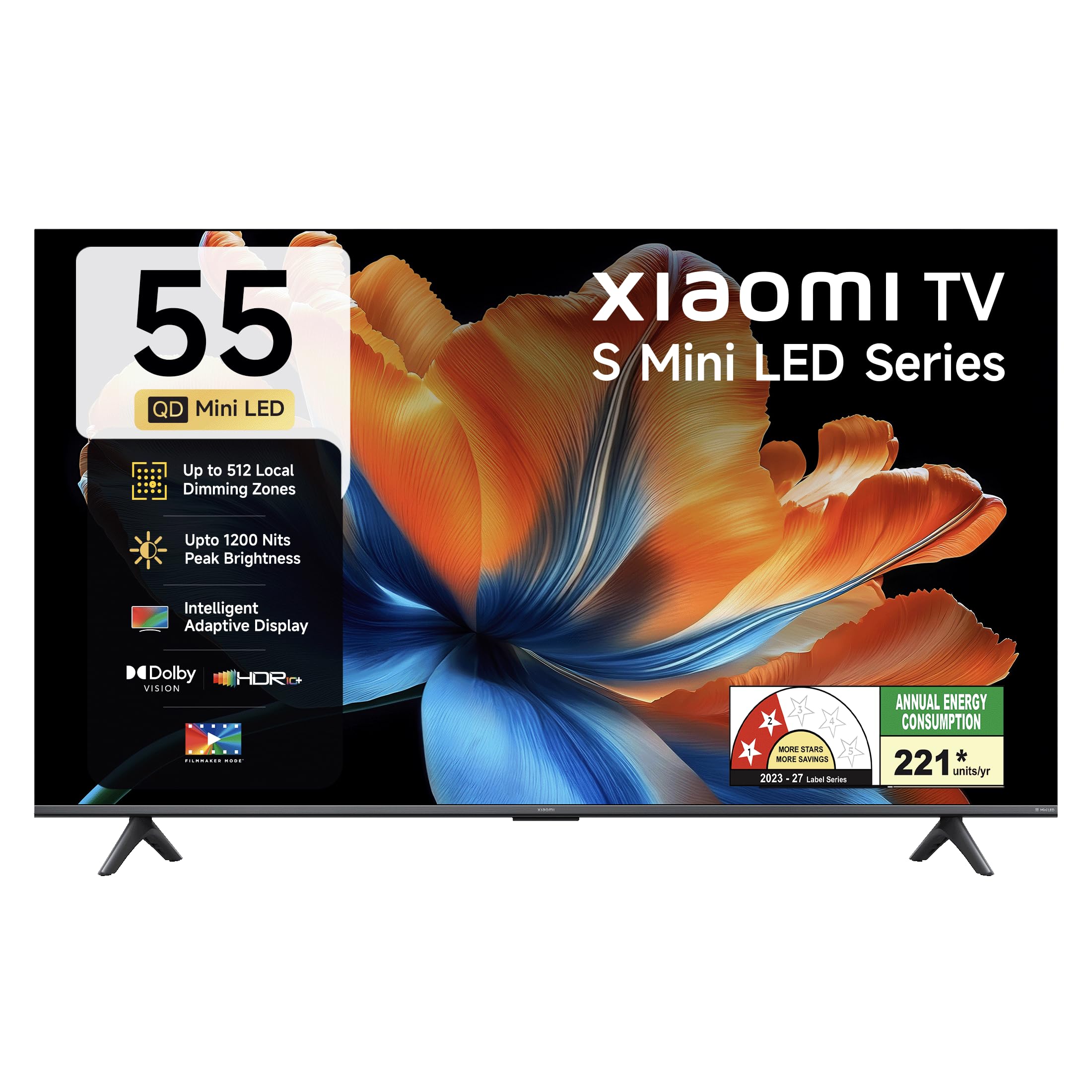
Bild: Vorderseite view of the Xiaomi 55-inch 4K UHD Smart Quantum MagiQ S Mini LED Google TV, showcasing sein schlankes Lünettendesign.
Installationshandbuch
1. Auspacken und enthaltene Komponenten
Carefully remove all items from the packaging. Ensure all components listed below are present and undamaged.

Image: Contents of the product box, including the TV unit, remote control, user manual, two stand units, four screws, two AAA batteries, and a power cord.
- 1 LED-TV-Einheit
- 1-Fernbedienung
- 1 Benutzerhandbuch (dieses Dokument)
- 2 Standeinheiten
- 4 Schrauben zur Standmontage
- 2 AAA-Batterien (für die Fernbedienung)
- 1 Netzkabel
2. Standinstallation oder Wandmontage
Your television supports both table-top stand installation and wall mounting. Choose the method suitable for your environment.
- Für die Ständerinstallation: Attach the two provided stand units to the bottom of the TV using the four screws. Ensure they are securely fastened.
- Für die Wandmontage: Use a compatible VESA wall mount (sold separately). Follow the instructions provided with your wall mount kit. Ensure the wall can support the TV's weight.
3. Anschließen externer Geräte
Connect your external devices such as set-top boxes, gaming consoles, or audio systems to the TV's ports.

Bild: Rückseite view of the TV highlighting connectivity ports: Optical, Earphone, AV In, 3 HDMI ports (one with eARC), 2 USB 2.0 ports, Antenna, and Ethernet.
- HDMI-Anschlüsse (x3): Connect gaming consoles, Blu-ray players, or set-top boxes. One port supports eARC for enhanced audio return channel functionality.
- USB-Anschlüsse (x2): Schließen Sie USB-Speichergeräte zur Medienwiedergabe an.
- Ethernet Anschluss: Für kabelgebundene Internetverbindungen.
- Optischer Ausgang: Zum Anschluss an externe Audiosysteme.
- AV-Eingang: Zum Anschluss älterer Geräte mit Composite-Video- und Stereo-Audio-Schnittstelle.
- Antenne: Zum Anschluss einer terrestrischen oder Kabelantenne.
4. Erste Inbetriebnahme und Einrichtung
After connecting all necessary cables, plug the power cord into an electrical outlet. Press the power button on the remote control or the TV to turn it on. Follow the on-screen instructions for initial setup, which typically includes:
- Sprachauswahl
- Netzwerkverbindung (WLAN oder Ethernet)
- Google-Konto-Anmeldung
- Kanalsuche
Operating Your Xiaomi Smart TV
1. Fernbedienungsfunktionen
Die mitgelieferte Fernbedienung ermöglicht den Zugriff auf alle TV-Funktionen. Legen Sie die beiden AAA-Batterien unter Beachtung der richtigen Polarität in die Fernbedienung ein.

Image: Xiaomi remote control, featuring dedicated quick access buttons for popular streaming services and Google Assistant voice control.
- Netzschalter: Schaltet den Fernseher ein oder aus.
- Google Assistant-Schaltfläche: Aktiviert die Sprachsteuerung für die Suche nach Inhalten, die Steuerung von Smart-Home-Geräten und mehr.
- Navigationspad: Dient zur Navigation in Menüs und zur Auswahl von Elementen.
- Lautstärke erhöhen/verringern: Regelt die Lautstärke.
- Kanal hoch/runter: Wechselt die Fernsehkanäle.
- Schnellzugriffstasten: Dedicated buttons for Netflix, Prime Video, YouTube, Disney+ Hotstar, SonyLIV, and Live TV.
- Stummschaltfläche: Schaltet den TV-Ton stumm.
2. Google TV Interface and Applications
Your TV runs on the Android 14 OS with Google TV, offering a personalized content experience. Access a wide range of applications from the Google Play Store.

Image: The PatchWall interface, providing customized content recommendations and curation from various streaming platforms.
- Content First UI: Organisiert Inhalte all Ihrer Streaming-Dienste an einem Ort.
- Personal Profiles: Erstellen Sie individuelle Profisfiles für personalisierte Empfehlungen.
- Unterstützte Apps: Pre-installed and downloadable apps include Netflix, Prime Video, YouTube, Zee5, JioCinema, SonyLiv, and more.
- Google Assistant: Use voice commands for navigation, search, and smart home control.
3. Bild- und Toneinstellungen
Optimieren Sie Ihre viewEin Hör- und Seherlebnis durch verschiedene Bild- und Tonmodi.
Bildeinstellungen:
- Filmemacher-Modus: Disables post-processing effects to display content as intended by the director.
- Dolby Vision: Enhances HDR content with dynamic metadata for optimized image quality frame by frame.
- HDR10+: Uses dynamic data to enhance every frame, providing an immersive viewErfahrung.
- Augenschonmodus: Reduziert Blaulicht und Flimmern für ein angenehmeres Seherlebnis viewErfahrung.
- MEMC-Motor: Bewegungserkennungs- und Bewegungskompensationstechnologie für flüssigere Bewegungen in schnelllebigen Szenen.
- AI Picture Optimization Engine: Advanced AI algorithms analyze content in real-time to enhance clarity, contrast, and color reproduction.

Image: Filmmaker Mode, designed to preserve original colors, contrast, and motion for an authentic cinematic experience.

Image: Dolby Vision technology, optimizing image quality with deeper blacks and brighter highlights.

Image: HDR10+ dynamic frame-by-frame tuning, ensuring consistent detail across dark and bright scenes.

Image: Eye Care Mode, providing flicker-free visuals with DC Dimming and reduced blue light for comfortable viewing.
Audioeinstellungen:
- 34 Watt Ausgangsleistung: Powerful built-in box speakers.
- Dolby-Audio: Liefert einen satten, klaren und kraftvollen Klang.
- DTS-X & DTS Virtual:X: Bietet ein immersives, mehrdimensionales Klangerlebnis.
- Xiaomi Sound: Preset audio configurations developed for optimal sound quality.

Image: Xiaomi Sound, offering tailored audio experiences through expert-developed configurations.
4. Konnektivität und Streaming
Your TV offers versatile connectivity options for seamless streaming and device integration.
- Dualband-WLAN: Connects to 2.4GHz and 5GHz wireless networks.
- Bluetooth: Connect wireless headphones, speakers, or other Bluetooth accessories.
- Google Cast Built-in: Stream content directly from compatible apps on your smartphone or tablet.
- Apple AirPlay 2: Streamen Sie Inhalte von Apple-Geräten.
- Miracast: Spiegeln Sie den Bildschirm Ihres Android-Geräts drahtlos.

Image: Stream content from your phone using Google Cast or Apple AirPlay 2.
Pflege und Wartung
Die richtige Pflege gewährleistet die Langlebigkeit und optimale Leistung Ihres Fernsehers.
- Bildschirmreinigung: Wischen Sie den Bildschirm vorsichtig mit einem weichen, fusselfreien Tuch ab. Bei hartnäckigen Flecken verwenden Sie ein spezielles Reinigungsmittel für Bildschirme, das Sie auf das Tuch und nicht direkt auf den Bildschirm auftragen.
- Körperreinigung: Wipe the TV's frame and back panel with a soft, dry cloth. Avoid abrasive cleaners or solvents.
- Belüftung: Sorgen Sie für ausreichende Luftzirkulation um den Fernseher herum. Blockieren Sie keine Lüftungsöffnungen.
- Ausschalten: Vor der Reinigung oder wenn der Fernseher längere Zeit nicht benutzt wird, schalten Sie ihn immer aus und ziehen Sie den Netzstecker.
- Software-Updates: Prüfen Sie regelmäßig, ob Software-Updates verfügbar sind, und installieren Sie diese, um optimale Leistung und Sicherheit zu gewährleisten.
Fehlerbehebung bei allgemeinen Problemen
Refer to this section for solutions to common operational problems.
| Problem | Lösung |
|---|---|
| Der Fernseher lässt sich nicht einschalten | Ensure the power cord is securely plugged into both the TV and a working electrical outlet. Check if the power outlet is active. Try pressing the power button on the TV itself. |
| Kein Bild, aber Ton ist vorhanden | Check the input source. Ensure the connected device (e.g., set-top box) is turned on and functioning. Try a different HDMI cable or port. |
| Kein Ton, aber ein Bild ist vorhanden. | Check the volume level and ensure the TV is not muted. Verify audio output settings (e.g., internal speakers, external sound system). Check audio cables for external devices. |
| Fernbedienung reagiert nicht | Replace the AAA batteries in the remote control. Ensure there are no obstructions between the remote and the TV. Re-pair the Bluetooth remote if necessary (refer to TV settings). |
| Keine Verbindung zum WLAN möglich | Ensure your Wi-Fi router is on and working. Re-enter the Wi-Fi password. Try restarting both the TV and the router. Check if other devices can connect to the Wi-Fi network. |
Technische Spezifikationen
Detailed specifications for the Xiaomi 55-inch 4K UHD Smart Quantum MagiQ S Mini LED Google TV (Model L55MC-IN).

Image: Physical dimensions and weight of the Xiaomi 55-inch TV, both with and without the stand.
| Besonderheit | Spezifikation |
|---|---|
| Modellnummer | L55MC-IN |
| Bildschirmgröße | 55 Zoll (138 cm) |
| Display-Technologie | Mini-LED |
| Auflösung | 4K Ultra HD (3840 x 2160) |
| Bildwiederholrate | 60 Hz (DLG 120 Hz) |
| Spitzenhelligkeit | Bis zu 1200 Nits |
| Betriebssystem | Android 14 OS with Google TV |
| RAM | 2 GB |
| ROM (Interner Speicher) | 32 GB |
| Tonausgabe | 34 Watt |
| Audiotechnologien | Dolby Audio, DTS-X, DTS Virtual:X |
| Konnektivität | Dual Band Wi-Fi, Bluetooth, 3 HDMI (1 eARC), 2 USB, Optical, Ethernet, AV In |
| Bildschirmspiegelung | Google Cast, Apple AirPlay 2, Miracast |
| Besondere Merkmale | Filmmaker Mode, MEMC, Eye Comfort Mode, AI Picture Optimization Engine |
| Produktabmessungen (T x B x H) | 31.2D x 31.2W x 76.9H Centimeters (with stand) |
| Item Weight Without Stand | 11.6 Kilogramm |
| Energieaufnahme | 230 Watt |
| Ursprungsland | Indien |
Garantieinformationen
Your Xiaomi TV comes with a comprehensive warranty provided by the brand from the date of purchase.
- Standardgarantie: 3-year comprehensive warranty for non-prebook customers (purchases between April 22nd - May 31st).
- Pre-book Customer Warranty: 4-year comprehensive warranty for pre-book customers (purchases between April 22nd - April 30th).
Warranty claims can be made using your Amazon invoice as proof of purchase. For detailed terms and conditions, please refer to the official Xiaomi warranty policy or contact customer support.
Kundenservice
For any assistance, service requests, or queries regarding your Xiaomi TV, please contact Xiaomi customer support.

Bild: Überview of Xiaomi's customer support commitments, including quick installation, prompt call-backs, and swift doorstep solutions.
- Installationsservices: New TV installations are typically completed within 3 hours of your appointment.
- Service Requests: Expect a call back from the support team within 60 minutes for any service request.
- On-site Support: Experts aim to arrive at your home within 24 hours of your service request.
Please visit the official Xiaomi India webDie aktuellsten Supportinformationen finden Sie auf unserer Website oder in den Kontaktinformationen auf Ihrer Produktverpackung.