
1. Einleitung
This manual provides instructions for the installation, operation, and maintenance of your SIXWIN Android 15 Autoradio. This unit is designed for specific Nissan Micra K13 models manufactured between 2013 and 2017. It features a 9-inch touchscreen, wireless CarPlay and Android Auto, integrated GPS, Bluetooth 5.0, Mirror Link functionality, FM/RDS radio, and supports USB connectivity and a rear camera.
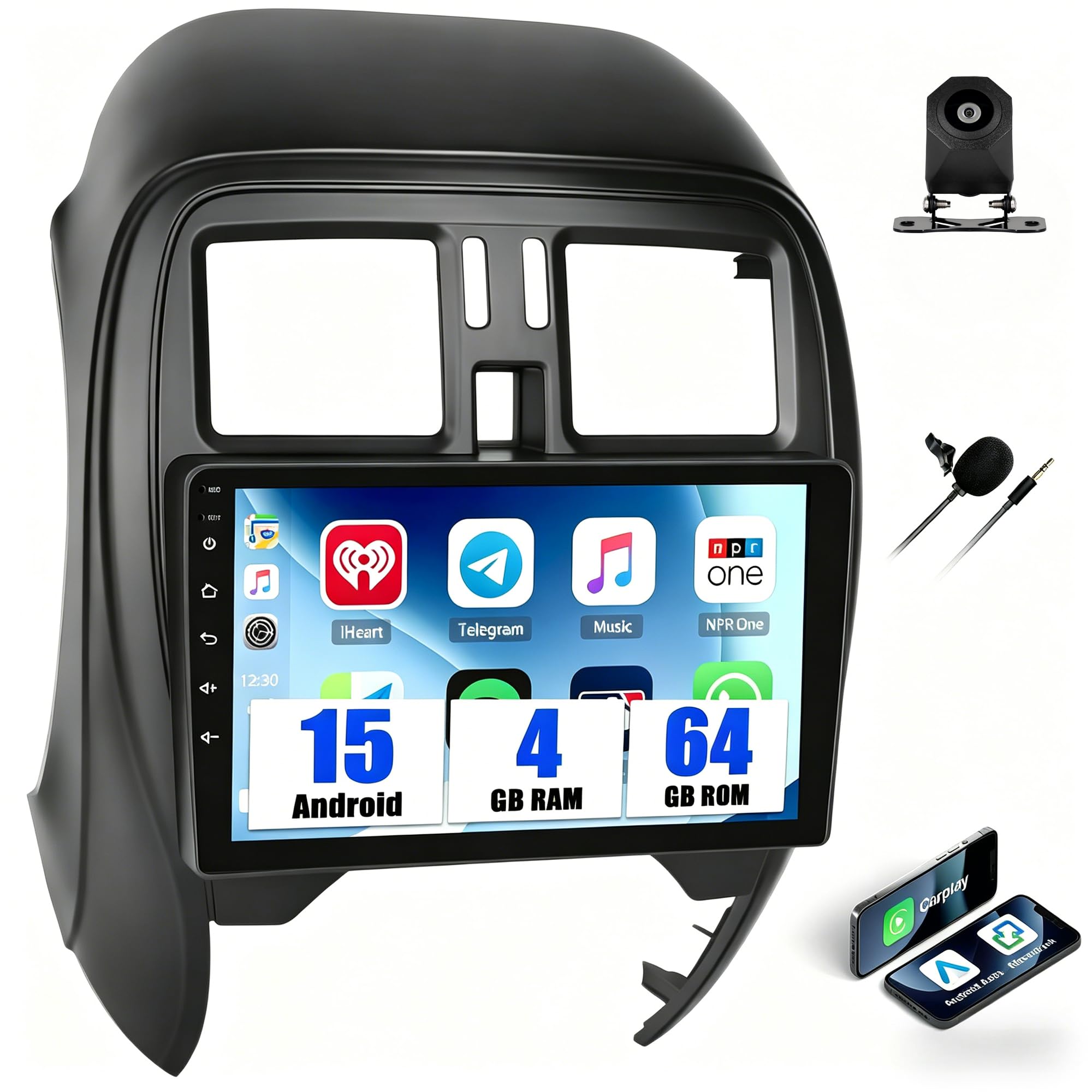
Image: The SIXWIN Android 15 Autoradio seamlessly integrated into a Nissan Micra K13 dashboard.
2. Wichtige Kompatibilitätsinformationen
This autoradio is specifically designed for NISSAN Micra K13 models from 2013-2017. Please note the following critical compatibility details:
- Kompatibel: Nissan Micra K13 City models with manual air conditioning.
- Nicht kompatibel: Nissan Micra K13 City models with automatic air conditioning (these typically lack a decorative trim above the control panel).
To ensure correct compatibility before installation, please verify your vehicle's central console matches the compatible models shown below. If you are unsure, contact customer support with your vehicle's model, year, and a photo of your central console.

Image: Visual guide for identifying compatible Nissan Micra K13 central console types (A and B are compatible, C is not).
3. Einrichtung und Installation
3.1 Packungsinhalt
Bitte stellen Sie vor Beginn der Installation sicher, dass alle Komponenten vorhanden sind:
- 1 x Android Autoradio Unit
- 1 x Stromkabelbaum
- 1 x GPS-Antenne
- 1 x RCA Cable + 2 x USB Cables
- 1 x Benutzerhandbuch (dieses Dokument)
- 1 x HD-Rückseite View Kamera (falls im Lieferumfang enthalten)
3.2 Installationsprozess
The SIXWIN Autoradio is designed for simple integration with your Nissan Micra K13 dashboard. No additional adapters are typically required. For detailed wiring diagrams and specific installation steps, please refer to the separate installation guide provided with your product. Professional installation is recommended if you are unfamiliar with car audio systems.

Image: Comparison of the car's central console before and after the autoradio installation.

Bild: Überview of the autoradio's rear connections and included cables (Power, RCA, USB, GPS Antenna, Rear Camera Input).
4. Bedienungsanleitung
4.1 System beendetview
Your SIXWIN Autoradio operates on the Android 15 system, powered by a quad-core processor with 4GB RAM and 64GB internal memory. The 9-inch HD screen (1280x720 resolution) provides clear visuals for navigation and media playback. You can download applications from the Play Store and store offline maps.
4.2 Kabelloses CarPlay und Android Auto
Connect your smartphone wirelessly via Bluetooth or Wi-Fi to access CarPlay (for iPhone) or Android Auto (for Android devices). This allows seamless integration for navigation, calls, messages, and music directly from the touchscreen. Voice commands can be used to control functions like launching Google Maps or Waze, and answering calls without taking your hands off the steering wheel.

Image: Display of Wireless CarPlay and Android Auto interfaces on the autoradio screen.
4.3 Mirror-Link-Funktion
The Mirror Link feature allows you to display your smartphone's screen directly onto the autoradio's display. Android devices can connect via USB or Wi-Fi, while iPhones connect via Wi-Fi. This is useful for sharing videos or other content with passengers.

Image: A smartphone screen being mirrored onto the autoradio display.
4.4 GPS-Navigation und WLAN-Konnektivität
The unit includes integrated GPS. You can use pre-installed maps or download other online/offline navigation applications. Connect to a Wi-Fi network or a mobile hotspot to access online maps, stream content, and update applications in real-time.

Image: The GPS navigation interface displaying a map with route guidance.
4.5 Bluetooth 5.0 und FM/RDS-Radio
Bluetooth 5.0 provides a stable, low-power connection for music streaming, hands-free calls, and file transfers. The FM/RDS radio allows you to listen to your favorite stations, displaying station names and real-time traffic information for a clear audio experience. The unit supports 18 preset stations.

Image: The FM radio interface displaying station frequency and RDS information.
4.6 32-Band-Equalizer
Customize your audio experience with the built-in 32-band equalizer. Choose from preset sound styles (Jazz, Rock, Classic, Pop) or create your own custom audio profile to ensure every sound detail is reproduced faithfully.

Image: The equalizer interface with frequency adjustments and a visual representation of the sound spectrum.
4.7 Lenkradsteuerung
After configuring the steering wheel control learning function, you can safely adjust volume, change tracks, or switch radio stations without removing your hands from the steering wheel.

Image: The steering wheel control setup screen on the autoradio, showing button assignments.
4.8 HD hinten View Kamera
Die mitgelieferte HD-Rückseite view camera activates automatically when you engage reverse gear, displaying a wide and clear image on the screen. This feature simplifies parking, even in tight spaces or low-light conditions.

Abbildung: Die Rückseite view camera display on the autoradio screen, showing parking guidelines.
4.9 Optionale Funktionen
The unit supports several optional functions:
- Integrated Dashcam for recording journeys.
- Intelligenter Sprachassistent.
- Global Radio Streaming.
- Real-time Global Weather Widget.
- DAB+ for high-quality digital radio.
5. Wartung
To ensure the longevity and optimal performance of your SIXWIN Autoradio, follow these maintenance guidelines:
- Bildschirmreinigung: Verwenden Sie ein weiches, fusselfreies Tuch, um den Touchscreen vorsichtig abzuwischen. Bei hartnäckigen Flecken etwas nachhelfen.ampReinigen Sie das Tuch mit Wasser oder einem für Bildschirme geeigneten Reiniger. Vermeiden Sie aggressive Chemikalien oder Scheuermittel.
- Reinigung der Wohneinheit: Keep the main unit and surrounding areas free from dust and debris. Use a dry cloth for cleaning.
- Software-Updates: Periodically check for system software updates via the Wi-Fi connection to ensure you have the latest features and performance enhancements. Follow the on-screen prompts for any available updates.
- Umgebungsbedingungen: Vermeiden Sie es, das Gerät extremen Temperaturen, direkter Sonneneinstrahlung über längere Zeiträume oder übermäßiger Feuchtigkeit auszusetzen.
6. Fehlerbehebung
If you encounter issues with your autoradio, consider the following basic troubleshooting steps:
- Kein Strom: Check all power connections to ensure they are securely fastened. Verify the vehicle's fuse for the radio is intact.
- Kein Ton: Check volume settings. Ensure speakers are properly connected. Verify audio source selection.
- Touchscreen reagiert nicht: Try restarting the unit. Ensure the screen is clean and free of obstructions.
- GPS funktioniert nicht: Stellen Sie sicher, dass die GPS-Antenne korrekt installiert ist und eine freie Sicht hat. view des Himmels. Überprüfen Sie die GPS-Einstellungen im Gerät.
- Bluetooth-/WLAN-Verbindungsprobleme: Ensure Bluetooth/Wi-Fi is enabled on both the autoradio and your device. Try re-pairing or reconnecting.
- CarPlay/Android Auto verbindet sich nicht: Verify your phone's compatibility and ensure the respective apps are updated. Try restarting both the phone and the autoradio.
Sollten diese Schritte das Problem nicht beheben, wenden Sie sich bitte an den Kundendienst, um weitere Unterstützung zu erhalten.
7. Spezifikationen
| Besonderheit | Detail |
|---|---|
| Marke | SIXWIN |
| Fahrzeug-Servicetyp | Auto |
| Bildschirmgröße | 9 Zoll |
| Besondere Merkmale | 32EQ, Bluetooth 5.0, FM/RDS, 4GB RAM+64GB ROM 4-Core, WiFi, GPS, Wireless Carplay & Android Auto |
| Konnektivitätstechnologie | Bluetooth, USB, WLAN |
| Kartentyp | Allgemein |
| Montagetyp | Dashboard-Halterung |
| Speicherkapazität | 64 GB |
| Anzeigetyp | Touch-Screen |
| Eingabe der menschlichen Schnittstelle | Tasten, Mikrofon, Touchscreen |
| Kontrollmethode | Push Button, Touch, Voice |
| Unterstütztes Satellitennavigationssystem | GPS |
| ASIN | B0GTNS1DHX |
8. Garantieinformationen
The SIXWIN Autoradio comes with a 2 Jahr Garantie Diese Garantie gilt ab Kaufdatum und deckt Herstellungsfehler ab. Sie gewährleistet, dass das Produkt die spezifizierten Leistungsstandards erfüllt. Bitte bewahren Sie Ihren Kaufbeleg für Garantieansprüche auf.
9. Kundendienst
For any questions, technical assistance, or support regarding your SIXWIN Autoradio, please do not hesitate to contact our customer service team. We offer 24/7 support to assist you before and after your purchase.
E-Mail: SIXWINVIP@126.com

Image: A customer service representative ready to assist.