
Einführung
Thank you for choosing the Adjustable Comfort Queen Premium Adjustable Bed Base. This manual provides essential information for the safe and efficient operation, assembly, and maintenance of your new adjustable bed base. This bed base is designed to enhance your sleep experience, offering customizable positions for various needs, such as alleviating mobility issues, sleep apnea, heartburn, acid reflux, or poor circulation.
Produkteigenschaften
- Adjustable Comfort & Support: Customize your sleep with independent head and foot elevation.
- Smart Technology via Wireless Remote: Easily control and modernize your sleep experience. Use the wireless remote to create and save custom positions.
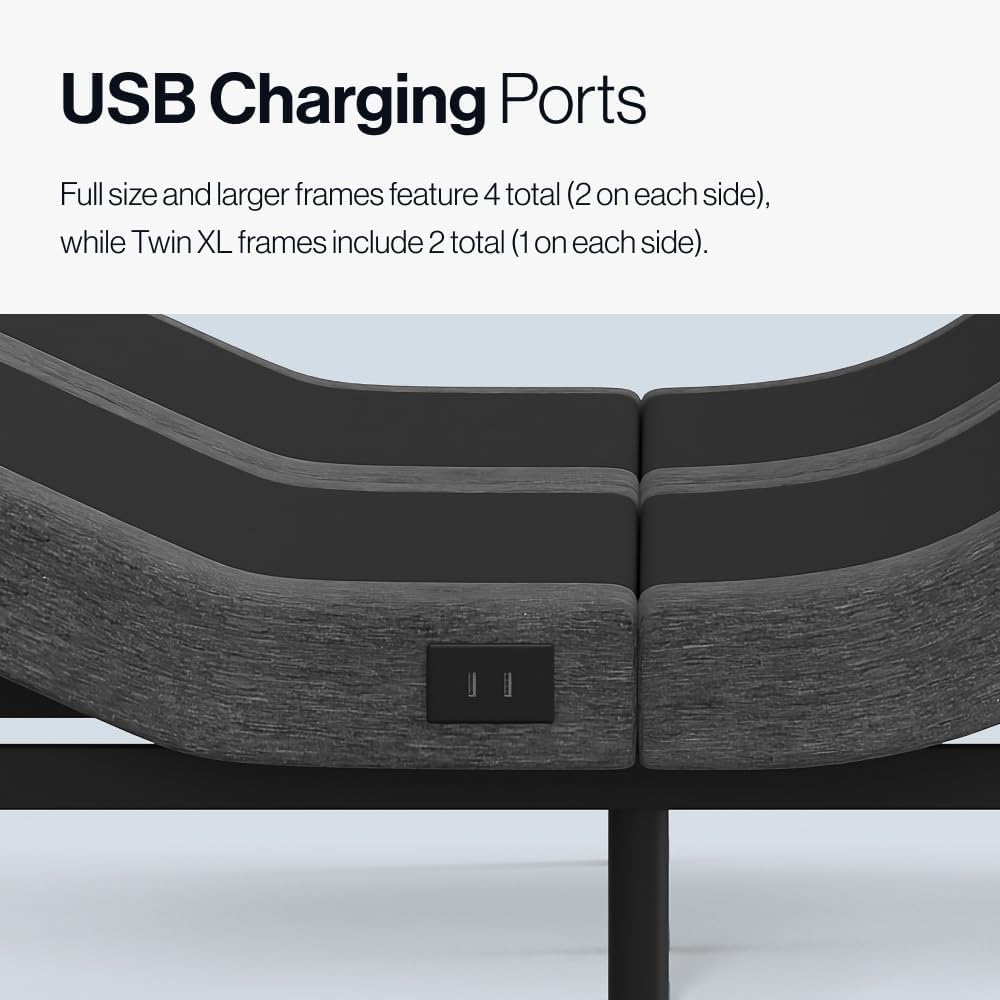
- Praktische USB-Anschlüsse: Charge devices with built-in USB ports. Full size and larger frames feature 4 total (2 on each side), while Twin XL frames include 2 total (1 on each side).
- Soothing Massage Settings: Experience relaxation with customizable vibration and 3 intensity levels.
- Schwerelosigkeitsposition: Elevate your sleep with the Zero Gravity position, designed to improve breathing and reduce pressure.
- Anti-Snore Setting: Silence snoring with a dedicated anti-snore setting.
- Flüsterleiser Betrieb: Enjoy adjustments without disruptive noise.
- Einfache Montage: Setup requires no tools, and all necessary components, including batteries, are included. The zero clearance design works on most existing platform frames.
Im Lieferumfang enthaltene Komponenten
Your Adjustable Comfort Queen Premium Adjustable Bed Base package includes:
- Verstellbarer Bettrahmen
- Hardware zur Montage
- Drahtlose Fernbedienung (mit Batterien)
- Montageanleitung
Einrichtung und Montage
The Adjustable Comfort Premium Adjustable Bed Base is designed for easy, tool-free assembly. Please follow the detailed assembly instructions provided in your package. It is recommended to have two people for lifting and positioning the bed base.
Wichtigste Montageschritte:
- Entpacken Sie alle Komponenten und überprüfen Sie sie anhand der Liste der enthaltenen Komponenten.
- Attach the legs to the bed base.
- Connect the drive motors and power cables as indicated in the instructions.
- Legen Sie Batterien in die Funkfernbedienung ein.
- Carefully flip the assembled base and place it in your desired location.

Image: A person demonstrating the easy assembly of the bed base by attaching one of the legs. The design allows for quick setup without specialized tools.
Bedienungsanleitung
Your adjustable bed base is controlled by a wireless remote. Familiarize yourself with the remote's functions for optimal use.
Funktionen der drahtlosen Fernbedienung:
- Head & Foot Elevation: Use dedicated buttons to raise or lower the head and foot sections independently.
- Schwerelosigkeit (ZG): Press the ZG button to activate the Zero Gravity position, which elevates both the head and feet to promote circulation and reduce pressure on the lower back.
- Anti-Schnarchen: Activate this preset position to slightly raise the head, which can help reduce snoring.
- Eben: Returns the bed base to a completely flat position.
- Programmable Memory Positions (M1, M2): Save your favorite head and foot positions for quick access. To program, adjust the bed to your desired position, then press and hold M1 or M2 until the remote confirms the setting is saved.
- Massage: Activate the massage function. Use the intensity buttons to cycle through 3 vibration levels.
- Timer: Set timers for automatic adjustments or massage duration.
- Convenient Flashlight: The remote includes a built-in flashlight for convenience in low light.

Image: The wireless remote control for the Adjustable Comfort bed base, highlighting buttons for head/foot elevation, Zero Gravity, massage, and programmable memory settings.
USB-Ladeanschlüsse:
Locate the USB charging ports on the side(s) of your bed base. These ports allow you to conveniently charge your electronic devices while relaxing in bed.

Bild: Eine Nahaufnahme view of the USB charging ports integrated into the side of the adjustable bed base, providing convenient access for charging devices.
Produktbilder

The Adjustable Comfort Premium Adjustable Base showcasing its key features: head and foot elevation, whisper-quiet massage, under-bed lighting, and integrated USB charging ports.
Eine detaillierte view of the Adjustable Comfort bed base highlighting the whisper-quiet massage function, designed to provide soothing vibrations for relaxation.
Produktvideos
Adjustable Comfort Classic Adjustable Base Overview
Dieses Video bietet ein Overview of the Adjustable Comfort Classic Adjustable Base, demonstrating its features such as head and foot elevation, and ease of use with the wireless remote. It highlights how the bed moves with you to provide optimal comfort and support.
Wartung
To ensure the longevity and optimal performance of your Adjustable Comfort bed base, follow these simple maintenance guidelines:
- Reinigung: Wipe the bed base with a damp cloth as needed. Avoid using harsh chemicals or abrasive cleaners, which can damage the finish.
- Regelmäßige Inspektion: Periodically check all connections and hardware to ensure they are secure. Tighten any loose screws or bolts.
- Pflege des Netzkabels: Ensure the power cord is not pinched or tangled. Keep it away from heat sources and sharp objects.
- Gewichtskapazität: Do not exceed the maximum weight recommendation of 750 pounds for the Queen size.
Fehlerbehebung
If you encounter any issues with your adjustable bed base, please refer to the following common troubleshooting tips:
- Kein Strom: Vergewissern Sie sich, dass das Netzkabel fest in einer funktionierenden Steckdose steckt. Prüfen Sie, ob der Sicherungsautomat ausgelöst hat.
- Fernbedienung reagiert nicht: Replace the batteries in the wireless remote. Ensure there are no obstructions between the remote and the bed base's receiver.
- Motorgeräusch: A slight hum from the motors during adjustment is normal. If you hear unusual or loud noises, check for any obstructions under the bed base.
- Ungleichmäßige Bewegung: Ensure the bed base is placed on a flat, stable surface. Check that all legs are properly installed and tightened.
Sollte das Problem nach Durchführung dieser Schritte weiterhin bestehen, wenden Sie sich bitte an den Kundendienst, um weitere Unterstützung zu erhalten.
Technische Daten
| Größe | Königin |
| Material | Metall |
| Produktabmessungen (L x B x H) | 79 Zoll L x 59 Zoll B x 14 Zoll H |
| Stil | Premium Adjustable Base |
| Besondere Merkmale | Adjustable, Remote Control, USB Port, Zero Gravity Mode, Massage |
| Im Lieferumfang enthaltene Komponenten | Adjustable Bed Frame, Hardware, Assembly Instructions |
| Marke | Anpassbarer Komfort |
| Hersteller | Resident Home |
| UPC | 810167468717 |
| Modellnummer | adjcomfgc-s |
| Artikelgewicht | 130 Pfund |
| Maximalgewichtsempfehlung | 750 Pfund |
| Erforderliche Montage | Ja |
Garantie und Support
Your Adjustable Comfort Queen Premium Adjustable Bed Base comes with a 3-year limited non-prorated warranty. This warranty covers manufacturing defects and ensures your product meets quality standards.
For warranty claims, technical support, or any questions regarding your product, please refer to the contact information provided in your product packaging or visit the official Adjustable Comfort webWebsite.