
1. Einleitung
This manual provides detailed instructions for the assembly, operation, maintenance, and troubleshooting of your HOSTACK 72-inch Tall Kitchen Pantry Cabinet. Please read this manual thoroughly before assembly and use to ensure proper functionality and safety.
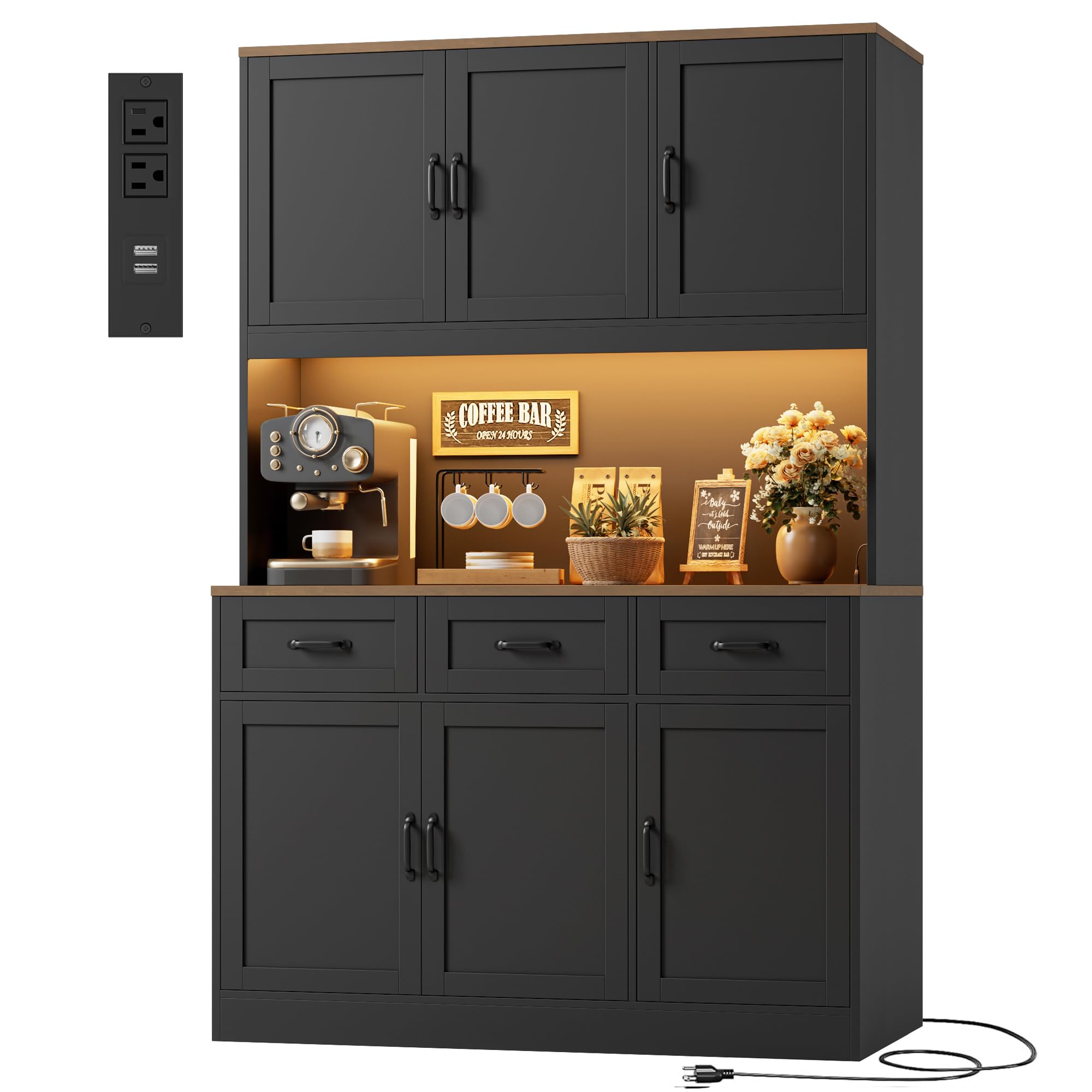
Figure 1: HOSTACK 72-inch Tall Kitchen Pantry Cabinet.
2. Sicherheitshinweise
Bitte beachten Sie bei der Montage und Verwendung die folgenden Sicherheitsvorkehrungen:
- Bewahren Sie alle Kleinteile und Verpackungsmaterialien außerhalb der Reichweite von Kindern und Haustieren auf, um Erstickungsgefahren zu vermeiden.
- Montieren Sie das Gerät auf einer weichen, sauberen Oberfläche, um Kratzer oder Beschädigungen zu vermeiden.
- Ensure all connections are secure before using the cabinet. Periodically check and re-tighten fasteners as needed.
- Regale und Schubladen nicht überladen. Das Gewicht gleichmäßig verteilen, um die Stabilität zu gewährleisten.
- Use the included anti-tip hardware to secure the cabinet to a wall, especially if children are present.
- For electrical components (LED lights, charging station), ensure they are connected to a suitable power source and avoid exposing them to moisture.
3. Parts List and Included Components
Your HOSTACK Kitchen Pantry Cabinet is delivered in two packages. Please ensure both packages are received before beginning assembly. The following components are included:
- 1x Large Pantry Cabinet (all individual parts for assembly)
- 1x Step-to-step Instructions (detailed assembly guide)
- 1x Accessories Bag (containing hardware and small parts)
Refer to the separate step-by-step instructions for a complete list of individual parts and hardware.

Figure 2: Product dimensions and packaging information.
4. Aufbau und Montage
Assembly of the HOSTACK Kitchen Pantry Cabinet requires following the detailed step-by-step instructions provided in the separate manual. Ensure you have adequate space and the necessary tools (typically a screwdriver) before starting.
Allgemeine Montagehinweise:
- Identify all parts and hardware before assembly. Numbered parts and clear diagrams are provided in the instruction manual.
- It is recommended to assemble this unit with two people for ease and safety, especially when lifting the upper sections.
- Do not fully tighten all screws until the entire section is assembled, allowing for minor adjustments.
- Attach the anti-tip hardware to the wall as instructed to prevent accidental tipping.
5. Bedienungsanleitung
5.1 RGB LED Lighting System
The cabinet features premium RGB LED strips for customizable ambiance. Control is available via a dedicated app remote and a physical switch.
- App-Steuerung: Download the specified app (refer to the LED light instructions for details) to access over 60,000 colors, adjustable brightness, and music synchronization features.
- Physikalischer Schalter: Use the inline physical switch to cycle through basic colors and turn the lights on/off.

Figure 3: RGB LED Dynamic Light features and control.
5.2 Integrierte Ladestation
The cabinet includes a built-in charging station for convenient power access. It provides:
- 2 Wechselstromsteckdosen (120 V/12 A)
- 2 USB-Anschlüsse (5V/2A)
- Maximale Leistung: 1500 W
Plug the cabinet's power cord into a standard wall outlet to activate the charging station. Ensure devices connected do not exceed the maximum power rating.

Figure 4: Built-in Charging Station details.
5.3 Aufbewahrungsmöglichkeiten
The cabinet is designed with multiple storage options:
- Geräumige Arbeitsfläche: Ideal for appliances like microwaves and coffee makers, or for meal preparation. Dimensions: 15.7"D x 47.2"W x 15.7"H.
- Tiefe Schubladen: Three deep drawers provide ample space for cutlery, dining essentials, and other small items.
- Verstellbare Einlegeböden: The 6-door cabinet sections include adjustable shelves, allowing you to customize storage space for items of various heights.

Figure 5: Multi-section design for organized storage.

Figure 6: Three spacious drawers for dining essentials.
5.4 Produktüberschussview Video
Sehen Sie sich dieses Video an, um einen visuellen Überblick zu erhalten.view of the HOSTACK LED Kitchen Pantry Cabinet's features and functionality.
Video 1: Endeview of the HOSTACK LED Kitchen Pantry Cabinet, showcasing its design, LED lights, and storage capabilities.
6. Wartung
To ensure the longevity and appearance of your HOSTACK Kitchen Pantry Cabinet, follow these maintenance guidelines:
- Reinigung: Wischen Sie Oberflächen mit einem weichen, damp Mit einem Tuch abwischen. Vermeiden Sie aggressive Chemikalien oder Scheuermittel, die die Oberfläche beschädigen könnten.
- Verschüttungen: Verschüttete Flüssigkeiten sollten sofort aufgewischt werden, um Fleckenbildung oder Feuchtigkeitsschäden am Holzwerkstoff zu vermeiden.
- Hardware: Periodically check all screws and fasteners to ensure they are tight. Re-tighten as necessary to maintain structural integrity.
- Umgebungsbedingungen: Stellen Sie den Schrank nicht in direktes Sonnenlicht oder in die Nähe von Wärmequellen, da dies zu Ausbleichen oder Verformungen führen kann. Sorgen Sie für eine gleichbleibende Raumtemperatur und Luftfeuchtigkeit.
7. Fehlerbehebung
7.1 Door Alignment Issues
If cabinet doors are misaligned, have gaps, or do not close properly, adjustments can be made using the hinges. Refer to the diagram and video below for guidance.

Figure 7: Step-by-step hinge adjustment for cabinet doors.
For a visual guide on adjusting door gaps, please watch the following video:
Video 2: Instructions on how to adjust cabinet door gaps and alignment.
7.2 Andere Probleme
If you encounter issues not covered in this manual, please refer to the contact information in the Warranty and Support section for assistance.
8. Spezifikationen
| Besonderheit | Detail |
|---|---|
| Marke | HOSTACK |
| Modell | B0GVDS361H |
| Farbe | Schwarz/Rustikales Braun |
| Material | Holzwerkstoff |
| Gesamtabmessungen (T x B x H) | 15.8"T x 47.2"B x 71.7"H |
| Anzahl Türen | 6 |
| Anzahl der Schubladen | 3 |
| Anzahl der Einlegeböden | 2 (einstellbar) |
| Ladestation | 2 AC Outlets (120V/12A), 2 USB Ports (5V/2A), 1500W Max Power |
| LED-Leuchten | RGB, App/Physical Switch Control, 60,000+ colors, Adjustable Brightness, Music Sync, Timing Function |
| Installationstyp | Freistehende |
| Montage erforderlich | Ja |
9. Garantie und Support
For warranty information, product support, or to report missing/damaged parts, please contact HOSTACK customer service. Refer to the original purchase documentation or the HOSTACK official webFür genaue Kontaktdaten und Garantiebedingungen besuchen Sie bitte die Webseite.
WebWebsite: Visit the HOSTACK Store on Amazon