
1. Einleitung
This manual provides essential information for the installation, operation, and maintenance of your ATOTO S8L 7-inch AI Android Double Din Car Stereo. Please read this manual thoroughly before using the product to ensure correct usage and to prevent damage.
2. Sicherheitshinweise
- Installation: Professional installation is recommended. Incorrect wiring can cause damage to the unit or your vehicle.
- Stromversorgung: Stellen Sie sicher, dass das Gerät an eine 12V-Gleichstromversorgung mit negativer Erdung angeschlossen ist.
- Betrieb: Bedienen Sie das Gerät nicht so, dass Sie vom Fahren abgelenkt werden. Die Verkehrssicherheit hat stets Vorrang.
- Temperatur: Setzen Sie das Gerät nicht über längere Zeit extremen Temperaturen oder direkter Sonneneinstrahlung aus.
- Feuchtigkeit: Das Gerät muss trocken bleiben. Feuchtigkeit kann zu Fehlfunktionen oder Stromschlägen führen.
3. Packungsinhalt
Bitte überprüfen Sie, ob alle unten aufgeführten Artikel in Ihrem Paket enthalten sind:
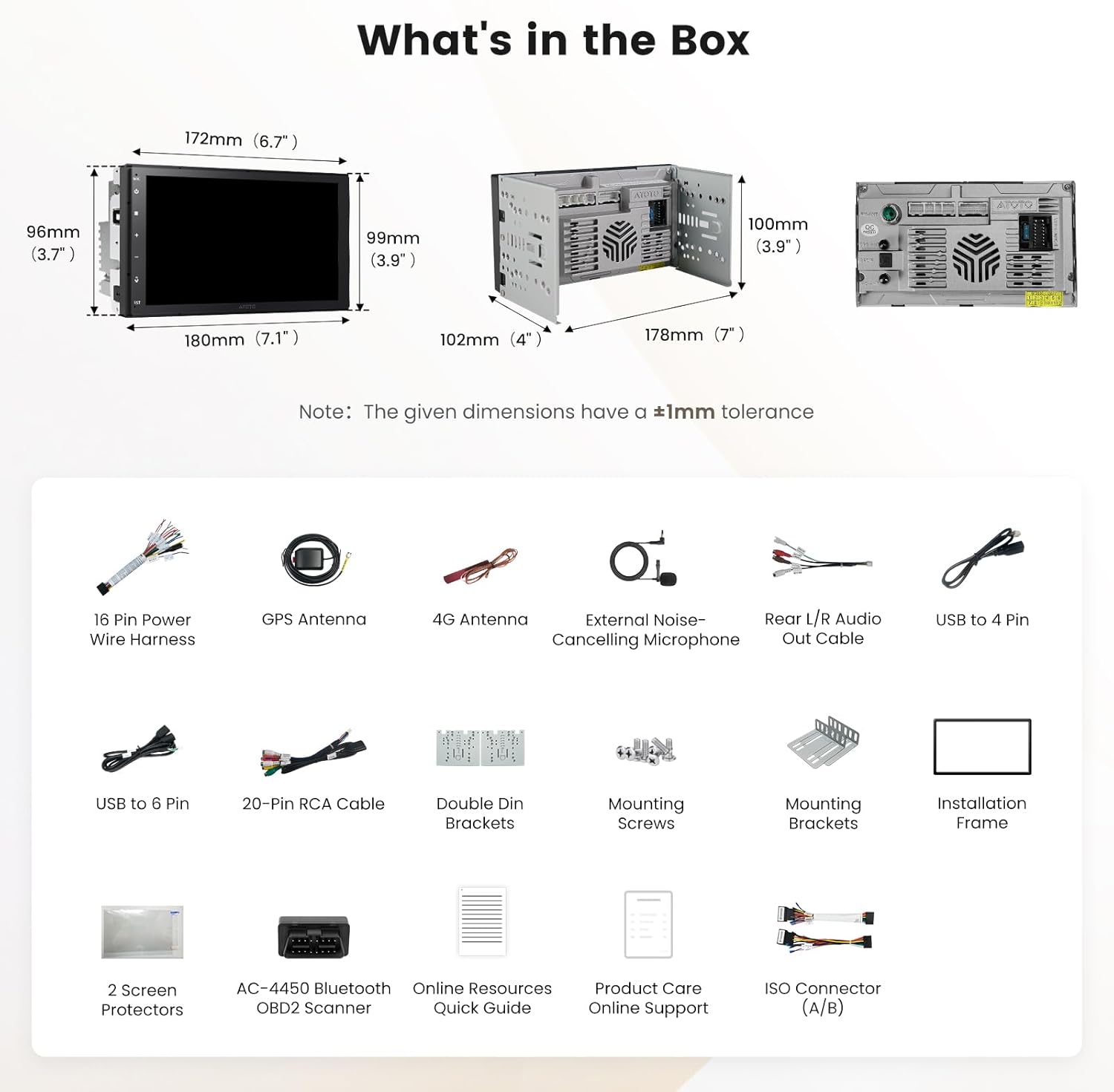
Abbildung 3.1: Diagramm der enthaltenen Komponenten
- ATOTO S8L Double Din Car Stereo
- AC-4450 Bluetooth OBD II Scanner
- 4G-Antenne
- GPS-Antenne
- External Noise-Cancelling Microphone
- 16 Pin Power Wire Harness
- RCA-Kabel
- Rear L/R Audio Out Cable
- Rückfahrkamerakabel
- USB to 4 Pin Cable
- USB to 6 Pin Cable
- Double Din Brackets
- Befestigungsschrauben
- Montagehalterungen
- Einbaurahmen
- 2 Displayschutzfolien
- Kurzanleitung zu Online-Ressourcen
- Produktpflege – Online-Supportinformationen
4. Installation
4.1 Schaltplan
Refer to the following diagram for proper wiring connections. Ensure all connections are secure to prevent electrical issues.

Figure 4.1: ATOTO S8L Wiring Diagram
4.2 Allgemeine Installationsschritte
- Vorbereitung: Vor Beginn der Installation die Fahrzeugbatterie abklemmen.
- Altes Gerät entfernen: Das vorhandene Autoradio vorsichtig aus dem Armaturenbrett ausbauen.
- Verkabelung anschließen: Match the wires from the ATOTO S8L harness to your vehicle's wiring harness. Use the provided 16-pin power wire harness and other cables as per the wiring diagram.
- Antennenanschlüsse: Connect the GPS antenna and 4G antenna to their respective ports on the unit. Position antennas in locations with clear signal reception.
- Externes Mikrofon: Connect the external noise-cancelling microphone and route it to a suitable location for optimal voice pickup.
- Montage: Secure the ATOTO S8L unit into the double din opening using the provided brackets and screws.
- Prüfen: Reconnect the vehicle's battery and perform a functional test of the unit before fully reassembling the dashboard.
5. Bedienungsanleitung
5.1 Grundlegende Bedienung
The ATOTO S8L operates on Android 15, providing a familiar touchscreen interface. Power on the unit by starting your vehicle. Adjust volume using the on-screen controls or steering wheel controls if configured.
5.2 Anzeigefunktionen
The 7-inch QLED display offers vivid colors and a wide viewing angle. It supports split-screen functionality, allowing you to view navigation and media simultaneously.

Figure 5.1: QLED Display and Split-Screen Functionality
5.3 Konnektivität
The S8L offers multiple connectivity options to keep you connected on the road.

Abbildung 5.2: Verbindungsoptionen
- Kabelloses CarPlay & Android Auto: Connect your smartphone wirelessly for navigation, music, calls, and voice commands. Wired Android Auto is also supported.
- 4G LTE with SIM Card: Insert a 4G SIM card for independent internet access, enabling navigation, streaming, and app usage without phone tethering.
- Wi-Fi & Bluetooth Tethering: Use your phone's hotspot for internet access when Wireless CarPlay or Android Auto is active.
5.4 AI Agent (DriveChat)
The integrated AI Agent, powered by ChatGPT 5.2 and Gemini 3.0, provides advanced voice assistance for various in-car tasks.

Figure 5.3: DriveChat AI in Action
- Sprachbefehle: Control calls, apps, and system functions using your voice.
- Info & Q&A: Get real-time information, weather updates, and general knowledge.
- GeoSense: Find routes, parking, and points of interest by voice.
5.5 Audiofunktionen
Experience enhanced audio quality with the S8L's advanced sound processing capabilities.

Figure 5.4: Audio Features Overview
- DSP & 32-Band-EQ: Customize your sound with a digital signal processor and a 32-band equalizer.
- Zeitliche Ausrichtung: Adjust audio delays for optimal sound staging.
- Einstellbare Frequenzweichen: Fine-tune frequency distribution to speakers and subwoofers.
- SCVC (Geschwindigkeitskompensierte Lautstärkeregelung): Automatically adjusts volume based on vehicle speed.
- Radio: Access FM/AM radio and online stations via SSRadio.
5.6 Kameraeingänge
The unit supports various camera inputs for improved safety and recording.
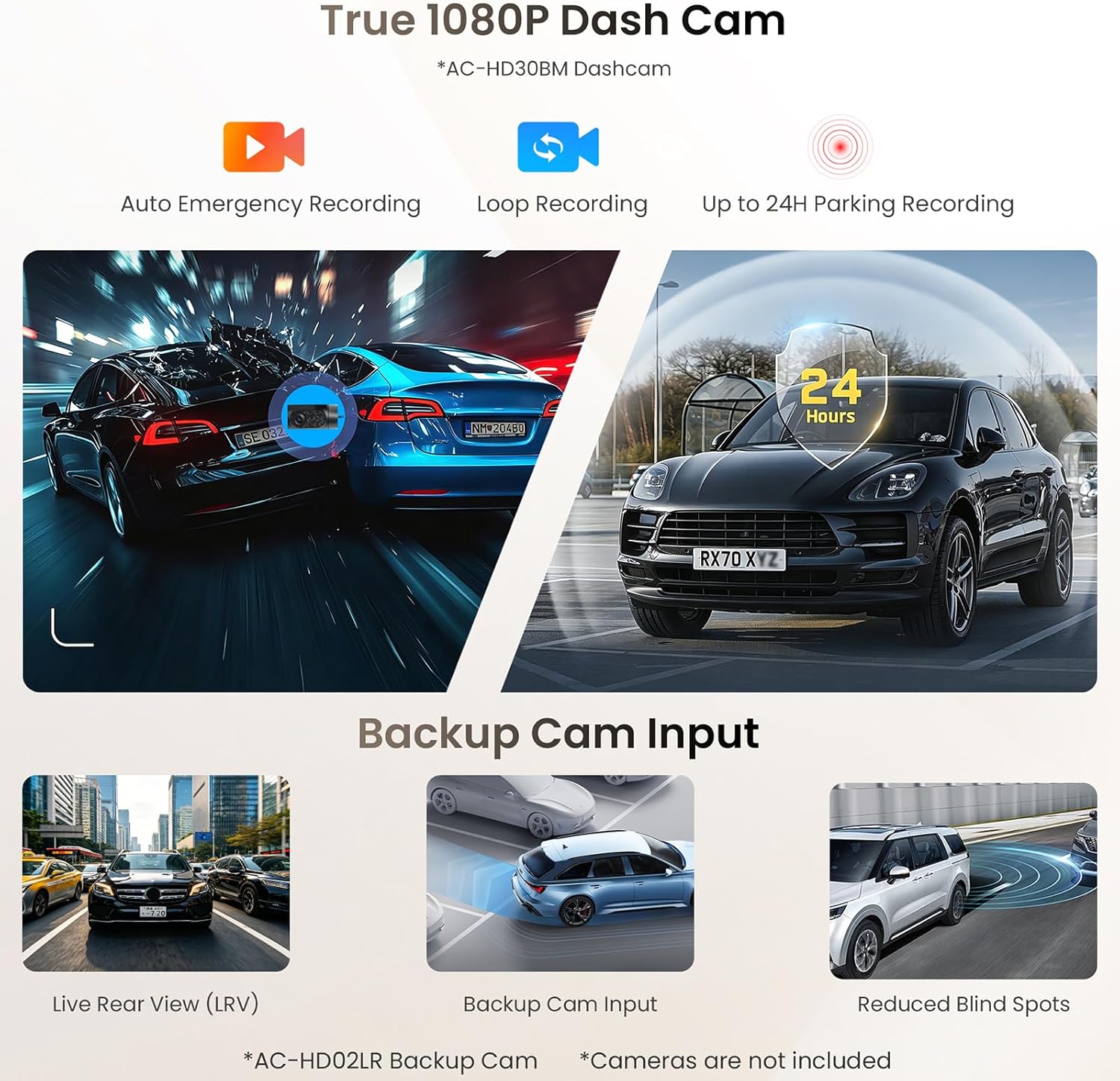
Figure 5.5: Camera Input Capabilities
- Dash Cam (AC-HD30BM, sold separately): Supports 1080P recording with emergency, loop, and 24-hour parking modes.
- Backup Cam Input (AC-HD02LR, sold separately): Provides Live Rear View (LRV) and aids in reducing blind spots during reversing.
5.7 Engine Diagnostics with OBD II
The included AC-4450 Bluetooth OBD II Scanner integrates with the S8L to provide real-time vehicle health data.

Abbildung 5.6: OBD-II-Diagnoseschnittstelle
- Echtzeitdaten: Monitor engine status, performance, and trouble codes.
- DriveChat Insights: Receive insights and proactive help based on OBD data.
5.8 Videoeingang und -ausgang
The S8L supports video input for external devices and dual-zone video output for rear-seat entertainment.

Figure 5.7: Video Input and Dual-Zone Output
- Video-Eingang: Connect external video sources (e.g., game consoles) via an optional AC-HAV50 adapter.
- Dual-Zone Video Output: Allows front-seat users to navigate while rear-seat passengers enjoy media on separate screens (requires AC-AHV48 or AC-AHV68 adapters, sold separately).
5.9 Lenkradsteuerung
The unit is compatible with most factory steering wheel controls. Custom key learning is available to map functions to your vehicle's buttons.
5.10 Screen Lock (Bluetooth Disconnect)
This feature automatically locks the display when your phone moves out of Bluetooth range, protecting your privacy by hiding personal information.
5.11 Smart App Suite
- TrackHU: Live GPS tracking with geofencing capabilities.
- FindApps: Provides a curated selection of car-optimized applications for easy installation.
- SSRadio: Offers access to thousands of global online radio stations.
6. Wartung
- Reinigung: Reinigen Sie Display und Gerät mit einem weichen, trockenen Tuch. Vermeiden Sie Scheuermittel und Lösungsmittel.
- Software-Updates (OTA): The S8L supports Over-the-Air (OTA) updates. Regularly check for and install updates via the FindApps application to ensure optimal performance and access to new features.
- Displayschutzfolien: Utilize the provided screen protectors to guard against scratches and smudges.
7. Fehlerbehebung
| Problem | Mögliche Ursache | Lösung |
|---|---|---|
| Gerät lässt sich nicht einschalten | Falsche Verkabelung; durchgebrannte Sicherung; Problem mit der Fahrzeugbatterie | Check power connections; Inspect vehicle fuses; Verify vehicle battery health. |
| Keine Tonausgabe | Speaker wiring issue; Volume too low; Mute activated; DSP settings incorrect | Check speaker connections; Increase volume; Deactivate mute; Reset DSP settings. |
| Drahtlose Verbindung mit CarPlay/Android Auto nicht möglich | Bluetooth/Wi-Fi off on phone/unit; Incorrect pairing; Software glitch | Ensure Bluetooth/Wi-Fi is active; Re-pair device; Restart unit and phone. |
| GPS-Signal verloren oder ungenau | GPS antenna improperly installed/damaged; Obstruction to signal | GPS-Antennenanschluss und -position prüfen; Fahrzeug in einen offenen Bereich bringen. |
| Touchscreen reagiert nicht | Software freeze; Physical damage | Starten Sie das Gerät neu. Sollte das Problem weiterhin bestehen, wenden Sie sich bitte an den Support. |
8. Spezifikationen
| Besonderheit | Detail |
|---|---|
| Marke | ATOTO |
| Modell | S8L |
| Anzeigegröße | 7 Zoll |
| Anzeigetyp | QLED |
| Betriebssystem | Android 15 |
| RAM | 4 GB |
| ROM | 64 GB |
| Konnektivität | 4G LTE, Wi-Fi 6, Bluetooth 5.4, USB, HDMI |
| Besondere Merkmale | Wireless CarPlay & Android Auto, AI Agent (DriveChat), DSP, 32-Band EQ, SCVC, GPS Navigation, OBD II Integration, Screen Mirroring, Front/Rear Camera Input |
| Audioausgabemodus | Stereo |
| Kontrollmethode | App, Fernbedienung, Touch, Sprache |
| Leistungsabgabe | Eingebaut Amplifier (4x45W Peak) |
9. Garantie und Support
The ATOTO S8L comes with 12 months of product care, extendable by an additional 6 months. For technical assistance, warranty claims, or further inquiries, please refer to the online resources quick guide included in your package or visit the official ATOTO support website. Regular OTA updates ensure your device remains current with the latest features and improvements.