
1. Wichtige Sicherheitshinweise
Please read this manual carefully before operating your Garvee 3-in-1 Portable Air Conditioner. Keep it for future reference. Failure to follow these instructions may result in electric shock, fire, or serious injury.
- Stellen Sie stets sicher, dass das Gerät auf einer stabilen, ebenen Fläche steht.
- Lufteinlässe und -auslässe dürfen nicht blockiert werden. Halten Sie einen Mindestabstand von 20 cm zu Wänden und Möbeln ein.
- Das Gerät, das Netzkabel und der Stecker dürfen nicht in Wasser oder andere Flüssigkeiten getaucht werden.
- Vor der Reinigung, Wartung oder wenn das Gerät nicht benutzt wird, ziehen Sie den Netzstecker.
- Do not operate the unit with a damaged cord or plug. Contact customer support for repairs.
- Dieses Gerät ist nicht für den Gebrauch durch Personen (einschließlich Kinder) mit eingeschränkten physischen, sensorischen oder geistigen Fähigkeiten oder Mangel an Erfahrung und Wissen bestimmt, es sei denn, sie werden von einer für ihre Sicherheit verantwortlichen Person beaufsichtigt oder erhalten Anweisungen zur Verwendung des Geräts.
- Verwenden Sie das Gerät nur in Innenräumen.
2. Produktüberschreitungview
The Garvee 3-in-1 Portable Air Conditioner offers cooling, ventilation, and humidification functions to enhance your indoor comfort. Its compact design and mobility make it suitable for various rooms.
Hauptmerkmale:
- 3-in-1-Funktionalität: Cooling, ventilation, and dehumidification in a single unit.
- Leiser Betrieb: Operates at an ultra-quiet 45 dB, ideal for bedrooms and offices.
- Effiziente Kühlung: Powerful cooling for rooms up to 32 m² with low energy consumption (0.13 kWh/h).
- Washable Dual Filter: Effectively captures dust, pollen, and pet dander for cleaner air.
- Einfache Mobilität: Equipped with 360° wheels and an ergonomic handle for effortless movement.
- Großer Wassertank: Features a removable 7L water tank for extended operation.
- Automatische Wassernachfüllung: Supports automatic water refilling for convenience.
- Timer-Funktion: 1-12-Stunden-Timer für den geplanten Betrieb.
Packungsinhalt:
- Garvee 3-in-1 Portable Air Conditioner Unit
- Fernbedienung
- Benutzerhandbuch (dieses Dokument)
- Cooling Packs (quantity may vary)
Komponenten der Einheit:
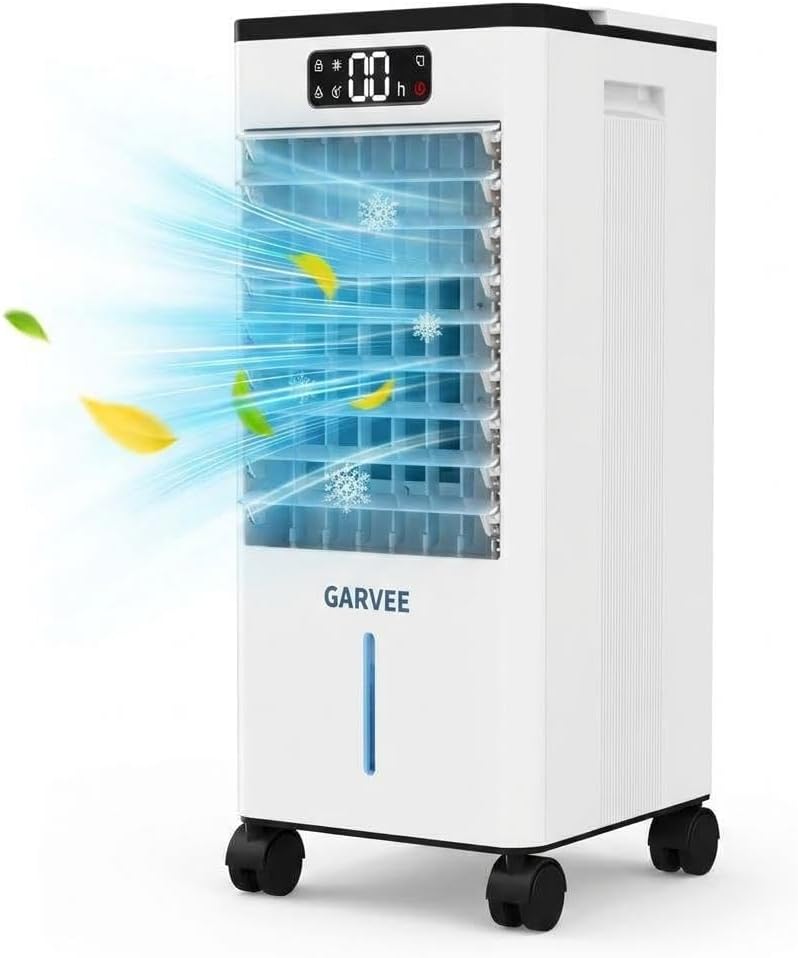
Abbildung 2.1: Vorderseite view of the Garvee 3-in-1 portable air conditioner, showcasing its sleek design and visible airflow during operation.

Figure 2.2: This diagram illustrates the air circulation within the unit, showing how it produces cold air and takes in warm air for cooling.
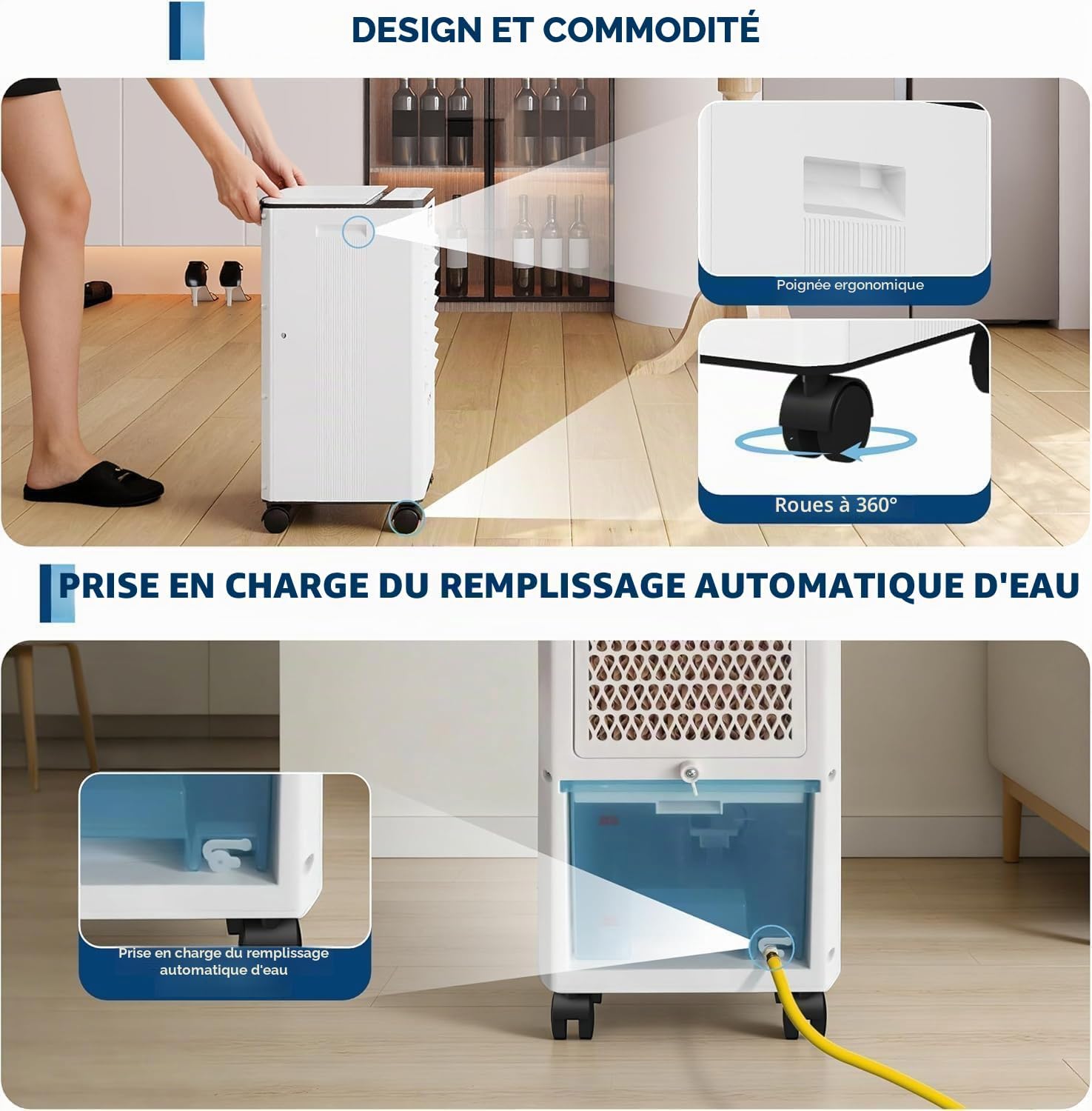
Figure 2.3: This image demonstrates the unit's portability features, including an ergonomic handle for easy lifting, 360-degree swivel wheels for effortless movement, and the automatic water refill mechanism.
3. Einrichtung
3.1 Auspacken
- Nehmen Sie das Gerät vorsichtig aus der Verpackung.
- Entfernen Sie sämtliches Verpackungsmaterial, einschließlich Schutzfolien oder Klebebänder.
- Prüfen Sie das Gerät auf Transportschäden. Im Schadensfall nicht in Betrieb nehmen und den Kundendienst kontaktieren.
3.2 Platzierung
Place the air conditioner on a firm, level surface in the desired room. Ensure there is at least 20 cm of clear space around the unit for proper airflow.

Figure 3.1: The unit is shown in different environments such as a living room, office, garage, and kitchen, illustrating its versatility and suitability for various residential and small office spaces.
3.3 Füllen des Wassertanks
For cooling and humidification functions, the water tank must be filled.
- Öffnen Sie den Wassertankdeckel oben am Gerät.
- Carefully pour clean, cold water into the tank, ensuring not to exceed the 'MAX' fill line.
- For enhanced cooling, you may add the included cooling packs or ice cubes to the water tank.
- Schließen Sie den Wassertankdeckel sicher.

Figure 3.2: The image shows the dual water tanks being filled, highlighting the unit's large capacity for extended operation and its ultra-quiet 45 dB noise level, ideal for use in bedrooms or nurseries.
3.4 Stromversorgung anschließen
Stecken Sie das Netzkabel in eine Standard-220-V-Steckdose. Stellen Sie sicher, dass die Steckdose ordnungsgemäß geerdet ist.
4. Bedienungsanleitung
Das Gerät kann über das Bedienfeld auf der Oberseite oder über die mitgelieferte Fernbedienung bedient werden.
4.1 Bedienfeld vorbeiview

Figure 4.1: A close-up of the control panel, featuring the 1-12 hour timer setting, a visual water level indicator, and an automatic refill reminder to ensure continuous operation.
Familiarize yourself with the buttons and indicators on the control panel:
- Netzschalter: Schaltet das Gerät EIN/AUS.
- Modus-Taste: Cycles through Cooling, Fan, and Humidifier modes.
- Geschwindigkeitstaste: Regelt die Lüftergeschwindigkeit (Niedrig, Mittel, Hoch).
- Timer-Taste: Stellt den automatischen Abschalttimer ein (1-12 Stunden).
- Oszillationstaste: Aktiviert oder deaktiviert die 120°-Oszillationsfunktion.
- Bildschirm: Shows current settings, timer, and water level indicators.
4.2-Betriebsmodi

Figure 4.2: This graphic explains the three operating modes: a 3-speed fan, a humidifier when water is added, and an air cooler when water and ice packs are used, providing versatile climate control.
- Kühlmodus: When water (and optionally ice packs) is in the tank, the unit will provide evaporative cooling. Press the Mode button until the cooling indicator lights up.
- Gebläsemodus: Operates as a standard fan, circulating air without water. Press the Mode button until the fan indicator lights up. Adjust fan speed as desired.
- Luftbefeuchtermodus: When water is in the tank, the unit will release moisture into the air. Press the Mode button until the humidification indicator lights up.
4.3 Timer-Funktion
To set the auto-off timer:
- Drücken Sie die Timer-Taste.
- Each press will increase the timer by 1 hour, up to a maximum of 12 hours.
- The unit will automatically turn off after the set time.
4.4 Schwingung
Press the Oscillation button to activate the 120° oscillation feature, which helps distribute air more widely throughout the room. Press again to stop oscillation.
5. Wartung
Regelmäßige Wartung gewährleistet optimale Leistung und Langlebigkeit Ihrer Klimaanlage.
5.1 Reinigung des Luftfilters
The unit features a washable dual filter. It is recommended to clean the filter every two weeks, or more frequently depending on usage and air quality.
- Ziehen Sie den Stecker aus der Steckdose.
- Locate the filter panel (usually at the back or side of the unit).
- Entfernen Sie den Filter.
- Rinse the filter under running water until clean. For stubborn dirt, use a soft brush and mild detergent.
- Lassen Sie den Filter vollständig an der Luft trocknen, bevor Sie ihn wieder in das Gerät einsetzen.
5.2 Entleeren und Reinigen des Wassertanks
To prevent mold and mildew growth, regularly drain and clean the water tank, especially if the unit will not be used for an extended period.
- Ziehen Sie den Stecker aus der Steckdose.
- Entfernen Sie den Wassertank.
- Schütten Sie das restliche Wasser ab.
- Reinigen Sie den Tank mit einem weichen Tuch und einem milden Reinigungsmittel. Gründlich ausspülen.
- Lassen Sie den Tank vor dem Wiedereinsetzen vollständig an der Luft trocknen.
5.3 Speicherung
If storing the unit for a long period:
- Perform a thorough cleaning of the filter and water tank.
- Stellen Sie sicher, dass alle Komponenten trocken sind.
- Lagern Sie das Gerät an einem kühlen, trockenen Ort, fern von direkter Sonneneinstrahlung und extremen Temperaturen.
6. Fehlerbehebung
Bevor Sie sich an den Kundendienst wenden, lesen Sie bitte die folgende Anleitung zur Fehlerbehebung:
| Problem | Mögliche Ursache | Lösung |
|---|---|---|
| Gerät lässt sich nicht einschalten. | Kein Netzteil. Netzkabel nicht eingesteckt. | Ensure the unit is plugged into a working 220V outlet. Check the power switch. |
| Keine Kühlwirkung. | Water tank is empty. Filter is dirty. Room is too large. | Fill the water tank. Clean the air filter. Ensure the unit is suitable for the room size (up to 32 m²). |
| Schwacher Luftstrom. | Der Luftfilter ist verschmutzt. Lufteinlass/Luftauslass ist verstopft. | Clean the air filter. Ensure there is no obstruction around the unit. |
| Ungewöhnliches Geräusch. | Das Gerät steht nicht auf einer ebenen Fläche. Fremdkörper im Inneren. | Place the unit on a flat, stable surface. Unplug and check for any foreign objects. |
| Wasserleck. | Water tank not properly installed. Tank overfilled. | Ensure the water tank is correctly seated. Do not fill past the 'MAX' line. |
7. Spezifikationen
| Marke | Garvee |
| Modellnummer | bc9-0-AzHufJ5Qe1WOnQ049wCh |
| Kapazität | 7 Liter (Wassertank) |
| Produktabmessungen (T x B x H) | 24 cm x 23 cm x 50 cm |
| Farbe | Weiß |
| Bandtage | 220 V |
| Geräuschpegel | 55 Dezibel |
| Stromquelle | Stromkabel |
| Formfaktor | Tragbar |
| Artikelgewicht | 5420 Gramm (5.42 kg) |
| Installationstyp | Freestanding / Portable |
| Außengerät erforderlich | NEIN |
| Anwendung | Wohnen |
| Wastage | 65 Watt |
| Kontrollmethode | Remote Control, On-unit Buttons |
| Betriebsarten | Cooling, Ventilation, Dehumidification |
| Energieeffizienz | A++ |
| Ursprungsland | China |
| UPC / GTIN | 828700671418 |
8. Garantie und Support
Your Garvee 3-in-1 Portable Air Conditioner is covered by a manufacturer's warranty. Please refer to the warranty card included in your packaging for specific terms and conditions, including the warranty period and coverage details.
For technical support, troubleshooting assistance beyond this manual, or warranty claims, please contact Garvee customer service. Contact information can typically be found on the product packaging, the official Garvee webWebsite oder Ihren Kaufbeleg.
Bitte halten Sie bei der Kontaktaufnahme mit dem Support Ihre Modellnummer bereit (bc9-0-AzHufJ5Qe1WOnQ049wCh) and proof of purchase readily available.


