
1. Einleitung
This manual provides essential information for the safe and effective use of your LIGE EF18 Smartwatch. Please read it thoroughly before using the device and retain it for future reference. The LIGE EF18 is a versatile smartwatch designed for daily wear, fitness tracking, and communication, compatible with both iOS and Android smartphones.
2. Packungsinhalt
Überprüfen Sie, ob alle Artikel in Ihrem Paket vorhanden sind:
- LIGE EF18 Smartwatch (with 1 stainless steel band attached)
- 2 x Silicone Bands (additional)
- Charging Cable (USB-A)
- Ladekabel (USB-C)
- Band Adjustment Tool (for stainless steel band)
- Bedienungsanleitung

Image: The LIGE EF18 Smartwatch, showing its large round display, accompanied by two additional silicone bands, two charging cables (USB-A and USB-C), and a band adjustment tool.
3. Produktüberschreitungview
The LIGE EF18 Smartwatch features a robust design with a 1.85-inch high-definition touch display. It includes physical buttons for navigation and quick access to features.
3.1. Uhrenkomponenten
- Anzeige: 1.85-inch LCD touchscreen with 2000 nits peak brightness.
- Tasten: Side buttons for power, menu navigation, and LED flashlight activation.
- Sensoren: Heart rate, blood oxygen, accelerometer, sleep tracker.
- Lautsprecher & Mikrofon: For Bluetooth calling and voice assistant.
- Ladeanschlüsse: Magnetische Ladekontakte auf der Rückseite.
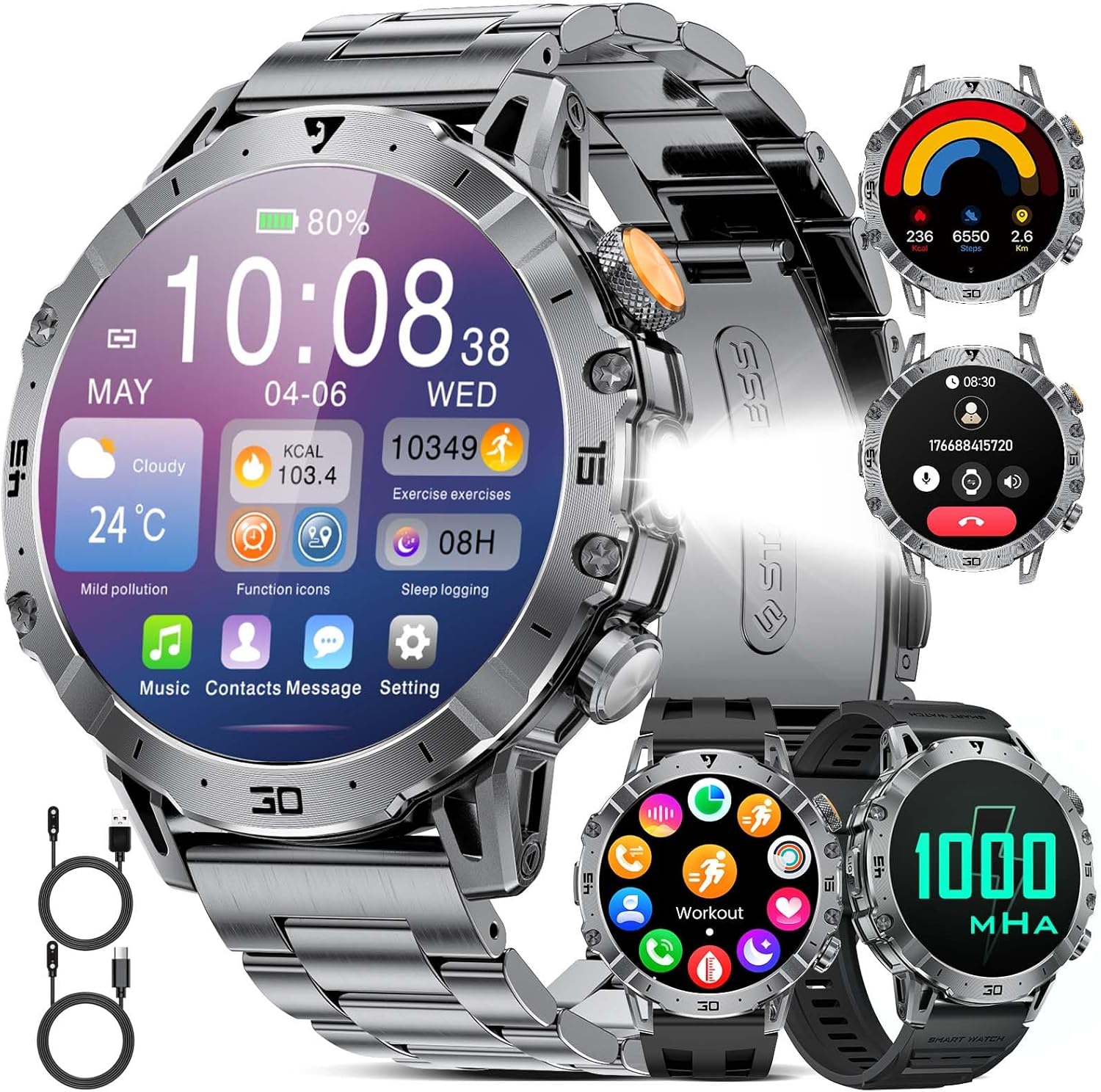
Image: A close-up of the LIGE EF18 Smartwatch, highlighting its large 1.85-inch display, metallic casing, and side buttons. The screen shows various health metrics and time.
4. Einrichtung
4.1. Aufladen der Smartwatch
Before first use, fully charge your smartwatch. Connect the magnetic charging cable to the charging pins on the back of the watch and plug the USB end into a power adapter (not included) or a computer USB port. A full charge takes approximately 3 hours.

Image: The LIGE EF18 Smartwatch connected to its magnetic charging cable, illustrating the charging process. The screen displays a charging animation.
4.2. App-Installation und -Kopplung
- Scan the QR code in the manual or on the watch screen to download the companion app (e.g., FitCloudPro).
- Install the app on your iOS (11.0 or higher) or Android (5.0 or higher) smartphone.
- Öffnen Sie die App und folgen Sie den Anweisungen auf dem Bildschirm, um ein Konto zu erstellen und Ihr Pro-Konto einzurichten.file.
- Aktivieren Sie Bluetooth auf Ihrem Smartphone.
- In the app, search for your LIGE EF18 device and pair it. Ensure the watch is powered on and near your phone.
- For Bluetooth calling functionality, ensure your iOS device is running iOS 13 or higher and follow any additional pairing prompts for call audio.
4.3. Bandinstallation und -einstellung
The smartwatch comes with one stainless steel band and two silicone bands. You can easily swap them to suit your style or activity.
- Bandwechsel: Use the quick-release pins to detach the current band and attach a new one.
- Adjusting Stainless Steel Band: Use the provided band adjustment tool to remove or add links for a comfortable fit.

Image: The LIGE EF18 Smartwatch displayed with its three interchangeable bands: a sleek stainless steel band and two flexible silicone bands, offering versatility for different occasions.
5. Bedienungsanleitung
5.1. Grundlegende Bedienung
- Ein-/Ausschalten: Drücken und halten Sie den Ein-/Ausschalter an der Seite.
- Bildschirmaktivierung: Heben Sie Ihr Handgelenk oder drücken Sie eine beliebige Taste.
- Navigation: Swipe left/right, up/down on the touchscreen to navigate menus. Press the side buttons for quick access or to return to the previous screen.
- Gesichter ansehen: Customize your watch face through the app or by long-pressing the watch screen. Over 200 online watch faces are available.

Image: The LIGE EF18 Smartwatch showcasing a selection of its over 200 customizable watch faces, allowing users to personalize their device's appearance.
5.2. Bluetooth-Anrufe
Sobald die Smartwatch mit Ihrem Smartphone gekoppelt ist, können Sie Anrufe direkt von Ihrer Smartwatch aus tätigen und empfangen.
- Anrufe tätigen: Greifen Sie auf das Tastenfeld oder die Kontaktliste der Uhr zu.
- Anrufe entgegennehmen: Anrufe können direkt über den Bildschirm der Uhr angenommen oder abgelehnt werden.

Image: The LIGE EF18 Smartwatch worn on a wrist, showing an active incoming call notification on its display, demonstrating its Bluetooth calling capability.
5.3. Benachrichtigungen
Receive real-time notifications from various apps (LINE, email, SMS, SNS) directly on your watch. Manage which app notifications appear via the companion app settings.

Image: The LIGE EF18 Smartwatch screen showing multiple notification icons from popular messaging and social media applications, indicating its notification feature.
5.4. Sportmodi
The smartwatch supports over 100 sports modes, including walking, running, cycling, strength training, yoga, and more. It automatically records your activity data such as steps, distance, and calories burned.
- Wählen Sie im Menü der Uhr den gewünschten Sportmodus aus, um die Aufzeichnung zu starten.
- Review your exercise records and progress in the companion app.

Image: A LIGE EF18 Smartwatch on a user's wrist during a cycling activity, with the screen showing real-time exercise data such as duration, calories, and distance.
5.5. Gesundheitsüberwachung
The EF18 smartwatch provides comprehensive health monitoring features:
- Schlafmonitor: Erfasst Ihre Schlafmuster, einschließlich Tiefschlaf, Leichtschlaf und Wachphasen. View detaillierte Analyse in der App.
- Schrittzähler & Kalorienzähler: Automatically counts your steps and estimates calories burned throughout the day.
- Herzfrequenz: Monitors your heart rate continuously or on demand.
- Blutsauerstoff: Misst Ihren Blutsauerstoffsättigungsgrad.
- Sitzende Erinnerung: Erinnert Sie nach längeren Inaktivitätsphasen an eine Bewegung.
- Erinnerung an Trinkwasser: Erinnert Sie daran, regelmäßig Wasser zu trinken.

Image: A user sleeping with the LIGE EF18 Smartwatch on their wrist, illustrating the device's sleep tracking capabilities and displaying sleep data on the screen.
5.6. LED-Licht
The smartwatch is equipped with a built-in LED flashlight for convenience in dark environments.
- Activate the LED light via a dedicated button or menu option.
- Useful for night activities, finding items in the dark, or as an emergency light.

Image: The LIGE EF18 Smartwatch with its powerful LED flashlight turned on, projecting a beam of light, useful for outdoor activities or in emergencies.
5.7. Weitere Funktionen
The LIGE EF18 Smartwatch offers a variety of additional features:
- Wettervorhersage: Zeigt aktuelles Wetter und Vorhersagen an, wenn eine Verbindung zu Ihrem Telefon besteht.
- Musiksteuerung: Steuern Sie die Musikwiedergabe auf Ihrem Smartphone (Wiedergabe, Pause, Titel überspringen).
- Fernsteuerung der Kamera: Verwenden Sie Ihre Uhr als Fernauslöser für die Kamera Ihres Telefons.
- Telefon finden: Hilft dabei, Ihr gekoppeltes Smartphone durch Klingeln zu orten.
- Wecker: Mehrere Alarme mit Vibrationsalarm einstellen.
- Taschenrechner: Grundlegende Taschenrechnerfunktionen.
- Sprachassistent: Access your phone's voice assistant (e.g., Siri, Google Assistant) through the watch.
- „Nicht stören“-Modus: Benachrichtigungen werden während festgelegter Zeiten stummgeschaltet.

Image: The LIGE EF18 Smartwatch showcasing its multi-functional capabilities, including weather display, music control interface, and remote camera activation, among others.
6. Wasserdichtigkeit (IP68)
The LIGE EF18 Smartwatch is IP68 rated, meaning it is resistant to dust and can withstand immersion in water up to 1.5 meters for 30 minutes. It is suitable for daily use such as hand washing, rain, and splashes during sports activities.
Wichtiger Hinweis:
- Do not use the watch for prolonged periods underwater.
- Not suitable for diving, hot water, seawater, or sauna environments.
- Water resistance may decrease over time with normal wear and tear.

Image: The LIGE EF18 Smartwatch with water splashing on it, visually representing its IP68 water-resistant design, suitable for everyday exposure to water.
7. Akkulaufzeit
The LIGE EF18 is equipped with a 1000mAh ultra-large capacity lithium polymer battery, offering extended usage times.
- Durchschnittliche Nutzung: Up to 10-20 days depending on feature usage.
- Standby-Zeit: Over 40 days.
- Ladezeit: Ungefähr 3 Stunden für eine vollständige Aufladung.

Image: The LIGE EF18 Smartwatch with a prominent graphic emphasizing its 1000mAh battery, illustrating its long-lasting power for extended use.
8. Wartung
To ensure the longevity and optimal performance of your LIGE EF18 Smartwatch, follow these maintenance guidelines:
- Keep the watch clean and dry. Wipe it with a soft, dry cloth regularly.
- Vermeiden Sie es, die Uhr extremen Temperaturen, längerer direkter Sonneneinstrahlung oder aggressiven Chemikalien auszusetzen.
- Reinigen Sie die Ladekontakte regelmäßig, um ein ordnungsgemäßes Laden zu gewährleisten.
- If the bands become dirty, clean them according to their material type (e.g., mild soap and water for silicone, dry cloth for stainless steel).
9. Fehlerbehebung
If you encounter issues with your LIGE EF18 Smartwatch, refer to the following common solutions:
| Problem | Mögliche Lösung |
|---|---|
| Die Uhr lässt sich nicht einschalten | Stellen Sie sicher, dass die Uhr vollständig aufgeladen ist. Halten Sie den Ein-/Ausschalter einige Sekunden lang gedrückt. |
| Kopplung mit Smartphone nicht möglich | Stellen Sie sicher, dass Bluetooth auf Ihrem Smartphone aktiviert ist. Vergewissern Sie sich, dass sich die Uhr in Reichweite befindet. Starten Sie sowohl die Uhr als auch Ihr Smartphone neu. Überprüfen Sie die App-Berechtigungen. |
| Nicht erhaltene Benachrichtigungen | Check app notification settings on your phone and in the smartwatch app. Ensure the watch is connected via Bluetooth. Disable 'Do Not Disturb' mode. |
| Ungenaue Gesundheitsdaten | Ensure the watch is worn snugly on your wrist. Clean the sensor on the back of the watch. Note that smartwatch data is for reference and not for medical use. |
| Kurze Akkulaufzeit | Reduce screen brightness, turn off unnecessary features, limit frequent heart rate monitoring. Ensure background app usage is optimized. |
10. Spezifikationen
| Besonderheit | Detail |
|---|---|
| Modell | EF18 (AK80) |
| Anzeige | 1.85-inch LCD Touchscreen, 2000 nits max brightness |
| Batteriekapazität | 1000 mAh Lithium-Polymer |
| Durchschnittliche Akkulaufzeit | 10-20 Tage (Nutzung), 40+ Tage (Standby) |
| Ladezeit | Ca. 3 Stunden |
| Konnektivität | Bluetooth (BT4.0) |
| Wasserbeständigkeit | IP68 |
| Betriebssystem | AsteroidOS |
| Speicherkapazität | 512 MB |
| Kompatible Geräte | iOS 11.0+ (iOS 13+ für Anrufe), Android 5.0+ |
| Armbandmaterial | Edelstahl, Silikon |
| Gehäusematerial | Metall |
| Merkmale | LED Flashlight, Bluetooth Call, 100+ Sports Modes, Health Monitoring (Sleep, Steps, Calories, Heart Rate, Blood Oxygen), Notifications, Weather, Music Control, Remote Camera, Find Phone, Alarm, Calculator, Voice Assistant, Drink Water Reminder, Sedentary Reminder, Do Not Disturb Mode |
11. Garantie und Support
LIGE provides comprehensive support for your EF18 Smartwatch:
- Garantie: 24-month (2-year) limited warranty from the date of purchase.
- Online-Hilfe: 24-hour online customer support is available.
- Rückgaben: 6-month return service is offered.
If you encounter any issues with parts, quality, operation, or charging, please contact customer support within 24 hours for a resolution.

Image: A graphic displaying the LIGE brand logo and details about their customer service, including 24-hour online support, 6-month return service, and a 2-year quality warranty.