
1. Einleitung
Thank you for choosing the FLEXISPOT CylineX Pro Electric Standing Desk Frame. This manual provides essential information for the safe and efficient assembly, operation, and maintenance of your new adjustable height desk. Please read these instructions carefully before use and retain them for future reference.
The CylineX Pro features a robust dual-motor system, a user-friendly piano-style control panel, and a wide height adjustment range to support a healthy and productive workspace.
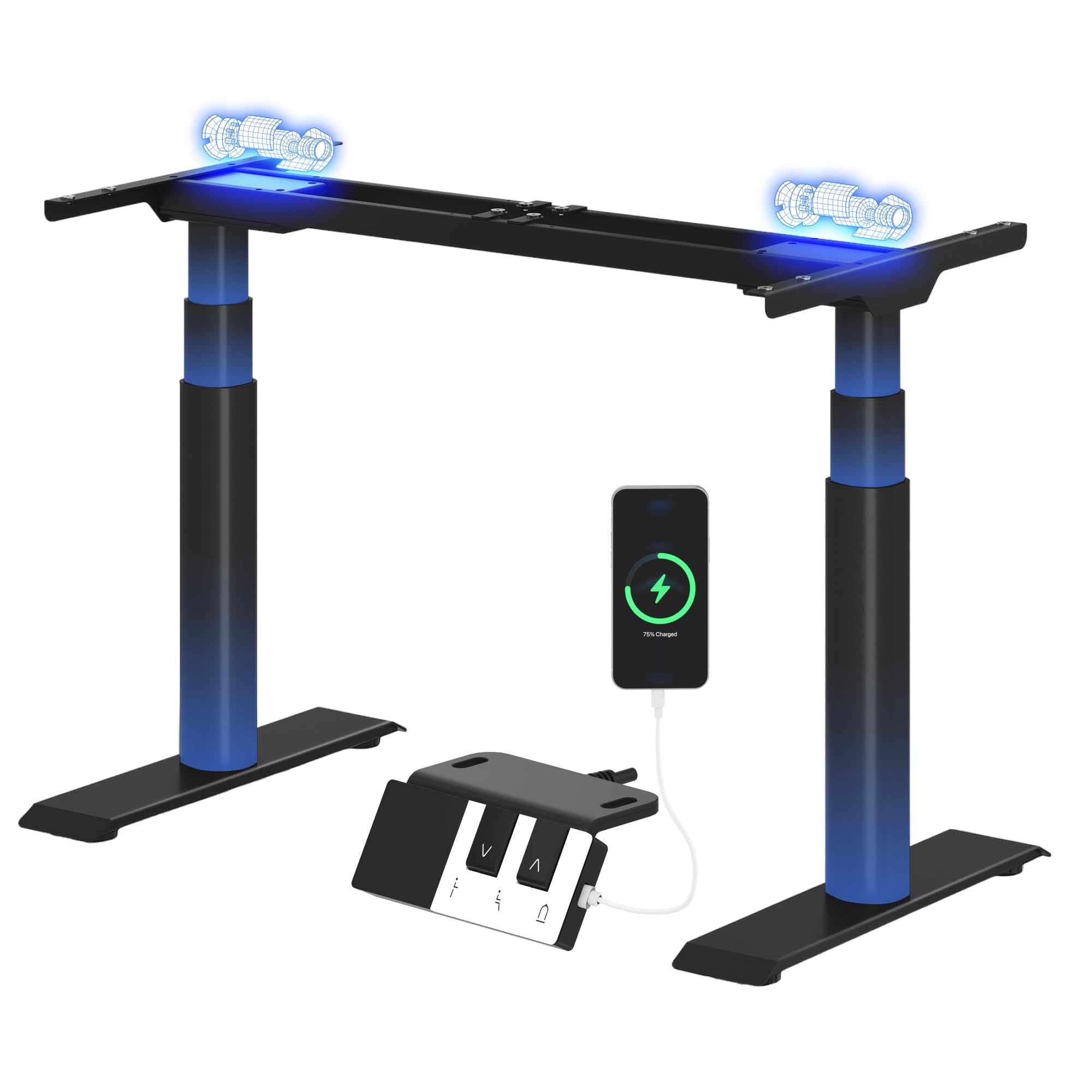
Image: The FLEXISPOT CylineX Pro Electric Standing Desk Frame with a black tabletop in a home office environment.
2. Sicherheitshinweise
Um einen sicheren Betrieb zu gewährleisten und Verletzungen oder Schäden zu vermeiden, beachten Sie bitte die folgenden Sicherheitsvorkehrungen:
- Vergewissern Sie sich vor der Verwendung, dass alle Komponenten sicher befestigt sind.
- Halten Sie Kinder und Haustiere während des Betriebs vom Schreibtisch fern.
- Do not place hands or other objects near moving parts.
- Avoid overloading the desk beyond its specified weight capacity.
- Setzen oder stehen Sie nicht auf dem Schreibtischrahmen.
- Trennen Sie die Stromversorgung vor der Reinigung oder Wartung.
- Verwenden Sie ausschließlich das mitgelieferte Netzteil und Zubehör.
- If any unusual noise, smell, or malfunction occurs, immediately unplug the desk and contact customer support.
- The anti-collision system is designed to prevent damage, but users should still exercise caution during height adjustments.

Image: The integrated anti-collision system provides safer movement by automatically reversing if an obstacle is detected.
3. Montageanleitung
The FLEXISPOT CylineX Pro desk frame is designed for straightforward assembly. It typically takes about 20 minutes to assemble. Please ensure you have received all packages, as the desk frame may be shipped in multiple boxes.
3.1 Packungsinhalt
Verify that all parts listed in the included user manual are present before beginning assembly. Contact customer support if any parts are missing or damaged.
3.2 Schrittweise Montage
- Komponenten auspacken: Nehmen Sie alle Teile vorsichtig aus der Verpackung und legen Sie sie auf eine weiche, saubere Oberfläche, um Kratzer zu vermeiden.
- Die Querstange montieren: Connect the two halves of the crossbar (if applicable) and secure them according to the detailed instructions in your physical manual.
- Anbringen von Hubsäulen: Securely attach the lifting columns (legs) to the assembled crossbar.
- Füße montieren: Attach the foot supports to the bottom of each lifting column.
- Anschluss-Steuerbox: Mount the control box to the designated area on the frame and connect the motor cables and power cable.
- Bedienfeld anhängen: Mount the piano-style control panel to the desired location on the desk frame or tabletop.
- Tischplatte montieren: Carefully place your chosen tabletop onto the assembled frame. Ensure it is centered and aligned, then secure it using the provided screws.
- Kabelmanagement: Organize and secure all cables using the included cable ties or management accessories.

Image: Components of the desk frame laid out, illustrating the ease of assembly.
4. Bedienungsanleitung
The CylineX Pro features an intuitive piano-style control panel for easy height adjustment and personalized settings.

Image: The piano-style control panel offers simple and intuitive control with memory functions, sit/stand reminder, child lock, and a USB port.
4.1 Grundlegende Höhenverstellung
- Drücken Sie die Nach oben (^) Knopf zum Anheben des Schreibtisches.
- Drücken Sie die Unten (v) Knopf zum Absenken des Schreibtisches.
- Release the button to stop the desk at the desired height.
4.2 Einstellen von Speichervoreinstellungen
Über das Bedienfeld können Sie bis zu drei bevorzugte Höheneinstellungen speichern:
- Stellen Sie den Schreibtisch mithilfe der Auf-/Ab-Tasten auf die gewünschte Höhe ein.
- Drücken Sie die "M" button (Memory) followed by one of the numbered preset buttons (1, 2, or 3). The display will show "S-" followed by the number to confirm the setting is saved.
- Um eine gespeicherte Höhe abzurufen, drücken Sie einfach die entsprechende nummerierte Voreinstellungstaste.
4.3 Sit/Stand Reminder
Activate the sit/stand reminder to prompt you to change positions at regular intervals:
- Drücken Sie die Timer button (often depicted as a clock icon) to cycle through reminder intervals (e.g., 30, 45, 60 minutes).
- The desk will beep or vibrate when it's time to change position.
4.4 Kindersicherungsfunktion
To prevent accidental adjustments, activate the child lock:
- Halten Sie die Sperren button (often depicted as a padlock icon) for a few seconds until "LOC" appears on the display.
- To unlock, press and hold the Lock button again until "LOC" disappears.
4.5 USB-Ladeanschluss
The control panel includes a USB port for convenient charging of your mobile devices.
5. Wartung
Regular maintenance ensures the longevity and optimal performance of your FLEXISPOT CylineX Pro desk frame.
- Reinigung: Wischen Sie das Tischgestell mit einem weichen, fusselfreien Tuch ab.amp cloth. Avoid abrasive cleaners or solvents that could damage the finish. Ensure no liquid enters the electrical components.
- Kabelmanagement: Periodically check and tidy up cables to prevent tangling or damage, which could interfere with desk movement.
- Überprüfung der Befestigungselemente: Überprüfen Sie alle paar Monate alle Schrauben und Bolzen auf festen Sitz. Ziehen Sie sie gegebenenfalls nach.
- Schmierung: Die Hubsäulen sind vorgeschmiert und benötigen in der Regel keine zusätzliche Schmierung. Sollten Sie ungewöhnliche Reibung feststellen, wenden Sie sich bitte an den Kundendienst.
6. Fehlerbehebung
Sollten Sie Probleme mit Ihrem Schreibtisch haben, beachten Sie bitte die folgenden gängigen Schritte zur Fehlerbehebung:
| Problem | Mögliche Ursache | Lösung |
|---|---|---|
| Schreibtisch lässt sich nicht bewegen / Kein Strom | Power cable disconnected, power outlet issue, control box malfunction. | Check power connections. Ensure the outlet is working. Try a different outlet. If still no power, contact support. |
| Desk moves unevenly or stops | Overload, obstruction, uneven weight distribution, synchronization issue. | Reduce weight on the desk. Check for obstructions. Ensure weight is evenly distributed. Perform a reset (see below). |
| Angezeigter Fehlercode (z. B. E01, E02) | Motor fault, sensor issue, overheating. | Refer to your physical manual for specific error code meanings. Often, a reset or power cycle can resolve temporary errors. If persistent, contact support. |
| Anti-collision system triggers too easily/not at all | Sensitivity setting, obstruction. | Check for obstructions. Consult your physical manual for instructions on adjusting anti-collision sensitivity. |
| Ungewöhnliche Geräusche oder Gerüche | Internal component issue, motor strain. | Immediately unplug the desk. Do not use. Contact FLEXISPOT customer support. |
6.1 Reset-Vorgang
A reset can often resolve minor operational issues. The exact procedure may vary slightly, but a common method is:
- Halten Sie die Unten (v) button until the desk reaches its lowest position and then slightly rises and lowers again.
- Alternatively, some models require holding the "M" Knopf und Unten (v) button simultaneously, or a specific combination of buttons. Refer to your physical manual for the precise reset sequence for your CylineX Pro model.
7. Spezifikationen
Key technical specifications for the FLEXISPOT CylineX Pro Electric Standing Desk Frame:

Image: Detailed dimensions and performance specifications of the CylineX Pro desk frame.
| Besonderheit | Spezifikation |
|---|---|
| Modell | CylineX Pro |
| Höhenverstellbereich | 60 cm - 125 cm (23.6" - 49.2") |
| Hubgeschwindigkeit | 35 mm/s |
| Statische Belastbarkeit | Bis zu 200 kg (440 lbs) |
| Dynamische Lastkapazität | Bis zu 160 kg (352 lbs) |
| Motortyp | Duales Motorsystem |
| Geräuschpegel | Weniger als 50 dB |
| Standby-Stromverbrauch | Weniger als 0.5 W |
| Kompatible Tischplattenbreite | 120 cm - 200 cm (47.2" - 78.7") |
| Compatible Tabletop Depth | 60 cm - 80 cm (23.6" - 31.5") |
| Bedienfeld | Piano-style with Memory Presets, Sit/Stand Reminder, Child Lock, USB Charging Port |
| Sicherheitsfunktionen | Antikollisionssystem |

Image: The desk's robust construction supports a maximum static load of 200 kg and a dynamic load of 160 kg.
8. Garantie und Support
FLEXISPOT hat sich der Bereitstellung qualitativ hochwertiger Produkte und exzellentem Kundenservice verschrieben.
8.1 Garantieinformationen
The FLEXISPOT CylineX Pro desk frame comes with a 10 Jahr Garantie. This warranty covers defects in materials and workmanship under normal use. Please retain your proof of purchase for warranty claims. For full warranty terms and conditions, please refer to the official FLEXISPOT webWebsite oder wenden Sie sich an den Kundendienst.
8.2 Kundendienst
If you have any questions, require assistance with assembly, or encounter any issues not covered in this manual, please do not hesitate to contact FLEXISPOT customer support. Our team is available to help you.
- Online-Hilfe: Besuchen Sie die offizielle FLEXISPOT-Website. webWebsite mit FAQs, Hilfeartikeln und Kontaktformularen.
- E-Mail-Support: Refer to your purchase documentation for the appropriate email address.
- Telefonischer Support: Check the FLEXISPOT webWebsite für regionale Kontaktnummern.