
1. Einleitung
This manual provides detailed instructions for the setup, operation, maintenance, and troubleshooting of your Innioasis Y2 64GB MP3 Player. Please read this manual thoroughly to ensure proper use and to maximize your device's performance.
2. Produktüberschreitungview
The Innioasis Y2 is a dedicated music player designed for high-fidelity audio playback. It features a classic click wheel interface, Bluetooth connectivity, and expandable storage. The device supports various audio formats, including lossless DSD DAC FLAC, and offers a long battery life for extended listening.

Abbildung: Vorder- und Seitenansicht view of the Innioasis Y2 MP3 Player, highlighting the classic click wheel, dedicated volume and power buttons, and the microSD card slot for storage expansion.
Hauptmerkmale:
- Classic Click Wheel Design: Intuitive Navigation und Steuerung.
- Hochauflösendes Audio: Supports DSD decoding and FLAC for superior sound quality.
- Bluetooth-Konnektivität: For wireless audio streaming to headphones or speakers.
- Erweiterbarer Speicher: 64GB internal storage, expandable up to 2TB via microSD card.
- Lange Akkulaufzeit: Up to 25 hours of music playback with wired earphones.
- M3U Playlist Support: Easy import and export of playlists.
- Anpassbare Designs: Personalize the user interface.
3. Einrichtung
3.1 Aufladen des Geräts
Before first use, fully charge your Innioasis Y2 MP3 Player. Connect the device to a power source (e.g., computer USB port or USB wall adapter) using the provided USB-C cable. The battery indicator on the screen will show charging status.
3.2 Einlegen einer microSD-Karte
The device comes with 64GB of internal storage and supports microSD cards up to 2TB for additional storage. To insert a microSD card:
- Suchen Sie den microSD-Kartensteckplatz an der Seite des Geräts.
- Gently push the microSD card into the slot until it clicks into place. Ensure it is fully seated to prevent it from popping out.
- Zum Herausnehmen die Karte erneut hineindrücken, bis sie herausspringt.

Image: The Innioasis Y2 MP3 Player demonstrating its expandable storage capability up to 2TB with a microSD card.
3.3 Musik übertragen und Files
Übertragen files from your computer to the MP3 player:
- Verbinden Sie den MP3-Player mit Ihrem Computer mithilfe des mitgelieferten USB-C-Kabels.
- The device should appear as a removable disk drive on your computer. If it does not, try using the original cable or a different USB port.
- Drag and drop your desired music, video, e-book, or photo files into the appropriate folders on the device's internal storage or microSD card.
- Sobald die Übertragung abgeschlossen ist, trennen Sie das Gerät sicher vom Computer, bevor Sie das Kabel abziehen.
4. Bedienungsanleitung
4.1 Ein-/Ausschalten
- Einschalten: Press and hold the dedicated power button on the side of the device until the screen illuminates.
- Ausschalten: Press and hold the power button until a power-off option appears on the screen, then confirm. A short press will turn the screen on/off.
4.2 Basic Navigation (Click Wheel)
The Innioasis Y2 utilizes a classic click wheel for navigation:
- Drehen: Spin the outer ring of the click wheel to scroll through menus or adjust volume.
- Mittlere Taste: Press the center button to select an item or play/pause music.
- Menü-Schaltfläche: Typically located above the click wheel, used to go back to the previous menu or home screen.
- Überspringen-/Vorspulen-/Zurückspulen-Tasten: Located around the click wheel for track control.
4.3 Musikwiedergabe
The device supports a wide range of audio formats including MP3, AAC, FLAC, APE, WAV, WMA, OGG, M4A, DFF, AMR, MID, M4R, and MP2. Navigate to the 'Music' section to browse your library by artist, album, genre, or all songs. Select a track to begin playback.

Image: The Innioasis Y2 MP3 Player supports HiFi Lossless DAC Music, compatible with multiple audio formats.
4.4 Bluetooth-Kopplung
To connect your Innioasis Y2 to Bluetooth headphones or speakers:
- Öffnen Sie das Menü „Bluetooth“ auf Ihrem MP3-Player.
- Stellen Sie sicher, dass sich Ihr Bluetooth-Audiogerät im Kopplungsmodus befindet.
- Wählen 'Suchen nach devices' on the MP3 player.
- Wählen Sie Ihr Gerät aus der Liste aus und bestätigen Sie die Kopplung.

Image: The Innioasis Y2 MP3 Player offers wide and stable Bluetooth connectivity for various audio devices.
4.5 Playlist Management
The device supports M3U playlist import and export, allowing you to easily transfer and manage your curated music collections.
- Import M3U Playlist: Navigate to the playlist settings and select 'Import M3U Playlist'. Follow the on-screen prompts to select your M3U file.
- Export M3U Playlist: You can also export existing playlists for backup or transfer to other devices.
- Create Custom Playlists: Use the 'Music Category Management' feature to create and organize custom playlists directly on the device.

Image: The Innioasis Y2 MP3 Player supports M3U playlist import and export for easy music management.

Image: The Innioasis Y2 MP3 Player offers powerful music category management for creating custom playlists and fast song search.
4.6 Designanpassung
Personalize your device's interface by selecting from various pre-installed themes. Navigate to the 'Themes' section in the settings to switch styles and match your preferences.

Image: Select your preferred MP3 player themes to freely switch styles and match personal taste.
4.7 Video Playback, E-book, and Photo Viewing
The Innioasis Y2 supports video playback (MP4, MKV, MOV, AVI, FLV, WMV), e-book reading, and photo viewing. While these features are available, the 2.4-inch screen size may limit the viewing experience for videos and detailed images. Video playback typically offers up to 4 hours on a full charge.
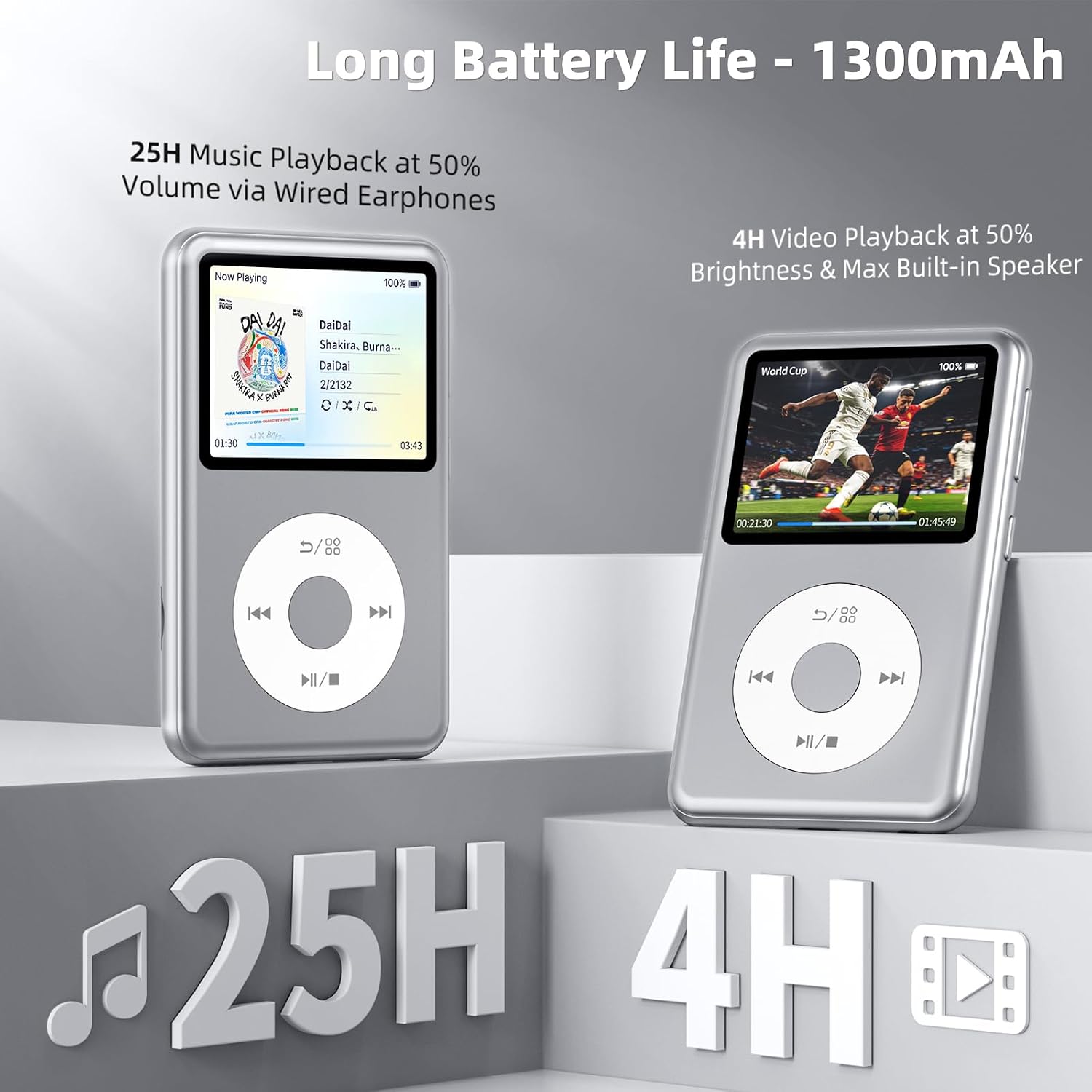
Image: The Innioasis Y2 MP3 Player offers long battery life, providing up to 25 hours of music playback and 4 hours of video playback.
5. Wartung
- Reinigung: Reinigen Sie das Gerät mit einem weichen, trockenen Tuch. Vermeiden Sie die Verwendung von flüssigen Reinigungsmitteln oder scheuernden Materialien.
- Lagerung: Bewahren Sie das Gerät an einem kühlen, trockenen Ort fern von direkter Sonneneinstrahlung und extremen Temperaturen auf.
- Software-Updates: Überprüfen Sie regelmäßig die Herstellerangaben. webWebsite für Firmware-Updates, um optimale Leistung und Zugriff auf neue Funktionen zu gewährleisten.
6. Fehlerbehebung
Häufige Probleme und Lösungen:
-
Gerät wird vom Computer nicht erkannt:
Ensure you are using the original USB-C cable. Try connecting to a different USB port on your computer. Restart both the device and the computer.
-
MicroSD card not detected or keeps popping out:
Ensure the microSD card is inserted correctly and fully seated until it clicks. If issues persist, try a different microSD card to rule out card malfunction.
-
Screen goes black or device freezes:
Press and hold the power button for about 10-15 seconds to force a restart. If the issue is frequent, ensure the device's firmware is up to date.
-
Bluetooth connection issues (disconnects, low volume):
Ensure the MP3 player and Bluetooth audio device are within range and fully charged. Try unpairing and re-pairing the devices. Adjust volume settings on both the player and the connected device.
-
Audio output too loud/low via wired headphones:
Adjust the volume using the dedicated volume buttons or the click wheel. Check equalizer settings if enabled.
7. Spezifikationen
| Marke | Inniose |
| Modellname | Y2 |
| Besonderheit | Equalizer |
| Konnektivitätstechnologie | Bluetooth |
| Speicherkapazität | 64 GB (internal), expandable up to 2 TB |
| Farbe | Silber |
| Bildschirmgröße | 2.4 Zoll |
| Kompatible Geräte | Personalcomputer |
| Medientyp | Micro SD, Micro SDHC, Micro SDXC |
| Unterstützte Standards | MP3, AAC, FLAC, APE, WAV, WMA, OGG, M4A, DFF, AMR, MID, M4R, MP4, MKV, MOV, AVI, FLV, WMV |
| Durchschnittliche Batterielebensdauer | 25 Stunden (Musikwiedergabe) |
| Artikelabmessungen (T x B x H) | 4.3" x 2.5" x 0.47" |
| Im Lieferumfang enthaltene Komponenten | MP3 Spieler |
8. Garantieinformationen
The Innioasis Y2 MP3 Player comes with a 1 Jahr Garantie from the date of purchase. This warranty covers manufacturing defects under normal use. Please retain your proof of purchase for warranty claims. For detailed terms and conditions, refer to the official Innioasis webWebsite oder wenden Sie sich an den Kundendienst.
9. Unterstützung
For further assistance, technical support, or inquiries regarding your Innioasis Y2 MP3 Player, please visit the official Innioasis webSie können die Website besuchen oder sich an den Kundendienst wenden. Die Kontaktdaten finden Sie in der Regel auf der Produktverpackung oder beim Hersteller. webWebsite.


