1. Einleitung
Vielen Dank für Ihren Einkauf.asing the GPX BCD2004 Boombox. This portable audio system features a top-loading CD player and an AM/FM tuner, designed for versatile audio playback. This manual provides essential information for setting up, operating, and maintaining your device to ensure optimal performance and longevity.
2. Sicherheitshinweise
- Anweisungen lesen: Carefully read all operating instructions before using the unit.
- Anweisungen aufbewahren: Bewahren Sie dieses Handbuch zum späteren Nachschlagen auf.
- Wasser und Feuchtigkeit: Setzen Sie dieses Gerät keinem tropfenden oder spritzenden Wasser aus. Stellen Sie keine mit Flüssigkeiten gefüllten Gegenstände, wie z. B. Vasen, auf das Gerät.
- Belüftung: Sorgen Sie für ausreichende Belüftung. Blockieren Sie keine Belüftungsöffnungen.
- Hitze: Nicht in der Nähe von Wärmequellen wie Heizkörpern, Heizlüftern, Öfen oder anderen Geräten (einschließlich) aufstellen. ampKonverter (Lüfter), die Wärme erzeugen.
- Energiequellen: Use only the power source indicated on the appliance.
- Batterien: Follow battery safety guidelines. Do not mix old and new batteries, or different types of batteries. Remove batteries if the unit is not used for extended periods.
- Wartung: Überlassen Sie sämtliche Wartungsarbeiten qualifiziertem Servicepersonal.
3. Packungsinhalt
Bitte überprüfen Sie, ob die folgenden Artikel in Ihrem Paket enthalten sind:
- GPX BCD2004 Boombox Unit
- Netzkabel
- Bedienungsanleitung
4. Bedienelemente und Funktionen im Überblickview
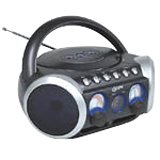
Abbildung 1: Front view of the GPX BCD2004 Boombox. This image shows the overall design of the boombox, including the speaker grilles and the general layout of the front panel.
Familiarize yourself with the main controls and features of your boombox:
- CD-Fach: Top-loading bay for inserting CDs.
- Funktionsschalter: Selects between CD, AM, FM, and OFF modes.
- Lautstärkeregelung: Drehregler zur Einstellung des Audioausgangspegels.
- Abstimmregler: Rotary dial for selecting AM or FM radio frequencies.
- Wiedergabe-/Pause-Taste: Starts or temporarily stops CD playback.
- Stopptaste: Stoppt die CD-Wiedergabe.
- Überspringen-/Suchbuttons (◀◀ / ▶▶): Skips to the previous/next track or searches within a track.
- Programmtaste: Used to program a sequence of tracks for CD playback.
- Wiederholen-Taste: Spielt den aktuellen Titel oder die gesamte CD wieder.
- AM/FM-Antenne: Telescopic antenna for FM reception, internal antenna for AM.
- Wechselstromeingang: Jack for connecting the AC power cord.
- Batteriefach: Located on the bottom or rear for 'C' batteries.
- Fold-down Carrying Handle: Für einfache Portabilität.
5. Einrichtung
5.1 Stromversorgung des Geräts
Your GPX BCD2004 Boombox can be powered by either AC power or batteries.
Wechselstrombetrieb
- Ensure the Function Switch is in the OFF position.
- Insert the small end of the AC power cord into the AC power input jack on the back of the unit.
- Stecken Sie das andere Ende des Netzkabels in eine normale Steckdose (120 V ~ 60 Hz).
Batteriebetrieb
For portable use, the boombox requires 8 'C' size batteries (not included).
- Ensure the Function Switch is in the OFF position.
- Open the battery compartment cover located on the bottom or rear of the unit.
- Legen Sie 8 Batterien der Größe 'C' ein und achten Sie dabei auf die richtige Polarität (+ und -), wie im Batteriefach angegeben.
- Schließen Sie den Batteriefachdeckel fest.
- Notiz: When operating on battery power, disconnect the AC power cord from the unit.
6. Operating the CD Player
The GPX BCD2004 is compatible with standard audio CDs, CD-R, and CD-RW discs.
6.1 Einlegen einer CD
- Lift the CD compartment door located on the top of the unit.
- Legen Sie eine CD mit der beschrifteten Seite nach oben auf die mittlere Spindel.
- Gently close the CD compartment door until it clicks shut.
6.2 Grundlegende CD-Wiedergabe
- Stellen Sie den Funktionsschalter auf die CD-Position.
- The CD player will begin to read the disc. The track number will typically display.
- Press the PLAY/PAUSE (▶/██) button to start playback.
- Stellen Sie mit dem Lautstärkeregler die gewünschte Lautstärke ein.
- To pause playback, press the PLAY/PAUSE (▶/██) button. Press it again to resume.
- To stop playback, press the STOP (■) button.
6.3 Skipping and Searching Tracks
- Track überspringen: During playback, press the SKIP/SEARCH FORWARD (▶▶) button to go to the next track. Press the SKIP/SEARCH BACKWARD (◀◀) button to go to the beginning of the current track, or press it twice to go to the previous track.
- Search Within Track: During playback, press and hold the SKIP/SEARCH FORWARD (▶▶) or SKIP/SEARCH BACKWARD (◀◀) button to fast forward or rewind through the current track. Release the button to resume normal playback.
6.4 Programmablauf
You can program up to 16 tracks to play in a specific order.
- In STOP mode, press the PROGRAM button. The program indicator will flash.
- Use the SKIP/SEARCH buttons (◀◀ / ▶▶) to select your desired first track.
- Press the PROGRAM button again to confirm the selection.
- Repeat steps 2 and 3 to add up to 16 tracks to your program list.
- After programming all desired tracks, press the PLAY/PAUSE (▶/██) button to start programmed playback.
- To clear the program, press the STOP (■) button twice.
6.5 Repeat Play
During CD playback, press the REPEAT button:
- Einmal drücken für Wiederholen Sie 1 (repeats the current track).
- Drücken Sie zweimal für Alles wiederholen (repeats the entire CD or programmed tracks).
- Press a third time to cancel repeat function.
7. Bedienung des AM/FM-Radios
7.1 Tuning to Radio Stations
- Set the Function Switch to either the AM or FM position.
- Adjust the Tuning Dial to select your desired radio station.
- Stellen Sie mit dem Lautstärkeregler die gewünschte Lautstärke ein.
7.2 Improving Radio Reception
- FM-Empfang: Ziehen Sie die Teleskopantenne vollständig heraus und justieren Sie ihre Position für den besten Empfang.
- AM-Empfang: The unit has a built-in AM antenna. Rotate the entire boombox for optimal AM reception.
8. Wartung
8.1 Reinigung des Geräts
- Wischen Sie die Außenseite des Geräts mit einem weichen,amp Tuch. Keine Scheuer- oder Lösungsmittel verwenden.
- Verwenden Sie für die CD-Linse eine spezielle CD-Linsenreinigungsscheibe oder ein weiches, fusselfreies Tuch, das speziell für optische Linsen entwickelt wurde.
8.2 Batteriepflege
- Um ein Auslaufen zu verhindern, entfernen Sie die Batterien, wenn das Gerät längere Zeit nicht benutzt wird.
- Entsorgen Sie gebrauchte Batterien verantwortungsvoll gemäß den örtlichen Vorschriften.
9. Fehlerbehebung
If you experience issues with your boombox, please refer to the following common problems and solutions:
| Problem | Mögliche Ursache | Lösung |
|---|---|---|
| Kein Strom | AC cord not connected; Batteries dead or incorrectly inserted; Function switch OFF. | Check AC cord connection; Replace batteries or check polarity; Set Function switch to CD, AM, or FM. |
| CD wird nicht abgespielt | CD inserted incorrectly; CD dirty or scratched; CD compartment door open; Function switch not on CD. | Insert CD with label side up; Clean or replace CD; Close CD door securely; Set Function switch to CD. |
| Schlechter Radioempfang | Antenne nicht ausgefahren/eingestellt; schwaches Signal. | FM-Antenne ausziehen und einstellen; Gerät für AM-Empfang drehen; einen anderen Standort ausprobieren. |
| Kein Ton oder geringe Lautstärke | Volume too low; Unit in pause mode. | Increase volume; Press Play/Pause button to resume playback. |
10. Spezifikationen
- Modell: BCD2004
- Marke: GPX
- CD-Kompatibilität: CD, CD-R, CD-RW
- Radio-Tuner: AM/FM
- Energiequelle: AC 120V ~ 60Hz or 8 x 'C' Batteries (not included)
- Referenten: 2 Full-range speakers
- Maße (ca.): 33.02 x 27.94 x 17.02 cm (L x B x H)
- Gewicht (ca.): 2.18 kg
- Merkmale: 16-track programming, Repeat play, Song skip/search, Fold-down carrying handle
11. Garantie und Support
This GPX BCD2004 Boombox comes with a 90 Tage Garantie Diese Garantie gilt ab dem Datum des ursprünglichen Kaufs und deckt Material- und Verarbeitungsfehler bei normalem Gebrauch ab.
For warranty service or technical support, please refer to the contact information provided with your purchase documentation or visit the official GPX website. Please have your model number (BCD2004) and proof of purchase ready when contacting support.


