1. Einleitung
Thank you for choosing the Nortek Soundream 2.1 Attive Minispeaker system. This manual provides essential information for the proper setup, operation, and maintenance of your new audio system. Please read this manual thoroughly before using the product to ensure optimal performance and safety.
2. Sicherheitshinweise
Um Brände, Stromschläge oder Produktschäden zu vermeiden, beachten Sie bitte die folgenden Sicherheitsvorkehrungen:
- Setzen Sie dieses Gerät weder Regen noch Feuchtigkeit aus.
- Stellen Sie keine mit Flüssigkeit gefüllten Gegenstände, wie beispielsweise Vasen, auf das Gerät.
- Sorgen Sie für ausreichende Belüftung. Blockieren Sie keine Belüftungsöffnungen.
- Installieren Sie das Gerät nicht in der Nähe von Wärmequellen wie Heizkörpern, Heizregistern, Öfen oder anderen Geräten (einschließlich ampKonverter (Lüfter), die Wärme erzeugen.
- Schützen Sie das Netzkabel vor dem Betreten oder Einklemmen, insbesondere an Steckern, Steckdosen und an der Stelle, an der sie aus dem Gerät austreten.
- Verwenden Sie nur vom Hersteller angegebene Zusatzgeräte/Zubehör.
- Trennen Sie dieses Gerät während eines Gewitters oder wenn es längere Zeit nicht verwendet wird.
3. Packungsinhalt
Bitte überprüfen Sie, ob alle Artikel im Paket vorhanden sind:
- 1 x Nortek Soundream 2.1 Subwoofer
- 2 x Satellitenlautsprecher
- 1 x Power Cable (Corded Electric)
- 1 x Audio Input Cable (e.g., 3.5mm stereo jack)
- 1 x Benutzerhandbuch (dieses Dokument)
4. Produktüberschreitungview
The Nortek Soundream 2.1 system consists of a subwoofer and two satellite speakers designed to deliver enhanced audio for various devices.
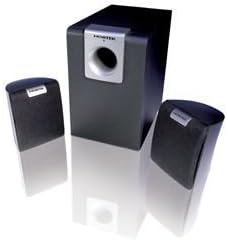
Image: The Nortek Soundream 2.1 Attive Minispeaker system, featuring a central subwoofer unit and two compact satellite speakers.
Komponenten:
- Subwoofer: The main unit containing the amplifier, bass driver, and primary controls.
- Satellitenlautsprecher: Zwei kompakte Lautsprecher für mittlere und hohe Frequenzen.
- Steuerung: Typically located on the subwoofer, these include power on/off, master volume, and potentially bass level adjustment.
5. Einrichtung
Follow these steps to set up your Nortek Soundream 2.1 system:
- Platzierung:
- Place the subwoofer on the floor, preferably near a wall or in a corner for optimal bass response.
- Position the two satellite speakers on either side of your listening area, facing towards you. Ensure they are equidistant from your listening position for balanced stereo sound.
- Satellitenlautsprecher anschließen:
- Connect the cables from the satellite speakers to the corresponding output jacks on the back of the subwoofer. Ensure correct polarity if applicable (e.g., red to red, black to black).
- Audioquelle anschließen:
- Connect one end of the audio input cable (e.g., 3.5mm stereo jack) to the 'Audio In' port on the subwoofer.
- Connect the other end of the audio input cable to the audio output jack of your device (e.g., computer, smartphone, MP3 player, TV).
- Strom anschließen:
- Plug the power cable into the power input on the subwoofer.
- Stecken Sie das andere Ende des Netzkabels in eine normale Steckdose.
6. Bedienungsanleitung
Once the system is set up, follow these steps to operate your speakers:
- Einschalten: Locate the power button or switch on the subwoofer and turn it to the 'ON' position. An indicator light may illuminate.
- Lautstärkeregelung: Turn the master volume knob on the subwoofer to a low setting before playing audio. Gradually increase the volume to your desired listening level.
- Bass Adjustment (if available): If your subwoofer has a separate bass control knob, adjust it to achieve your preferred bass level.
- Audio abspielen: Starten Sie die Audiowiedergabe von Ihrem angeschlossenen Gerät.
- Ausschalten: When finished, turn the power switch on the subwoofer to the 'OFF' position. For extended periods of non-use, it is recommended to unplug the system from the power outlet.
7. Wartung
Proper maintenance ensures the longevity and performance of your speaker system:
- Reinigung: Disconnect the power before cleaning. Use a soft, dry cloth to wipe the surfaces of the speakers and subwoofer. Do not use liquid cleaners or abrasive materials.
- Belüftung: Ensure that the ventilation openings on the subwoofer are not blocked by dust or other objects.
- Lagerung: If storing the system for an extended period, unplug it and store it in a cool, dry place away from direct sunlight and extreme temperatures.
- Kabelpflege: Avoid bending or crimping the audio and power cables excessively.
8. Fehlerbehebung
If you encounter issues with your Nortek Soundream 2.1 system, refer to the following common problems and solutions:
- Kein Ton:
- Ensure the power cable is securely plugged into both the subwoofer and the wall outlet.
- Verify the power switch on the subwoofer is in the 'ON' position.
- Check that the audio input cable is securely connected to both the subwoofer and your audio source.
- Increase the master volume on the subwoofer and the volume on your audio source device.
- Test with a different audio source or cable to rule out a faulty source or cable.
- Verzerrter Klang:
- Reduce the volume on both the subwoofer and your audio source.
- Ensure the audio input cable is fully inserted and not damaged.
- Überprüfen Sie, ob Störungen durch andere elektronische Geräte auftreten.
- Only One Satellite Speaker Working:
- Überprüfen Sie die Verbindung des nicht funktionierenden Satellitenlautsprechers zum Subwoofer.
- Ensure the audio source is outputting stereo sound.
9. Spezifikationen
- Modell: Nortek Soundream 2.1
- Konfiguration: 2.1 Channel (Subwoofer + 2 Satellite Speakers)
- Ausgangsleistung (Watt)tage): 2 Watt
- Energiequelle: Kabelgebundene Elektrik
- Artikelgewicht: Ungefähr 1.5 kg (3.31 Pfund)
- ASIN: B000CFYA2C
- Hersteller: Nortek
10. Garantie und Support
For warranty information and technical support, please refer to the warranty card included with your product or visit the official Nortek webBewahren Sie Ihren Kaufbeleg als Kaufnachweis für eventuelle Garantieansprüche auf.


