Einführung
This manual provides comprehensive instructions for the GPX KCL8806DT, a compact under-counter unit featuring a 7-inch LCD television and an AM/FM radio. It is designed for space-saving installation, commonly found in kitchens, workshops, or other areas where counter space is valuable. The unit includes mounting hardware and a remote control for convenient operation.
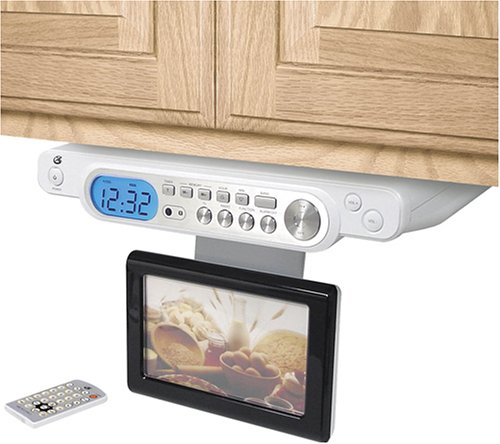
Image: The GPX KCL8806DT under-counter TV unit, featuring a 7-inch LCD screen and integrated AM/FM radio. The unit is white with a silver face, designed for discreet installation.
Packungsinhalt
- GPX KCL8806DT Under Counter 7-Inch LCD TV with AM/FM Radio
- Montagezubehör
- Fernbedienung
- Stand (for optional tabletop use)
- Benutzerhandbuch (dieses Dokument)
Setup und Installation
Montage des Geräts
The KCL8806DT is primarily designed for under-counter installation. Use the provided mounting hardware to securely attach the unit to a flat, sturdy surface. Ensure adequate clearance for the screen to fold down and rotate for optimal viewing angles. Follow the detailed instructions in the mounting template for precise placement and drilling.
Anschließen der Stromversorgung
Plug the power adapter into the DC IN port on the unit, then plug the other end into a standard electrical outlet (AC 120V, 60Hz). Ensure the power source is stable.
Antennenanschluss
Connect an appropriate antenna to the ANTENNA IN port for receiving over-the-air broadcasts. For optimal reception, position the antenna away from obstructions.
Wichtiger Verbraucherhinweis: This television receiver has only an analog broadcast tuner. After February 17, 2009, a converter box is required to receive over-the-air broadcasts with an antenna due to the U.S. transition to digital broadcasting. Analog-only TVs will continue to function with cable and satellite TV services, gaming consoles, VCRs, DVD players, and similar products. For more information, contact the Federal Communications Commission at 1-888-225-5322 (TTY: 1-888-835-5322) or visit www.dtv.gov.
Anschlüsse externer Geräte
The unit supports HDMI and USB connectivity for external devices. Refer to the specific port labels on the unit for connection points. Ensure devices are compatible with the unit's input specifications.
Bedienungsanleitung
Ein-/Ausschalten
Press the Power button on the unit's front panel or the remote control to turn the device on or off. An indicator light will confirm the power status.
TV-Betrieb
Select the TV mode using the MODE button. Use the Channel Up/Down buttons to navigate through available channels. Access the on-screen menu for options such as automatic channel scanning, picture settings (brightness, contrast), and aspect ratio adjustments.
Radiobetrieb
Select the AM/FM radio mode using the MODE button. Use the Tuning buttons to scan for radio stations. The display will show the current frequency. You can save favorite stations to preset memory slots.
Fernbedienung
The included remote control provides full functionality for TV and radio operation, including power, volume, channel selection, mode switching, and menu navigation. Ensure batteries are correctly installed (typically 2x AAA batteries, not included) and replace them when necessary. Point the remote directly at the unit's IR sensor.
Wartung und Pflege
Reinigung
Use a soft, dry cloth to clean the unit's exterior. For the LCD screen, use a soft, lint-free cloth lightly dampened with a screen-cleaning solution specifically designed for electronics. Avoid abrasive cleaners, solvents, or harsh chemicals, as these can damage the finish and screen.
Lagerung
When not in use, the screen can be folded up against the unit's base to save space. Store the unit in a cool, dry place away from direct sunlight, extreme temperatures, and high humidity. Avoid placing heavy objects on top of the unit.
Fehlerbehebung
- Kein Strom:
- Stellen Sie sicher, dass das Netzkabel sowohl am Gerät als auch an einer funktionierenden Steckdose fest angeschlossen ist.
- Prüfen Sie die Steckdose mit einem anderen Gerät, um sicherzustellen, dass sie funktionsfähig ist.
- Kein Bild/Schlechte Bildqualität:
- Verify the antenna connection is secure and the antenna is properly positioned.
- If using an analog antenna after February 17, 2009, ensure a digital converter box is properly connected and configured.
- Check external device connections (HDMI, USB) if applicable.
- Adjust picture settings (brightness, contrast) via the on-screen menu.
- Kein Ton/Schlechte Tonqualität:
- Check the volume level on the unit and ensure the mute function is not active.
- For external devices, ensure audio cables are correctly connected.
- Fernbedienung funktioniert nicht:
- Ersetzen Sie die Batterien in der Fernbedienung.
- Ensure there are no obstructions between the remote control and the unit's infrared (IR) sensor.
Technische Daten
| Besonderheit | Detail |
|---|---|
| Modellnummer | KCL8806DT |
| Marke | GPX |
| Bildschirmgröße | 7 Zoll |
| Display-Technologie | LCD |
| Auflösung | 720p |
| Radio-Tuner | AM/FM |
| Konnektivitätstechnologie | HDMI, USB |
| Montagetyp | Under Counter / Table Mount |
| Technische Daten | 13.5 x 15 x 4 Zoll |
| Artikelgewicht | 9.11 Pfund |
Hinweis: Technische Daten können ohne vorherige Ankündigung geändert werden.
Garantie und Support
For warranty information, technical support, or service inquiries, please refer to the documentation included with your original purchase. It is recommended to keep your purchase receipt as proof of purchase for warranty claims. You may also visit the official GPX website for additional support resources and contact information.


