Einführung
This manual provides detailed instructions for the setup, programming, and operation of your RCA 6-Device Universal Remote Control, model RCR6473Z. This remote is designed to consolidate control of up to six different audio/video devices, simplifying your home entertainment experience. Please read these instructions carefully before use to ensure proper functionality and to maximize the remote's capabilities.
Packungsinhalt
- RCA 6-Device Universal Remote Control (RCR6473Z)
Note: Two AAA batteries are required and are not included in the package.
Hauptmerkmale
- Controls up to 6 devices: TV, Satellite/Cable, Digital-to-Analog Converter (DTC), DVD, DVR, AUX, Audio, or VCR.
- Expanded DVD and DVR capabilities.
- Ergonomisches Design für komfortables Handling.
- Multiple programming methods: Automatic, Direct Code Entry, Brand Code Search, and Manual Code Search.
- Device mode indicators for easy identification of the active device.
- Glow keys for improved visibility in low-light conditions.
- Dedicated buttons for Menu, Guide, Info, and Clear functions.
- Full playback controls including Play, Stop, Pause, Record, Reverse, Forward, Skip Back, and Skip Forward.
Aufstellen
1. Einlegen der Batterie
Um Ihre Fernbedienung mit Strom zu versorgen, befolgen Sie diese Schritte:
- Suchen Sie die Batteriefachabdeckung auf der Rückseite der Fernbedienung.
- Drücken Sie auf die Lasche und schieben Sie die Abdeckung ab.
- Insert two new AAA alkaline batteries, ensuring the positive (+) and negative (-) terminals align with the markings inside the compartment.
- Schieben Sie die Batterieabdeckung wieder an ihren Platz, bis sie sicher einrastet.
Note: Replace batteries when the remote's performance diminishes or when the indicator light does not illuminate during button presses.
2. Programmierung Ihrer Fernbedienung
The RCA universal remote can be programmed using several methods. It is recommended to try the Automatic Code Search first, then Direct Code Entry, followed by Brand Code Search, and finally Manual Code Search if other methods are unsuccessful. You will need the original remote control for the device you wish to program, or the device itself, to test functionality.
Automatische Codesuche
This method scans through codes until it finds one that operates your device.
- Schalten Sie das Gerät ein, das Sie steuern möchten (z. B. Fernseher, DVD-Player).
- Die gewünschte Gerätetaste gedrückt halten (z. B. TV, DVD) auf der Universalfernbedienung, bis die Kontrollleuchte aufleuchtet.
- Halten Sie die Gerätetaste gedrückt und drücken Sie gleichzeitig die Taste LEISTUNG button. Release both buttons. The indicator light should blink once and then stay lit.
- Richten Sie die Fernbedienung auf das Gerät und drücken Sie wiederholt die Taste SPIELEN Taste (oder LEISTUNG button for some devices) until the device turns off. Pause briefly between presses to allow the device to respond.
- Sobald sich das Gerät ausschaltet, drücken Sie die Taste STOPPEN Drücken Sie diese Taste, um den Code zu speichern. Die Kontrollleuchte erlischt.
- Test the remote's functions (e.g., volume, channel, power) to ensure proper operation. If not all functions work, repeat the process to find a better code.
Direkte Codeeingabe
This method requires you to enter a specific code for your device's brand, usually found in a code list provided with the full manual.
- Schalten Sie das Gerät ein, das Sie steuern möchten.
- Locate the code list for your device's brand and type (e.g., TV, DVD).
- Die gewünschte Gerätetaste gedrückt halten (z. B. TV, DVD) auf der Universalfernbedienung, bis die Kontrollleuchte aufleuchtet.
- Enter the 4-digit code using the number buttons. As you enter each digit, the indicator light should blink.
- If the code is valid, the indicator light will turn off. If the code is invalid, the light will flash rapidly and remain lit, indicating you should try another code.
- Test the remote's functions. If the device does not respond or not all functions work, try another code from the list.
Markencode-Suche
This method searches through codes for a specific brand.
- Schalten Sie das Gerät ein, das Sie steuern möchten.
- Die gewünschte Gerätetaste gedrückt halten (z. B. TV, DVD) auf der Universalfernbedienung, bis die Kontrollleuchte aufleuchtet.
- Halten Sie die MARKE Schaltfläche (falls verfügbar, oder eine Kombination wie CODE-SUCHE). Release both buttons. The indicator light should blink once and then stay lit.
- Richten Sie die Fernbedienung auf das Gerät und drücken Sie wiederholt die Taste LEISTUNG button until the device turns off. Pause briefly between presses.
- Sobald sich das Gerät ausschaltet, drücken Sie die Taste STOPPEN Drücken Sie diese Taste, um den Code zu speichern. Die Kontrollleuchte erlischt.
- Test the remote's functions.
Manuelle Codesuche
This method allows you to manually cycle through all available codes.
- Schalten Sie das Gerät ein, das Sie steuern möchten.
- Die gewünschte Gerätetaste gedrückt halten (z. B. TV, DVD) auf der Universalfernbedienung, bis die Kontrollleuchte aufleuchtet.
- Halten Sie die CODE-SUCHE button (or a similar button combination). Release both buttons. The indicator light should blink once and then stay lit.
- Richten Sie die Fernbedienung auf das Gerät und drücken Sie wiederholt die Taste LEISTUNG button. Each press sends a new code. Pause briefly between presses.
- Sobald sich das Gerät ausschaltet, drücken Sie die Taste STOPPEN Drücken Sie diese Taste, um den Code zu speichern. Die Kontrollleuchte erlischt.
- Test the remote's functions. If not all functions work, repeat the process to find a better code.
Bedienung Ihrer Fernbedienung
The RCA 6-Device Universal Remote Control features a logical button layout for intuitive operation. Refer to the image below for a visual guide to the remote's buttons.
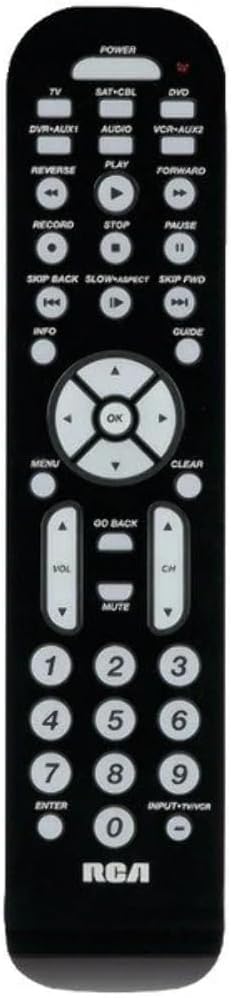
Bild: Vorderseite view of the RCA 6-Device Universal Remote Control (RCR6473Z). The remote is black with white buttons. At the top are device selection buttons: TV, SAT-CBL, DVD, DVR-AUX1, AUDIO, VCR-AUX2, and a large POWER button. Below these are playback controls: REVERSE, PLAY, FORWARD, RECORD, STOP, PAUSE, SKIP BACK, SLOW/ASPECT, SKIP FWD. A central navigation pad with OK button is surrounded by arrow keys. Other buttons include MENU, CLEAR, INFO, GUIDE, GO BACK, VOL (volume up/down), CH (channel up/down), MUTE, and a numeric keypad (0-9) with ENTER and INPUT-TV/VCR buttons. The RCA logo is at the bottom.
Geräteauswahl
To control a specific device, press the corresponding device button at the top of the remote. The indicator light will illuminate to confirm the selected device mode.
- FERNSEHER: Für Ihren Fernseher.
- SAT-CBL: For satellite receiver or cable box.
- DVD: For DVD players.
- DVR-AUX1: For Digital Video Recorders or an auxiliary device.
- AUDIO: For audio receivers or sound systems.
- VCR-AUX2: For VCRs or a second auxiliary device.
Grundfunktionen
- LEISTUNG: Schaltet das ausgewählte Gerät ein oder aus.
- VOL ▲/▼: Erhöht oder verringert die Lautstärke.
- CH ▲/▼: Ändert den Kanal nach oben oder unten.
- STUMM: Schaltet die Audioausgabe stumm.
- Ziffernblock (0-9): Used for direct channel entry or code input during programming.
- EINGEBEN: Confirms channel selection or other inputs.
- INPUT-TV/VCR: Switches between video inputs on the selected device.
Wiedergabesteuerung
- ABSPIELEN: Startet die Medienwiedergabe.
- STOPPEN: Stoppt die Wiedergabe.
- PAUSE: Pausiert die Wiedergabe.
- AUFZEICHNEN: Initiates recording (if supported by the device).
- UMKEHREN: Rewinds media.
- NACH VORNE: Fast forwards media.
- ZURÜCKSPRINGEN: Springt zum vorherigen Titel/Kapitel.
- SKIP FWD: Springt zum nächsten Titel/Kapitel.
- SLOW/ASPECT: Activates slow motion playback or changes aspect ratio (functionality varies by device).
Navigations- und Menüfunktionen
- SPEISEKARTE: Öffnet das Bildschirmmenü des ausgewählten Geräts.
- OK: Bestätigt die Auswahl in Menüs.
- Arrow Buttons (▲/▼/◀/▶): Navigates through on-screen menus and options.
- KLAR: Clears entries or exits certain menus.
- INFO: Zeigt Informationen zum aktuellen Programm oder Medium an.
- FÜHRUNG: Greift auf den elektronischen Programmführer (EPG) zu.
- GEH ZURÜCK: Kehrt zum vorherigen Menü oder Bildschirm zurück.
Wartung
Batteriewechsel
When the remote's range decreases or buttons become unresponsive, it's time to replace the batteries. Always replace both AAA batteries at the same time with new ones. Do not mix old and new batteries, or different types of batteries.
Reinigung
To clean your remote control, use a soft, dry cloth. Do not use liquid cleaners or abrasive materials, as these can damage the remote's surface or internal components.
Fehlerbehebung
- Remote does not operate your device:
- Ensure the remote is in the correct device mode (e.g., TV button pressed for TV).
- Verify that the batteries are fresh and inserted correctly.
- Reprogram the remote using a different code from the code list or try another programming method.
- Stellen Sie sicher, dass sich keine Hindernisse zwischen der Fernbedienung und dem Infrarotsensor des Geräts befinden.
- Some buttons do not work:
- Not all functions of your original remote may be supported by the universal remote.
- Try reprogramming the remote with a different code for your device, as some codes may offer better functionality.
- Kontrollleuchte leuchtet nicht:
- Überprüfen Sie die Batterieinstallation und ersetzen Sie die Batterien bei Bedarf.
Technische Daten
| Modellnummer | RCR6473E (also known as RCR6473Z) |
| Marke | Cinch |
| Maximale Anzahl unterstützter Geräte | 6 |
| Technische Daten | 2.5 x 6 x 1 Zoll (ungefähr) |
| Artikelgewicht | 12.8 Unzen |
| Batterien erforderlich | 2 AAA-Batterien (nicht im Lieferumfang enthalten) |
| Hersteller | Audiovox Zubehör Corporation |
Garantie und Support
Rechtliche Hinweise
Die Garantie deckt keinen Missbrauch des Produkts ab.
Herstellerinformationen
For further assistance or specific product inquiries, please refer to the contact information provided by Audiovox Accessories Corporation, the manufacturer of this RCA product. Additional support resources may be available on the official RCA webWebsite.


