1. Einleitung
Thank you for choosing the NEC LCD4215 42-inch MultiSync LCD Monitor. This manual provides essential information for the safe and efficient use of your new display. Please read these instructions thoroughly before installation and operation, and retain them for future reference.
2. Sicherheitshinweise
Beachten Sie die folgenden Sicherheitsvorkehrungen, um Schäden am Monitor zu vermeiden und die Sicherheit des Benutzers zu gewährleisten:
- Energiequelle: Connect the monitor only to a grounded power outlet with the correct voltagwie auf dem Produktetikett angegeben.
- Belüftung: Sorgen Sie für ausreichende Belüftung um den Monitor herum. Blockieren Sie keine Lüftungsöffnungen.
- Flüssigkeitsexposition: Avoid exposing the monitor to rain, moisture, or excessive humidity. Do not place liquid-filled objects on or near the monitor.
- Reinigung: Vor der Reinigung den Netzstecker ziehen. Ein weiches, trockenes Tuch verwenden. Flüssige oder Aerosol-Reinigungsmittel vermeiden.
- Wartung: Versuchen Sie nicht, dieses Produkt selbst zu warten. Überlassen Sie alle Wartungsarbeiten qualifiziertem Servicepersonal.
- Platzierung: Stellen Sie den Monitor auf eine stabile, ebene Fläche, um zu verhindern, dass er herunterfällt.
3. Packungsinhalt
Prüfen Sie, ob alle Artikel im Paket enthalten sind. Sollten Artikel fehlen oder beschädigt sein, kontaktieren Sie umgehend Ihren Händler.
- NEC LCD4215 42-inch MultiSync LCD Monitor
- Netzkabel
- VGA-Kabel
- Fernbedienung mit Batterien
- Benutzerhandbuch (dieses Dokument)
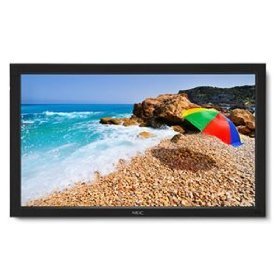
Image: The NEC LCD4215 42-inch MultiSync LCD Monitor, shown from the front with its stand. This image represents the primary display unit.
4. Einrichtung
4.1 Auspacken
- Carefully open the packaging and remove the monitor and accessories.
- Place the monitor face down on a soft, clean surface to avoid scratching the screen.
4.2 Stand/Mounting Installation
The monitor can be used with its included desktop stand or mounted using a VESA-compatible wall mount (sold separately).
4.2.1 Desktop Stand Installation
- Befestigen Sie den Standfuß mit den mitgelieferten Schrauben am Standhals.
- Secure the assembled stand to the back of the monitor using the designated mounting points and screws.
- Heben Sie den Monitor vorsichtig an und stellen Sie ihn auf eine stabile, ebene Fläche.
4.2.2 Wandmontage (optional)
If using a VESA-compatible wall mount, follow the instructions provided with your wall mount kit. Ensure the mount supports the weight and VESA pattern of the NEC LCD4215 monitor.
4.3 Anschlusskabel
Before connecting any cables, ensure the monitor and all connected devices are powered off.
- Videokabel: Connect one end of the appropriate video cable (VGA, DVI, HDMI, etc.) to the video output port of your computer or media device and the other end to the corresponding input port on the monitor.
- Audiokabel (optional): If using the monitor's internal speakers or audio output, connect an audio cable from your source device to the monitor's audio input.
- Stromkabel: Connect the power cord to the monitor's AC input and then plug the other end into a grounded electrical outlet.
5. Bedienungsanleitung
5.1 Ein-/Ausschalten
- Press the power button on the front panel of the monitor or on the remote control to turn the monitor on. The power indicator light will illuminate.
- Um den Monitor auszuschalten, drücken Sie die Ein/Aus-Taste erneut.
5.2 Eingangsauswahl
The monitor can display content from multiple sources. To switch between inputs:
- Press the 'Input' or 'Source' button on the remote control or the monitor's control panel.
- Use the navigation buttons to select the desired input source (e.g., VGA, DVI, HDMI).
- Press 'Enter' or 'OK' to confirm your selection.
5.3 Grundlegende Anzeigeeinstellungen
Access the On-Screen Display (OSD) menu to adjust various settings:
- Press the 'Menu' button on the remote control or the monitor's control panel.
- Use the navigation buttons (Up/Down/Left/Right) to browse through menu options such as 'Brightness', 'Contrast', 'Color Temperature', and 'Aspect Ratio'.
- Press 'Enter' or 'OK' to select an option and adjust its value.
- Press 'Menu' again to exit the OSD menu.
6. Wartung
6.1 Display reinigen
To maintain optimal display quality, clean the screen and casing regularly:
- Vor der Reinigung den Monitor immer ausschalten und vom Stromnetz trennen.
- Mit einem weichen, fusselfreien Tuch leichtampened with water or a non-abrasive, ammonia-free, and alcohol-free screen cleaner.
- Wischen Sie den Bildschirm vorsichtig ab und casing. Do not apply excessive pressure.
- Avoid spraying liquid directly onto the screen or into any openings.
6.2 Speicherung
If storing the monitor for an extended period, ensure it is powered off, unplugged, and stored in a cool, dry place away from direct sunlight and extreme temperatures. Use the original packaging if available for protection.
7. Fehlerbehebung
Before contacting customer support, refer to the following table for common issues and their solutions:
| Problem | Mögliche Ursache | Lösung |
|---|---|---|
| Kein Bild auf dem Bildschirm | Monitor nicht eingeschaltet; Videokabel locker oder nicht angeschlossen; Falsche Eingangsquelle ausgewählt. | Press the power button; Check video cable connections; Select the correct input source. |
| Bild zu dunkel/hell | Helligkeits-/Kontrasteinstellungen sind falsch. | Adjust 'Brightness' and 'Contrast' in the OSD menu. |
| Kein Ton | Audio cable disconnected; Volume too low; Muted. | Check audio cable connection; Increase volume; Unmute audio. |
| Flackerndes Bild | Video cable faulty; Resolution/Refresh rate mismatch. | Replace video cable; Adjust display settings on your computer. |
8. Spezifikationen
Detailed technical specifications for the NEC LCD4215 MultiSync LCD Monitor:
| Besonderheit | Spezifikation |
|---|---|
| Modellnummer | LCD4215 |
| Bildschirmgröße | 42 Zoll |
| Maximale Bildschirmauflösung | 1366 x 768 |
| Seitenverhältnis | 1.78:1 |
| Artikelgewicht | 47 Pfund |
| Produktabmessungen (L x B x H) | 44 x 27.5 x 9.25 Zoll |
| Farbe | Schwarz |
| Hersteller | Nec Computers |
| Datum der ersten Verfügbarkeit | 31. Juli 2008 |
9. Garantie und Support
9.1 Garantieinformationen
This NEC LCD4215 monitor comes with a standard manufacturer's warranty. Please refer to the separate warranty card included in your product packaging for specific terms, conditions, and duration of coverage. Keep your proof of purchase for warranty claims.
9.2 Kundendienst
For technical assistance, troubleshooting beyond this manual, or warranty service, please contact NEC customer support. Visit the official NEC website for the most up-to-date contact information, including phone numbers and online support resources.
WebWebsite: www.nec.com


