Einführung
This manual provides essential instructions for the safe and effective operation of your Microlife WS100 Digital Body Fat Analyzer Weight Scale. Please read this manual thoroughly before using the device and retain it for future reference. The Microlife WS100 is designed to measure body weight, body fat percentage und Muskelmasse.
Sicherheitshinweise
- Do not use this device if you have a pacemaker or other electronic medical implant.
- Schwangere Frauen sollten vor der Anwendung dieses Geräts ihren Arzt konsultieren.
- Ensure the scale is placed on a hard, flat surface for accurate measurements. Avoid carpets or uneven floors.
- Die Waage darf nicht auf nassen oder rutschigen Oberflächen benutzt werden, um Stürze zu vermeiden.
- Bewahren Sie das Gerät außerhalb der Reichweite von Kindern auf.
- Zerlegen Sie das Gerät nicht und versuchen Sie nicht, es selbst zu reparieren. Wenden Sie sich bei Problemen an den Kundendienst.
Aufstellen
1. Auspacken und Erstinspektion
Carefully remove the Microlife WS100 scale from its packaging. Inspect the device for any signs of damage. If any damage is observed, do not use the scale and contact your retailer.
2. Einlegen der Batterie
The Microlife WS100 scale comes with batteries included. Locate the battery compartment on the underside of the scale. Open the compartment cover and ensure the batteries are correctly inserted according to the polarity indicators (+/-). Close the battery compartment securely.
3. Erstkalibrierung
Before first use or after moving the scale, it is recommended to perform an initial calibration. Place the scale on a hard, flat surface. Briefly step onto the scale, then step off. The display will show "0.0" or a similar indication, confirming calibration.
4. Benutzerprofifile Setup (for Body Fat Analysis)
To utilize the body fat and muscle mass analysis features, you must set up a user profile. Refer to the detailed instructions in the "Operating Instructions" section for setting up user profiles, including age, gender, and height.
Bedienungsanleitung
1. Grundlegende Gewichtsmessung
- Stellen Sie die Waage auf eine feste, ebene Fläche.
- Stellen Sie sich barfuß auf die Waage und bleiben Sie stehen.
- Your weight will be displayed on the screen. The scale will automatically turn off after a few seconds.
2. Body Fat and Muscle Mass Measurement
For body composition analysis, ensure your user profile ist eingerichtet.
- Press the "SET" button to enter user selection mode.
- Use the arrow buttons to select your user number (P1, P2, etc.).
- Stellen Sie sich barfuß auf die Waage und achten Sie darauf, dass Ihre Füße auf den Metallelektroden stehen.
- Stand still until the measurements (weight, body fat percentage, Muskelmasse-Prozenttage) are displayed sequentially.
- The scale will automatically store the data and turn off.
3. Umschalten der Maßeinheiten
The unit switch button (usually located on the underside of the scale) allows you to toggle between kilograms (kg) and pounds (lb). Press this button to select your preferred unit before taking a measurement.
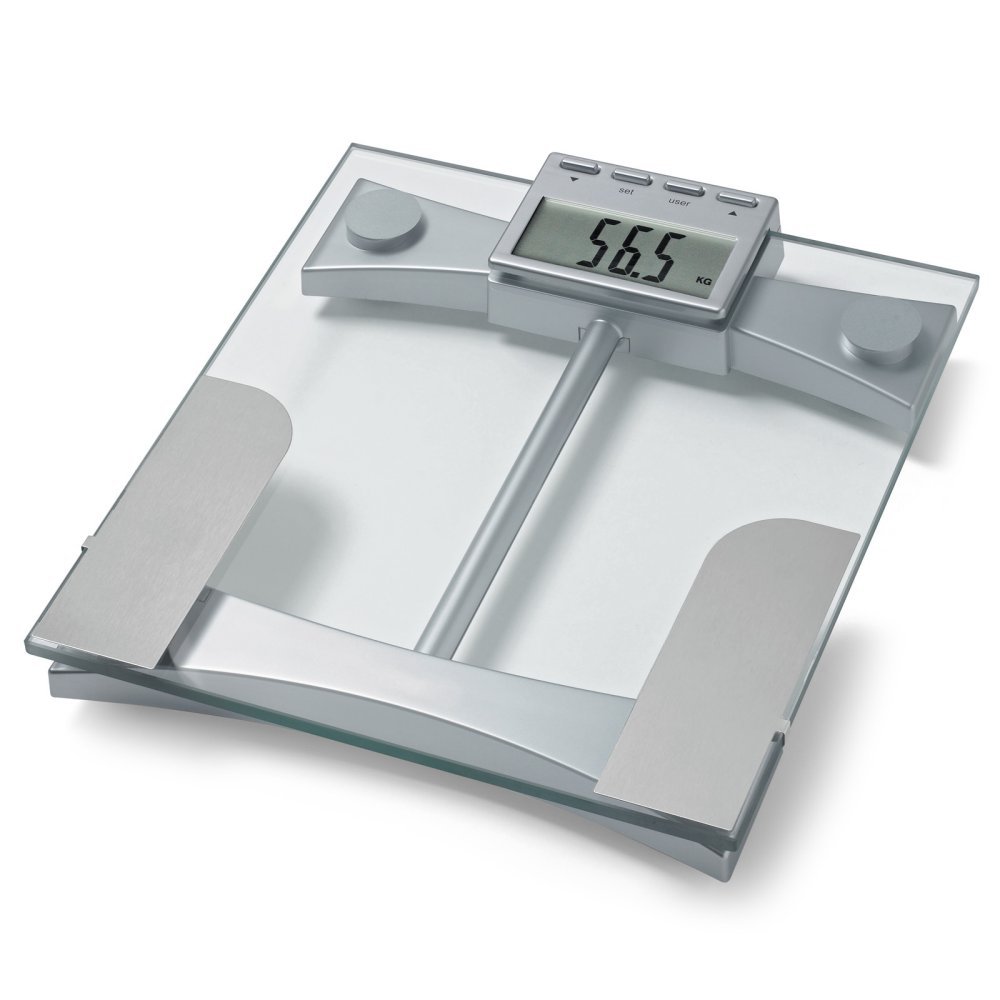
Abbildung 1: Spitze view of the Microlife WS100 scale. Note the display area and the metallic electrodes for body composition analysis. Ensure feet are placed correctly on these electrodes for accurate readings.
Wartung
1. Cleaning the Scale
Wischen Sie die Waagenoberfläche mit einem weichen,amp cloth. Do not use abrasive cleaners or immerse the scale in water. Avoid harsh chemicals that may damage the surface or electronic components.
2. Speicherung
Bewahren Sie die Waage an einem kühlen, trockenen Ort, vor direkter Sonneneinstrahlung und extremen Temperaturen geschützt auf. Vermeiden Sie es, schwere Gegenstände auf die Waage zu stellen, wenn sie nicht benutzt wird.
3. Batteriewechsel
When the display shows a "Lo" indicator, it is time to replace the batteries. Open the battery compartment on the underside of the scale, remove the old batteries, and insert new ones of the same type, observing correct polarity. Dispose of old batteries responsibly.
Fehlerbehebung
| Problem | Mögliche Ursache | Lösung |
|---|---|---|
| "Lo" angezeigt | Niedriger Batteriestand. | Ersetzen Sie die Batterien durch neue. |
| "Fehler" angezeigt | Überlastung oder Messfehler. | Ensure the scale is not overloaded. Step off and then back on the scale. Ensure stable footing. |
| Ungenaue Messwerte | Waage auf unebener Oberfläche, nicht kalibriert oder Benutzerfehlerfile falsch. | Place scale on a hard, flat surface. Perform initial calibration. Verify user profile settings (age, height, gender). |
| Keine Anzeige | Batteries incorrectly installed or completely drained. | Batteriepolarität prüfen. Batterien gegebenenfalls austauschen. |
Technische Daten
- Modell: WS100
- Marke: Microlife
- Anzeigetyp: Digitales
- Besondere Merkmale: Body Fat, Bodyweight, Muscle Mass
- Material: Plastik
- Farbe: Schwarz
- Energiequelle: Batterien enthalten)
- Produktabmessungen: 31.75 x 7.62 x 37.47 cm (12.5 x 3 x 14.75 Zoll)
- Artikelgewicht: 2.99 kg
- GTIN/UPC: 642632841233
Garantie und Support
For warranty information or technical support, please refer to the warranty card included with your product or visit the official Microlife webBitte versuchen Sie nicht, das Gerät selbst zu reparieren, da dies zum Erlöschen der Garantie führen kann.