1. Einleitung
Vielen Dank für Ihren Einkauf.asing the Korg GA30 Guitar and Bass Tuner. This ultra-compact, high-precision tuner is designed to provide accurate and stable tuning for both guitar and bass instruments. Please read this manual thoroughly to understand the features and proper operation of your GA30 tuner.
2. Produktüberschreitungview
The Korg GA30 features an LCD needle-type meter for stable tuning, a Quinta Flat Tuning mode, support for 7-string guitar tunings, and a Sound Out function for reference tones. Its auto power-off function helps conserve battery life, providing approximately 100 hours of continuous use.
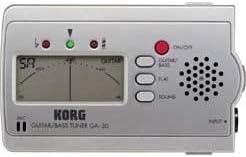
Abbildung 1: Front panel of the Korg GA30 Tuner. This image displays the front panel of the Korg GA30 tuner, showing its LCD needle-type display, input jack, speaker, and control buttons for power, guitar/bass mode, flat tuning, and sound out.
Hauptmerkmale:
- Ultrakompaktes Design: Tragbar und einfach zu tragen.
- High Precision LCD Needle-Type Meter: Provides stable and accurate visual tuning.
- Quinta Flat Tuning Mode: Allows tuning 1 to 5 semitones flat.
- 7-String Guitar Support: Accommodates extended range guitars.
- Sound Out Function: Produces a reference tone from the internal speaker.
- Automatisches Ausschalten: Automatically shuts off to save battery life.
- Verlängerte Akkulaufzeit: Ungefähr 100 Stunden Dauerbetrieb.
3. Einrichtung
3.1 Einlegen der Batterie
- Öffnen Sie die Abdeckung des Batteriefachs auf der Rückseite des Geräts.
- Legen Sie zwei AAA-Batterien ein und achten Sie dabei auf die richtige Polarität (+/-).
- Schließen Sie den Batteriefachdeckel fest.
3.2 Anschließen Ihres Instruments
Connect your guitar or bass to the INPUT jack on the right side of the GA30 tuner using a standard 1/4-inch instrument cable.
3.3 Ein-/Ausschalten
Drücken Sie die rote EIN/AUS button located on the front panel to turn the tuner on. Press and hold the EIN/AUS button for a few seconds to turn the tuner off. The tuner will automatically power off after a period of inactivity to conserve battery life.
4. Bedienungsanleitung
4.1 Selecting Instrument Mode (Guitar/Bass)
Drücken Sie die GITARRE/BASS button to toggle between Guitar mode and Bass mode. The selected mode will be indicated on the LCD display.
4.2 Standard Tuning
In either Guitar or Bass mode, play a single note on your instrument. The LCD needle will indicate the pitch. Adjust your instrument's tuning pegs until the needle is centered and the green indicator light illuminates, signifying accurate tuning.
4.3 Flat Tuning (Quinta Flat)
The GA30 allows for flat tuning from 1 to 5 semitones. Press the WOHNUNG button repeatedly to select the desired number of semitones flat (b, bb, bbb, bbbb, bbbbb). The selected flat setting will be displayed. Tune your instrument as you would in standard tuning, but the tuner will now register the pitch relative to the flat setting.
4.4 Sound Out Function
Drücken Sie die KLANG button to activate the Sound Out function. The tuner will emit a reference tone from its internal speaker. Press the GITARRE/BASS button to cycle through different reference notes. This feature is useful for tuning by ear. Press the KLANG button again to turn off the reference tone.
5. Wartung
5.1 Batteriewechsel
When the display becomes dim or the tuner does not power on, replace the batteries. Follow the steps in Section 3.1 for battery installation. Always use fresh AAA batteries and dispose of old batteries responsibly.
5.2 Reinigung
Wipe the unit with a soft, dry cloth. Do not use abrasive cleaners, waxes, or solvents, as these can damage the finish and internal components.
5.3 Speicherung
If the unit will not be used for an extended period, remove the batteries to prevent leakage and potential damage. Store the tuner in a cool, dry place away from direct sunlight and extreme temperatures.
6. Fehlerbehebung
- Kein Strom:
Check if the batteries are inserted correctly with the proper polarity. Replace with fresh batteries if necessary. - Ungenaue Stimmung:
Ensure your instrument is properly connected to the INPUT jack. Make sure you are playing a single, clear note. Check for external noise interference. - No Sound from Speaker (Sound Out):
Ensure the SOUND function is activated. Adjust the volume on your instrument if applicable (though the tuner's speaker volume is fixed). - Bildschirm ist dunkel:
Dies deutet auf einen niedrigen Batteriestand hin. Tauschen Sie die Batterien aus.
7. Spezifikationen
- Modell: GA30
- Marke: Korg
- Stimmungsskala: 12-Noten-gleichschwebende Stimmung
- Erfassungsbereich: A0 (27.50 Hz) – C8 (4186.01 Hz) (for a sine wave)
- Referenztonhöhe: A4 = 430 – 450 Hz (1 Hz steps)
- Flache Stimmung: 1 to 5 semitones (Quinta Flat)
- Eingangsimpedanz: 1 MΩ
- Anschlüsse: INPUT (1/4" mono jack)
- Stromversorgung: Zwei AAA-Batterien (3 V)
- Akkulaufzeit: Ungefähr 100 Stunden (Alkaline-Batterien)
- Abmessungen: (W x D x H) Approximately 102 x 60 x 16 mm (4.02 x 2.36 x 0.63 inches)
- Gewicht: Approximately 99.79 g (3.52 oz) (including batteries)
- Hersteller: Korg
- ASIN: B001VHQKSW
Änderungen der Spezifikationen im Zuge von Produktverbesserungen sind vorbehalten.
8. Garantie und Support
Informationen zur Garantie und zum Kundendienst finden Sie auf der Ihrem Produkt beiliegenden Garantiekarte oder auf der offiziellen Korg-Website. webBewahren Sie Ihren Kaufbeleg als Kaufnachweis für eventuelle Garantieansprüche auf.


