Einführung
This manual provides instructions for the Vivitar Vivicam 5024 5.1MP Digital Camera. It covers setup, operation, maintenance, and troubleshooting to help you get the most from your camera. The Vivicam 5024 features a 5.1-megapixel sensor, 8x digital zoom, and a 2.4-inch TFT preview screen, designed for capturing photos and videos.
Produkt überview
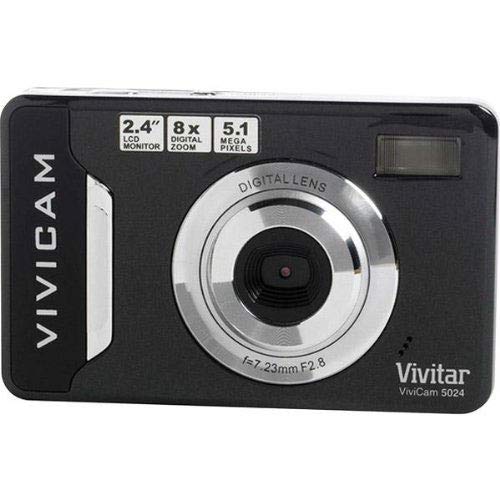
Bild 1: Front view of the Vivitar Vivicam 5024 Digital Camera. Shows the lens, flash, and overall compact design.
The Vivitar Vivicam 5024 is a compact digital camera equipped with a 5.1-megapixel sensor for still images and video recording. It includes an 8x digital zoom and a 2.4-inch color LCD screen for framing shots and reviewing content. Key features include anti-shake technology, scene modes, ISO adjustment, and white balance settings.
Aufstellen
1. Einlegen der Batterie
The Vivicam 5024 operates on three (3) AAA batteries. Ensure batteries are inserted with correct polarity.
- Suchen Sie die Abdeckung des Batteriefachs an der Unterseite der Kamera.
- Schieben Sie die Abdeckung auf.
- Legen Sie drei neue AAA-Batterien ein und achten Sie dabei auf die richtige Polung (+) und den richtigen Minuspol (-) im Batteriefach.
- Schließen Sie den Batteriefachdeckel fest.
2. Installation der SD-Karte
The camera uses an SD (Secure Digital) card for storing photos and videos. A 4GB SD card is typically included.
- Locate the SD card slot, which does not have a cover, on the side of the camera.
- Insert the SD card into the slot with the metal contacts facing the front of the camera until it clicks into place.
- To remove, gently push the card further in until it springs out.
3. Erstes Einschalten
Press and hold the Power button, usually located on the top of the camera, until the LCD screen illuminates.
Bedienung der Kamera
1. Grundlegende Steuerelemente
- Netzschalter: Schaltet die Kamera ein/aus.
- Auslöser: Zum Fokussieren halb durchdrücken, zum Fotografieren ganz durchdrücken.
- Zoom-Tasten: Control the 8x digital zoom (usually marked 'W' for Wide and 'T' for Telephoto).
- Navigationstasten: Used to navigate menus and playback images.
- LCD Bildschirm: 2.4-inch display for framing shots, reviewing images, and accessing menus.
2. Fotos machen
- Schalten Sie die Kamera ein.
- Nutzen Sie den 2.4-Zoll-LCD-Bildschirm, um Ihr Bild optimal zu gestalten.
- Use the zoom buttons to adjust the 8x digital zoom as needed.
- Drücken Sie den Auslöser halb durch, damit die Kamera fokussieren kann.
- Drücken Sie den Auslöser vollständig durch, um das Bild aufzunehmen.
- Wichtig: Due to the camera's design, it is crucial to hold the camera perfectly still for a couple of seconds after pressing the shutter button to ensure a clear image.
The camera features anti-shake technology to assist in reducing blur, but stable handling is still recommended.
3. Videos aufnehmen
The Vivicam 5024 can record video. To switch to video mode, navigate through the camera's menu or use a dedicated mode button if available.
- Start recording by pressing the Shutter button (or dedicated record button).
- Stop recording by pressing the button again.
- Notiz: The Vivitar Vivicam 5024 records video without sound. This is a design characteristic and not a malfunction.
4. Wiedergabemodus
Um zu review Ihre Fotos und Videos:
- Wechseln Sie in den Wiedergabemodus (in der Regel über eine spezielle Taste oder eine Menüoption).
- Verwenden Sie die Navigationsschaltflächen, um durch Ihre aufgenommenen Medien zu scrollen.
- Drücken Sie den Auslöser oder die OK-Taste, um view ein Video oder ein größeres Bild.
5. Menüeinstellungen
Access the camera's menu to adjust various settings:
- Szenenmodi: Select pre-set modes for different shooting conditions (e.g., Portrait, Landscape).
- ISO: Adjust light sensitivity (e.g., for low-light conditions).
- Weißabgleich: Correct color cast based on lighting (e.g., Daylight, Cloudy, Fluorescent).
- Flash-Modi: Set the built-in flash to Automatic, Red-Eye Reduction, Fill-Flash, or Off.
- Selbstauslöser: Set a delay (e.g., 10 seconds) before taking a photo.
Anschließen an einen Computer
So übertragen Sie Fotos und Videos auf Ihren Computer:
- Stellen Sie sicher, dass die Kamera ausgeschaltet ist.
- Locate the USB port on the unten der Kamera.
- Connect the camera to your computer using a compatible USB cable.
- Schalten Sie die Kamera ein. Sie sollte auf Ihrem Computer als Wechseldatenträger angezeigt werden.
- Ziehen und Ablegen files from the camera's SD card folder to your computer.
- Trennen Sie die Kamera sicher vom Computer, bevor Sie das USB-Kabel abziehen.
Wartung
1. Reinigung der Kamera
- Verwenden Sie ein weiches, trockenes Tuch, um das Kameragehäuse zu reinigen.
- Für die Reinigung der Linse und des LCD-Bildschirms verwenden Sie ein spezielles Linsenreinigungstuch und eine spezielle Reinigungslösung.
- Vermeiden Sie die Verwendung von Scheuermitteln oder Lösungsmitteln.
- Note that the camera does not have a lens cover, so keep the lens area clean and protected from dust.
2. Batteriepflege
- Entfernen Sie die Batterien, wenn die Kamera längere Zeit nicht benutzt wird.
- Use high-quality AAA alkaline or rechargeable batteries for optimal performance.
3. Pflege der SD-Karte
- Format the SD card periodically within the camera's menu to maintain performance.
- Avoid removing the SD card while the camera is writing data.
- The SD card slot does not have a cover; protect it from dust and moisture.
Fehlerbehebung
- Kamera lässt sich nicht einschalten: Überprüfen Sie den Batterieeinbau und stellen Sie sicher, dass die Batterien neu sind.
- Unscharfe Fotos: Ensure the camera is held still for a few seconds after pressing the shutter. Check lighting conditions and adjust ISO if necessary.
- Flash funktioniert nicht: Verify flash mode settings in the camera menu. Ensure batteries have sufficient power.
- No sound in videos: This camera model (Vivicam 5024) does not record audio with video. This is a normal operational characteristic.
- Übertragung nicht möglich files zum Computer: Ensure USB cable is securely connected to both camera (bottom port) and computer. Verify camera is powered on and recognized as a removable disk.
Technische Daten
| Modellname | 5024 |
| Auflösung des Fotosensors | 5.1 Megapixels (Effective Still Resolution: 5 MP) |
| Digital Zoom | 8x |
| Bildschirmgröße | 2.4 Zoll (TFT-LCD) |
| Bildstabilisierung | Digitales |
| Unterstützt File Format | JPEG (Fotos), MP4 (Video) |
| Integrierte Medien | SD-Karte (bis zu 4 GB empfohlen) |
| Konnektivitätstechnologie | USB |
| Stromquelle | 3 x AAA-Batterien |
| Blitz | Built-In, Automatic modes |
| Selbstauslöser | 10 Sekunden |
| Artikelgewicht | 100 Gramm |
Garantie und Support
Specific warranty information for the Vivitar Vivicam 5024 is typically provided with the product packaging or can be found on the manufacturer's official website. For technical support or service inquiries, please refer to the contact information provided by Vivitar at the time of purchase or visit their official support channels.


