Einführung
This manual provides detailed instructions for the proper use and maintenance of your Royal DM2070 Electronic Organizer. Please read this manual thoroughly before operating the device to ensure safe and efficient use. Keep this manual for future reference.
Sicherheitshinweise
- Setzen Sie das Gerät keinen extremen Temperaturen, direkter Sonneneinstrahlung oder hoher Luftfeuchtigkeit aus.
- Vermeiden Sie es, das Gerät fallen zu lassen oder starken Stößen auszusetzen.
- Versuchen Sie nicht, das Gerät selbst zu zerlegen oder zu reparieren. Überlassen Sie alle Wartungsarbeiten qualifiziertem Fachpersonal.
- Halten Sie das Gerät von Wasser und anderen Flüssigkeiten fern.
- Verwenden Sie zum Austausch ausschließlich den angegebenen Batterietyp.
Packungsinhalt
Überprüfen Sie, ob alle Artikel in Ihrem Paket vorhanden sind:
- Royal DM2070 Electronic Organizer
- Stylus (if applicable)
- Kurzanleitung
- Garantiekarte
Aufstellen
1. Einlegen der Batterie
The Royal DM2070 requires batteries for operation. Follow these steps to install them:
- Suchen Sie die Abdeckung des Batteriefachs auf der Rückseite des Geräts.
- Schieben oder heben Sie den Deckel an, um das Fach zu öffnen.
- Insert the required batteries, ensuring correct polarity (+ and -) as indicated inside the compartment.
- Bringen Sie den Batteriefachdeckel wieder fest an.
2. Erstes Einschalten und Einstellungen
After installing batteries, power on your device and configure basic settings:
- Halten Sie die LEISTUNG Drücken Sie die Taste, bis der Bildschirm aufleuchtet.
- The device may prompt you to set the date and time. Use the navigation buttons or stylus to enter the correct information.
- Confirm your settings to complete the initial setup.
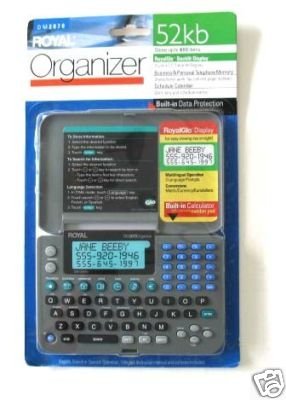
Image: Royal DM2070 Electronic Organizer. This image displays the device's front view, highlighting its screen and keypad, essential for navigation and data entry.
Bedienungsanleitung
1. Navigation
The DM2070 features a keypad and potentially a stylus for navigation. Use the arrow keys to move between menu options and press EINGEBEN or a designated selection button to confirm.
2. Entering Data
To enter information such as contacts, appointments, or notes:
- Navigate to the desired application (e.g., 'Contacts', 'Calendar', 'Notes').
- Select 'New Entry' or a similar option.
- Use the alphanumeric keypad to input text. Some models may offer an on-screen keyboard via stylus.
- Save your entry before exiting the application.
3. Nutzung von Anwendungen
The DM2070 includes various applications:
- Kalender: View daily, weekly, or monthly schedules. Add and edit appointments.
- Kontakte: Store names, phone numbers, addresses, and email information.
- Hinweise: Create and manage text notes or memos.
- Taschenrechner: Führe einfache Rechenoperationen durch.
- Währungsrechner: Convert between different currencies (requires manual update of exchange rates on some models).
Wartung
1. Reinigen des Geräts
To keep your DM2070 in optimal condition:
- Wischen Sie den Bildschirm ab und casing with a soft, dry, lint-free cloth.
- Bei hartnäckigen Flecken leicht dampDas Tuch mit Wasser befeuchten; aggressive Chemikalien oder Scheuermittel vermeiden.
- Ensure no moisture enters openings.
2. Batteriepflege
- Tauschen Sie die Batterien umgehend aus, sobald die Anzeige für niedrigen Batteriestand erscheint.
- Wenn das Gerät längere Zeit nicht verwendet wird, entfernen Sie die Batterien, um ein Auslaufen zu verhindern.
Fehlerbehebung
If you encounter issues with your Royal DM2070, refer to the following common solutions:
| Problem | Mögliche Ursache | Lösung |
|---|---|---|
| Gerät lässt sich nicht einschalten. | Defekte oder falsch eingesetzte Batterien. | Ersetzen Sie die Batterien durch neue und achten Sie dabei auf die richtige Polarität. |
| Der Bildschirm ist leer oder eingefroren. | Softwarefehler oder schwache Batterie. | Try a soft reset (refer to Quick Start Guide for specific button combination) or replace batteries. |
| Data loss. | Battery depletion or improper shutdown. | Ensure batteries are fresh. Always save data before powering off. |
| Tastatur reagiert nicht. | Dust/debris under keys or internal issue. | Clean keypad gently. If problem persists, contact support. |
Technische Daten
Key technical specifications for the Royal DM2070 Electronic Organizer:
| Besonderheit | Detail |
|---|---|
| Marke | KÖNIGLICH |
| Modellnummer | DM2070 |
| Bezugsmaterial | Leder |
| Format | Veranstalter |
| Artikelgewicht | 181 g |
| Artikelabmessungen (LxBxH) | 24.4 x 14.5 x 1 Zentimeter |
| Zielgruppe | Erwachsene |
Garantie und Support
The Royal DM2070 Electronic Organizer comes with a standard manufacturer's warranty. Please refer to the warranty card included in your package for specific terms and conditions. For technical support, service, or inquiries, please contact Royal customer service through the contact information provided on the warranty card or the official Royal webWebsite.


