1. Einleitung
This manual provides essential instructions for the safe and efficient operation, maintenance, and troubleshooting of your Dirt Devil Scorpion Plus QuickFlip Handheld Vacuum Cleaner, Model SD20005RED. Please read this manual thoroughly before using the appliance and retain it for future reference.

Bild 1.1: The Dirt Devil Scorpion Plus QuickFlip Handheld Vacuum Cleaner, showcasing its compact design and integrated crevice tool.
2. Wichtige Sicherheitshinweise
Beim Gebrauch von Elektrogeräten sollten immer grundlegende Vorsichtsmaßnahmen beachtet werden, darunter die folgenden:
- Lesen Sie alle Anweisungen, bevor Sie diesen Staubsauger verwenden.
- Vor der Reinigung oder Wartung des Geräts muss immer der Netzstecker gezogen werden.
- Nicht im Freien oder auf nassen Oberflächen verwenden.
- Nicht als Spielzeug verwenden. Bei Verwendung durch oder in der Nähe von Kindern ist besondere Vorsicht geboten.
- Verwenden Sie das Produkt nur wie in dieser Anleitung beschrieben. Verwenden Sie ausschließlich die vom Hersteller empfohlenen Anbauteile.
- Verwenden Sie das Gerät nicht mit einem beschädigten Kabel oder Stecker. Sollte das Gerät nicht ordnungsgemäß funktionieren, heruntergefallen, beschädigt, im Freien gelassen oder ins Wasser gefallen sein, bringen Sie es bitte zu einem Servicecenter zurück.
- Ziehen oder tragen Sie das Gerät nicht am Kabel, verwenden Sie das Kabel nicht als Griff, schließen Sie keine Türen am Kabel und ziehen Sie das Kabel nicht um scharfe Kanten oder Ecken. Fahren Sie nicht mit dem Gerät über das Kabel. Halten Sie das Kabel von heißen Oberflächen fern.
- Ziehen Sie den Stecker nicht am Kabel, sondern fassen Sie ihn am Stecker und nicht am Kabel an.
- Fassen Sie Stecker oder Gerät nicht mit nassen Händen an.
- Stecken Sie keine Gegenstände in die Öffnungen. Verwenden Sie das Gerät nicht, wenn die Öffnungen blockiert sind. Halten Sie das Gerät frei von Staub, Flusen, Haaren und allem, was den Luftstrom beeinträchtigen könnte.
- Halten Sie Haare, lose Kleidung, Finger und alle Körperteile von Öffnungen und beweglichen Teilen fern.
- Heben Sie keine brennenden oder rauchenden Gegenstände auf, z. B. Zigaretten, Streichhölzer oder heiße Asche.
- Nicht zum Aufsaugen von entzündlichen oder brennbaren Flüssigkeiten (z. B. Benzin) verwenden oder in Bereichen verwenden, wo diese vorhanden sein können.
- Nicht ohne eingesetzten Staubbecher und/oder Filter verwenden.
- Schalten Sie alle Bedienelemente aus, bevor Sie den Stecker ziehen.
- Seien Sie beim Reinigen von Treppen besonders vorsichtig.
3. Produktmerkmale und Komponenten
The Dirt Devil Scorpion Plus QuickFlip Handheld Vacuum Cleaner is designed for quick and efficient cleaning tasks. Key features include:
- QuickFlip Crevice Tool: Integrated into the unit for easy access and storage. Ideal for tight spaces and corners.
- Extended Reach Hose: Provides flexibility to clean high spots and hard-to-reach areas.
- XL Easy-Empty Dirt Cup: Designed for convenient disposal of collected debris with fewer trips to the trash.
- Kabelgebundener Betrieb: Ensures consistent, powerful suction without battery limitations.

Bild 3.1: Demonstrating the QuickFlip Crevice Tool in use for cleaning vehicle interiors.

Bild 3.2: The vacuum's compact size and corded power offer convenient cleaning for various surfaces.
4. Einrichtung
- Auspacken: Nehmen Sie den Staubsauger und sämtliches Zubehör vorsichtig aus der Verpackung.
- Überprüfen: Check the unit for any signs of damage. Do not use if damaged.
- Filterinstallation: Ensure the F5 filter and dirt cup are correctly installed before first use. Refer to the "Maintenance" section for details on filter placement.
- Stromanschluss: Plug the power cord into a standard electrical outlet. The vacuum is corded and does not require battery charging.
5. Bedienungsanleitung
The Dirt Devil Scorpion Plus is designed for dry pick-up only.
- Ein-/Ausschalten: Locate the power switch on the handle. Press it to turn the vacuum on or off.
- Allgemeine Reinigung: Hold the vacuum by the handle and move the nozzle over the area to be cleaned. The powerful suction will pick up dirt and debris.
- Using the QuickFlip Crevice Tool:
- To deploy, simply flip out the integrated crevice tool from the front of the unit until it clicks into place.
- Use this tool for cleaning tight corners, edges, and narrow spaces such as between car seats or couch cushions.
- To retract, press the release button (if applicable) and fold the tool back into its storage position.
- Using the Extended Reach Hose: Attach the hose accessory to the vacuum's suction port. This allows for greater reach to clean elevated surfaces or awkward angles.
- Cleaning Stairs and Car Interiors: The compact size and included tools make this vacuum ideal for these specific applications.
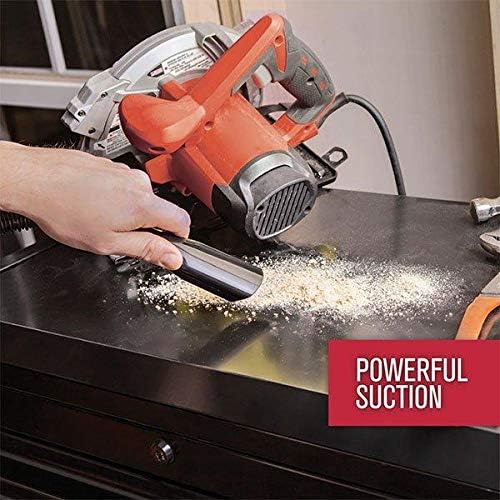
Bild 5.1: The vacuum's strong suction effectively removes dust and debris from surfaces.
6. Wartung
Regelmäßige Wartung gewährleistet optimale Leistung und verlängert die Lebensdauer Ihres Staubsaugers. Ziehen Sie vor Wartungsarbeiten immer den Netzstecker.
6.1 Den Schmutzbecher leeren
- Press the dirt cup release button, typically located near the nozzle, to detach the dirt cup from the main unit.
- Hold the dirt cup over a trash receptacle.
- Open the dirt cup lid or release the bottom flap to empty the contents.
- Close the lid/flap and reattach the dirt cup to the vacuum until it clicks securely into place.

Bild 6.1: Demonstrating the process of emptying the easy-empty dirt cup.
6.2 Cleaning the Filter (Type F5)
Der Filter sollte regelmäßig gereinigt werden, um die Saugkraft aufrechtzuerhalten.
- Entfernen Sie den Schmutzbehälter wie oben beschrieben.
- Carefully remove the F5 filter from the dirt cup.
- Tap the filter gently over a trash can to remove loose dirt and debris.
- For a more thorough cleaning, rinse the filter under cool running water. Ensure it is completely dry before reinstalling. Verwenden Sie den Staubsauger nicht mit einem nassen Filter.
- Reinsert the dry filter into the dirt cup, then reattach the dirt cup to the vacuum.
7. Fehlerbehebung
If your vacuum cleaner is not performing as expected, consult the following table for common issues and solutions.
| Problem | Mögliche Ursache | Lösung |
|---|---|---|
| Das Vakuum lässt sich nicht einschalten. | Das Netzkabel ist nicht richtig eingesteckt. | Vergewissern Sie sich, dass das Netzkabel fest in einer funktionierenden Steckdose eingesteckt ist. |
| Saugkraftverlust. | Dirt cup is full. Filter ist verstopft. Düse oder Schlauch ist verstopft. | Leeren Sie den Schmutzbehälter. Clean or replace the F5 filter. Check nozzle and hose for obstructions and remove them. |
| Der Staubsauger überhitzt und schaltet sich ab. | Längerer Gebrauch. Verstopfter Filter oder Verstopfung. | Allow the vacuum to cool down for at least 30 minutes. Ensure the filter is clean and there are no blockages. |
| Ungewöhnliches Geräusch. | Verstopfung im Lüfter- oder Motorbereich. | Immediately turn off and unplug the vacuum. Inspect for and remove any foreign objects. If noise persists, contact customer support. |
8. Spezifikationen
| Besonderheit | Detail |
|---|---|
| Modellname | Skorpion |
| Modellnummer | SD20005ROT |
| Marke | Schmutzteufel |
| Stromquelle | Kabelgebundene Elektrik |
| Wastage | 150 Watt |
| AmpAlter | 5 Amps |
| Kapazität | 0.18 Gallonen |
| Filtertyp | F5 |
| Schlauchlänge | 2.5 Fuß |
| Produktabmessungen (L x B x H) | 12" x 5" x 7" |
| Artikelgewicht | 4.5 Pfund |
| Geräuschpegel | 72 Dezibel |
| Besondere Merkmale | Bagless, Corded, Portable, QuickFlip Crevice Tool |
| Empfohlene Verwendung | Car Interiors, Stairs |
9. Garantie und Support
This Dirt Devil Scorpion Plus QuickFlip Handheld Vacuum Cleaner comes with a 3 Jahr eingeschränkte Garantie. For warranty claims, technical support, or to purchase replacement parts, please contact Dirt Devil Customer Service.
Please visit the official Dirt Devil website for the most up-to-date contact information and support resources. Keep your purchase receipt as proof of purchase for warranty purposes.


