1. Einleitung
The Zircon StudSensor e50 Electronic Stud Finder is designed to quickly and easily locate the edges of wood and metal studs and joists behind walls, floors, and ceilings. It incorporates advanced technology to provide accurate detection and enhance safety during various home improvement and construction tasks.

Figure 1: Zircon StudSensor e50 Electronic Stud Finder
This manual provides detailed instructions for the proper setup, operation, and maintenance of your StudSensor e50. Please read it thoroughly before use to ensure safe and effective operation.
2. Einrichtung
2.1 Einlegen der Batterie
- Öffnen Sie die Abdeckung des Batteriefachs auf der Rückseite des Geräts.
- Legen Sie eine neue 9V-Alkalibatterie ein und achten Sie dabei auf die richtige Polarität (+/-).
- Schließen Sie den Batteriefachdeckel fest.
2.2 Kalibrierung
The StudSensor e50 features patented TruCal technology, which automatically calibrates the tool. To ensure accurate scanning:
- Place the tool flat against the wall where you intend to scan.
- Press and hold the Power button. The tool will emit an audio tone and the LCD display will indicate when calibration is complete and the tool is ready to scan.
- Do not release the Power button during the entire scanning process.
3. Betriebsarten
The StudSensor e50 offers two primary scanning modes for different applications:
3.1 STUD SCAN Mode
This mode locates the edges and center of wood or metal studs in normal walls up to 3/4 inch (19 mm) deep.

Figure 2: Using the StudSensor e50 for wall scanning
3.2 DEEPSCAN Mode
This mode doubles the scanning depth for walls up to 1-1/2 inches (38 mm) deep. It also enables scanning for joists in some ceilings and floors.
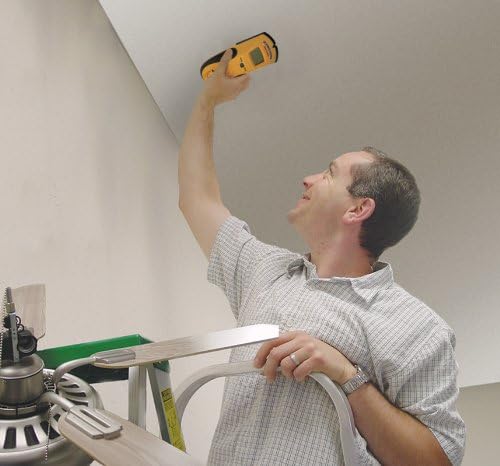
Figure 3: Using the StudSensor e50 for ceiling scanning
3.3 WireWarning Detection
The WireWarning detection feature indicates the presence of live, unshielded electrical wiring up to 2 inches (51 mm) deep in both Stud Scan and DeepScan modes. This is a crucial safety feature to prevent accidental contact with electrical hazards.
4. Hauptmerkmale
- Gut lesbares LCD-Display: Clearly indicates stud edges and other detected objects.
- Updated SpotLite Pointer: Shines an arrow-shaped light on the wall to precisely mark the target location.
- Ergonomisches Design: The e50's new body design can be held comfortably in either hand at any angle, reducing common scanning errors. The rubber overmolded grip provides a secure hold.
- "Over-the-Stud" Indication: Zircon's patented technology alerts the user if scanning begins over a stud, prompting them to start the scan in a new location for accurate results.
- Patented TruCal Technology: Automatically calibrates the tool and indicates when it is ready to scan.

Figure 4: Ergonomic design of the StudSensor e50
5. Anwendungstipps
- Ensure the tool is calibrated on a section of the wall that is free of studs or other objects.
- Move the tool slowly and steadily across the surface. Rapid movements can lead to inaccurate readings.
- Keep your free hand away from the scanning surface to avoid interference.
- For best results, scan the area multiple times from different directions to confirm findings.
6. Fehlerbehebung
- Ungenaue Messwerte: Ensure proper calibration. If the
Zugehörige Dokumente - StudSensor e50

Zircon StudSensor Pro SL-AC Stud Finder Benutzerhandbuch
Umfassende Anleitung zur Verwendung des Zircon StudSensor Pro SL-AC Bolzensuchers mit detaillierten Informationen zu Installation, Kalibrierung, Scanmodi, AC-Voltage-Erkennung und Fehlerbehebung für eine genaue Bolzen- und Kabelortung.
Zircon StudSensor L20 Balkensucher: Benutzerhandbuch und Bedienungsanleitung
Ausführliche Anleitung für den Zircon StudSensor L20 Wandständersucher mit Informationen zu Installation, Bedienung, Fehlerbehebung und Sicherheitsvorkehrungen für die Ortung von Wandständern. Enthält Produktmerkmale, Anwendungstipps und Garantieinformationen.
Zircon SuperScan® ID Advanced Wandscanner: Benutzerhandbuch und Anleitung
Ausführliches Benutzerhandbuch für den Zircon SuperScan® ID Advanced Wandscanner. Erfahren Sie, wie Sie Bolzen, Metallobjekte, Gegenstände mit geringer Dichte und stromführende Wechselstromleitungen erkennen. Enthält Informationen zu Einrichtung, Bedienung, Fehlerbehebung und Garantie.
Zircon Wood Stud SuperScan Advanced Stud Finder – Benutzerhandbuch
Ausführliches Benutzerhandbuch für den Zircon Wood Stud SuperScan Advanced Stud Finder mit detaillierten Informationen zu Funktionen, Betriebsmodi (Auto, Edge, DeepScan), WireWarning-Erkennung, Installation, Scantechniken und Fehlerbehebung.
Zircon MultiScanner x85 OneStep Multifunction Wall Scanner User Manual
Comprehensive user manual for the Zircon MultiScanner x85 OneStep, detailing its features for detecting studs, AC wires, and thermal signatures, with operating instructions and troubleshooting tips.
Zircon MultiScanner 740 Multifunction Wall Scanner User Manual
User manual for the Zircon MultiScanner 740, a versatile wall scanner designed to detect studs (wood and metal), metal objects, and live AC wires. Features three scan modes: STUD SCAN, METAL SCAN, and AC SCAN, along with WireWarning® Detection. Includes detailed operating instructions, tips for various materials, troubleshooting advice, and warranty information.