1. Produktüberschreitungview
The DEGEN DE1125 is a compact and versatile portable device that integrates multiple functionalities into a single unit. It serves as a world-band radio, an MP3 player, a digital recorder, and an ebook reader. Designed for portability, it features a slim profile and lightweight construction, making it ideal for travel and on-the-go use.
Zu den Hauptmerkmalen gehören:
- Pocket-size world-band radio with built-in speaker and Digital Signal Processing (DSP) technology.
- 4 GB flash memory MP3 player for music playback.
- Digital recorder for radio programs and voice recording, offering up to 150 hours of recording time (at 32 kbps).
- 255 preset memories for radio stations.
- Built-in battery charger.
- LED back-lit display for clear visibility.
- Digital clock, sleep timer, key lock, and numeric volume indicator.
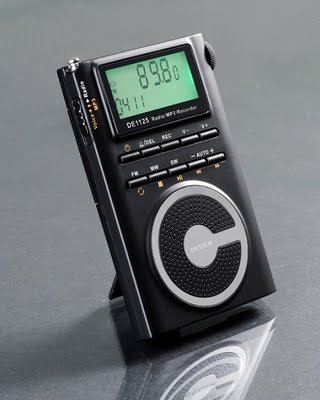
Figure 1.1: The DEGEN DE1125 portable radio and multimedia player, shown standing upright with its integrated kickstand.
2. Installationsanleitung
2.1 Auspacken und erste Inspektion
Nehmen Sie alle Komponenten vorsichtig aus der Verpackung. Überprüfen Sie, ob alle unten aufgeführten Teile vorhanden und unbeschädigt sind:
- DEGEN DE1125 Unit
- Kopfhörer
- AC Wall Plug (Charger)
- USB-Kabel
- Tragetasche
- Wiederaufladbarer Akku
- Benutzerhandbuch (dieses Dokument)
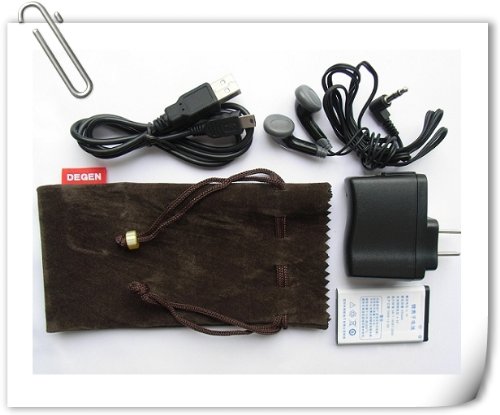
Figure 2.1: All included accessories for the DEGEN DE1125, including earphones, USB cable, AC adapter, carrying pouch, and rechargeable battery.
2.2 Einlegen und Laden der Batterie
The DE1125 is powered by a rechargeable lithium battery. Before first use, ensure the battery is properly installed and fully charged.
- Suchen Sie das Batteriefach auf der Rückseite des Geräts.
- Setzen Sie den Akku ein und achten Sie dabei auf die richtige Polarität, wie im Batteriefach angegeben.
- Schließen Sie den Batteriefachdeckel fest.
- Connect the small end of the USB cable to the mini-USB port on the side of the DE1125.
- Connect the standard USB end of the cable to the AC wall plug, then plug the AC wall plug into a standard electrical outlet. Alternatively, connect the standard USB end directly to a computer's USB port for charging.
- The display will indicate charging status. Allow the battery to fully charge before initial use.
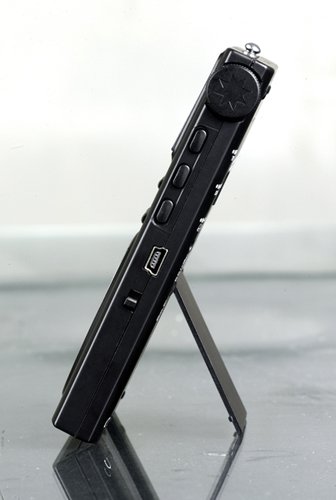
Abbildung 2.2: Seite view of the DEGEN DE1125, highlighting the mini-USB port for charging and data transfer.
3. Bedienungsanleitung
3.1 Allgemeine Kontrollen
Familiarize yourself with the buttons and display on the DE1125:
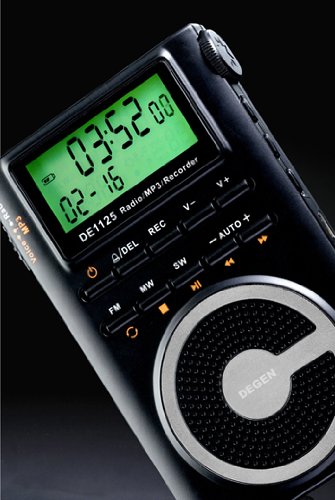
Abbildung 3.1: Nahaufnahme view of the DEGEN DE1125's display and control panel, showing buttons for power, mode selection, tuning, and volume.
- Power-Taste (): Halten Sie gedrückt, um das Gerät ein- oder auszuschalten.
- Volume Buttons (V+, V-): Stellen Sie den Audioausgangspegel ein.
- Menü-Schaltfläche: Access the main menu or settings within a mode.
- Navigationstasten (, ): Navigate through menus or adjust frequencies/tracks.
- Mode Buttons (FM, MW, SW, MP3, REC): Wählen Sie die gewünschte Betriebsart aus.
- Wiedergabe-/Pause-Taste (): Start or pause playback in MP3 mode, or confirm selections.
3.2 Radio Operation (FM, AM, SW)
The DE1125 supports FM (64.0 - 108.0 MHz), MW (520-1710 KHz), and SW (2.3-23.0 MHz) bands.
- Schalten Sie das Gerät ein.
- Press the corresponding mode button (FM, MW, or SW) to select the desired radio band.
- Tuning-Optionen:
- Auto-Scan: Press and hold the 'AUTO' button to automatically scan and store available stations.
- Manuelle Abstimmung: Verwenden Sie die Navigationsschaltflächen (, ) to fine-tune the frequency step-by-step.
- Digital Tuning: Enter the desired frequency directly using the numeric keypad (if available, or through menu options).
- ATS (Auto Tuning Storage): Automatically scans and stores strong signals into memory presets.
- Voreingestellte Sender: The device can store up to 255 preset stations. Use the 'M+' and 'M-' buttons to navigate through stored presets.
3.3 MP3-Player-Funktion
The DE1125 features 4GB of internal flash memory for MP3 playback.

Figure 3.2: The DEGEN DE1125 display indicating the 'Music' mode, ready for MP3 playback.
- Press the 'MP3' button to enter MP3 player mode.
- Musik übertragen files from your computer, connect the DE1125 to your computer using the provided USB cable. The device will appear as a removable disk drive. Drag and drop your MP3 files into the device's storage.
- Verwenden Sie die Navigationsschaltflächen (, ) to select tracks.
- Drücken Sie die Play / Pause-Taste () zum Starten oder Pausieren der Wiedergabe.
3.4 Digital Recorder Function
The DE1125 can record radio programs or function as a voice recorder.

Figure 3.3: The DEGEN DE1125 display showing the 'Record' mode, indicating readiness for audio capture.

Figure 3.4: The DEGEN DE1125 display showing the 'Voice' mode, used for voice recording functions.
- Press the 'REC' button to enter recording mode.
- Select either 'Radio Record' or 'Voice Record' from the menu.
- Press the 'REC' button again to start recording. The display will show recording time.
- Press the 'REC' button again to stop recording. Recorded files are saved to the internal memory.
- To play back recordings, navigate to the 'Recordings' folder in MP3 mode.
3.5 Ebook Reader Function
The DE1125 supports basic ebook reading functionality.

Figure 3.5: The DEGEN DE1125 display showing the 'Ebook' mode, indicating readiness to display text files.
- Connect the DE1125 to your computer via USB.
- Transfer compatible text files (e.g., .TXT) to the device's internal memory.
- Trennen Sie das Gerät vom Computer.
- Navigate to the 'Ebook' mode using the menu or mode selection.
- Select the desired ebook file Zum Öffnen und Lesen.
4. Pflege und Wartung
Proper care ensures the longevity and optimal performance of your DEGEN DE1125.
- Reinigung: Use a soft, dry cloth to clean the exterior of the device. Do not use liquid cleaners, aerosols, or abrasive materials.
- Lagerung: Store the device in a cool, dry place away from direct sunlight, extreme temperatures, and high humidity. Use the provided carrying pouch for protection during transport.
- Batteriepflege: To maintain battery health, avoid fully discharging the battery frequently. If storing for an extended period, charge the battery to about 50% and recharge every few months.
- Wassereinwirkung: Dieses Gerät ist nicht wasserdicht. Vermeiden Sie den Kontakt mit Wasser oder anderen Flüssigkeiten.
- Auswirkungen: Schützen Sie das Gerät vor Stürzen und Stößen, da diese interne Komponenten oder den Bildschirm beschädigen können.
5. Fehlerbehebung
If you encounter issues with your DEGEN DE1125, refer to the following common problems and solutions:
| Problem | Mögliche Ursache | Lösung |
|---|---|---|
| Gerät lässt sich nicht einschalten. | Die Batterie ist leer oder nicht richtig eingesetzt. | Laden Sie den Akku auf. Achten Sie darauf, dass der Akku mit der richtigen Polarität eingelegt ist. |
| No radio reception or poor signal. | Weak signal area, antenna not extended, interference. | Extend the telescopic antenna fully. Move to an area with better reception. Avoid sources of electronic interference. |
| MP3 files spielt nicht. | Nicht unterstützt file Format beschädigt file, NEIN files on device. | Sicherstellen files are in MP3 format. Re-transfer files. Verify files exist in the device's memory. |
| Cannot record audio. | Insufficient storage space, incorrect mode. | Altes löschen files to free up space. Ensure you are in the correct recording mode (Radio Record or Voice Record). |
| Der Bildschirm ist leer oder eingefroren. | System error, low battery. | Press and hold the power button for 10 seconds to force a restart. Charge the battery. |
6. Technische Daten
| Besonderheit | Spezifikation |
|---|---|
| Marke | Degen |
| Modell | DE1125 |
| Technische Daten | 11 x 1.5 x 6.7 cm |
| Artikelgewicht | 113 g |
| Speicherkapazität | 4 GB |
| Hardware-Schnittstelle | USB |
| Tuner-Technologie | AM, FM, SW |
| FM-Frequenzbereich | 64.0 - 108.0 MHz |
| MW Frequency Range | 520 - 1710 kHz |
| SW-Frequenzbereich | 2.3 - 23.0 MHz |
| Kompatible Geräte | Kopfhörer |
| Anzeigetyp | LED |
| Bildschirmgröße | 0.5 Inches (visible diagonal 1" / 2 cm) |
| Stromquelle | Batteriebetrieben |
| Akku-Typ | Lithium-Akku |
| Steckertyp | USB |
| Kompatibler Medientyp | MP3 |
| Material | Andere |
7. Garantie und Support
7.1 Garantieinformationen
This product is covered by a manufacturer's warranty. Please refer to the warranty policy provided at the time of purchase or contact your retailer for specific details regarding warranty duration and terms. Keep your proof of purchase for warranty claims.
7.2 Kundendienst
For technical assistance, troubleshooting beyond this manual, or inquiries about your DEGEN DE1125, please contact the retailer or the manufacturer's customer support. Refer to the contact information provided with your purchase documentation.


