1. Einleitung
The Digi Connectport TS 8 is a robust serial to Ethernet terminal server designed to connect multiple serial devices to an IP network. This device facilitates remote access, management, and control of serial equipment over standard Ethernet infrastructure, enabling efficient data communication and device integration. It supports 8 serial ports, allowing for centralized management of various serial-based systems.
This manual provides essential information for the proper installation, configuration, operation, and maintenance of your Digi Connectport TS 8.
2. Einrichtung
2.1 Auspacken und Prüfen
Carefully remove the Digi Connectport TS 8 from its packaging. Inspect the device for any signs of physical damage. Ensure all components listed in the packing slip are present. If any items are missing or damaged, contact your vendor immediately.
2.2 Physische Verbindungen
Before powering on the device, establish all necessary physical connections.
- Stromanschluss: Connect the provided power adapter to the device's power input and then to a suitable power outlet.
- Ethernet-Verbindung: Connect a standard Ethernet cable from your network switch or router to the Ethernet port on the Digi Connectport TS 8.
- Serial Device Connections: Connect your serial devices to the 8 serial ports on the device using appropriate serial cables.
- Console Port (Optional): For initial configuration or direct access, connect a serial cable from your computer's serial port to the device's console port.
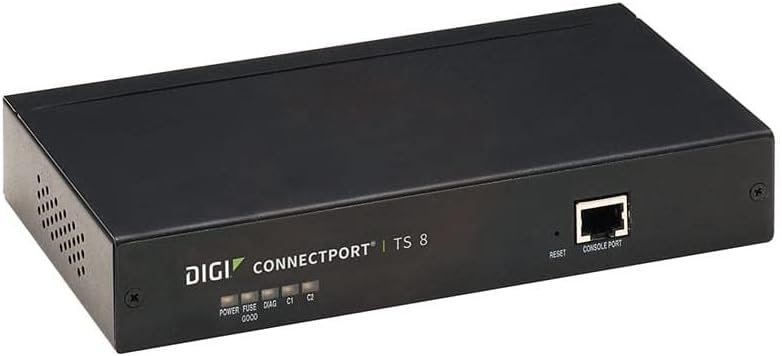
Figure 1: Front panel of the Digi Connectport TS 8. Visible elements include the product branding, five LED indicators for power, fuse status, diagnostics, and two communication channels (C1, C2). A reset button and a console port are also present on the right side of the front panel.
2.3 Erstkonfiguration
After connecting the device, power it on. The device can typically be configured via a web interface or through the console port. Refer to the device's network configuration guide for detailed instructions on accessing the web interface or using the command-line interface via the console port to set up network parameters and serial port settings.
3. Bedienungsanleitung
3.1 Ein-/Ausschalten
- Einschalten: Connect the power adapter. The "POWER" LED indicator on the front panel should illuminate.
- Ausschalten: Disconnect the power adapter from the device or the power outlet.
3.2 Statusanzeigen
The front panel features several LED indicators to provide operational status at a glance:
- LEISTUNG: Zeigt an, dass das Gerät mit Strom versorgt wird.
- FUSE GOOD: Indicates the internal fuse is operational.
- DIAG: Diagnostic indicator, typically flashes during boot-up and indicates status or errors.
- C1, C2: Communication indicators for specific serial ports or internal processes. Refer to the detailed product documentation for specific interpretations.
3.3 Accessing Serial Devices
Once configured, serial devices connected to the Connectport TS 8 can be accessed over the network using various methods, including:
- TCP/IP Sockets: Direct TCP or UDP connections to specific port numbers associated with each serial port.
- Serial over IP (SoIP) Software: Using specialized software on a host computer to create virtual serial ports that map to the physical serial ports on the Connectport TS 8.
- Telnet/SSH: For command-line access to the device itself or to serial devices configured for raw data passthrough.
4. Wartung
4.1 Firmware-Updates
Überprüfen Sie regelmäßig die Herstellerangaben. website for firmware updates. Firmware updates can provide new features, performance enhancements, and security patches. Follow the instructions provided with the firmware update package carefully to avoid damaging the device.
4.2 Reinigung
Ensure the device is powered off and disconnected from all power sources before cleaning. Use a soft, dry cloth to wipe the exterior of the device. Do not use liquid cleaners or aerosol sprays directly on the unit.
4.3 Umweltaspekte
Operate the device within its specified temperature and humidity ranges. Ensure adequate ventilation around the unit to prevent overheating. Avoid exposing the device to direct sunlight, excessive dust, or moisture.
5. Fehlerbehebung
This section provides solutions to common issues you might encounter with the Digi Connectport TS 8.
5.1 Kein Strom
- Symptom: Die POWER-LED ist aus.
- Aktion: Verify the power adapter is securely connected to both the device and a working power outlet. Check the power outlet with another device. If the FUSE GOOD LED is off, the internal fuse may need inspection by qualified personnel.
5.2 Keine Netzwerkverbindung
- Symptom: Cannot access the device via its IP address or network tools.
- Aktion: Ensure the Ethernet cable is properly connected. Check the link/activity LEDs on the Ethernet port. Verify network settings (IP address, subnet mask, gateway) are correctly configured on the device and match your network. Ping the device's IP address from a computer on the same network.
5.3 Serial Device Not Responding
- Symptom: Data is not being transmitted or received from a connected serial device.
- Aktion: Verify the serial cable connection. Check the serial port configuration (baud rate, data bits, parity, stop bits, flow control) on both the Connectport TS 8 and the serial device. Ensure the correct serial port is being accessed over the network.
5.4 Geräte-Reset
The device features a reset button on the front panel. Pressing this button typically initiates a soft reboot. For a factory reset, consult the detailed product documentation, as this often involves a specific sequence or holding the button for an extended period, which will erase all custom configurations.
6. Spezifikationen
| Besonderheit | Detail |
|---|---|
| Modellnummer | 70002323 |
| Technische Daten | 10.5 x 7.75 x 3.75 Zoll |
| Artikelgewicht | 2.73 Pfund (1.24 Kilogramm) |
| Anzahl der Ports | 8 (Serial) |
| Konnektivitätstechnologie | Ethernet |
| Kompatible Geräte | Personal Computer, Serial Devices |
| Betriebssystem | Digi's proprietary firmware |
| Security Protocol | WPS (Wireless Protected Setup - Note: This might be a misclassification from Amazon's data for a wired device, but I'll include it as provided in the source data. For a serial server, this usually refers to network security features.) |
| Hersteller | DIGI INTERNATIONAL |
7. Garantie und Support
7.1 Produktgarantie
This product is covered by a limited warranty provided by the manufacturer, DIGI INTERNATIONAL. For specific warranty terms, duration, and conditions, please refer to the warranty card included with your product or visit the official DIGI INTERNATIONAL webBewahren Sie Ihren Kaufbeleg für Garantieansprüche auf.
7.2 Technischer Support
For technical assistance, troubleshooting beyond this manual, or inquiries regarding product functionality, please contact DIGI INTERNATIONAL customer support. Support contact information can typically be found on the manufacturer's website or in the documentation accompanying the product.
Before contacting support, please have your product model number (70002323) and a detailed description of the issue ready.


