Einführung
Vielen Dank für Ihren Einkauf.asing the Optimus F-1760 16-inch Wave Oscillating Stand Fan. This manual provides important information regarding the safe operation, assembly, maintenance, and troubleshooting of your fan. Please read these instructions thoroughly before use and retain them for future reference.

Image: The Optimus F-1760 stand fan positioned in a bedroom, showcasing seine Gestaltung und Größe im Verhältnis zu Möbeln.
Wichtige Sicherheitshinweise
Beim Gebrauch von Elektrogeräten sollten zur Verringerung der Gefahr von Bränden, Stromschlägen und Verletzungen immer grundlegende Vorsichtsmaßnahmen beachtet werden. Dazu gehören die folgenden:
- Lesen Sie alle Anweisungen, bevor Sie diesen Ventilator verwenden.
- Verwenden Sie diesen Ventilator nur wie in dieser Bedienungsanleitung beschrieben. Andere, nicht empfohlene Verwendungszwecke können zu Bränden, Stromschlägen oder Verletzungen führen.
- Um einen Stromschlag zu vermeiden, stellen Sie den Ventilator nicht ins Fenster, tauchen Sie das Gerät, den Stecker oder das Kabel nicht in Wasser und besprühen Sie es nicht mit Flüssigkeiten.
- Bei der Benutzung von Geräten durch oder in der Nähe von Kindern ist eine genaue Aufsicht erforderlich.
- Unplug fan from outlet when not in use, when moving fan from one location to another, and before cleaning.
- Do not operate fan in the presence of explosive and/or flammable fumes.
- Platzieren Sie den Ventilator oder andere Teile nicht in der Nähe von offenen Flammen, Koch- oder anderen Heizgeräten.
- Do not operate fan with a damaged cord or plug, or after the fan malfunctions or has been dropped or damaged in any manner.
- Vermeiden Sie den Kontakt mit beweglichen Teilen.
- Zum Trennen den Stecker greifen und aus der Steckdose ziehen. Niemals am Kabel ziehen.
- Immer auf einer trockenen, ebenen Oberfläche verwenden.
- Hängen oder montieren Sie den Ventilator nicht an einer Wand oder Decke.
- Nicht ohne ordnungsgemäß angebrachte Lüftergitter betreiben.
- This product employs overload protection (fuse). A blown fuse indicates an overload or short-circuit situation. If the fuse blows, unplug the product from the outlet. Replace the fuse as per the servicing instructions (follow product marking for proper fuse rating) and check the product. If the replacement fuse blows, a short-circuit may be present and the product should be discarded or returned to an authorized service facility for examination and/or repair.
Einrichtung und Montage
The Optimus F-1760 fan requires minimal assembly. Ensure all components are present and undamaged before proceeding.
- Basismontage: Attach the weighted base legs to the main pole. Ensure they are securely fastened to provide stability. The base is designed to be sturdy, with weights at the ends of the feet.
- Höhenverstellung: The fan's height can be adjusted. Loosen the height adjustment knob on the pole, extend or retract the pole to the desired height, and then securely tighten the knob.
- Lüfterkopfaufsatz: Ensure the fan head is securely attached to the top of the pole. The motor housing and fan blade are plastic, while the grill is metal.
- Platzierung: Place the fan on a dry, level surface. Ensure there is adequate space around the fan for proper air circulation and oscillation.
Bedienungsanleitung
The Optimus F-1760 fan offers multiple control options and features for customized comfort.
Bedienfeld
The fan features a 4-position push-button switch on the pole for basic operation.
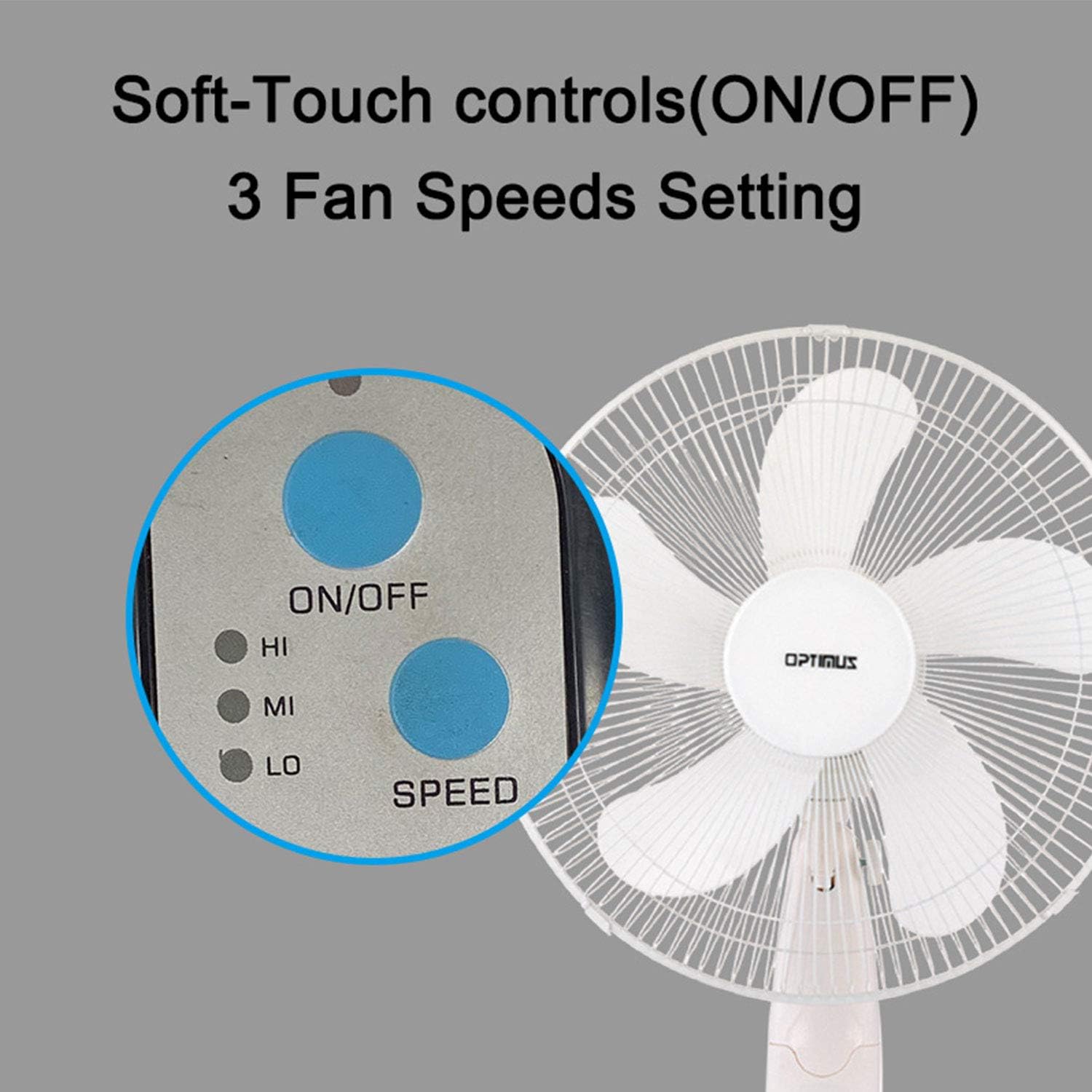
Image: The fan's soft-touch control panel, showing buttons for ON/OFF and SPEED, with indicators for High (HI), Medium (MI), and Low (LO) fan speeds.
- EIN/AUS: Drücken Sie , um den Lüfter ein- oder auszuschalten.
- Geschwindigkeitseinstellungen: Select from Low, Medium, or High speeds. The 3-speed, energy-saving, whisper-quiet operation motor provides efficient airflow.
Fernbedienung
The fan comes with a remote control for convenient operation from a distance. (Batteries not included).

Image: The remote control for the fan, featuring buttons for Mode, Time, Speed, and ON/OFF functions.
- EIN/AUS: Schaltet den Lüfter ein oder aus.
- GESCHWINDIGKEIT: Cycles through the three fan speeds (Low, Medium, High).
- MODUS: Selects between different wind modes.
- ZEIT: Activates and sets the shut-off timer.
Windmodi
The fan offers three distinct wind modes to suit your preference:

Image: The fan's control panel highlighting the MODE button and indicators for Normal, Natural, and Sleep wind modes.
- Normalmodus: The fan blows at a constant speed based on your selected setting.
- Natürlicher Modus: The fan speed fluctuates to mimic a natural breeze.
- Schlafmodus: The fan operates at a lower, quieter speed, ideal for sleeping, with gentle speed variations.
Schwingung
The F-1760 features unique wave oscillation for comprehensive air distribution.

Image: A diagram illustrating the fan's capability for both vertical (up/down) and horizontal (left/right) wave oscillation, providing wider air coverage.
- Up/Down & Left/Right Wave Oscillating: Activates a unique oscillation pattern that moves the fan head both horizontally and vertically, distributing air throughout the room.
- Um die Schwingung zu stoppen, drücken Sie die Schwingungstaste erneut.
Timerfunktion
Stellen Sie den Ventilator so ein, dass er sich nach einer bestimmten Zeit automatisch ausschaltet.

Image: The fan's control panel showing the TIME button and indicators for 1 hour (1H), 2 hours (2H), and 4 hours (4H) timer settings. The fan can be programmed for up to 7 hours.
- The timer can be set for 1, 2, 4, or up to 7 hours. Press the TIME button repeatedly to cycle through the desired duration.
Wartung und Reinigung
Regelmäßige Reinigung trägt dazu bei, die Leistung des Ventilators aufrechtzuerhalten und seine Lebensdauer zu verlängern.
- Vor der Reinigung: Vor der Reinigung muss der Ventilator immer vom Stromnetz getrennt werden.
- Außenreinigung: Verwenden Sie ein weiches,amp Verwenden Sie ein Tuch, um die Außenflächen des Ventilators abzuwischen. Verwenden Sie keine Scheuermittel oder Lösungsmittel.
- Grillreinigung: The metal grill can be cleaned with a soft brush or vacuum cleaner to remove dust. For thorough cleaning, the grill may need to be carefully removed.
- Klingenreinigung: If necessary, the fan blades can be cleaned. Ensure the fan is completely off and unplugged. The care instructions specify "Hand Wash" for components.
- Lagerung: Bei längerer Nichtbenutzung sollte der Ventilator an einem kühlen, trockenen Ort, vorzugsweise in seiner Originalverpackung, aufbewahrt werden.
Fehlerbehebung
| Problem | Mögliche Ursache | Lösung |
|---|---|---|
| Der Ventilator schaltet sich nicht ein. | No power supply. Blown fuse. | Ensure the fan is plugged into a working outlet. Check the fuse in the plug and replace if necessary (refer to safety instructions for fuse replacement). |
| Fan operates but air movement is weak. | Low speed setting. Dust accumulation on blades/grill. | Increase the fan speed. Clean the fan blades and grills as per maintenance instructions. |
| Die Fernbedienung funktioniert nicht. | Dead batteries. Obstruction between remote and fan. | Replace batteries in the remote control. Ensure a clear line of sight between the remote and the fan's receiver. |
| Fan changes speed automatically or unexpectedly. | Interference from other remote controls (e.g., TV remote). | This fan may respond to frequencies from other remote controls. Try operating the fan manually or repositioning the fan/other devices to minimize interference. |
| Fan makes clicking noises during oscillation. | Normal operation of oscillation gears. | A slight clicking noise from the oscillation gears can occur during normal operation. If the noise is excessive or new, ensure the fan head is securely attached. |
| Fan feels unstable. | Base not properly assembled or tightened. Uneven surface. | Ensure all base components are securely fastened and the fan is placed on a firm, level surface. |
Technische Daten
- Modellname: F-1760
- Marke: Optimus
- Lüfterdurchmesser: 16 Zoll
- Design des elektrischen Ventilators: Bodenventilator
- Energiequelle: Kabelgebundene Elektrik
- Wastage: 60 Watt
- Bandtage: 6 Volt
- Anzahl der Klingen: 3
- Geschwindigkeitseinstellungen: 3 Umdrehungen pro Minute (Niedrig, Mittel, Hoch)
- Kontrollmethode: Fernbedienung, Druckknopf
- Besondere Merkmale: Up/Down & Left/Right Wave Oscillating, Adjustable Height, Timer Function (up to 7 hours), Wind Modes (Normal, Natural, Sleep)
- Verwendung im Innen- und Außenbereich: Innenbereich
- Artikelgewicht: 9.9 Pfund
- Enthaltene Komponenten: Produkt, Handbuch
Garantieinformationen
This Optimus F-1760 fan comes with a 1 Jahr eingeschränkte Garantie from the date of purchase. This warranty covers defects in materials and workmanship under normal use. It does not cover damage resulting from misuse, accident, alteration, or unauthorized repair. Please retain your proof of purchase for warranty claims.
Kundenservice
For technical assistance, warranty claims, or questions regarding your Optimus F-1760 fan, please contact Optimus customer service. Refer to the product packaging or the official Optimus webDie aktuellsten Kontaktinformationen finden Sie auf dieser Webseite.


