Einführung
The Brookstone Cool It Personal Fan is a portable, battery-powered device designed to provide personal cooling. Its compact size and flexible blades make it suitable for various environments, offering an adjustable airflow for comfort.
Zu den Hauptmerkmalen gehören:
- Portable design for personal use anywhere.
- Adjustable fan speed for customized airflow.
- Flexible, finger-safe blades for enhanced safety.
- Includes a lanyard for hands-free carrying.
- Betrieb mit 4 AA-Batterien (nicht im Lieferumfang enthalten).
Aufstellen
1. Einlegen der Batterie
The Brookstone Cool It Personal Fan requires 4 AA batteries for operation. Batteries are not included with the product.
- Locate the battery compartment cover on the back of the fan handle.
- Schieben oder lösen Sie die Abdeckung vorsichtig, um das Fach zu öffnen.
- Legen Sie 4 AA-Batterien ein und achten Sie dabei auf die richtige Polarität (+ und -), wie im Batteriefach angegeben.
- Bringen Sie die Abdeckung des Batteriefachs wieder an und achten Sie darauf, dass sie fest verschlossen ist.

Abbildung: Seite view of the fan, illustrating the general area for battery access.
2. Lanyard-Befestigung
A lanyard is included for convenient, hands-free carrying.
- Locate the small loop or attachment point at the top of the fan handle.
- Thread the lanyard through this loop and secure it according to the lanyard's design.
Bedienungsanleitung
Ein-/Ausschalten und Geschwindigkeitseinstellung
The fan features a variable speed control for customized airflow.
- To turn the fan on, rotate the control dial, typically located on the handle, clockwise.
- Continue rotating the dial clockwise to increase the fan speed.
- To decrease the fan speed, rotate the dial counter-clockwise.
- To turn the fan off, rotate the dial fully counter-clockwise until it clicks into the 'off' position.

Bild: Vorderseite view of the fan, highlighting the fan blades and the control dial on the handle.
Verwendung des integrierten Ständers
The fan includes a small integrated stand for tabletop use.
- Locate the stand mechanism on the bottom or side of the fan handle.
- Extend or unfold the stand until it locks into position, allowing the fan to sit upright on a flat surface.
- Ensure the fan is stable before use.
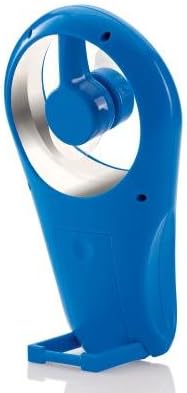
Abbildung: Seite view of the fan with its integrated stand extended for tabletop use.
Wartung
Reinigung
To maintain optimal performance and appearance, clean the fan periodically.
- Ensure the fan is turned off and batteries are removed before cleaning.
- Wischen Sie die Außenflächen mit einem weichen, damp Tuch. Keine Scheuer- oder Lösungsmittel verwenden.
- The flexible blades can be gently wiped if dust accumulates. Avoid bending them excessively.
- Tauchen Sie den Ventilator nicht in Wasser oder andere Flüssigkeiten.
Batteriewechsel
Replace batteries when the fan's performance diminishes or it stops working.
- Befolgen Sie die im Abschnitt „Einrichtung“ beschriebenen Schritte zur Installation der Batterie.
- Always replace all 4 AA batteries at the same time with new ones.
- Mischen Sie keine alten und neuen Batterien oder verschiedene Batterietypen.
- Entsorgen Sie gebrauchte Batterien verantwortungsvoll gemäß den örtlichen Vorschriften.
Fehlerbehebung
| Problem | Mögliche Ursache | Lösung |
|---|---|---|
| Der Ventilator schaltet sich nicht ein. | Die Batterien sind leer oder falsch eingelegt. | Batteriepolung prüfen. Durch neue AA-Batterien ersetzen. |
| Geringer Luftdurchsatz oder schwache Lüfterdrehzahl. | Batteries are low. Speed dial is set too low. | Replace batteries. Rotate the control dial clockwise to increase speed. |
| Der Ventilator macht ungewöhnliche Geräusche. | Obstruction near blades. Loose battery cover. | Ensure no foreign objects are near the blades. Check if battery cover is secure. |
Technische Daten
- Marke: Brookstone
- Modellname: Cool It
- Artikelmodellnummer: 883594041181
- Energiequelle: Batteriebetrieben
- Batterien: 4 x AA (nicht im Lieferumfang enthalten)
- Kontrollmethode: Variable Dial Control
- Besondere Merkmale: Portable, Flexible Blades, Integrated Stand
- Enthaltene Komponenten: Schlüsselband
- Produktabmessungen: 4 x 2 x 7 Zoll (L x B x H)
- Artikelgewicht: 8 Unzen (ohne Batterien)
- Verwendung im Innen- und Außenbereich: Im Freien
Garantie und Support
Warranty information for the Brookstone Cool It Personal Fan is not provided within this manual. For details regarding warranty coverage, product support, or service inquiries, please refer to the official Brookstone webWebsite oder wenden Sie sich direkt an den Kundendienst.
You may find additional information and contact options on the Brookstone Store auf Amazon.


