Einführung
This manual provides comprehensive instructions for the safe and efficient use of your BlackBerry HS-300 Wireless Bluetooth Headset. Please read this manual thoroughly before operating the device and retain it for future reference. The BlackBerry HS-300 is designed for hands-free communication with compatible Bluetooth-enabled devices.
Packungsinhalt
Überprüfen Sie, ob Ihr Paket die folgenden Artikel enthält:
- BlackBerry HS-300 Wireless Bluetooth Headset
- Ear hook (optional, for secure fit)
- Ear gels/tips (various sizes for comfort)
- Ladekabel
- Benutzerhandbuch (dieses Dokument)
Gerät überview
Familiarize yourself with the components of your BlackBerry HS-300 headset.
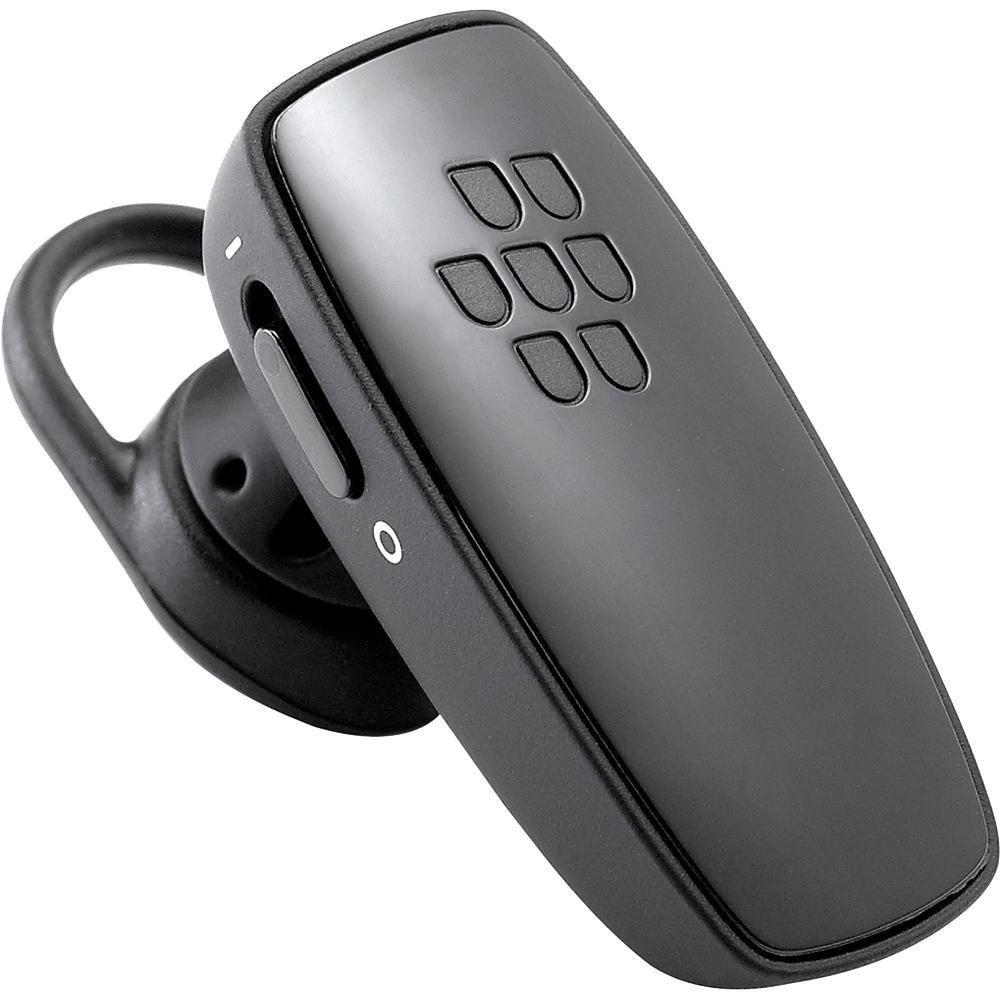
Bild 1: Front view of the BlackBerry HS-300 Wireless Bluetooth Headset. The image displays the main body of the headset, featuring the BlackBerry logo (seven-dot pattern) on the front surface. A slender button, likely for volume control or multi-function, is visible on the side. An ear hook is attached, designed to secure the headset over the ear. A small indicator light is also present near the button.
- Multifunktionstaste: Used for answering/ending calls, voice commands, and pairing.
- Tasten zur Lautstärkeregelung: Adjusts call and media volume.
- LED-Anzeigelampe: Zeigt den Status an (Stromversorgung, Kopplung, Ladevorgang).
- Mikrofon: Captures your voice during calls.
- Stromschalter: Schaltet das Headset ein oder aus.
- Ladeanschluss: Connects to the charging cable.
Aufstellen
1. Laden des Headsets
Before initial use, fully charge your headset. The HS-300 features rapid charge capabilities.
- Connect the charging cable to the headset's charging port and to a compatible USB power source.
- The LED indicator will show the charging status (e.g., solid red for charging, solid blue for fully charged).
- Eine vollständige Ladung ermöglicht bis zu 4 Stunden Gesprächszeit.
2. Kopplung mit einem Bluetooth-Gerät
To use your headset, it must be paired with a Bluetooth-enabled phone or device.
- Stellen Sie sicher, dass das Headset ausgeschaltet ist.
- Press and hold the Multi-function Button until the LED indicator flashes blue and red alternately. This indicates pairing mode.
- On your phone, enable Bluetooth and search for new devices.
- Select "BlackBerry HS-300" from the list of available devices.
- Wenn Sie zur Eingabe eines Passcodes aufgefordert werden, geben Sie "0000" (vier Nullen) ein.
- Nach erfolgreicher Kopplung blinkt die LED-Anzeige periodisch blau.
Bedienungsanleitung
Ein-/Ausschalten
- So schalten Sie das Gerät ein: Slide the Power Switch to the 'On' position. The LED indicator will flash blue.
- So schalten Sie das Gerät aus: Slide the Power Switch to the 'Off' position. The LED indicator will turn off.
Anrufe tätigen und empfangen
- Anruf annehmen: Drücken Sie einmal die Multifunktionstaste.
- Anruf beenden: Drücken Sie während eines Anrufs einmal die Multifunktionstaste.
- Anruf ablehnen: Die Multifunktionstaste etwa 2 Sekunden lang gedrückt halten.
- Einen Anruf tätigen: Dial the number on your phone. The call will automatically transfer to the headset if connected.
- Voice Dialing (if supported by phone): Press the Multi-function Button once when not on a call.
Lautstärkeregelung
- Use the Volume Control Buttons on the headset to adjust the call or media volume.
Wartung
- Reinigen Sie das Headset regelmäßig mit einem weichen, trockenen Tuch.
- Avoid exposing the headset to extreme temperatures, moisture, or corrosive substances.
- Bewahren Sie das Headset bei Nichtgebrauch an einem kühlen, trockenen Ort auf.
- Versuchen Sie nicht, das Headset zu zerlegen oder zu verändern, da dies zum Erlöschen der Garantie führt und Schäden verursachen kann.
Fehlerbehebung
| Problem | Lösung |
|---|---|
| Das Headset lässt sich nicht einschalten. | Ensure the headset is charged. Connect it to a power source using the charging cable. |
| Ich kann das Headset nicht mit meinem Telefon koppeln. |
|
| Kein Ton oder schlechte Tonqualität. |
|
| Das Headset verliert häufig die Verbindung. |
|
Technische Daten
| Besonderheit | Detail |
|---|---|
| Modellnummer | HS-300 |
| Konnektivität | Bluetooth Wireless (Version 2.1) |
| Gesprächszeit | Bis zu 4 Stunden |
| Laden | Rapid charge capable |
| Bedienelemente | Volume control, Multi-function button |
| Mikrofon | Integriert |
| Formfaktor | On-ear (single ear) |
| Gewicht | Ungefähr 3.2 Unzen |
| Maße | 2.5 x 2 x 6.5 Zoll (ungefähr) |
Garantie und Support
For warranty information and technical support, please refer to the documentation provided at the time of purchase or visit the official BlackBerry support webBewahren Sie Ihren Kaufbeleg für Garantieansprüche auf.
Online-Hilfe: www.blackberry.com/support


