Sony SANS300

Sony SA-NS300 Wireless Multi-Room Audio Speaker User Manual

Model: SA-NS300 (SANS300)

Einführung

The Sony SA-NS300 is a compact wireless multi-room audio speaker designed to stream music wirelessly within your home environment. It integrates with your home network to play audio from compatible devices such as a PC or a Sony Blu-ray Disc home theater system. This speaker supports multi-room audio playback, allowing you to enjoy your music in various rooms by adding more compatible speakers.

This manual will guide you through the setup, operation, and maintenance of your SA-NS300 speaker to ensure optimal performance and longevity.

Sicherheitshinweise

Wichtige Sicherheitshinweise

  • Lesen Sie diese Anweisungen sorgfältig durch, bevor Sie das Gerät in Betrieb nehmen.
  • Bewahren Sie diese Anleitung zum späteren Nachschlagen auf.
  • Beachten Sie alle Warnhinweise auf dem Produkt und in der Bedienungsanleitung.
  • Befolgen Sie alle Anweisungen.
  • Verwenden Sie dieses Gerät nicht in der Nähe von Wasser.
  • Nur mit trockenem Tuch reinigen.
  • Die Lüftungsöffnungen dürfen nicht blockiert werden. Die Installation muss gemäß den Anweisungen des Herstellers erfolgen.
  • Installieren Sie das Gerät nicht in der Nähe von Wärmequellen wie Heizkörpern, Heizregistern, Öfen oder anderen Geräten (einschließlich ampKonverter (Lüfter), die Wärme erzeugen.
  • Schützen Sie das Netzkabel vor Beschädigungen oder Beschädigungen durch Fußgänger, insbesondere an den Steckern, Steckdosen und an der Stelle, an der es aus dem Gerät austritt.
  • Verwenden Sie nur vom Hersteller angegebene Zusatzgeräte/Zubehör.
  • Trennen Sie das Gerät bei Gewitter oder längerer Nichtbenutzung vom Stromnetz.
  • Überlassen Sie alle Wartungsarbeiten qualifiziertem Servicepersonal. Eine Wartung ist erforderlich, wenn das Gerät auf irgendeine Weise beschädigt wurde, z. B. wenn das Netzkabel oder der Stecker beschädigt sind, Flüssigkeit in das Gerät verschüttet wurde oder Gegenstände hineingefallen sind, das Gerät Regen oder Feuchtigkeit ausgesetzt war, nicht normal funktioniert oder fallengelassen wurde.

Lieferumfang

Upon unpacking your Sony SA-NS300, ensure all components are present:

Note: The SA-NS300 includes an integrated subwoofer.

Aufstellen

1. Physische Platzierung

Place the speaker on a stable, flat surface. Ensure there is adequate ventilation around the unit. Avoid placing it in direct sunlight, near heat sources, or in excessively humid or dusty environments. For optimal wireless performance, position the speaker within reasonable range of your Wi-Fi router.

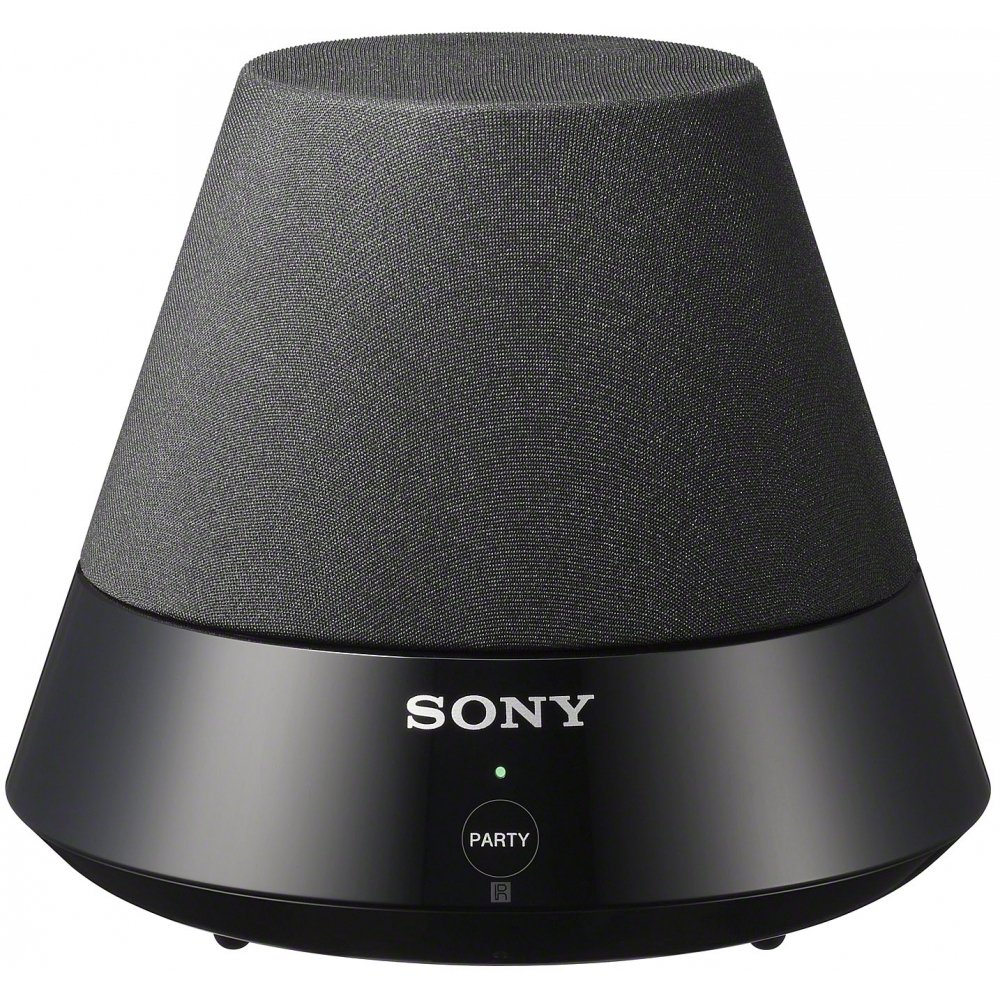
Sony SA-NS300 Wireless Multi-Room Audio Speaker, front view

Bild: Vorderseite view of the Sony SA-NS300 Wireless Multi-Room Audio Speaker, showing the speaker grille and the control panel with the Sony logo and 'PARTY' button.

2. Stromanschluss

  1. Connect the supplied AC power adapter to the DC IN jack on the rear of the speaker.
  2. Stecken Sie den Netzadapter in eine Wandsteckdose.
  3. The power indicator on the speaker will illuminate, indicating it is receiving power.

3. Network Connection (Wi-Fi Setup)

The SA-NS300 connects to your home network via Wi-Fi. You will need your Wi-Fi network name (SSID) and password.

  1. Ersteinrichtung: For the first-time setup, it is recommended to use the Sony Network Audio Remote application on your smartphone or tablet, or follow the on-screen instructions if connecting via a compatible Sony Blu-ray Disc player or TV.
  2. WPS (Wi-Fi Protected Setup): If your router supports WPS, press the WPS button on your router, then press and hold the "WPS" button (often combined with another function or indicated by an icon) on the SA-NS300 speaker within two minutes. The network indicator will show connection status.
  3. Manuelle Einrichtung: Refer to the detailed instructions in the Sony Network Audio Remote application or your compatible Sony device's manual for manual Wi-Fi configuration.

Ensure your Wi-Fi network is active and within range for a stable connection.

4. Erstkonfiguration

Once connected to the network, the speaker may require a brief update or configuration. Follow any prompts from the Sony Network Audio Remote app or your connected Sony device.

Bedienungsanleitung

1. Anschluss von Audioquellen

The SA-NS300 is designed to stream audio from various sources over your Wi-Fi network.

  • From a PC: You can stream music from your computer using compatible software, such as Windows Media Player 11 or later, or a DLNA-compliant media server (e.g., Twonky). Ensure your PC is connected to the same Wi-Fi network as the speaker.
  • From a Sony Blu-ray Disc Home Theater System: If you have a compatible Sony Blu-ray Disc home theater system, you can stream audio directly from it to the SA-NS300. Refer to your home theater system's manual for specific instructions on enabling network audio streaming.
  • DLNA-Kompatibilität: The speaker is DLNA (Digital Living Network Alliance) compliant, allowing it to play media from other DLNA-certified devices on your network.

2. PartyStream Playback

PartyStream allows you to synchronize music playback across multiple compatible Sony network speakers in different rooms.

  1. Initiate music playback on your primary Sony network device (e.g., Blu-ray player or another network speaker).
  2. On the SA-NS300, press the PARTY button. The indicator light will change to confirm it has joined the PartyStream group.
  3. To exit PartyStream, press the PARTY erneut die Taste.

Note: PartyStream functionality may vary depending on the source device and content. Some internet streaming services may not support PartyStream due to content protection or licensing.

3. Bedienelemente und Anzeigen

The SA-NS300 features a minimalist control panel.

  • POWER (I/O) Button: Located on the side/rear, this button turns the speaker on or off.
  • PARTY Button: Located on the front panel, used to join or leave a PartyStream group.
  • Lautstärkeregler (+/-): Typically located near the power button or controlled via the Network Audio Remote app.
  • Indikatoren: Various LED indicators (e.g., Power, Network, Party) provide status information. Refer to the full manual for detailed indicator meanings.

Wartung

Reinigen des Geräts

  • Wischen Sie die Außenseite des Lautsprechers mit einem weichen, trockenen Tuch ab.
  • Verwenden Sie keine Scheuerschwämme, Scheuerpulver oder Lösungsmittel wie Alkohol oder Benzol, da diese die Oberfläche beschädigen können.
  • Avoid spraying water or cleaning solutions directly onto the speaker.

Firmware-Aktualisierungen

Sony may release firmware updates to improve performance or add new features. Ensure your speaker is connected to the internet to receive these updates. Updates are typically performed automatically or prompted via the Network Audio Remote app.

Fehlerbehebung

If you encounter issues with your SA-NS300 speaker, refer to the following common problems and solutions:

ProblemMögliche Ursache/Lösung
Kein Strom
  • Ensure the AC power adapter is securely connected to the speaker and a working wall outlet.
  • Überprüfen Sie, ob die Steckdose funktionsfähig ist.
Kein Ton
  • Check the volume level on the speaker and the source device.
  • Ensure the speaker is properly connected to your Wi-Fi network.
  • Verify that the correct audio source is selected on your streaming device.
  • Restart the speaker and the source device.
Keine Verbindung zum WLAN-Netzwerk möglich
  • Vergewissern Sie sich, dass Ihr WLAN-Router eingeschaltet ist und ordnungsgemäß funktioniert.
  • Verify the Wi-Fi network name (SSID) and password are correct.
  • Move the speaker closer to the Wi-Fi router to improve signal strength.
  • Restart your Wi-Fi router and the speaker.
  • If using WPS, ensure the WPS process is completed within the time limit.
Music playback is intermittent or drops out
  • Poor Wi-Fi signal strength. Move the speaker closer to the router or reduce interference.
  • Network congestion. Try reducing the number of devices using your Wi-Fi network.
  • Interference from other wireless devices (e.g., cordless phones, microwaves).
  • Stellen Sie sicher, dass die Firmware Ihres Routers auf dem neuesten Stand ist.
PartyStream not working with certain content
  • Some internet streaming services or protected content may not support PartyStream functionality.
  • Ensure all PartyStream-enabled devices are on the same network and compatible.

Weitere Unterstützung erhalten Sie beim Sony-Support. webWebsite oder wenden Sie sich an den Kundendienst.

Technische Daten

BesonderheitDetail
MarkeSony
ModellnummerSA-NS300 (SANS300)
LautsprechertypMulti-Room, Subwoofer
KonnektivitätstechnologieKabellos (Wi-Fi)
Drahtlose KommunikationstechnologieW-lan
AudioausgabemodusStereo
Maximale Lautsprecherausgangsleistung6 Watt
Subwoofer-Durchmesser5 Zoll
Artikelgewicht1.5 Pfund (ca. 0.68 kg)
Produktabmessungen (L x B x H)5.67 x 4.87 x 5.67 Zoll (ca. 14.4 x 12.4 x 14.4 cm)
StromquelleKabelgebundene Elektrik
Empfohlene VerwendungHome entertainment, music streaming, living room audio, computer audio enhancement
KontrollmethodeRemote (via app/compatible device)
Verwendung im Innen- und AußenbereichInnenbereich

Garantie und Support

Garantieinformationen

This product is covered by a limited warranty provided by Sony. The specific terms and duration of the warranty may vary by region. Please refer to the warranty card included with your product or visit the official Sony support webWebsite für detaillierte Garantieinformationen.

Bewahren Sie Ihren Kaufbeleg für Garantieansprüche auf.

Kundenservice

For technical support, troubleshooting assistance, or service inquiries, please visit the official Sony support website or contact Sony customer service in your region. You can typically find contact information and support resources by searching for "Sony Support" and your product model number (SA-NS300).

Online resources often include FAQs, software downloads, and additional troubleshooting guides.

Zugehörige Dokumente - SANS300

Vorview Regulamin promocji: Kaufen Sie eine Soundbar von Sony und kaufen Sie ein Akzesorium für 1 PLN
Oficjalny regulamin promocji TERG SA (Medienexperte) „Kup Soundbar Sony i zyskaj akcesorium już od 1 zł“. Szczegóły dotyczące produktów, das i zasad uczestnictwa.
Vorview Sony HT-ST9 Service Manual - Technical Guide
Official service manual for the Sony HT-ST9 Sound Bar (SA-ST9). Provides detailed technical information, repair procedures, schematics, and troubleshooting for service professionals.
Vorview Sony HT-Z9F/Z9RF/ZF9 Servicehandbuch – Explosionszeichnung Views und Spezifikationen
Ausführliches Servicehandbuch für die Sony Soundbar-Systeme HT-Z9F, HT-Z9RF und HT-ZF9. Enthält umfassende Spezifikationen, Modellbezeichnungen der Komponenten und Explosionszeichnungen. view Diagramme mit Teilebeschreibungen zur Fehlersuche und Reparatur.
Vorview Sony HT-SC40 Soundbar Bedienungsanleitung
Ausführliche Bedienungsanleitung für das Sony HT-SC40 Soundbar-System mit detaillierten Informationen zu Einrichtung, Anschlüssen, Funktionen, Klangeinstellungen, Fehlerbehebung und technischen Spezifikationen.
Vorview Sony SA-WMSP2/WMSP4 Aktiv-Subwoofer – Servicehandbuch
Servicehandbuch für die aktiven Subwoofer Sony SA-WMSP2 und SA-WMSP4 mit detaillierten Spezifikationen, Sicherheitsvorkehrungen, Schaltplänen und Explosionszeichnungen. views und umfassende Listen elektrischer Bauteile.
Vorview Sony SA-RS5 Rücklautsprecher – Bedienungsanleitung – Einrichtung, Anschluss und Fehlerbehebung
Comprehensive operating instructions for the Sony SA-RS5 wireless rear speakers, covering setup, installation, connection, troubleshooting, and specifications. Learn how to integrate these speakers with compatible Sony audio systems for an enhanced surround sound experience.