1. Einleitung
Thank you for choosing the Coleman 12.0 MP Waterproof Digital Still and Video Camera. This camera is designed for capturing high-quality photos and videos in various environments, including underwater up to 33 feet (10 meters). Featuring a 12.0 Megapixel CMOS sensor, 1x optical zoom, and a 2.7-inch LCD screen, it is built to accompany you on your adventures.
To ensure optimal performance and longevity of your camera, please read this manual thoroughly before use and retain it for future reference.
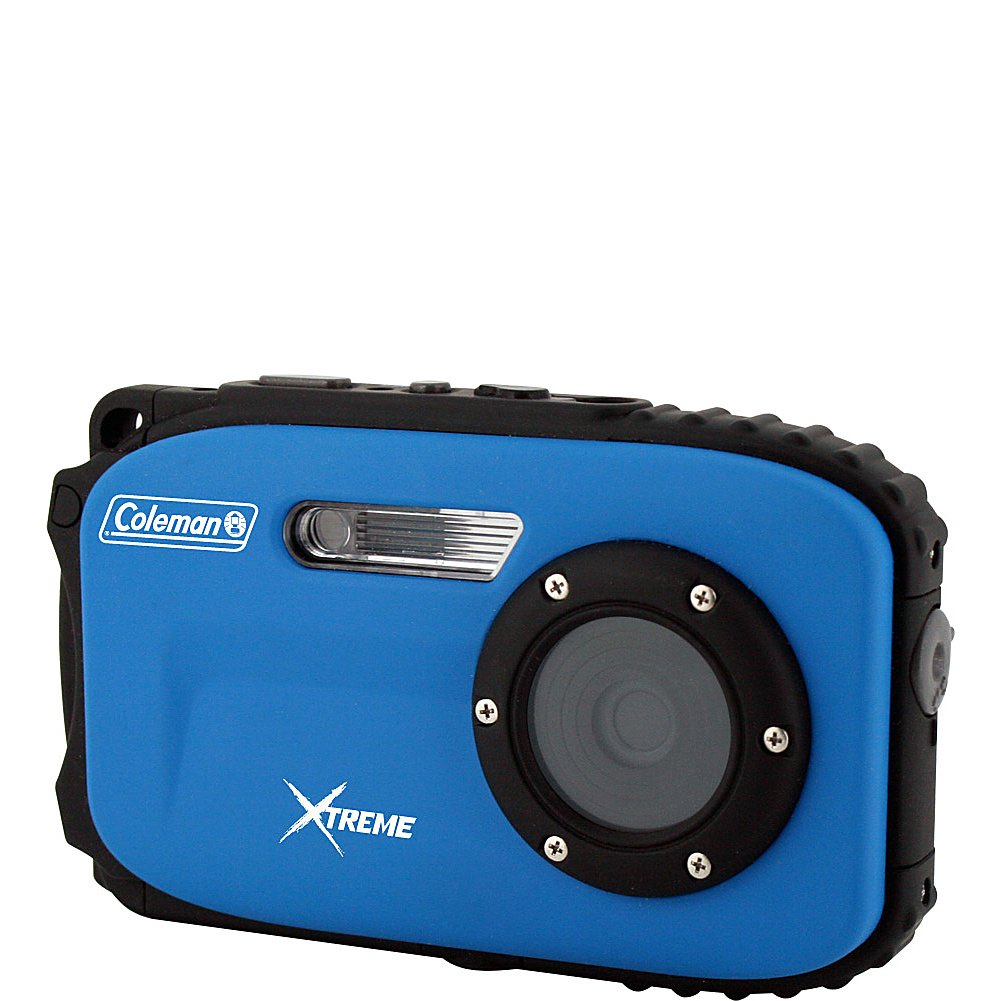
Bild 1.1: Vorderseite view of the Coleman 12.0 MP Waterproof Digital Camera.
2. Sicherheitshinweise
- Wasserdichte Dichtung: Always ensure the battery/memory card compartment door is clean and securely latched before submerging the camera in water. Failure to do so will result in water damage and void the warranty.
- Batteriesicherheit: Use only the specified Li-ion battery. Do not expose batteries to excessive heat or dispose of them in fire.
- Reinigung: After use in saltwater, rinse the camera thoroughly with fresh water and dry it completely before opening any compartments.
- Temperatur: Avoid using or storing the camera in extreme temperatures.
- Auswirkungen: While durable, avoid dropping the camera or subjecting it to strong impacts.
3. Packungsinhalt
Vergewissern Sie sich, dass alle Artikel in Ihrem Kamerapaket enthalten sind:
- Coleman 12.0 Megapixel Xtreme Waterproof Digital Camera (Blue)
- Lithium-Ionen-Akku
- USB 2.0 Kabel
- Image Editing Software (on CD or download link)
- Benutzerhandbuch (dieses Dokument)
4. Kamera überview
Machen Sie sich mit den Tasten und Funktionen der Kamera vertraut:

Abbildung 4.1: Rückseite view der Kamera mit LCD-Bildschirm und Bedientasten.
4.1 Steuertasten
- Netzschalter: Schaltet die Kamera ein oder aus.
- Auslöser: Press halfway to focus, fully to take a picture or start/stop video recording.
- W/T Buttons: Control the digital zoom (Wide/Telephoto).
- Modus-Taste: Switches between different shooting modes (e.g., Photo, Video, Playback).
- Flash-Taste: Cycles through flash modes (e.g., Auto, Fill-in, Off).
- Schaltfläche löschen: Löscht ausgewählte Fotos oder Videos im Wiedergabemodus.
- Menü-Schaltfläche: Öffnet das Einstellungsmenü der Kamera.
- OK-Taste: Confirms selections in the menu or playback.
- Navigationstasten (Auf/Ab/Links/Rechts): Used for menu navigation and quick access to certain functions.
5. Einrichtung
5.1 Einlegen und Laden der Batterie
- Open the battery compartment door on the side/bottom of the camera.
- Insert the provided Li-ion battery, ensuring correct polarity.
- Close the compartment door firmly until it clicks and the lock is engaged.
- Connect the camera to a power source using the USB cable to charge the battery. The charging indicator will illuminate.
- Laden Sie den Akku vor dem ersten Gebrauch vollständig auf.
5.2 Installation der Speicherkarte
The camera supports Micro SD cards up to 8 GB. A memory card is required to store a significant number of photos and videos.
- Open the battery/memory card compartment door.
- Insert the Micro SD card into the designated slot with the contacts facing the correct direction until it clicks into place.
- Schließen Sie die Fachtür fest.
- It is recommended to format the memory card using the camera's menu before first use.
5.3 Erstes Einschalten und Einstellungen
- Zum Einschalten der Kamera die Ein-/Aus-Taste gedrückt halten.
- If prompted, set the date and time using the navigation buttons and confirm with the OK button.
- Navigate through the menu to adjust basic settings such as language, resolution, and scene modes as desired.
6. Bedienung der Kamera
6.1 Fotos aufnehmen
- Turn on the camera. Ensure it is in Photo mode (indicated on the LCD). If not, press the Mode button to switch.
- Nutzen Sie den 2.7-Zoll-LCD-Bildschirm, um Ihr Bild optimal zu gestalten.
- Verwenden Sie die W/T buttons to adjust the digital zoom.
- Press the Shutter button halfway down to allow the camera to focus. The focus indicator will appear.
- Drücken Sie den Auslöser vollständig durch, um das Bild aufzunehmen.
Fotoeinstellungen:
- Szenenmodi: The camera offers 10 scene modes (e.g., Landscape, Macro, Sports) to optimize settings for different shooting conditions. Access these via the Menu.
- Anti-Shake-Technologie: This feature helps reduce blur caused by camera movement. Ensure it is enabled in the settings for clearer images.
- Blitz: Press the Flash button to cycle through available flash options (Auto, Fill-in, Off). Note that the camera has no built-in flash, but uses digital flash modes.
- Self-Timer/Smile Shutter: These features can be activated through the menu for delayed shots or automatic capture when a smile is detected.
6.2 Videos aufnehmen
- Turn on the camera and switch to Video mode using the Mode button.
- Platzieren Sie Ihr Motiv auf dem LCD-Bildschirm.
- Drücken Sie den Auslöser, um die Aufnahme zu starten. Eine Aufnahmeanzeige erscheint auf dem Bildschirm.
- Press the Shutter button again to stop recording. Videos are saved in MP4 format at 1280p resolution.
6.3 Wiedergabemodus
- Press the Mode button to enter Playback mode.
- Verwenden Sie die Navigationsschaltflächen, um durch Ihre Fotos und Videos zu scrollen.
- Drücken Sie die OK-Taste bis view ein Video oder ein Foto vergrößern.
- Zum Löschen eines file, select it and press the Delete button, then confirm.
7. Richtlinien für die Verwendung im wasserdichten Zustand
The Coleman C5WP-BL camera is waterproof up to 33 feet (10 meters). Follow these guidelines for safe underwater use:
- Before Submerging: Ensure the battery/memory card compartment door is completely clean, free of sand or debris, and securely latched. A small particle can compromise the seal.
- Tiefenbegrenzung: Do not exceed the maximum waterproof depth of 33 feet (10 meters).
- Temperatur: Avoid sudden temperature changes when moving the camera from a warm to a cold environment, as this can cause condensation.
- Nach der Unterwasserverwendung: After using the camera in saltwater, rinse it thoroughly with fresh water while the compartment door remains closed. Dry the camera completely with a soft cloth before opening any compartments.
- Auswirkungen vermeiden: Do not drop or hit the camera, especially when underwater, as this can damage the waterproof seals.
8. Wartung
- Reinigung von Linse und Bildschirm: Use a soft, lint-free cloth specifically designed for optical surfaces. Do not use abrasive cleaners.
- Reinigung des Kameragehäuses: Wischen Sie das Kameragehäuse mit einem weichen, fusselfreien Tuch ab.amp Bei hartnäckigem Schmutz eine milde Seifenlösung verwenden und anschließend mit einem sauberen Tuch nachwischen.amp Tuch abwischen und gründlich trocknen.
- Batteriepflege: Store the battery in a cool, dry place when not in use. If storing for extended periods, charge the battery periodically to maintain its life.
- Lagerung: Store the camera in a dry, well-ventilated area away from direct sunlight and extreme temperatures.
9. Fehlerbehebung
| Problem | Lösung |
|---|---|
| Die Kamera lässt sich nicht einschalten. | Stellen Sie sicher, dass der Akku vollständig geladen und richtig eingelegt ist. |
| Photos are blurry or out of focus. | Ensure the camera is held steady. Check if Anti-Shake Technology is enabled. For underwater shots, ensure the lens is clean and free of water droplets. Allow the camera to focus by pressing the shutter button halfway before fully pressing. |
| Speicherkartenfehler. | Ensure the Micro SD card is inserted correctly. Try formatting the card via the camera's menu (this will erase all data). Use a compatible Micro SD card (up to 8 GB). |
| Wasser dringt in das Batteriefach ein. | Immediately remove the battery and memory card. Dry the compartment thoroughly. This indicates the compartment door was not properly sealed or the seal is damaged. Refer to safety information. |
| Slow shutter speed. | This can occur in low light conditions. Ensure adequate lighting or adjust scene modes if available. |
10. Spezifikationen
| Besonderheit | Detail |
|---|---|
| Modellnummer | C5WP-BL |
| Effektive Standbildauflösung | 12 Megapixel |
| Fotosensor-Technologie | CMOS |
| Optischer Zoom | 1x |
| Bildstabilisierung | Digital, optisch |
| Bildschirmgröße | 2.7 inches (LCD) |
| Wasserbeständigkeit | Waterproof up to 33 feet (10 meters) |
| Videoauflösung | 1280p |
| Videoaufnahmeformat | MP4 |
| Compatible Flash Memory | Micro-SD-Karte (bis zu 8 GB) |
| Akku-Typ | Lithium-Ionen |
| Konnektivität | USB 2.0 |
| Artikelgewicht | 6.4 Unzen |
| Aufnahmemodi | 10 scene modes (e.g., Landscape, Macro, Sports) |
| Besondere Merkmale | Self-timer, Smile Shutter |
11. Garantie und Support
11.1 Garantieinformationen
This Coleman camera is covered by a 1 Jahr Herstellergarantie from the date of purchase. This warranty covers defects in materials and workmanship under normal use. It does not cover damage caused by misuse, accident, unauthorized modification, or failure to follow the instructions in this manual, particularly regarding waterproof usage.
11.2 Kundendienst
For technical assistance, warranty claims, or product inquiries, please contact Coleman customer support. Refer to the contact information provided with your product packaging or visit the official Coleman webBesuchen Sie die Website für die aktuellsten Supportinformationen.


