1. Einleitung
The Behringer XENYX 302USB is an ultra-compact, low-noise analog mixer designed for a variety of audio applications, from home recording to live podcasting. It features a high-quality XENYX microphone preamp and a built-in USB/audio interface, allowing direct connection to your computer for recording and playback. Its small footprint makes it ideal for setups where space is limited.

Abbildung 1.1: Oben view of the Behringer XENYX 302USB mixer, showing all controls and inputs/outputs.
2. Hauptmerkmale
- Ultrakompaktes Design: Small footprint (approx. 117 x 135 mm) ideal for portable use or limited desktop space.
- XENYX Mikrofonvorstufeamp: State-of-the-art, phantom-powered microphone preamp for transparent, high-quality audio.
- USB/Audio-Schnittstelle: Built-in stereo USB interface for direct connection to PC or Mac, enabling recording and playback.
- Vielseitige Eingänge: Features an XLR & 1/4-inch combination input, a stereo USB/Line channel, and a dedicated 2-Track input.
- British EQ: Sublimely musical 2-band EQ on the Line/USB channel for sound shaping.
- Flexible Energieversorgung: Can be powered directly via a laptop's USB socket or an included external power adapter.
- Enthaltene Software: Comes with free audio recording, editing, and podcasting software (Tracktion) plus 150 instrument/effect plug-ins.
3. Einrichtung und Anschlüsse
This section details how to connect your XENYX 302USB mixer to various audio sources and destinations.
3.1 Stromanschluss
The 302USB can be powered via its USB port from a computer or by using the included external power adapter. Connect the USB cable to your computer or the power adapter to a suitable power outlet and then to the mixer's USB port.
3.2 Eingangsverbindungen
- MIC-EINGANG: Connect a microphone using an XLR cable to the combination XLR/TRS input. This input provides phantom power for condenser microphones.
- LINE-IN: Connect stereo line-level sources (e.g., keyboard, media player) to the RCA LINE IN jacks.
- 2-TRACK IN: Connect an external playback device (e.g., CD/DVD player, dedicated audio player) to the RCA 2-TRACK IN jacks.
3.3 Ausgangsanschlüsse
- MAIN MIX OUT: Connect these RCA outputs to your monitoring system (e.g., powered speakers, amplifer).
- KOPFHÖRER: Connect headphones to the 3.5mm HEADSET jack.

Figure 3.1: Basic setup diagram showing connections for a microphone, laptop (USB), powered speakers, and a DVD player.

Figure 3.2: Advanced setup diagram illustrating connections for a guitar, keyboard, digital recorder, and headphones.

Figure 3.3: Podcasting setup diagram showing connections for a microphone, laptop (USB), headphones, and an iPod.

Figure 3.4: Studio setup diagram with connections for a microphone, laptop (USB), studio monitors, headphones, a keyboard, and an iPod.
4. Bedienung des Mischpults
Understanding the controls and signal flow is essential for optimal performance.
4.1 Kontrollen überview
- GAIN (MIC): Adjusts the input sensitivity for the microphone channel. Use this to set a healthy signal level without clipping.
- LOW/HIGH (LINE/USB EQ): Two-band equalizer for the Line/USB channel, allowing adjustment of bass and treble frequencies.
- PAN (MIC): Pans the microphone signal between the left and right channels of the main mix.
- BAL (LINE/USB): Balances the stereo signal of the Line/USB channel between left and right.
- MIC Level: Controls the output level of the microphone channel to the main mix.
- LINE/USB Level: Controls the output level of the Line/USB channel to the main mix.
- Hauptmix-Pegel: Controls the overall output level of the main mix to the MAIN MIX OUT jacks.
- TELEFON-Level: Regelt die Lautstärke des Kopfhörerausgangs.
4.2 Indikatoren
- POWER LED: Illuminates when the mixer is receiving power.
- SIG/CLIP LEDs: Indicate signal presence (SIG) and clipping (CLIP) for the left and right channels. Adjust input gain to avoid consistent clipping.
- USB-LED: Illuminates when the USB interface is active and connected to a computer.
4.3 Signal Routing
- LINE IN to USB Play: This switch routes the signal from the LINE IN jacks to the USB output for recording on your computer.
- MAIN MIX to PHONES: This switch routes the main mix signal to the headphones output.
- 2-TRACK to MAIN MIX/PHONES: This switch routes the signal from the 2-TRACK IN to either the main mix or the headphones output, depending on the position.
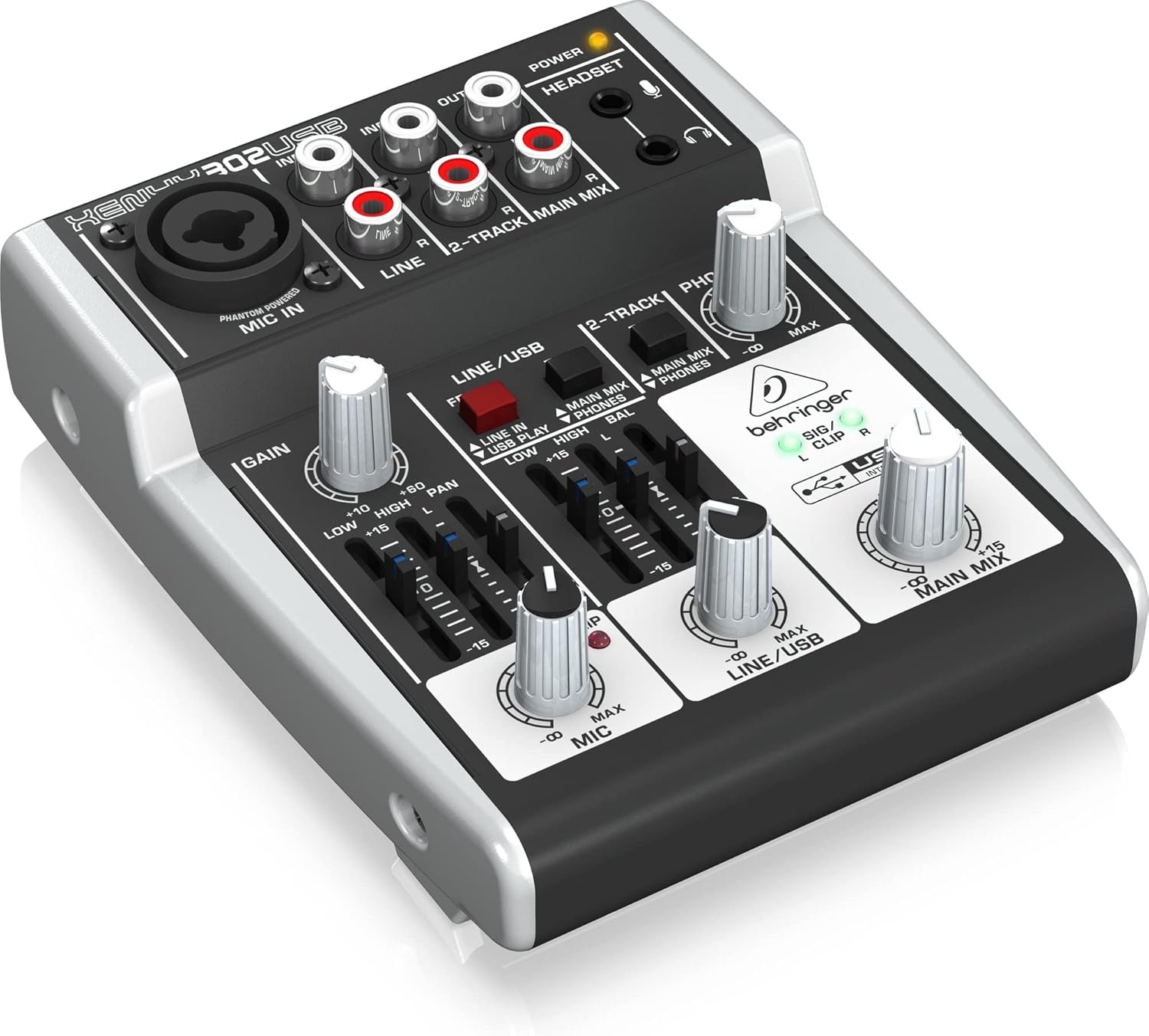
Abbildung 4.1: Schräg view of the mixer, highlighting the various knobs and faders for control.
5. Wartung
Proper care ensures the longevity and performance of your mixer.
- Reinigung: Reinigen Sie die Außenseite des Mixers mit einem weichen, trockenen Tuch. Vermeiden Sie Scheuermittel oder Lösungsmittel.
- Umfeld: Operate and store the mixer in a clean, dry environment, away from direct sunlight, excessive heat, moisture, and dust.
- Belüftung: Sorgen Sie für eine ausreichende Belüftung rund um das Gerät, um eine Überhitzung zu vermeiden.
- Kabelmanagement: Avoid putting strain on cables and connectors. Disconnect cables by pulling the plug, not the cable itself.
6. Fehlerbehebung
If you encounter issues, try these basic troubleshooting steps before seeking professional assistance.
- Keine Tonausgabe:
- Prüfen Sie alle Kabelverbindungen (Eingänge, Ausgänge, Stromversorgung).
- Ensure all level knobs (GAIN, MIC, LINE/USB, MAIN MIX, PHONES) are turned up.
- Verify that your monitoring system (speakers, headphones) is powered on and functioning.
- Check the signal routing switches (e.g., MAIN MIX to PHONES).
- Verzerrter Klang:
- Reduce input GAIN to prevent the CLIP LED from illuminating consistently.
- Lower the channel level or MAIN MIX level.
- Prüfen Sie, ob die Kabel beschädigt sind.
- USB Not Recognized by Computer:
- Stellen Sie sicher, dass das USB-Kabel sowohl mit dem Mischpult als auch mit dem Computer fest verbunden ist.
- Probieren Sie einen anderen USB-Anschluss an Ihrem Computer aus.
- Install the latest drivers from the Behringer webWebsite.
- Starten Sie Ihren Computer und das Mischpult neu.
- Phantom Power Issue:
- Ensure the mixer is powered on. The XENYX 302USB's phantom power is always active on the MIC IN. If a condenser mic isn't working, check the mic and cable.
7. Spezifikationen
| Besonderheit | Spezifikation |
|---|---|
| Technische Daten | 13.59 x 11.4 x 4.6 cm |
| Artikelmodellnummer | 302USB |
| Gehäusematerial | Verbundwerkstoff |
| Farbname | Schwarz |
| Steckertyp | USB; 1 x XLR/TRS; 1 x 3.5mm |
| Hardware-Schnittstelle | USB 2.0 |
| Country Produced In | Deutschland |
| Anzahl der Mischkanäle | 5 |
| Stromquelle | Kabelgebundene Elektrik |
| Bandtage | 15 Volt |
| Artikelgewicht | 380 g |
| Anzahl der Kanäle | 5 |
| Konnektivitätstechnologie | Cable (XLR, TRS, RCA) |
| Ausgangssteckertyp | XLR |
| Audioeingang | XLR (Mono) & Stereo |
| Geräuschpegel | 130 dB |
8. Garantie und Support
Behringer offers a generous 3-Year Warranty program for its products, reflecting confidence in their manufacturing quality. For detailed warranty terms and conditions, please refer to the official Behringer webWebsite.
For technical support, driver downloads, software updates, and additional resources, please visit the official Behringer website. A comprehensive library of resources is available to assist you with your product.
Offiziell WebWebsite: www.behringer.com


