1. Einleitung
This manual provides comprehensive instructions for the setup, operation, and maintenance of your Geemarc CL100 Amplified Big Button Corded Phone. Please read this manual carefully to ensure proper use and to maximize the benefits of your new telephone.
The Geemarc CL100 is designed for ease of use, featuring large buttons, adjustable amplification, and visual indicators, making it suitable for individuals with hearing or visual impairments. This telephone is line-powered and does not require an external power source.
Wichtiger Hinweis: This telephone does not include a built-in answering machine, speakerphone, caller display, talking caller ID, talking keypad, or voice assist functionality.
2. Produktüberschreitungview
2.1 Packungsinhalt
- Geemarc CL100 Corded Telephone Base
- Mobilteil
- Aufgerolltes Hörerkabel
- Telefonkabel
- Benutzerhandbuch (dieses Dokument)
2.2 Telephone Layout
Familiarize yourself with the key components and controls of your Geemarc CL100 phone.

Abbildung 1: Von oben nach unten view of the Geemarc CL100 phone, illustrating the large numeric keypad, function buttons, and memory slots.
- Mobilteil: For speaking and listening during calls.
- Numerische Tastatur: Large, easy-to-read buttons for dialing numbers.
- P1, P2, P3 Buttons: Priority memory buttons for frequently called numbers.
- Tasten M1-M9: One-touch memory buttons for storing additional numbers.
- Wahlwiederholungstaste: Wählt die zuletzt gewählte Nummer.
- Flash-Taste: Wird für Netzwerkdienste verwendet (z. B. Anklopfen).
- Store-Button: Used for programming memory numbers.
- Stummschaltfläche: Schaltet Ihr Mikrofon während eines Anrufs vorübergehend stumm.
- Tonreglerschalter: Adjusts the audio tone for clearer conversations.
- Lautstärkeregler: Adjusts the receiving volume during a call.
- Optische Klingelanzeige: Flashes when an incoming call is received.
- Memory Index Card: Pull-out card for noting stored memory numbers.

Abbildung 2: Seite view of the phone, illustrating the ringer ON/OFF switch and the telephone line connection port.
3. Einrichtung
3.1 Telefon anschließen
- Anschließen des Mobilteils: Plug one end of the coiled handset cord into the handset and the other end into the handset jack on the side of the telephone base.
- Schließen Sie die Telefonleitung an: Plug one end of the telephone line cord into the jack labeled with a telephone icon on the back or side of the phone base. Plug the other end into your wall telephone jack.
- Energiequelle: The Geemarc CL100 is powered by the telephone line and does not require an external power adapter.
- Ringer Switch: Ensure the ringer switch (located on the side) is set to "Low" or "High" for audible ringing.
3.2 Erste Kontrollen
- Lift the handset and listen for a dial tone. If no dial tone is present, check all connections.
- Make a test call to ensure proper functionality.
4. Bedienungsanleitung
4.1 Anruf tätigen
- Nehmen Sie den Hörer ab.
- Warten Sie auf das Freizeichen.
- Dial the required number using the numeric keypad.
- Upon completion of the call, carefully replace the handset in the cradle to disconnect.
4.2 Einen Anruf annehmen
When an incoming call is received, the phone will ring and the visual indicator will flash.
- Heben Sie den Hörer ab, um den Anruf anzunehmen.
- Upon completion of the call, carefully replace the handset in the cradle.
4.3 Wahlwiederholung der letzten Nummer
- Nehmen Sie den Hörer ab.
- Warten Sie auf das Freizeichen.
- Drücken Sie die Wahlwiederholung button. The previously dialed number will be automatically redialed.
- Note: This function does not apply to numbers dialed from memory buttons.
4.4 Mute-Funktion
The Mute button allows you to speak privately without your caller overhearing.
- Drücken Sie während eines Anrufs die Taste Stumm button. You will still hear the caller, but they will not hear you.
- Drücken Sie die Stumm button again to resume normal conversation.
4.5 Storing Telephone Numbers (Memory Dialing)
Your telephone can store 12 direct memory numbers: 3 priority numbers (P1, P2, P3) and 9 standard memory numbers (M1-M9). Priority memories can store up to 24 digits, and M1-M9 can store up to 32 digits.
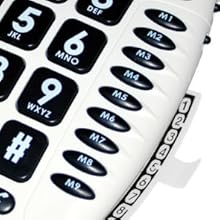
Abbildung 3: Detail of the memory buttons (M1-M9) and the integrated memory index card.
- Nehmen Sie den Hörer ab.
- Drücken Sie die Speichern Taste.
- Dial the telephone number you wish to store.
- Drücken Sie die Speichern erneut die Taste.
- Press the desired memory button (P1, P2, P3, or M1-M9) where you want to save the number.
- Legen Sie den Hörer auf.
- Note: Use the index card located under the base to record your stored numbers for easy reference. Stored memories are protected even if the phone line is unplugged.
4.6 Dialing Stored Numbers
- Nehmen Sie den Hörer ab.
- Warten Sie auf das Freizeichen.
- Press the appropriate memory button (P1, P2, P3, or M1-M9). The stored number will be dialed automatically.
4.7 Recall (R), * & # Buttons
These buttons are used in conjunction with new services provided on digital exchanges. For specific details on their use, please contact your network operator.
4.8 Hörgerätekompatibilität
If you are using this telephone with a hearing aid, set your hearing aid to the "T" (Telecoil) setting for optimal audio quality.
5. Wartung
- Reinigung: Reinigen Sie das Telefon mit einem weichen, fusselfreien Tuch.amp Tuch. Keine Scheuer- oder Lösungsmittel verwenden.
- Lagerung: Bewahren Sie das Telefon an einem kühlen, trockenen Ort fern von direkter Sonneneinstrahlung und extremen Temperaturen auf.
- Vermeiden Sie Flüssigkeiten: Do not expose the telephone to water or other liquids.
- Kabelpflege: Ensure the handset and line cords are not tangled or pinched to prevent damage.
6. Fehlerbehebung
| Problem | Mögliche Ursache | Lösung |
|---|---|---|
| Kein Wählton | Das Telefonkabel ist nicht richtig angeschlossen. | Check that both ends of the telephone line cord are securely plugged in. |
| Anrufer nicht hören / Anrufer kann mich nicht hören | Volume settings are too low or Mute is active. | Adjust the Volume control. Ensure the Mute button is not pressed. |
| Telefon klingelt nicht | Ringer switch is set to "Off". | Set the ringer switch (on the side) to "Low" or "High". |
| Stored memory numbers are lost | This phone protects stored memories even if the phone line is unplugged. If numbers are lost, they may not have been stored correctly. | Re-store the numbers following the instructions in Section 4.5. |
| Difficulty dialing quickly | Some older phone systems may require a slower dialing pace. | Try dialing at a slightly slower pace. Consider using the memory dial function for frequently called numbers. |
7. Spezifikationen
- Modell: Geemarc CL100
- Typ: Kabelgebundenes Telefon
- Amplifikation: Up to 30 dB receiving volume
- Ruftonlautstärke: Adjustable up to 85 dB
- Erinnerung: 3 Priority (P1-P3), 9 One-touch (M1-M9)
- Energiequelle: Line-powered (no external adapter required)
- Kompatibel mit Hörgeräten: Yes (T-coil setting)
- Abmessungen: Ungefähr 7.5 x 8 x 3 Zoll (19 x 20.3 x 7.6 cm)
- Gewicht: Ungefähr 2.25 Pfund (1.02 kg)
- Farbe: Weiß
8. Garantie und Support
8.1 Garantieinformationen
For information regarding the warranty period and terms for your Geemarc CL100 telephone, please refer to the warranty card included with your purchase or visit the official Geemarc webBewahren Sie Ihren Kaufbeleg für Garantieansprüche auf.
8.2 Kundendienst
If you encounter any issues not covered in the troubleshooting section or require further assistance, please contact Geemarc customer support. Contact details can typically be found on the Geemarc webauf der Website oder auf der Produktverpackung.
Für Online-Ressourcen besuchen Sie: www.geemarc.com


