Einführung
This manual provides comprehensive instructions for the installation, operation, and maintenance of the Scantronic 9448 Alarm Panel. Please read this manual thoroughly before attempting any installation or operation to ensure proper functionality and safety.
The Scantronic 9448 is a robust alarm panel designed for home security, offering reliable protection and ease of use.
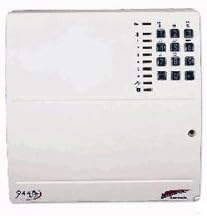
Abbildung 1: Front view of the Scantronic 9448 Alarm Panel, showing the white casing and integrated numeric keypad on the right side.
Setup und Installation
The Scantronic 9448 Alarm Panel is designed for straightforward installation. It is recommended that installation be performed by a qualified professional. Ensure all power is disconnected before beginning installation.
Montage des Panels
- Choose a secure, central location within the premises, away from direct sunlight and moisture.
- Mark the mounting points on the wall using the panel as a template.
- Drill appropriate holes and secure the panel firmly to the wall using suitable screws and wall plugs.
Kabelverbindungen
Refer to the wiring diagram provided inside the panel cover for specific terminal connections. Key connections include:
- Stromversorgung: Connect the main AC power supply to the designated terminals.
- Batterie-Backup: Install the backup battery (not included) into its compartment and connect it to the battery terminals.
- Zoneneingänge: Connect detection devices (e.g., PIRs, door contacts) to the numbered zone terminals.
- Sirenenausgang: Connect the external siren to the alarm output terminals.
- Keypad/Communicator: Connect any external keypads or communication modules as per their respective manuals.
Ensure all connections are secure and correctly polarized to prevent damage or malfunction.
Bedienungsanleitung
Scharfschalten des Systems
- Ensure all protected zones are closed (e.g., doors and windows).
- Enter your 4-digit User Code on the keypad.
- Drücken Sie die ARM Taste.
- The system will provide an exit delay countdown. Exit the premises within this time.
Das System entschärfen
- Upon entry, the system will begin an entry delay countdown.
- Enter your 4-digit User Code on the keypad before the delay expires.
- The system will disarm, and the status indicator will change.
Benutzercodes ändern
Only the Master User can change user codes.
- Enter the Master User Code.
- Drücken Sie die PROG Taste.
- Follow the on-screen prompts or refer to the detailed programming section for specific code entry sequences.
Wartung
Regular maintenance ensures the continued reliability of your alarm system.
- Batterieprüfung: Testen Sie die Notstrombatterie jährlich. Tauschen Sie sie aus, wenn sie keine Ladung mehr hält.
- Sensorprüfung: Periodically test all connected sensors (e.g., motion detectors, door/window contacts) to ensure they trigger an alarm correctly.
- Panelreinigung: Wipe the panel and keypad with a soft, dry cloth. Avoid abrasive cleaners or solvents.
- Professionelle Inspektion: Consider a professional inspection and service every 1-2 years.
Fehlerbehebung
| Problem | Mögliche Ursache | Lösung |
|---|---|---|
| Panel lässt sich nicht einschalten | No AC power; Dead backup battery. | Check AC power connection; Replace backup battery. |
| System kann nicht scharfgeschaltet werden | Open zone (door/window); Incorrect user code. | Check all zones are closed; Re-enter correct user code. |
| Falscher Alarm | Faulty sensor; Environmental factors (pets, drafts). | Inspect sensors for damage; Adjust sensor sensitivity or placement. |
| Tastatur reagiert nicht | Loose connection; Keypad fault. | Check keypad wiring; Contact technical support if issue persists. |
Technische Daten
- Modell: Scantronic 9448
- Hersteller: Scantronic
- Artikelgewicht: 1.4 kg
- Farbe: Weiß
- Energiequelle: Kabelgebundene Elektrik
- Im Lieferumfang enthaltene Batterien: NEIN
- Erforderliche Batterien: No (for operation, but backup battery recommended)
- ASIN: B006WOATSG
- Frühestmöglicher Termin: 12. Januar 2012
Garantie und Support
For warranty information, please refer to the documentation provided at the time of purchase or contact your retailer. Scantronic offers technical assistance via email or phone for support queries related to the 9448 Alarm Panel.
Für technischen Support wenden Sie sich bitte an:
- E-Mail: support@scantronic.com
- Telefon: Refer to your regional Scantronic support contact details.


