Einführung
The OSD Audio AB12 is an in-wall speaker selector A/B switch designed to manage audio output between two amplifiers and one pair of speakers, or one amplifier and two pairs of speakers. This device allows for convenient selection of audio sources or destinations within a dedicated audio zone. It is rated for up to 100 watts per channel and features a push-button control for easy operation.
Sicherheitsvorkehrungen
- Trennen Sie immer die Stromversorgung des amplifier and any connected audio equipment before installation or wiring.
- Ensure all wiring connections are secure to prevent short circuits or damage to equipment.
- Do not exceed the maximum power rating of 100 watts per channel.
- Consult a qualified electrician if you are unsure about any electrical wiring procedures.
Setup und Installation
Erforderliche Werkzeuge
- Schraubendreher (Kreuzschlitz)
- Abisolierzange
- Isolierband (optional)
- Standard single-gang junction box (if not already installed)
Verdrahtungsanweisungen
The AB12 features removable, solderless terminals for easy wiring. It accepts speaker wire up to 14 gauge. For optimal sound quality, 14-16 gauge wire is recommended.
- Drähte vorbereiten: Strip approximately 1/4 to 1/2 inch of insulation from the ends of your speaker wires. Twist the bare wire strands tightly.
- Terminals identifizieren: The AB12 has clearly labeled terminals for 'OUTPUT' (to speakers) and 'AMP A INPUT' / 'AMP B INPUT' (from amplifiers). Each input/output has terminals for Left (+) and (-), and Right (+) and (-).
- Lautsprecher anschließen: Connect your speaker wires to the 'OUTPUT' terminals. Ensure correct polarity (positive to positive, negative to negative).
- Verbinden Amplifier: Connect the speaker output wires from your primary ampVerstärker zum 'AMP A INPUT' terminals. Connect the speaker output wires from your secondary amplifier (if used) to the 'AMP B INPUT' terminals. Maintain correct polarity.
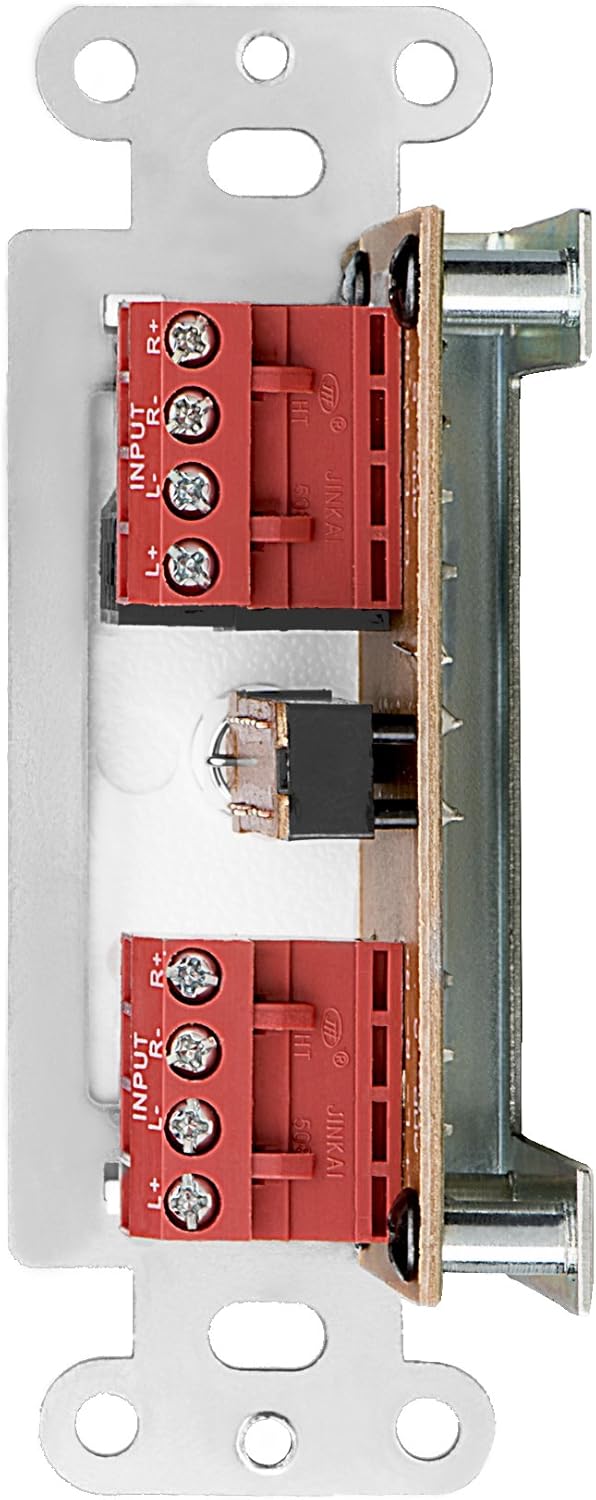
Abbildung 1: Rückseite view of the AB12 switch with clearly labeled input and output terminals for wiring.

Abbildung 2: Bspample of speaker wire connections to the removable solderless terminals.
Montage des Schalters
The AB12 is designed to fit into a standard single-gang junction box with a minimum depth of 2.9 inches. The dimensions of the selector are approximately 1 inch (W) x 2.75 inches (H) x 1.75 inches (D).
- Anschlussdose vorbereiten: Ensure the junction box is securely installed in the wall.
- Einsteckschalter: Carefully push the wired AB12 switch into the junction box. Ensure wires are not pinched.
- Sichere Frontplatte: Attach the desired color faceplate (white, beige, or light almond options are typically included) over the switch and secure it to the junction box using the provided screws.

Figure 3: Mounting brackets for securing the switch within a standard gang box.
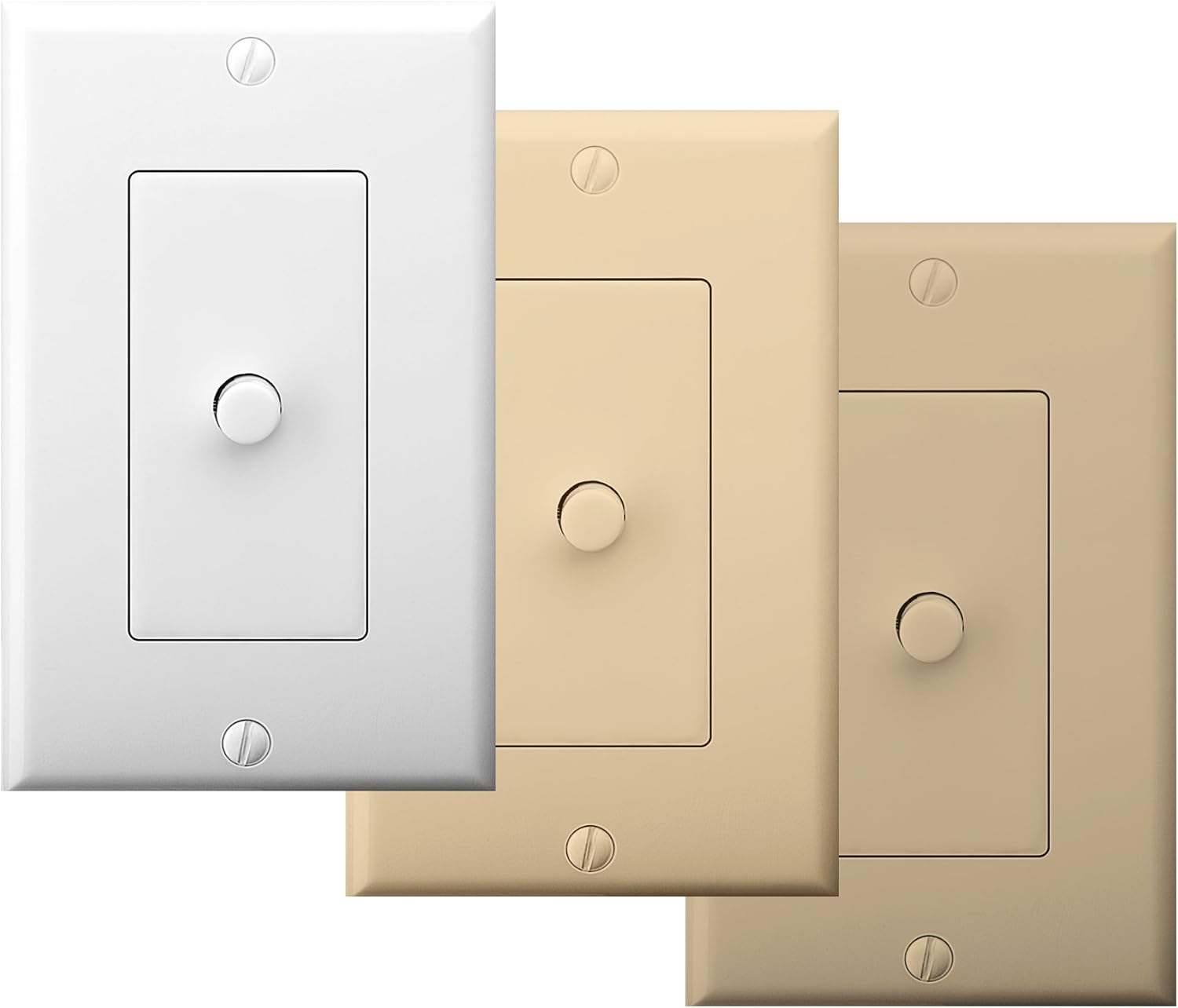
Figure 4: The AB12 switch typically includes multiple faceplate colors for aesthetic integration.
Bedienungsanleitung
The OSD Audio AB12 switch provides a simple push-button mechanism to select between two audio configurations.
Funktionalität
- Zwei Amplifiers to One Speaker Pair: Zwei gewinnt amplifiers to 'AMP A INPUT' and 'AMP B INPUT' respectively. Connect one pair of speakers to 'OUTPUT'. Press the button to switch between AmpVerstärker A und Amplifier B playing through the single speaker pair.
- Eins Amplifier to Two Speaker Pairs: Verbinden Sie einen amplifier to 'AMP A INPUT'. Connect two pairs of speakers to 'OUTPUT' (one pair wired to the 'A' side of the output terminals, the other to the 'B' side, if applicable, or use the switch to select between two distinct output paths). Press the button to switch between Speaker Pair A and Speaker Pair B playing from the single ampschwerer.
The switch is designed to allow power to flow to speakers from either A or B, but not from both simultaneously. This prevents potential damage to amplifiers or speakers due to conflicting signals.

Figure 5: The AB12 switch integrated into an audio system, allowing selection between different sources or destinations.
Wartung
The OSD Audio AB12 In-Wall Speaker Selector requires minimal maintenance.
- Reinigung: To clean the faceplate, gently wipe it with a soft, dry cloth. Avoid using abrasive cleaners or solvents, as these can damage the finish.
- Verbindungen: Periodically check all wiring connections to ensure they remain secure. Loose connections can lead to signal loss or poor audio quality.
- Umfeld: Ensure the switch is installed in a dry environment, away from excessive heat or moisture.
Fehlerbehebung
If you encounter issues with your AB12 speaker selector, refer to the following troubleshooting steps:
| Problem | Mögliche Ursache | Lösung |
|---|---|---|
| Kein Ton von den Lautsprechern | Lose Kabelverbindungen Falsche Schalterposition Amplifier or speaker issue | Check all speaker wire connections at the AB12 switch and at the amplifier/speakers. Ensure the switch is fully engaged in the desired A or B position. Verify amplifier and speakers are functioning correctly by bypassing the switch temporarily. |
| Sound from only one speaker (left or right channel) | Falsche Verdrahtungspolarität Loose connection for one channel Defekter Schaltmechanismus | Verify correct positive (+) and negative (-) wiring for both left and right channels. Check connections for the affected channel. If the issue persists, the internal switch mechanism may be faulty; contact support. |
| Difficulty fitting into standard gang box | Insufficient depth or width in junction box Excessive wiring inside box | Ensure the junction box meets the minimum depth requirement (2.9 inches). Carefully arrange wires to minimize bulk. Some older or non-standard boxes may require minor modification (e.g., widening the opening) or a deeper box. |
| Verzerrte oder schlechte Audioqualität | Falscher Drahtquerschnitt Lose Verbindungen Exceeding power rating | Use recommended 14-16 gauge speaker wire. Check all connections. Ensure the amplifier output does not exceed the 100-watt rating of the switch. |
Technische Daten
| Besonderheit | Spezifikation |
|---|---|
| Modell | AB12 |
| Betriebsmodus | A/B-Schalter |
| Nennleistung | 100 Watt pro Kanal |
| Frequenzgang | 20 Hz bis 20 kHz |
| Lautsprecherkabelstärke | Up to 14 gauge (14-16 gauge recommended) |
| Steckertyp | Lötfreie Anschlüsse |
| Antriebstyp | Druckknopf |
| Anzahl Positionen | 2 |
| Montagetyp | Standard Single-Gang Box Mount |
| Produktabmessungen (L x B x H) | 4.5 x 2.75 x 2.5 Zoll |
| Artikelgewicht | 6.4 Unzen |
| Material (Gehäuse) | Plastik |
| Kontaktmaterial | Metall |
| Farbe | White (with additional faceplate options) |
Garantie und Support
OSD Audio products are designed for reliability and performance. For warranty information or technical support, please refer to the official OSD Audio webBesuchen Sie die Website oder kontaktieren Sie den Kundendienst. Bewahren Sie Ihren Kaufbeleg als Kaufnachweis für eventuelle Garantieansprüche auf.
Online-Hilfe: www.osdaudio.com


