Einführung
This manual provides detailed instructions for the operation and maintenance of your Casio DBC-611-1DF Men's Silver Tone 25 Memory Calculator Databank Watch. Please read this manual thoroughly to ensure proper use and to fully utilize all features of your watch.

Front view of the Casio DBC-611-1DF Databank Watch, displaying the digital time and calculator keypad.
Aufstellen
Einstellen von Uhrzeit und Datum
- Im Zeitmessmodus die Taste drücken ANPASSEN button (top left) until the seconds start to flash. This indicates the setting mode.
- Drücken Sie die MODUS button (bottom left) to cycle through the settings: seconds, hour, minutes, year, month, day.
- Use the numeric keypad (calculator buttons) to input the correct values for each setting. For example, to set the hour, press the corresponding number on the keypad.
- Um zwischen 12-Stunden- und 24-Stunden-Format umzuschalten, drücken Sie die Taste PM button (bottom left of keypad) while the hour setting is flashing.
- Sobald alle Einstellungen vorgenommen sind, drücken Sie die Taste ANPASSEN erneut drücken, um den Einstellmodus zu verlassen.
Anpassen des Bandes
The watch features an adjustable metal band. To adjust the length, locate the clasp and use a small flathead tool to lift the locking tab. Slide the clasp along the band to the desired position, then press the tab down firmly to secure it. Ensure the clasp is securely fastened before wearing.
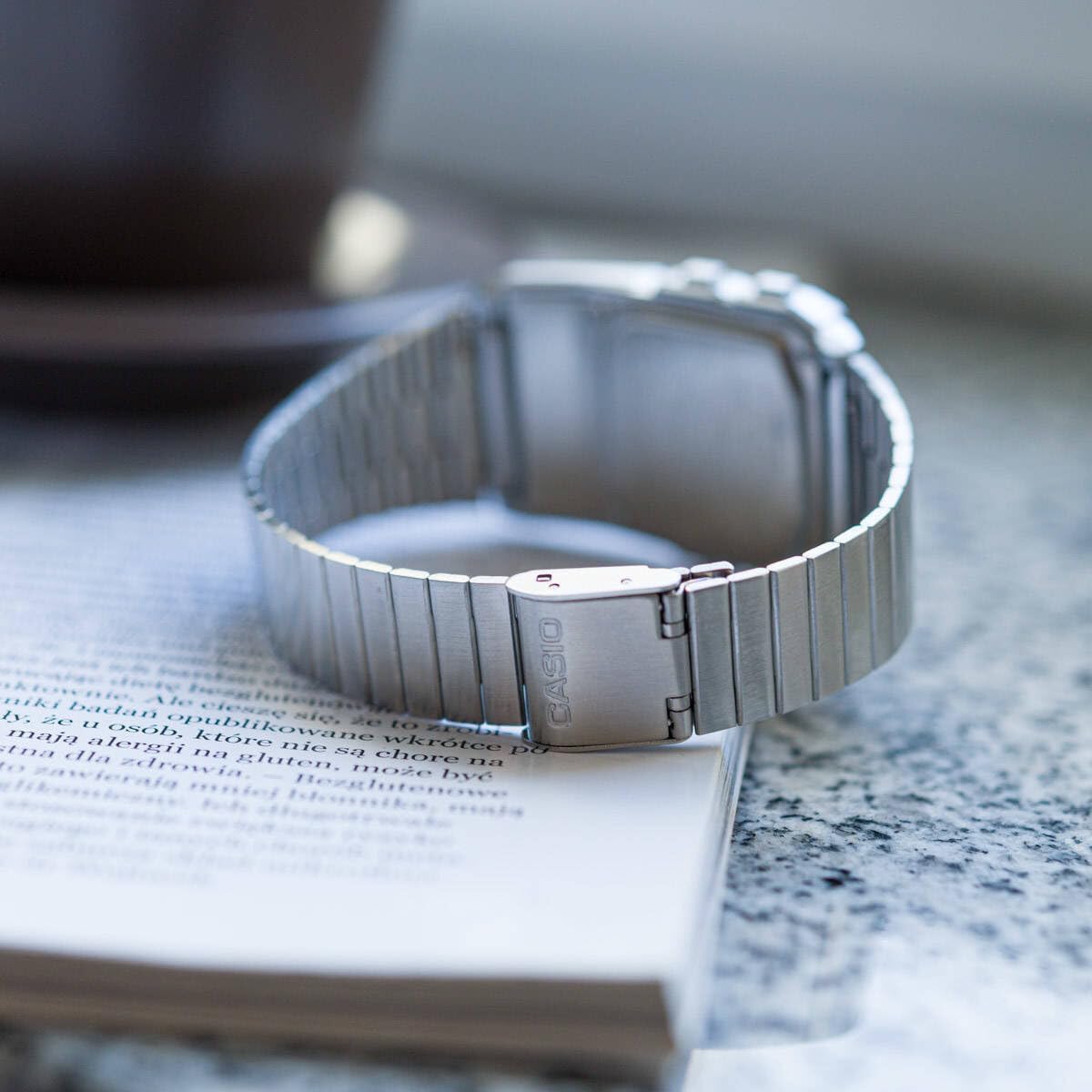
Hinteren view of the watch, showing the adjustable metal clasp for band sizing.
Bedienungsanleitung
Modusnavigation
Drücken Sie die MODUS Taste (unten links) zum Durchschalten der verschiedenen Modi:
- Zeitnehmungsmodus: Zeigt die aktuelle Uhrzeit, das Datum und den Wochentag an.
- Telememo-Modus: Stores up to 25 sets of name and telephone number data.
- Calculator Mode: Performs basic arithmetic calculations.
- Stoppuhr-Modus: Measures elapsed time, split times, and 1st-2nd place times.
- Dualzeitmodus: Displays the current time in a different time zone.
- Alarmmodus: Sets up to 5 daily alarms and an hourly-Zeitsignal.
Verwenden des Rechners
In Calculator Mode, use the numeric keypad to input numbers and perform operations. The display supports 8 digits. Press the AC button (top right of keypad) to clear the current entry.
Telememo-Funktion
To enter or recall data in Telememo Mode:
- Navigate to Telememo Mode.
- Drücken Sie die ANPASSEN button to enter data input mode.
- Use the numeric keypad to enter numbers. Use the RAUM button for spaces.
- Drücken ANPASSEN um den Eintrag zu speichern.
- Verwenden Sie die TEL/FWD Und REV/TIME Schaltflächen zum Durchblättern der gespeicherten Einträge.
Stoppuhrfunktion
Im Stoppuhrmodus:
- Drücken START/STOP (bottom right of keypad) to start and stop the stopwatch.
- Drücken RUNDE/ZURÜCKSETZEN (bottom left of keypad) to record lap times or reset the stopwatch when stopped.
Wecker und Hourly Zeitsignal
Im Alarmmodus:
- Verwenden Sie die MODUS button to select one of the 5 alarms or the hourly-Zeitsignal.
- Drücken ANPASSEN to set the alarm time. Use the numeric keypad to input the hour and minutes.
- Drücken ALM ON/OFF (top left of keypad) to toggle the selected alarm on or off.
- Drücken SIG ON/OFF (middle right of keypad) to toggle the hourly Zeitsignal ein- oder ausschalten.
Auto LED Light
The watch features an Auto LED light. This function automatically illuminates the display when the watch is tilted towards your face in a dark environment. To activate or deactivate this feature, refer to the detailed instructions in the full module manual (Module No. 437, 438, 3208).

Abgewinkelt view of the Casio Databank Watch, highlighting the display and keypad.
Wartung
Allgemeine Pflege
- Reinigen Sie die Uhr regelmäßig mit einem weichen, trockenen Tuch.
- Vermeiden Sie es, die Uhr extremen Temperaturen, längerer direkter Sonneneinstrahlung oder starken Magnetfeldern auszusetzen.
- While the watch is water-resistant, avoid direct contact with water to prolong its lifespan, especially for the calculator buttons.
Batteriewechsel
The watch uses 1 CR123A battery. Battery life is approximately 5 years. When the display becomes dim or functions become erratic, it is time to replace the battery. Battery replacement should ideally be performed by a qualified technician to ensure water resistance is maintained.
Fehlerbehebung
- Bildschirm ist leer oder dunkel: Check the battery. If recently replaced, ensure it is installed correctly.
- Tasten reagieren nicht: Ensure the watch is not in a locked mode (if applicable, refer to full manual). If the issue persists, a reset may be required (consult a technician).
- Die Zeitangabe ist ungenau: Re-set the time and date as per the "Setting the Time and Date" section.
Technische Daten
| Marke | Casio |
| Modellnummer | DBC-611-1DF |
| Technische Daten | 2.44 x 4.09 x 3.62 Zoll |
| Artikelgewicht | 1.69 Unzen |
| Akku-Typ | 1 CR123A (im Lieferumfang enthalten) |
| Besondere Merkmale | 25 pages of Telememo, 1/100-second stopwatch, Dual time, 5 alarms, Auto LED light |
| Wasserbeständigkeit | Water Resistant (general daily use, not for swimming or diving) |
| Datum der ersten Verfügbarkeit | 22. März 2012 |
Offizielles Produktvideo
Offizielles Produktvideo präsentiertasing the features and design of the Casio Databank Watch.
Garantie und Support
Informationen zur Garantie und zum Kundendienst finden Sie auf der Ihrem Produkt beiliegenden Garantiekarte oder auf der offiziellen Casio-Website. website. The module number for this watch is 437, 438, or 3208, which can be used to find specific support documents online.
For additional assistance, you may contact Casio customer service directly.