Einführung
This manual provides comprehensive instructions for the installation, operation, and maintenance of your Sony XM-GTX6041 600W Amplifier. Designed for car audio systems, this 4-channel amplifier delivers clear, precise, and distortion-free sound. It features advanced thermal control and a high-capacity air cooling system to ensure stable performance even under demanding conditions. Please read this manual thoroughly before using the amplifier to ensure proper setup and to maximize its performance and longevity.
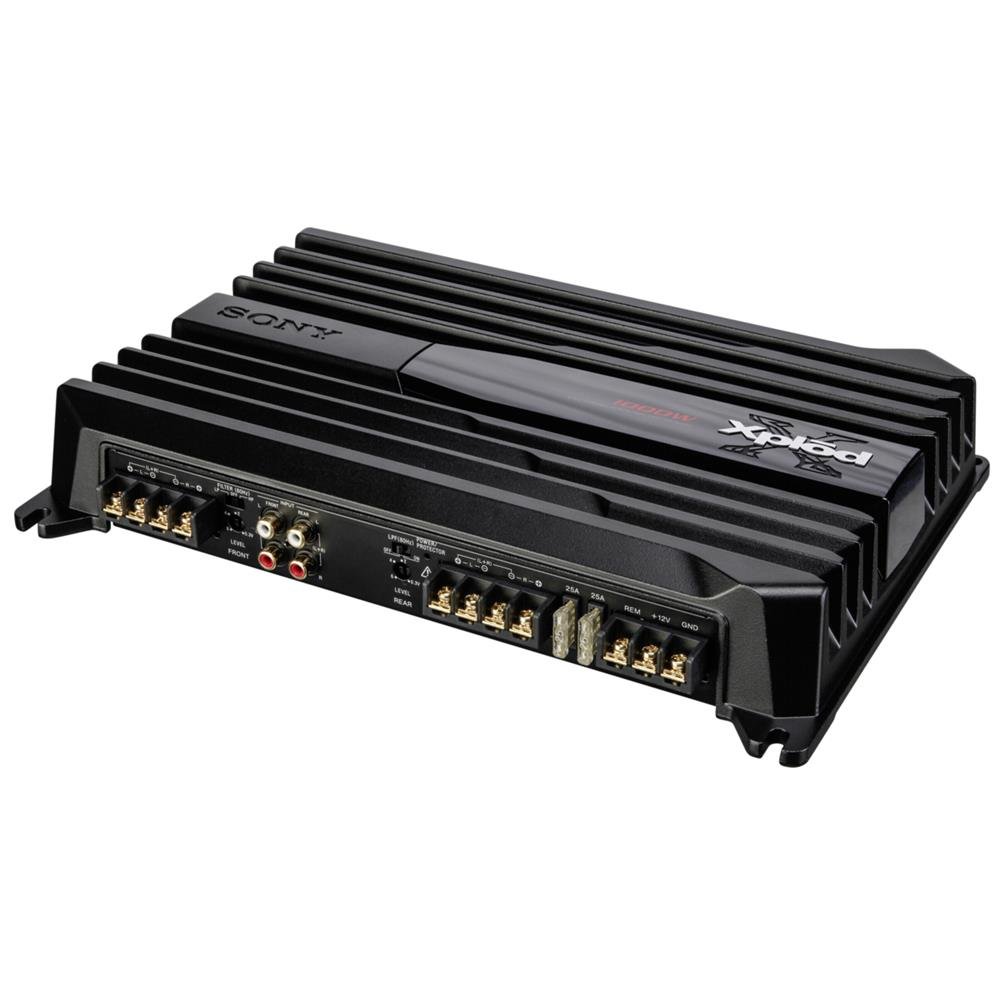
Image: Sony XM-GTX6041 600W AmpVerstärker. Dieses Bild zeigt die Oberseite. view der amplifier unit, highlighting its compact design and connection terminals.
Sicherheitshinweise
- Stromversorgung: Verbinden Sie amplifier only to a 12V DC car battery with a negative ground.
- Verdrahtung: Stellen Sie sicher, dass alle Kabel korrekt angeschlossen und isoliert sind, um Kurzschlüsse und elektrische Gefahren zu vermeiden. Verwenden Sie Kabel mit geeignetem Querschnitt für Strom- und Erdungsanschlüsse.
- Montage: Montieren Sie die ampDer Verstärker sollte sicher an einem Ort aufgestellt werden, der für ausreichende Belüftung sorgt und vor Feuchtigkeit und übermäßiger Hitze geschützt ist.
- Lautstärkepegel: Avoid prolonged listening at extremely high volume levels to prevent hearing damage.
- Professionelle Installation: Wenn Sie sich bei einzelnen Installationsschritten unsicher sind, wenden Sie sich an einen qualifizierten Fachmann für den Einbau von Auto-Audio-Systemen.
Aufstellen
1. Auspacken
Entfernen Sie vorsichtig die amplifier and all accessories from the packaging. Verify that all components are present before proceeding with installation.
2. Montageort
Wählen Sie einen Montageort, der folgende Eigenschaften aufweist:
- Dry and protected from moisture.
- Gute Belüftung für eine ordnungsgemäße Wärmeableitung.
- Secure and stable to prevent movement during vehicle operation.
- Away from direct sunlight or heat sources.
Übliche Verstecke sind unter einem Sitz, im Kofferraum oder hinter einer Verkleidung.
3. Kabelverbindungen
Follow these general guidelines for wiring your ampReiniger:
- Leistung (BATT+): Connect a heavy-gauge power cable directly from the positive terminal of your car battery to the BATT+ terminal on the amplifier. Install an in-line fuse (not supplied) as close to the battery as possible.
- Masse (GND): Schließen Sie ein dickes Erdungskabel an den GND-Anschluss des Geräts an. ampSchließen Sie den Verstärker an eine saubere, unlackierte Metalloberfläche des Fahrzeugchassis an. Stellen Sie eine sichere elektrische Verbindung sicher.
- Fernbedienung (REM): Verbinden Sie ein Remote-Einschaltkabel vom Remote-Ausgang Ihres Autoradios mit dem REM-Anschluss des amplifier. This will turn the ampVerstärker mit dem Autoradio ein- und ausschalten.
- Cinch-Eingang: Connect RCA cables from your head unit's pre-out outputs to the RCA input jacks on the ampschwerer.
- Lautsprecherausgang: Schließen Sie Ihre Lautsprecher an die Lautsprecherausgangsklemmen des Geräts an. amplifier. Ensure correct polarity (+ to + and - to -) for each speaker. The XM-GTX6041 supports 4-channel speaker configurations.
Always double-check all connections before applying power to the ampschwerer.
Bedienungsanleitung
1. Ein-/Ausschalten
Der ampDer Verstärker schaltet sich automatisch ein, wenn Ihr Autoradio eingeschaltet wird (über die Fernkabelverbindung), und schaltet sich aus, wenn das Autoradio ausgeschaltet wird.
2. Anpassen der Verstärkungsregelung
The gain control (often labeled "LEVEL" or "GAIN") matches the amplifier's input sensitivity to the output level of your head unit. To set the gain:
- Drehen Sie den ampDen Verstärkungsregler des Verstärkers auf die minimale Einstellung (ganz nach links gedreht) bringen.
- Drehen Sie die Lautstärke Ihres Autoradios auf etwa 75-80% der Maximallautstärke.
- Erhöhen Sie langsam die ampDrehen Sie den Gain-Regler des Verstärkers so lange, bis Sie Verzerrungen hören, und drehen Sie ihn dann etwas zurück, bis der Klang klar ist.
The gain control is not a volume control; it is for matching signal levels.
3. Crossover Settings (High-Pass / Low-Pass Filters)
The XM-GTX6041 features built-in high-pass (HPF) and low-pass (LPF) filters to optimize sound output for different speakers:
- Hochpassfilter (HPF): Allows frequencies über the set point to pass through. Use for full-range speakers or tweeters to prevent them from playing low bass frequencies they cannot reproduce effectively.
- Tiefpassfilter (LPF): Allows frequencies unten the set point to pass through. Use for subwoofers to ensure they only reproduce bass frequencies.
Adjust these filters according to your speaker types and desired sound profile. Refer to your speaker's specifications for recommended crossover points.
Wartung
1. Reinigung
Reinigen Sie regelmäßig die Außenseite des amplifier with a soft, dry cloth. Do not use harsh chemicals or abrasive cleaners. Ensure that the cooling fins and ventilation openings are free from dust and debris to maintain optimal airflow.
2. Wärmemanagement
The XM-GTX6041 features an advanced thermal control system and high-capacity air cooling to prevent overheating. Ensure that the amplifier is mounted in a location with sufficient air circulation. Avoid blocking any ventilation openings. If the amplifier enters thermal protection mode (indicated by a protection light, if present), reduce the volume or allow it to cool down before continued use.
Fehlerbehebung
| Problem | Mögliche Ursache | Lösung |
|---|---|---|
| Keine Energie / Amplifier schaltet sich nicht ein |
|
|
| Keine Tonausgabe |
|
|
| Verzerrter Ton |
|
|
| Amplifier overheats / Enters protection mode |
|
|
Technische Daten
| Besonderheit | Detail |
|---|---|
| Marke | Sony |
| Modellnummer | XMGTX6041 |
| Anzahl der Kanäle | 4 |
| Maximale Leistungsabgabe | 600 Watt |
| Bandtage | 12 Volt (DC) |
| Montagetyp | Oberflächenmontage |
| Betriebstemperatur | Bis zu 125 Grad Celsius |
| Abmessungen (L x B x H) | 10 x 10 x 10 Zentimeter |
| Internationaler Artikelcode (UPC) | 04905524761740 |
Garantie und Support
Garantieinformationen
Specific warranty details for the Sony XM-GTX6041 amplifier are typically provided with the product at the time of purchase or can be found on the official Sony webBitte bewahren Sie Ihren Kaufbeleg für Garantieansprüche auf.
Kundenservice
For further assistance, technical support, or service inquiries, please contact Sony customer support through their official webWebsite oder die in Ihrer Produktdokumentation angegebenen Kontaktinformationen.