Produkt überview
The Targus Presenter AMP09AP is a multimedia presentation remote designed for ease of use during presentations. It features a laser pointer for highlighting content, backlit buttons for low-light environments, and an ergonomic design for comfortable handling. This remote also offers cursor control for remote program access and volume adjustment for media. Its wireless technology provides a range of up to 50 feet, and the USB receiver conveniently stores within the presenter.
Installationshandbuch
1. Auspacken
Carefully remove the Targus Presenter AMP09AP and its components from the packaging. The box should contain:
- One Targus Presentation Remote
- One USB Receiver
2. Einlegen der Batterie
The Targus Presenter AMP09AP requires batteries (not included). Use alkaline batteries for optimal performance.
- Suchen Sie das Batteriefach auf der Rückseite des Präsentationsgeräts.
- Öffnen Sie die Abdeckung des Batteriefachs.
- Legen Sie die benötigten Batterien ein und achten Sie dabei auf die richtige Polarität (+/-).
- Schließen Sie den Batteriefachdeckel fest.
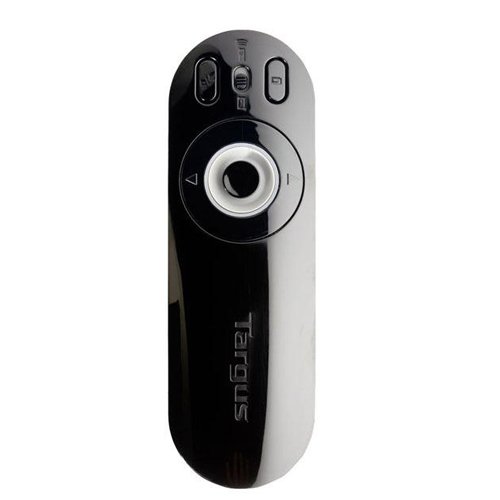
Image: The Targus Presenter AMP09AP, its USB receiver, and the open battery compartment revealing two AAA batteries.
3. Anschließen des USB-Empfängers
- Remove the USB receiver from its storage slot within the presenter.
- Stecken Sie den USB-Empfänger in einen freien USB-Port Ihres Computers.
- Der Computer sollte die notwendigen Treiber automatisch erkennen und installieren.
The remote is now ready for use.
Bedienungsanleitung
Präsentationsmodus
The presenter's simplistic layout allows for easy navigation during presentations.
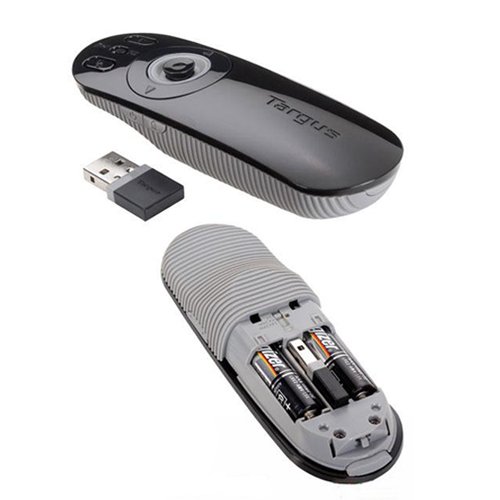
Bild: Oben view of the Targus Presenter AMP09AP, highlighting the laser pointer button, slide navigation buttons, and the mode switch.
- Laserpointer: Press and hold the dedicated laser button to activate the laser pointer for highlighting content.
- Nächste Folie: Press the forward arrow button to advance to the next slide.
- Vorherige Folie: Press the backward arrow button to return to the previous slide.
- Von hinten beleuchtete Tasten: Buttons are backlit for visibility in dimly lit rooms.
Cursor Control Mode
The presenter features cursor control for remote access to programs and media functions.
- Activating Cursor Control: Use the mode switch (located at the top right of the remote) to toggle between presentation and cursor control modes.
- Moving Cursor: Use the central circular button (joystick/directional pad) to move the mouse cursor on the screen.
- Klicken: Press the center of the circular button to perform a left-click action.
- Lautstärkeregelung: Adjust the volume for music and videos remotely using the designated volume controls (if available on your specific model).
Drahtlose Reichweite
The wireless technology allows operation up to 50 feet (approximately 15 meters) from the computer, providing flexibility during presentations.
Wartung
- Reinigung: Wipe the presenter with a soft, dry cloth. Avoid using harsh chemicals or abrasive cleaners.
- Batteriewechsel: Replace batteries when the indicator light (if present) signals low power, or when performance degrades. Ensure correct polarity during replacement.
- Lagerung: When not in use, store the USB receiver inside the presenter's dedicated slot to prevent loss. Store the presenter in a cool, dry place.
Fehlerbehebung
| Problem | Mögliche Ursache | Lösung |
|---|---|---|
| Moderator antwortet nicht | Niedrige oder leere Batterien | Ersetzen Sie die Batterien durch neue Alkalibatterien. |
| Moderator antwortet nicht | USB-Empfänger nicht richtig angeschlossen | Stellen Sie sicher, dass der USB-Empfänger fest an einen funktionierenden USB-Anschluss Ihres Computers angeschlossen ist. Versuchen Sie es mit einem anderen USB-Anschluss. |
| Moderator antwortet nicht | Außerhalb der Reichweite | Move closer to the computer (within 50 feet / 15 meters). |
| Laserpointer funktioniert nicht | Schwache Batterie | Batterien ersetzen. |
| Cursor control erratic or not working | Interference or mode not activated | Ensure no obstructions between presenter and receiver. Check if cursor control mode is active using the mode switch. |
Technische Daten
| Besonderheit | Detail |
|---|---|
| Marke | Targus |
| Modellnummer | AMP09AP-51 |
| Farbe | Schwarz und Grau |
| Abmessungen (LxBxH) | 12.1 x 3.8 x 2.5 cm |
| Artikelgewicht | 140 g |
| Konnektivitätstechnologie | Kabellos |
| Drahtlose Reichweite | Bis zu 50 Fuß (ca. 15 Meter) |
| Akku-Typ | Alkalisch (nicht im Lieferumfang enthalten) |
| Im Lieferumfang enthaltene Komponenten | Presentation Remote, USB Receiver |
| Besondere Merkmale | Ergonomic design, Laser pointer, Cursor control, Backlit buttons |
Garantie und Support
For warranty information and technical support, please refer to the documentation provided with your purchase or visit the official Targus webBewahren Sie Ihren Kaufbeleg für Garantieansprüche auf.


