1. Wichtige Sicherheitshinweise
Please read these instructions carefully before operating the unit and retain them for future reference. Following these guidelines will ensure safe and proper use of your GPX R602B radio.
- Wasser und Feuchtigkeit: Do not use this apparatus near water. Avoid exposure to rain or moisture.
- Wärmequellen: Installieren Sie das Gerät nicht in der Nähe von Wärmequellen wie Heizkörpern, Heizregistern, Öfen oder anderen Geräten (einschließlich ampKonverter (Lüfter), die Wärme erzeugen.
- Belüftung: Sorgen Sie für ausreichende Belüftung. Blockieren Sie keine Belüftungsöffnungen.
- Energiequellen: Das Gerät darf nur mit der auf dem Typenschild angegebenen Stromquelle betrieben werden.
- Reinigung: Nur mit trockenem Tuch reinigen.
- Anhänge: Verwenden Sie nur vom Hersteller angegebene Anbaugeräte/Zubehör.
- Wartung: Überlassen Sie alle Wartungsarbeiten qualifiziertem Servicepersonal. Eine Wartung ist erforderlich, wenn das Gerät auf irgendeine Weise beschädigt wurde, z. B. wenn das Netzkabel oder der Stecker beschädigt sind, Flüssigkeit in das Gerät verschüttet wurde oder Gegenstände hineingefallen sind, das Gerät Regen oder Feuchtigkeit ausgesetzt war, nicht normal funktioniert oder fallengelassen wurde.
Batteriesicherheit
- Mischen Sie keine alten und neuen Batterien.
- Mischen Sie keine Alkali-, Standard- (Kohle-Zink) oder wiederaufladbaren (Nickel-Cadmium) Batterien.
- Insert batteries correctly, observing the + and - polarities.
- Erschöpfte Batterien umgehend entfernen.
- Entsorgen Sie Batterien ordnungsgemäß. Nicht verbrennen.
2. Funktionen
The GPX R602B Portable AM/FM Radio offers a range of features designed for convenience and versatility:
- Portable AM/FM radio with a built-in handle for easy transport.
- Integrated speakers with analog volume control and durable metal grills.
- Digital clock with user-friendly setting buttons.
- Operates using the built-in AC power cable.
- Can also be powered by 3 C batteries (sold separately) for portable use.
- 3.5mm audio line input jack for connecting external audio devices.
- Telescopic antenna for improved FM reception.
- Stereo headphone jack for private listening.

Figure 2.1: Key features and connection points of the GPX R602B radio.
3. Packungsinhalt
Upon unpacking your GPX R602B radio, please ensure all the following items are present:
- GPX R602B Portable AM/FM Radio Unit
- Bedienungsanleitung
- Built-in AC Power Adapter
4. Bedienelemente und Anzeigen
Familiarize yourself with the controls and indicators on your radio for optimal operation.
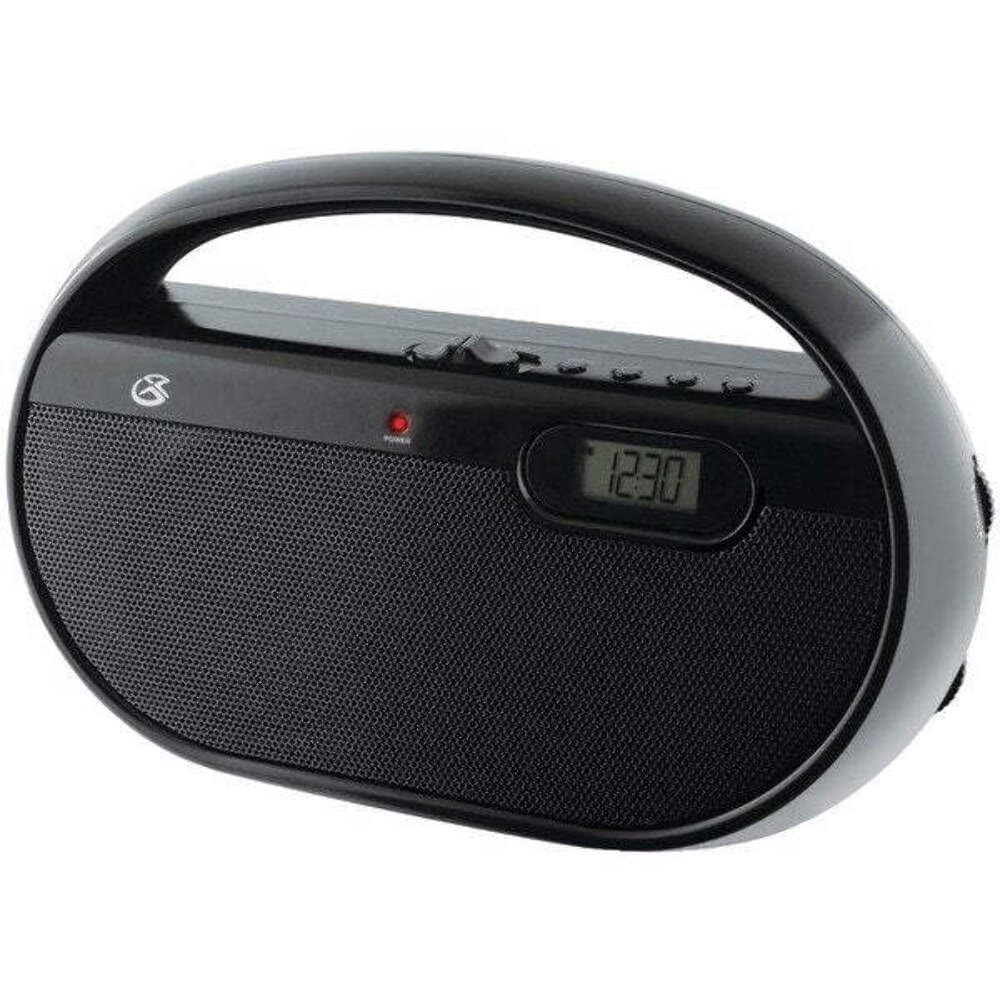
Abbildung 4.1: Vorderseite view of the GPX R602B radio.
Control Layout (Refer to Figure 4.1)
- Ein/Aus-/Lautstärkeregler: Rotates to turn the unit ON/OFF and adjust the volume level.
- Abstimmknopf: Rotates to select AM or FM radio stations.
- Bandwahlschalter: Slides to select between AM and FM radio bands.
- Digitaler Bildschirm: Shows the current time or radio frequency.
- Zeitschalttaste: Used in conjunction with H/M buttons to set the clock.
- H/M Buttons: Used to adjust hours and minutes when setting the clock.
- Display Time Button: Briefly shows the time when the radio is playing.
- Aux In Jack (3.5mm): Schließen Sie externe Audiogeräte an.
- Kopfhöreranschluss (3.5 mm): Schließen Sie Kopfhörer für privates Hören an.
- Teleskop-FM-Antenne: Extend and adjust for optimal FM reception.
5. Stromversorgung des Geräts
The GPX R602B radio can be powered by either AC power or batteries.
Wechselstrombetrieb
- Locate the built-in AC power cord. This cord is typically stored in the battery compartment when not in use.
- Plug the AC power cord into a standard wall outlet (120V AC, 60Hz).
- Das Gerät ist jetzt betriebsbereit.
Batteriebetrieb
For portable use, the radio requires 3 'C' size batteries (not included).
- Öffnen Sie die Abdeckung des Batteriefachs auf der Rückseite des Geräts.
- Insert 3 'C' size batteries, ensuring the correct polarity (+ and -) as indicated inside the compartment.
- Schließen Sie den Batteriefachdeckel fest.
- The unit is now ready for battery-powered operation.

Figure 5.1: Power options for the GPX R602B radio.
6. Einrichtung und grundlegende Bedienung
Ersteinrichtung
- Stromanschluss: Connect the radio to AC power or insert batteries as described in Section 5.
- Antenneneinstellung: For FM reception, extend the telescopic antenna fully. For AM reception, the unit has a built-in antenna, so no external adjustment is needed. Position the unit for best AM reception.
Bedienung des Radios
- Einschalten: Rotate the Power/Volume knob clockwise until it clicks and the unit powers on.
- Band auswählen: Slide the Band Selector switch to either AM or FM.
- Tune-Sender: Rotate the Tuning knob to find your desired radio station. The frequency will be displayed on the digital screen.
- Lautstärke anpassen: Rotate the Power/Volume knob to adjust the sound level.
- Ausschalten: Rotate the Power/Volume knob counter-clockwise until it clicks and the unit powers off.
Using the Line Input (Aux In)
You can connect external audio devices, such as smartphones or MP3 players, to play audio through the radio's speakers.
- Connect a 3.5mm audio cable (not included) from the headphone jack or line-out jack of your external device to the Aux In jack on the radio.
- Turn on the radio and your external device.
- Adjust the volume on both the radio and your external device for optimal sound.

Figure 6.1: Devices compatible with the Aux In feature.
Kopfhörer verwenden
For private listening, plug standard 3.5mm headphones (not included) into the Headphone Jack. The internal speakers will automatically mute.
Einstellen der Digitaluhr
The digital clock can be set when the radio is turned off.
- Ensure the radio is turned OFF using the Power/Volume knob.
- Halten Sie die beiden Zeit einstellen und die HM gleichzeitig drücken.
- Halten Sie die Zeit einstellen button, repeatedly press the HM button to adjust the hour and then the minutes.
- Lassen Sie den Zeit einstellen Drücken Sie die Taste, sobald die gewünschte Zeit eingestellt ist.
- Zu view the time while the radio is playing, press the Anzeigedauer button. The time will appear briefly on the digital display.
7. Wartung
Proper care and maintenance will ensure the longevity of your GPX R602B radio.
- Reinigung: Wischen Sie die Außenseite des Geräts mit einem weichen, trockenen Tuch ab. Verwenden Sie keine Scheuermittel, Wachse oder Lösungsmittel.
- Batteriewechsel: If using batteries, replace all three 'C' batteries when the unit's performance diminishes. Always replace with new batteries of the same type.
- Lagerung: If storing the unit for an extended period, remove the batteries to prevent leakage and corrosion.
8. Fehlerbehebung
If you encounter issues with your GPX R602B radio, refer to the following common problems and solutions:
| Problem | Mögliche Ursache | Lösung |
|---|---|---|
| Kein Strom | AC cord not plugged in; Batteries exhausted or incorrectly inserted. | Ensure AC cord is securely plugged into a live outlet. Replace batteries with new ones, checking polarity. |
| Schlechter Radioempfang | Antenna not extended (FM); Unit poorly positioned (AM); Weak signal. | Extend and adjust the telescopic FM antenna. For AM, rotate the unit for better reception. Try moving the radio to a different location. |
| Kein Ton von den Lautsprechern | Lautstärke zu niedrig; Kopfhörer angeschlossen. | Increase the volume using the Power/Volume knob. Disconnect headphones if not desired. |
| Clock not setting correctly | Falsche Tastenfolge. | Ensure the radio is OFF. Press and hold both 'Set Time' and 'H/M' buttons simultaneously, then repeatedly press 'H/M' to adjust. Release 'Set Time' when done. |
| Ton verzerrt oder unklar | Volume too high; Poor reception; External device volume too high. | Lower the volume. Adjust antenna or unit position for better reception. If using Aux In, adjust volume on the external device. |
9. Spezifikationen
Detailed technical specifications for the GPX R602B Portable AM/FM Radio:
- Modellnummer: R602B
- Produktabmessungen (L x B x H): 9.62 x 3.74 x 6.3 Zoll (24.43 x 9.50 x 16.00 cm)
- Artikelgewicht: 1.76 Pfund (0.80 kg)
- Energiequelle: AC 120V, 60Hz or 3 x 'C' size batteries (not included)
- Tuner-Technologie: AM/FM
- Unterstützte Radiobänder: 2-Band (AM/FM)
- Konnektivitätstechnologie: Radio, 3.5mm Aux In
- Besondere Merkmale: Built-In AM Antenna, Built-In Clock, Portable, Telescopic FM Antenna, 3.5mm Headphone Jack
- Farbe: Schwarz
- Hersteller: Digital Products International, Inc.
- Datum der Erstveröffentlichung: 5. Juni 2012
10. Garantie und Support
For warranty information and customer support regarding your GPX R602B radio, please refer to the warranty card included with your purchase or visit the official GPX webBewahren Sie Ihren Kaufbeleg als Kaufnachweis für eventuelle Garantieansprüche auf.
If you require technical assistance or have questions not covered in this manual, please contact GPX customer service directly. Contact details are typically available on the manufacturer's webWebsite oder in der Produktverpackung.


