Einführung
This user manual provides comprehensive instructions for the installation, operation, and maintenance of your RCA RTS736W 30-Inch Streaming Soundbar. Please read this manual thoroughly before using the product to ensure proper functionality and to prevent damage.
The RCA RTS736W is designed to enhance your home audio experience with its 3.0 channel sound and integrated Wi-Fi for streaming online content.
Hauptmerkmale
- Wi-Fi Built-In for streaming video content to a TV.
- 3.0 Channel Left/Center/Right audio configuration.
- HDMI 1080p Output for high-definition connectivity.
- Includes 1 Rear Analog Audio-in Jack and 1 Side Line-in Jack for various audio sources.
- Flexible placement options: includes table or wall mounting brackets.
Packungsinhalt
Überprüfen Sie, ob alle Artikel im Paket vorhanden sind:
- RCA RTS736W 30-Inch Streaming Soundbar
- Fernbedienung
- Netzteil
- Table or Wall Mounting Brackets
- Benutzerhandbuch (dieses Dokument)
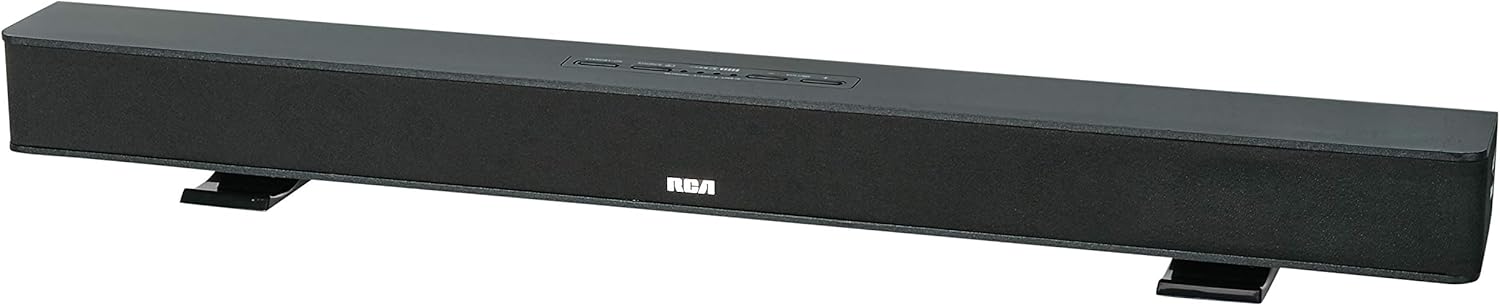
Image: The RCA RTS736W 30-Inch Streaming Soundbar, shown with its sleek black design and integrated controls.
Aufstellen
1. Platzierungsoptionen
The soundbar offers flexible placement:
- Platzierung der Tischplatte: Place the soundbar on a flat, stable surface in front of your television. Ensure there is adequate ventilation around the unit.
- Wandmontage: Use the included wall mounting brackets to secure the soundbar to a wall. Refer to the separate wall mounting template (if provided) for detailed instructions. Ensure the wall can support the weight of the soundbar.

Image: The RCA RTS736W soundbar positioned on a TV stand, demonstrating a typical home theater setup with various streaming service icons displayed on the television screen.
2. An die Stromversorgung anschließen
- Connect the power adapter to the DC IN 13.5V port on the back of the soundbar.
- Stecken Sie das andere Ende des Netzteils in eine Steckdose.
3. Audioverbindungen
Choose one of the following methods to connect the soundbar to your audio source:
- HDMI-Ausgang: Connect an HDMI cable from the HDMI OUT port on the soundbar to an HDMI input on your television. This connection supports 1080p video output from the soundbar's streaming functions.
- Analog Audio-in (AUX 1 / AUX 2): Use RCA audio cables to connect your TV or other audio devices to the AUX 1 or AUX 2 input jacks on the back of the soundbar. Match the red and white connectors.
- Side Line-in Jack: For portable devices like smartphones or tablets, connect a 3.5mm audio cable from your device's headphone jack to the Line-in jack located on the side of the soundbar.

Bild: Eine Nahaufnahme view of the rear panel of the RCA RTS736W soundbar, highlighting the AUX 1, AUX 2, DC IN 13.5V, HDMI OUT, and VIDEO OUT ports for various connections.
4. Netzwerkverbindung (WLAN)
To utilize the streaming features, connect the soundbar to your home Wi-Fi network. This process is typically guided by on-screen prompts when the soundbar is first powered on and connected to a TV via HDMI.
- Ensure your TV is connected to the soundbar via HDMI and powered on.
- Folgen Sie den Anweisungen auf dem Bildschirm, um Ihr WLAN-Netzwerk auszuwählen und das Passwort einzugeben.
Bedienungsanleitung
1. Ein-/Ausschalten
Drücken Sie die Leistung Drücken Sie eine Taste an der Soundbar oder auf der Fernbedienung, um das Gerät ein- oder auszuschalten.
2. Eingabeauswahl
Drücken Sie die Eingang button on the remote control or the soundbar to cycle through available audio sources: HDMI, AUX 1, AUX 2, Line-in, and Wi-Fi streaming.
3. Lautstärkeregelung
Verwenden Sie die Volume + Und Lautstärke - buttons on the remote control or the soundbar to adjust the audio level.
Drücken Sie die Stumm Taste zum vorübergehenden Stummschalten des Tons.
4. Streaming-Inhalte
Once connected to Wi-Fi and your TV via HDMI, you can access various streaming applications. Navigate using the directional buttons and OK Taste auf der Fernbedienung.
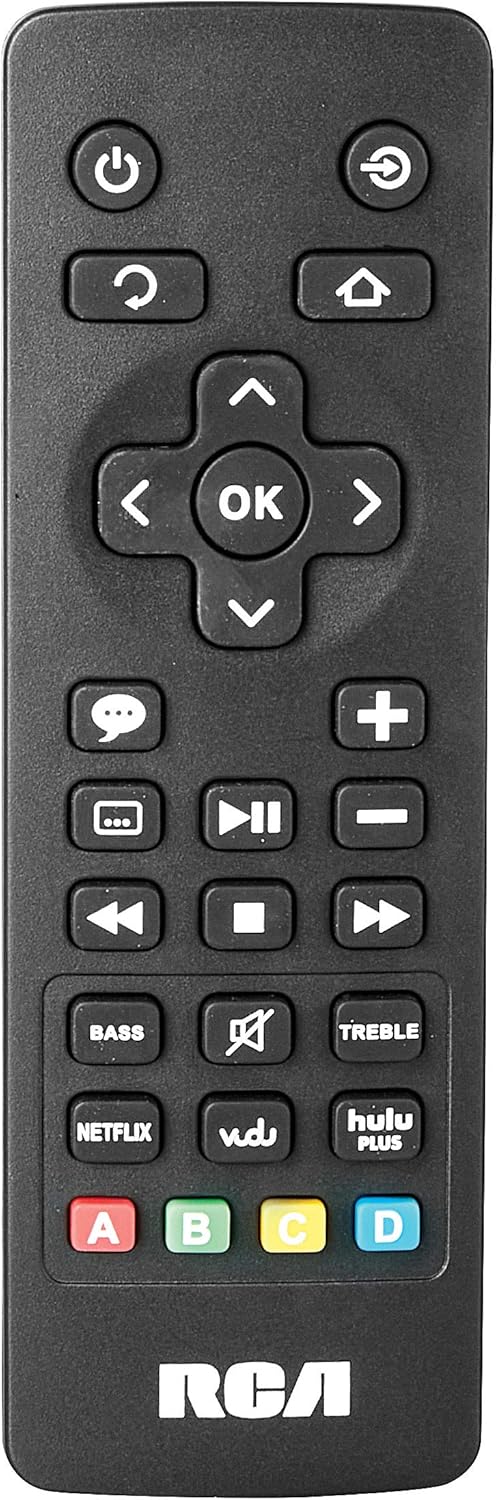
Image: The remote control for the RCA RTS736W soundbar, featuring dedicated buttons for power, volume, input selection, navigation, and direct access to streaming services like Netflix, Vudu, and Hulu Plus.
Dedicated buttons for services like Netflix, Vudu, and Hulu Plus may be available on the remote for direct access.
5. Audio-Anpassungen
Verwenden Sie die BASS Und VERDREIFACHEN buttons on the remote control to fine-tune the audio output to your preference.
Wartung
- Reinigung: Disconnect the soundbar from the power outlet before cleaning. Use a soft, dry cloth to wipe the exterior surfaces. Do not use liquid cleaners or abrasive materials.
- Belüftung: Stellen Sie sicher, dass die Lüftungsöffnungen der Soundbar nicht blockiert sind. Eine ausreichende Luftzirkulation verhindert Überhitzung.
- Lagerung: Wenn Sie die Soundbar über einen längeren Zeitraum lagern, trennen Sie sie vom Stromnetz und bewahren Sie sie an einem kühlen, trockenen Ort fern von direkter Sonneneinstrahlung und extremen Temperaturen auf.
Fehlerbehebung
Kein Strom
- Check if the power adapter is securely connected to the soundbar and a working wall outlet.
- Prüfen Sie, ob die Steckdose funktioniert, indem Sie sie mit einem anderen Gerät testen.
Kein Ton
- Verify that the correct input source is selected on the soundbar.
- Check all audio cable connections between the soundbar and your audio source (TV, etc.).
- Ensure the volume on both the soundbar and the connected audio source is turned up and not muted.
- If using HDMI, confirm that your TV's audio output settings are configured to send audio to the soundbar.
Streaming Issues (Buffering, Freezing)
- Check your Wi-Fi network connection. Ensure the signal strength is adequate.
- Restart your home router and modem.
- Restart the soundbar by unplugging it from the power outlet for a few minutes, then plugging it back in.
- Ensure your internet service is active and performing correctly.
Fernbedienung funktioniert nicht
- Ersetzen Sie die Batterien in der Fernbedienung.
- Stellen Sie sicher, dass sich keine Hindernisse zwischen der Fernbedienung und dem Sensor der Soundbar befinden.
- Richten Sie die Fernbedienung direkt auf die Soundbar.
Technische Daten
| Modellnummer | RTS736W |
| Lautsprechertyp | Soundbar |
| Kanäle | 3.0 (Left/Center/Right) |
| Konnektivität | HDMI, RCA, Wi-Fi |
| Wireless-Technologie | W-lan |
| HDMI-Ausgang | 1080p |
| Audioeingänge | 2x Analog Audio-in (RCA), 1x Side Line-in (3.5mm) |
| Lautsprechergröße | 30 Zoll |
| Maximale Ausgangsleistung | 150 Watt |
| Impedanz | 8 Ohm |
| Stromquelle | Kabelgebundene Elektrik |
| Produktabmessungen (L x B x H) | 33.5 x 6.5 x 5.5 Zoll |
| Artikelgewicht | 5.55 Pfund |
| Hersteller | Alco Electronics Ltd. |
Garantieinformationen
Specific warranty details for the RCA RTS736W Soundbar are typically provided with the product packaging or can be found on the official RCA webBitte bewahren Sie Ihren Kaufbeleg für Garantieansprüche auf.
For warranty service, contact RCA customer support with your model number and purchase date.
Kundenservice
For further assistance, technical support, or service inquiries, please refer to the contact information provided in your product's original documentation or visit the official RCA support webWebsite.
Online-Ressourcen: Besuchen Sie den RCA Store auf Amazon
Zugehörige Dokumente - RTS736W
 |
Sicherheitsvorkehrungen und Erste Schritte für RCA Ultra HD Smart TV Umfassende Sicherheitsvorkehrungen, wichtige Anweisungen, Zubehörliste und Kurzanleitung für RCA Ultra HD Smart TVs, einschließlich Informationen zu Fernbedienung und Batterie. |
 |
Bedienungsanleitung für den RCA RNSMU5836 58-Zoll 4K UHD Smart TV Ausführliche Bedienungsanleitung für den RCA RNSMU5836 58-Zoll 4K UHD Smart TV. Beinhaltet Einrichtung, Anschlüsse, Smart-Funktionen, Menüoptionen und Fehlerbehebung für ein optimales Benutzererlebnis. |
 |
RCA SBT17015B Soundbar – Benutzerhandbuch und Einrichtungsanleitung Ausführliches Benutzerhandbuch für die RCA SBT17015B Soundbar mit detaillierten Informationen zu Einrichtung, Anschlüssen, Bluetooth-Kopplung, Audioeinstellungen, Sicherheitsvorkehrungen und Garantiebestimmungen. |
 |
RCA Universal Rechargeable 3-Device Streaming Remote Control Quick Start Guide Step-by-step instructions for setting up and programming your RCA Universal Rechargeable 3-Device Streaming Remote Control, including charging, device pairing, and code entry. |
 |
RCA RPJ135 Standard HD-Projektor mit Roku Streaming Stick – Benutzerhandbuch Bedienungsanleitung für den RCA RPJ135 Standard HD-Projektor, einschließlich Informationen zu Einrichtung, Betrieb, Fehlerbehebung und Garantie für den Projektor und den integrierten Roku Streaming Stick. |
 |
RCA RS32H2-EU 32-Zoll LED HD LCD-Fernseher – Benutzerhandbuch Ausführliches Benutzerhandbuch für den RCA RS32H2-EU 32-Zoll LED HD LCD-Fernseher, einschließlich Sicherheitshinweisen, Einrichtung, Bedienung, technischen Daten und Fehlerbehebung. |