Einführung
This manual provides comprehensive instructions for the safe and efficient use of your Marmitek BoomBoom 560 Bluetooth Over-Ear Headphones. These headphones offer excellent digital sound quality with clear mid-tones and deep bass, along with passive noise reduction for an immersive audio experience. Please read this manual thoroughly before operating the device.

Image: Marmitek BoomBoom 560 Bluetooth Over-Ear Headphones, black, shown from a slight angle.
Packungsinhalt
Bitte überprüfen Sie, ob alle unten aufgeführten Artikel in Ihrem Paket enthalten sind:
- 1x Marmitek BoomBoom 560 Bluetooth Over-Ear Headphones
- 1x Micro USB to USB charging cable
- 1x 3.5mm Mini-jack audio cable (160 cm)
- 1x Benutzerhandbuch (dieses Dokument)

Image: Visual representation of the Marmitek BoomBoom 560 package contents, including the headphones, charging cable, audio cable, and user manual.
Produkt überviewBedienelemente und Anschlüsse
Familiarize yourself with the controls and ports on your BoomBoom 560 headphones:
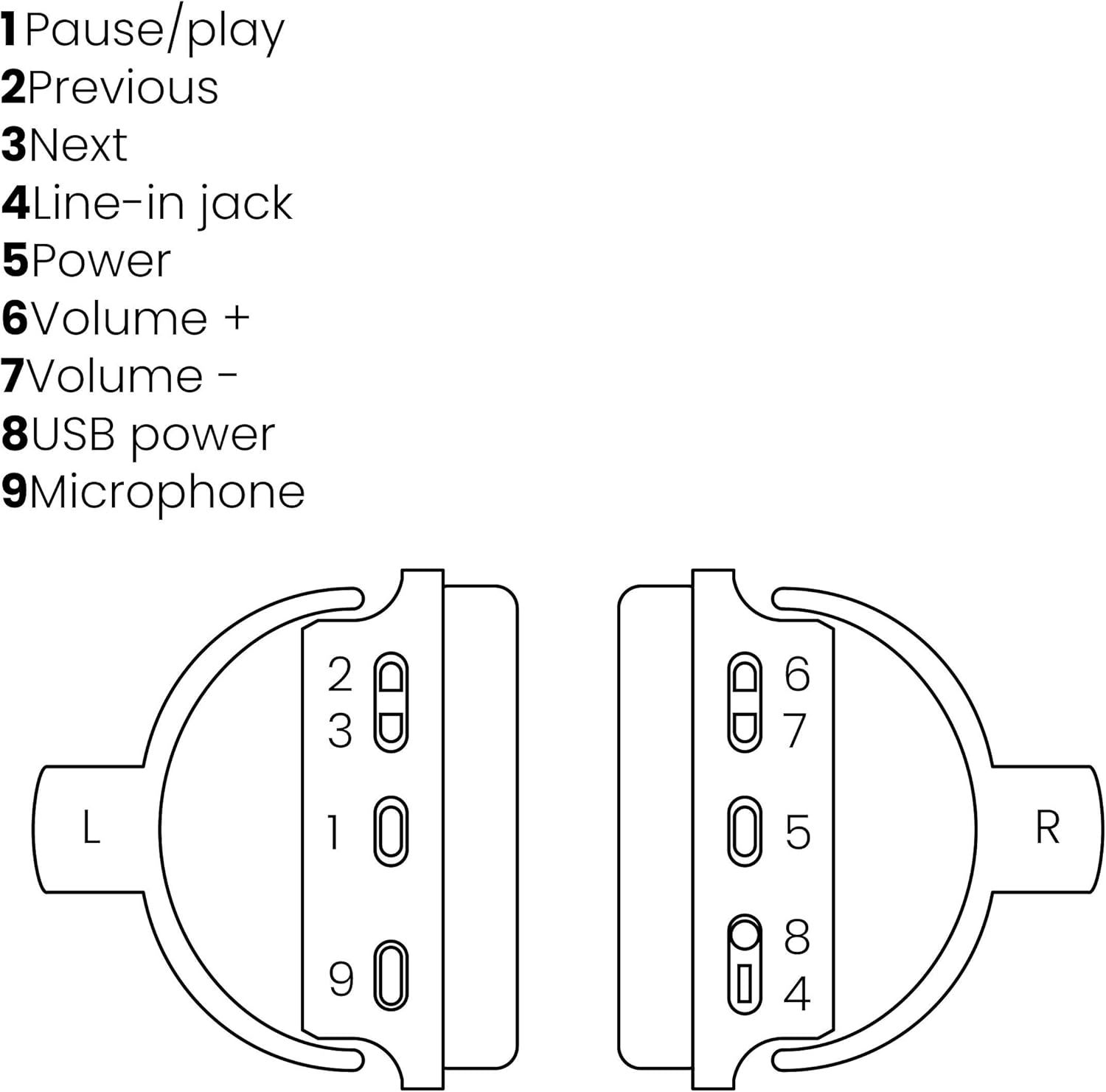
Image: A line drawing illustrating the left and right ear cup controls and ports, numbered for identification.
- Pause/Wiedergabe-Taste: Steuert die Musikwiedergabe.
- Schaltfläche "Vorheriger Titel": Springt zum vorherigen Lied.
- Nächster Track-Button: Springt zum nächsten Lied.
- Line-In-Buchse: For wired audio connection using the 3.5mm cable.
- Netzschalter: Turns the headphones on/off and initiates Bluetooth pairing.
- Lautstärke + Taste: Erhöht die Lautstärke.
- Lautstärketaste: Verringert die Lautstärke.
- USB-Stromanschluss: For charging the headphones using the Micro USB cable.
- Mikrofon: Eingebautes Mikrofon für freihändige Anrufe.
Aufstellen
1. Aufladen der Kopfhörer
Before first use, fully charge your headphones. Connect the Micro USB end of the charging cable to the USB Power Port (8) on the headphones and the standard USB end to a USB power adapter (not included) or a computer's USB port. The LED indicator will show charging status. A full charge provides over 8 hours of playback time.
2. Bluetooth-Kopplung
So verbinden Sie Ihre Kopfhörer drahtlos mit einem Bluetooth-fähigen Gerät:
- Stellen Sie sicher, dass die Kopfhörer ausgeschaltet sind.
- Halten Sie die Netzschalter (5) until the LED indicator flashes blue and red, indicating pairing mode.
- Aktivieren Sie Bluetooth auf Ihrem Smartphone, Tablet oder einem anderen Bluetooth-fähigen Gerät und suchen Sie nach verfügbaren Geräten.
- Select "BoomBoom 560" from the list of found devices.
- Sobald die Verbindung hergestellt ist, blinkt die LED-Anzeige langsam blau.

Image: Illustration depicting various Bluetooth-enabled devices (laptop, smartphone, tablet) wirelessly transmitting audio to the headphones.
3. Kabelgebundene Verbindung
If Bluetooth is not available or the battery is depleted, you can use the included 3.5mm audio cable. Connect one end of the cable to the Line-in Jack (4) on the headphones and the other end to the audio output of your device.
Bedienungsanleitung
Ein-/Ausschalten
- So schalten Sie das Gerät ein: Halten Sie die Netzschalter (5) for approximately 3 seconds until the LED indicator flashes blue.
- So schalten Sie das Gerät aus: Halten Sie die Netzschalter (5) for approximately 3 seconds until the LED indicator turns off.
Musikwiedergabe
- Abspielen/Pause: Drücken Sie die Pause/Play Button (1) einmal.
- Nächster Titel: Drücken Sie die Next Track Button (3) einmal.
- Vorheriges Lied: Drücken Sie die Previous Track Button (2) einmal.
Anruf-Management
When connected via Bluetooth, you can manage phone calls using the built-in microphone (9):
- Anruf annehmen/beenden: Drücken Sie die Pause/Play Button (1) einmal.
- Anruf ablehnen: Halten Sie die Pause/Play Button (1) etwa 2 Sekunden lang.
Lautstärkeregelung
- Lautstärke erhöhen: Drücken Sie die Volume + Button (6).
- Lautstärke verringern: Drücken Sie die Volume - Button (7).

Image: A user enjoying music or media with the Marmitek BoomBoom 560 headphones while relaxing at home.
Wartung
Um die Langlebigkeit und optimale Leistung Ihrer Kopfhörer zu gewährleisten:
- Reinigen Sie die Kopfhörer mit einem weichen, trockenen Tuch. Verwenden Sie keine Scheuermittel oder Lösungsmittel.
- Vermeiden Sie es, die Kopfhörer extremen Temperaturen, hoher Luftfeuchtigkeit oder direkter Sonneneinstrahlung auszusetzen.
- Bewahren Sie die Kopfhörer an einem kühlen, trockenen Ort auf, wenn Sie sie nicht verwenden.
- Versuchen Sie nicht, die Kopfhörer selbst zu zerlegen oder zu reparieren, da dies zum Erlöschen der Garantie führt.
Fehlerbehebung
If you encounter issues with your BoomBoom 560 headphones, refer to the following common solutions:
- Kein Strom: Stellen Sie sicher, dass die Kopfhörer vollständig aufgeladen sind. Verbinden Sie sie mit dem USB-Ladekabel mit einer Stromquelle.
- Kopplung via Bluetooth nicht möglich:
- Stellen Sie sicher, dass sich die Kopfhörer im Kopplungsmodus befinden (LED blinkt blau und rot).
- Ensure your Bluetooth device's Bluetooth function is enabled and within range (typically 10 meters).
- Try turning off and on both the headphones and your Bluetooth device.
- Delete "BoomBoom 560" from your device's Bluetooth list and attempt to pair again.
- Kein Ton:
- Überprüfen Sie die Lautstärke sowohl an den Kopfhörern als auch an Ihrem angeschlossenen Gerät.
- Stellen Sie sicher, dass die Kopfhörer richtig gekoppelt sind bzw. dass das 3.5-mm-Audiokabel fest angeschlossen ist.
- Falls Sie Bluetooth verwenden, versuchen Sie, die Verbindung zu trennen und wiederherzustellen.
- Schlechte Tonqualität:
- Move closer to your Bluetooth device to reduce interference.
- Stellen Sie sicher, dass sich keine Hindernisse zwischen den Kopfhörern und dem Gerät befinden.
- Prüfen Sie die Audioquelle auf Qualitätsprobleme.
- Loose Earcup Bracket: If the earcup bracket feels loose, handle the headphones with care. Avoid excessive force when adjusting or folding. If the issue persists and affects functionality, contact customer support.
Technische Daten
| Modellname | Boom Boom 560 |
| Modellnummer | 8122 |
| Marke | Marmitek |
| Konnektivitätstechnologie | Wireless (Bluetooth), Wired (3.5mm jack) |
| Bluetooth-Kompatibilität | Ja |
| Formfaktor | Over-Ear-Kopfhörer |
| Material | Leder (Ohrmuscheln) |
| Besondere Merkmale | Rauschunterdrückung |
| Mikrofontechnik | Omni (Built-in) |
| Batteriebeschreibung | Lithium-Ionen (Li-Ion) |
| Akkulaufzeit | Über 8 Stunden (ca.) |
| Signal-Rausch-Verhältnis (SNR) | 82 dB |
| Technische Daten | 23 x 5 x 18 cm; 100 g |
Garantie und Support
Marmitek products are designed and manufactured to high quality standards. For information regarding warranty terms and conditions, please refer to the documentation provided with your purchase or visit the official Marmitek webWebsite.
Für weitere Hilfe oder technischen Support besuchen Sie bitte die Marmitek Store on Amazon or the official Marmitek support channels.

Image: Logo indicating "Dutch Quality" and compliance with "EU European Standards".


