1. Einleitung
The Contour +2 HD GPS Wearable Video Camera is designed for capturing high-definition video in various environments. This camera features a built-in GPS receiver for tracking speed, elevation, and distance, which can be overlaid onto your video footage. Mobile connectivity allows for real-time video preview and camera setting adjustments via a smartphone or tablet. The instant-on record switch ensures quick capture, and the included waterproof case extends its usability to underwater activities.
2. Packungsinhalt
Verify that all the following items are included in your Contour +2 package:
- Contour +2 HD GPS Wearable Video Camera
- Waterproof Case (submersible up to 60 meters)
- 4 GB Micro SD-Karte
- Profile Montieren
- Rotating Flat Surface Mount
- Wiederaufladbarer Akku
- USB 2.0 Kabel
- Mini-HDMI-Kabel
- Mikrofonkabel
- Contour Flex Mount Strap (Amazon exclusive)
3. Kamera überview
Familiarize yourself with the key components of your Contour +2 camera.


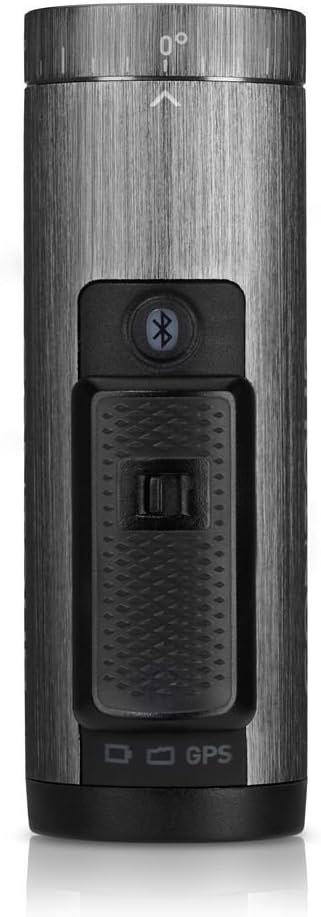


4. Einrichtung
4.1. Laden des Akkus
Before first use, fully charge the camera's rechargeable battery. Connect the camera to a USB power source using the provided USB 2.0 cable. The status indicator light will show charging progress.
4.2. Einlegen der Micro-SD-Karte
Open the battery/SD card compartment at the rear of the camera (refer to Figure 3.5). Insert the 4GB Micro SD card into the designated slot until it clicks into place. Ensure the card is oriented correctly. For optimal performance, it is recommended to format the SD card using the camera's format switch or the Contour mobile app.
4.3. Montage der Kamera
The Contour +2 camera utilizes a rail mount system. Attach the desired mount (e.g., Profile Mount, Rotating Flat Surface Mount, or Flex Mount Strap) to your helmet, handlebars, or other surfaces. Slide the camera onto the mount until it locks securely. The camera's lens can rotate up to 270 degrees to achieve the desired recording angle.
4.4. Pairing with Mobile App (Bluetooth)
Download the Contour mobile app (available for iOS/Android devices). Enable Bluetooth on your mobile device and on the Contour +2 camera by pressing the Bluetooth button (refer to Figure 3.3). Follow the app's instructions to pair your camera. This allows for live preview, remote control, and advanced setting adjustments.
5. Bedienung
5.1. Powering On/Off and Recording
To power on the camera and begin recording, slide the Instant On-Record Switch (located on top of the camera, refer to Figure 3.3) into its forward, locked position. The camera will power on and immediately start recording. To stop recording and power off the camera, slide the switch back to its original position.
5.2. Using the Laser Level
The integrated laser level assists in aligning your shot. When the camera is powered on, a laser line will project from the front of the camera (near the lens). Adjust the camera's rotation until the laser line is horizontal, ensuring a level recording angle.
5.3. Customizing Settings via Mobile App
The Contour mobile app provides extensive control over camera settings:
- Videoqualität: Select from various recording modes, including 1080p and 480p at up to 120 frames per second (fps) for slow-motion effects.
- Bildeinstellungen: Adjust white balance, contrast, sharpness, exposure, and exposure metering.
- Audio: Control microphone gain, especially useful when using an external microphone via the external mic jack.
- Geographisches Positionierungs System: Enable or disable GPS tracking for data overlay.
5.4. GPS-Funktionalität
The built-in GPS receiver tracks speed, elevation, and distance during recording. This data can be integrated and displayed with your video footage using the Contour Storyteller app or other compatible software.
5.5. Verwendung des wasserdichten Gehäuses
For underwater activities or protection in wet conditions, place the Contour +2 camera inside the provided waterproof case. Ensure the case is properly sealed before submersion. The case is rated for depths up to 60 meters.
6. Wartung
6.1. Reinigung der Kamera und des Gehäuses
Wipe the camera body with a soft, dry cloth. For the lens, use a specialized lens cleaning cloth and solution. Clean the waterproof case with fresh water after saltwater exposure and ensure all seals are free of debris.
6.2. Batteriepflege
To prolong battery life, avoid extreme temperatures. Store the camera with a partially charged battery if not in use for extended periods. The rechargeable battery provides up to 2.5 hours of recording, depending on settings and environmental conditions.
6.3. SD-Kartenverwaltung
Regularly transfer recorded footage to a computer to free up space on the Micro SD card. Format the SD card periodically using the camera's format switch or the mobile app to maintain optimal recording performance and prevent data corruption.
7. Fehlerbehebung
| Ausgabe | Mögliche Ursache | Lösung |
|---|---|---|
| Die Kamera lässt sich nicht einschalten. | Die Batterie ist leer oder nicht richtig eingesetzt. | Laden Sie den Akku vollständig auf. Stellen Sie sicher, dass der Akku korrekt im Akkufach sitzt. |
| Camera does not record. | Die SD-Karte ist voll, beschädigt oder nicht eingelegt. | Insert a valid SD card. Format the SD card. Transfer files, um Speicherplatz freizugeben. |
| Die Videoqualität ist schlecht. | Incorrect settings or dirty lens. | Check video resolution settings in the mobile app. Clean the camera lens. |
| Mobile app cannot connect to camera. | Bluetooth ist deaktiviert oder es liegt ein Kopplungsproblem vor. | Ensure Bluetooth is enabled on both camera and mobile device. Re-attempt pairing through the app. |
| GPS data not overlaying. | GPS feature disabled or poor signal. | Ensure GPS is enabled in camera settings via the mobile app. Record in an open area with clear sky view. |
8. Spezifikationen
| Besonderheit | Detail |
|---|---|
| Technische Daten | 3.88 x 1.25 x 2.25 Zoll |
| Artikelgewicht | 5.3 Unzen |
| Batterien | 1 Lithium-Ionen-Akku (im Lieferumfang enthalten) |
| Fotosensor-Technologie | CMOS |
| Auflösung der Videoaufnahme | 1080p, 480p |
| Flash-Speichertyp | Micro SD |
| Videoaufnahmeformat | MP4 |
| Unterstütztes Audioformat | AAC, MP3 |
| Bildschirmgröße | 2.7 Inches (for preview via mobile app) |
| Konnektivitätstechnologie | Bluetooth, HDMI, USB |
| Besonderheit | Waterproof (with included case) |
| Hersteller | Kontur |
9. Garantie und Support
For warranty information and technical support, please refer to the official Contour webBesuchen Sie die Website oder kontaktieren Sie den Kundendienst. Bewahren Sie Ihren Kaufbeleg für eventuelle Garantieansprüche auf.