1. Einleitung
This manual provides detailed instructions for the setup, operation, and maintenance of your Rii Mini i8 2.4GHz Wireless Keyboard with Touchpad. This device combines a full QWERTY keyboard with a multi-touch touchpad, designed for convenient control of various devices such as PCs, Smart TVs, Android TV Boxes, and game consoles.

Bild: Abgewinkelt view of the Rii Mini i8 Wireless Keyboard, showcasing sein kompaktes Design und Tastenlayout.
2. Packungsinhalt
Bitte überprüfen Sie den Packungsinhalt, um sicherzustellen, dass alle Artikel vorhanden sind:
- Rii Mini i8 Wireless Keyboard with Touchpad
- USB Receiver (stored inside the battery compartment)
- USB-Ladekabel
- Benutzerhandbuch (dieses Dokument)
3. Einrichtung
- Suchen Sie den USB-Empfänger: Open the battery compartment cover on the back of the keyboard. The USB receiver is stored inside.
- USB-Empfänger einstecken: Stecken Sie den USB-Empfänger in einen freien USB-Anschluss Ihres Geräts (PC, Smart-TV, Android-TV-Box usw.).
- Tastatur einschalten: Suchen Sie den Ein-/Ausschalter an der Seite der Tastatur und schieben Sie ihn in die Position „EIN“.
- Automatische Verbindung: Die Tastatur sollte sich automatisch mit Ihrem Gerät verbinden. In der Regel sind keine zusätzlichen Treiber erforderlich.

Bild: Rückseite view of the Rii Mini i8 keyboard, showing the battery compartment and the USB receiver stored within.

Bild: Rückseite view of the Rii Mini i8 keyboard with the battery cover open, illustrating the location of the removable USB receiver.
4. Bedienungsanleitung
Once connected, the Rii Mini i8 functions as a standard keyboard and mouse.
- Tippen: Use the QWERTY keyboard layout for text input.
- Mausfunktion: The central touchpad allows for cursor control.
- Multimedia-Tasten: Dedicated keys for volume control, play/pause, and other media functions are located on the left side.
- Funktionstasten (Fn): Halten Sie die Fn key (bottom left) and then press a key with a blue icon to access its secondary function (e.g., Fn + F1 for email).

Image: A user holding the Rii Mini i8 keyboard, demonstrating its use for controlling a television display.
5. Keyboard Layout and Functions
The Rii Mini i8 features a compact QWERTY layout with additional function and multimedia keys.

Bild: Draufsicht view of the Rii Mini i8 Wireless Keyboard, clearly showing the full QWERTY layout, touchpad, and dedicated function keys.
- QWERTY Keys: Standard alphanumeric keys for typing.
- Funktionstasten (F1-F12): Zugriff durch Drücken von Fn + corresponding key.
- Multimedia-Steuerungstasten: Volume up/down, mute, play/pause, next/previous track.
- Steuerkreuz: Located on the right side for navigation.
- Linke/Rechte Maustaste: Dedicated buttons below the touchpad.
6. Touchpad-Funktionen
Das integrierte Touchpad unterstützt Multi-Touch-Gesten für eine intuitive Navigation.
- Tippen mit einem Finger: Funktioniert wie ein linker Mausklick.
- Zwei-Finger-Tippen: Funktioniert wie ein Rechtsklick.
- Two Finger Drag (Vertical): Scrolls up or down.
- Ziehen mit einem Finger: Bewegt den Cursor.
7. Aufladen des Geräts
The Rii Mini i8 keyboard is powered by a rechargeable Lithium Metal battery.
- Schließen Sie das Ladekabel an: Plug the small end of the included USB charging cable into the mini-USB port on the top edge of the keyboard.
- An Stromquelle anschließen: Plug the standard USB end of the cable into a USB port on your computer, a USB wall adapter, or a power bank.
- Ladeanzeige: A charging indicator light (usually red) will illuminate during charging and turn off or change color when fully charged.
- Akkulaufzeit: The keyboard is designed for extended use on a single charge.

Image: The included USB charging cable, showing the mini-USB connector for the keyboard and the standard USB connector for a power source.
8. Wartung
- Reinigung: Reinigen Sie die Oberfläche der Tastatur mit einem weichen, trockenen Tuch. Bei hartnäckigem Schmutz kann ein leicht trocknendes Tuch hilfreich sein.amp Ein Tuch kann verwendet werden, wobei darauf zu achten ist, dass keine Flüssigkeit in das Gerät eindringt.
- Lagerung: Bei längerer Nichtbenutzung sollte die Tastatur ausgeschaltet werden, um die Batterielebensdauer zu verlängern. An einem kühlen, trockenen Ort aufbewahren.
- Batteriepflege: Vermeiden Sie häufiges vollständiges Entladen des Akkus. Laden Sie das Gerät regelmäßig auf, um die Akkuleistung zu erhalten.
9. Fehlerbehebung
| Problem | Mögliche Lösung |
|---|---|
| Tastatur reagiert nicht |
|
| Die Cursorbewegung ist unregelmäßig oder langsam. |
|
| Schlüssel funktionieren nicht |
|
10. Spezifikationen
Key technical specifications for the Rii Mini i8 Wireless Keyboard:
- Modell: RT-MWK08RF
- Konnektivität: 2.4 GHz Wireless (über USB-Dongle)
- Hardware-Schnittstelle: Radiofrequenz
- Betriebslautstärketage: 3.3 Volt
- Energiequelle: Battery Powered (Lithium Metal, included)
- Produktabmessungen: 5.79 x 0.75 x 3.86 cm (ca. 147 x 18 x 97 mm)
- Artikelgewicht: 110 g
- Besondere Merkmale: Kabellos, Touchpad
- Bewegungserkennungstechnologie: Optical (for touchpad)
- Tastaturbeschreibung: Innenbereich
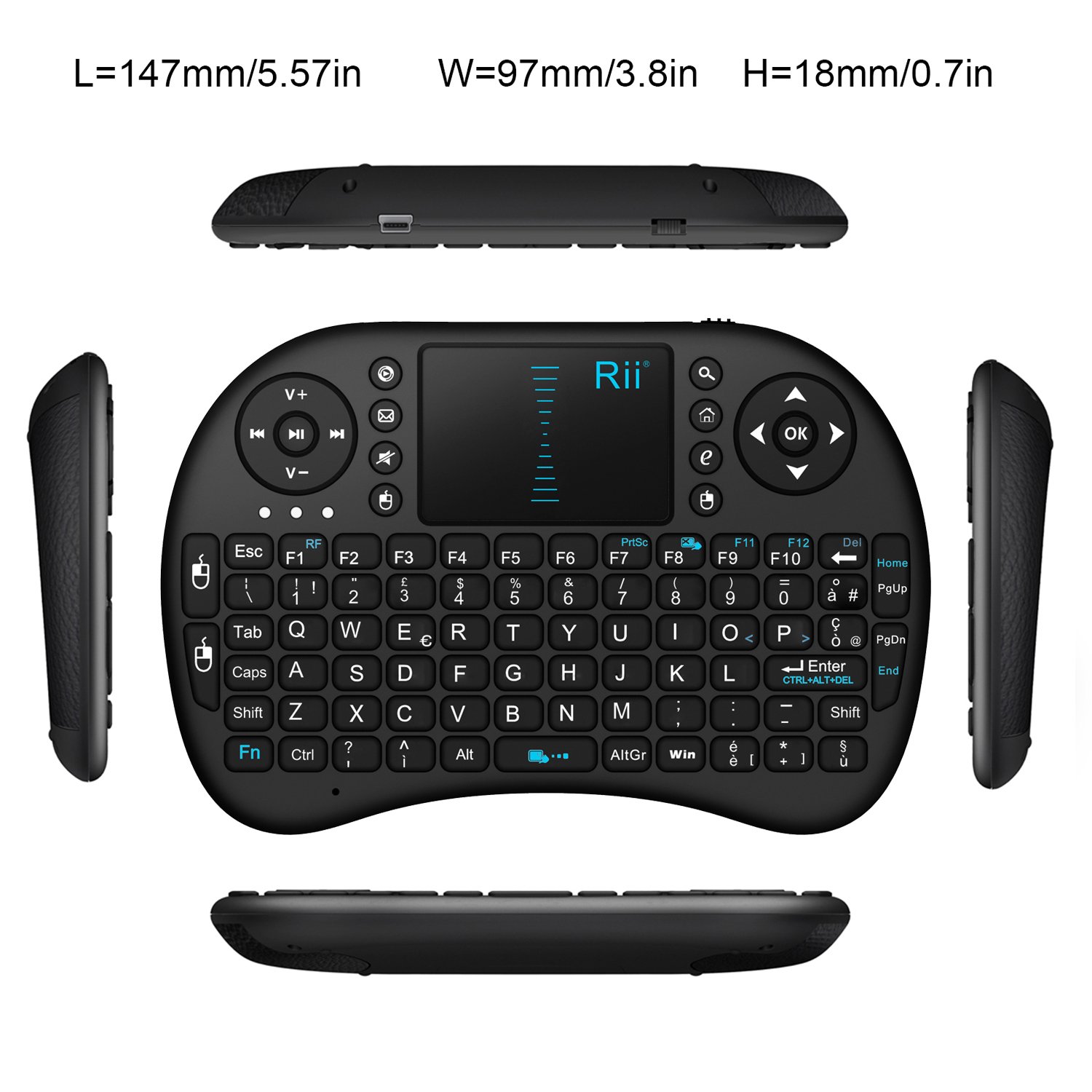
Bild: Draufsicht view of the Rii Mini i8 keyboard with its dimensions (length, width, height) indicated in millimeters and inches.
11. Garantie und Support
Informationen zur Garantie und zum technischen Support finden Sie auf der offiziellen Website des Herstellers. webBesuchen Sie unsere Website oder wenden Sie sich an Ihren Händler. Bewahren Sie Ihren Kaufbeleg für Garantieansprüche auf.