1. Einleitung
The Lorex LW2731AC1 is an add-on wireless camera designed to expand your existing Lorex 7-Inch LCD Wireless Home Monitoring System. This camera provides additional surveillance capabilities, allowing you to monitor more areas of your home or property. It features day and night viewing, two-way audio communication, and a secure digital wireless signal for reliable performance.
This manual provides essential information for the proper installation, operation, and maintenance of your LW2731AC1 add-on camera.
2. Packungsinhalt
Überprüfen Sie, ob alle Komponenten im Paket vorhanden sind:
- 1 x Indoor/Outdoor Wireless Camera (LW2731AC1)
- 1 x Netzteil für die Kamera
3. Produktmerkmale
The LW2731AC1 camera is equipped with several features to enhance your monitoring experience:
- VGA (640 x 480) Resolution Sensor: Bietet klare Videoqualitättage.
- 52 Grad Viewing-Winkel: Offers a focused field of view for specific areas.
- 40 Fuß Infrarot-Nachtsichtgerät: Enables monitoring in low-light or complete darkness, with black and white video.
- IR-Sperrfilter: Ensures accurate color reproduction during daylight conditions.
- Advanced Day/Night Mode: Automatically switches between color (day) and black and white (night) modes for optimal clarity.
- Passive Infrared (PIR) Motion Detection: Detects movement to trigger recording or alerts.
- Zweiwege-Audio: Built-in microphone and speaker allow for listening and speaking through the camera.
- Secure Digital Wireless Signal: Utilizes Frequency Hopping Spread Spectrum (FHSS) technology for private and secure video and audio transmission.
- Wetterbeständiges Design: Suitable for both indoor and outdoor installation. For outdoor use, install under shelter to protect from direct exposure to rain or snow.

Abbildung 3.1: Vorderansicht view of the Lorex LW2731AC1 Add-on Camera, showing the lens, IR LEDs, and antenna.

Abbildung 3.2: Nahaufnahme von vorn view of the camera, highlighting the lens, infrared LEDs, and the motion sensor below.
4. Einrichtung
4.1 Physische Installation
- Wählen Sie einen Standort: Select a suitable location for your camera. Consider the desired viewing area, proximity to a power outlet, and wireless signal strength to your Lorex 7-Inch LCD monitor. For outdoor use, ensure the camera is installed under shelter to protect it from direct weather exposure.
- Montieren Sie die Kamera: Use the provided mounting hardware to securely attach the camera to a wall or ceiling. Adjust the camera's angle to cover the desired area.
- Strom anschließen: Plug the camera's power adapter into the camera and then into a standard electrical outlet. The camera requires a local power outlet for operation.
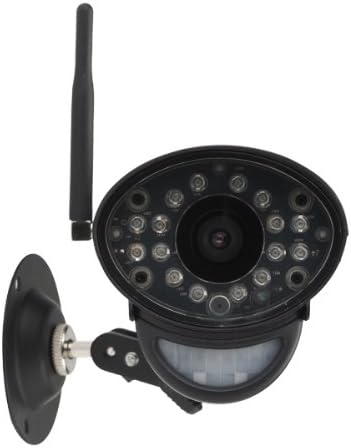
Abbildung 4.1: Vorderseite view of the camera with its adjustable mounting bracket, ready for installation.
4.2 Pairing with Your Monitoring System
To integrate the LW2731AC1 add-on camera with your Lorex 7-Inch LCD monitoring system, follow the pairing instructions provided with your main monitoring system. Typically, this involves:
- Access the menu on your Lorex 7-Inch LCD monitor.
- Navigate to the 'Camera Pairing' or 'Add Camera' section.
- Select an unused channel for the new camera.
- Follow the on-screen prompts, which usually instruct you to press a 'Pair' or 'Sync' button on the back of the camera within a specified timeframe (e.g., 30 seconds).
- Once successfully paired, the camera's video feed will appear on the selected channel of your monitor.
Note: Refer to your Lorex 7-Inch LCD monitoring system's manual for specific pairing instructions, as steps may vary slightly by model.
5. Bedienung
Once paired, the LW2731AC1 camera operates in conjunction with your Lorex 7-Inch LCD monitoring system. Refer to your main system's manual for detailed instructions on:
- Viewing-Modi: How to switch between single camera view, scan mode (automatic switching), and quad split-screen mode (if supported by your monitor).
- Bewegungserkennungseinstellungen: Adjusting sensitivity and recording triggers for the camera's passive infrared motion sensor.
- Zweiwege-Audio: Using the talk-back function to communicate through the camera.
- Aufnahme und Wiedergabe: Managing video recordings stored on your monitoring system's SD card.
The camera's digital wireless signal ensures a private and secure connection, minimizing interference and unauthorized access to your video feed.
6. Wartung
6.1 Reinigung der Kamera
To maintain optimal image quality, periodically clean the camera lens and housing:
- Stellen Sie sicher, dass die Kamera vor der Reinigung ausgeschaltet ist.
- Use a soft, lint-free cloth to gently wipe the lens. If necessary, dampBefeuchten Sie das Tuch leicht mit Wasser oder einer milden Linsenreinigungslösung.
- Wipe the camera housing with a soft, damp Tuch. Vermeiden Sie aggressive Chemikalien oder Scheuermittel.
6.2 Umweltaspekte
While the camera is weather-resistant, extreme conditions can affect its performance and lifespan:
- Avoid installing the camera in direct sunlight for prolonged periods, as this can cause overheating.
- Protect the camera from direct exposure to heavy rain, snow, or hail. Install under an overhang or eave when used outdoors.
- Ensure the power adapter is protected from moisture.
7. Fehlerbehebung
If you encounter issues with your LW2731AC1 add-on camera, consider the following common solutions:
- Kein Videosignal:
- Ensure the camera is powered on and its power adapter is securely connected to a working outlet.
- Verify the camera is within range of your Lorex 7-Inch LCD monitor. Obstructions like thick walls or multiple floors can reduce wireless range.
- Attempt to re-pair the camera with your monitoring system (refer to Section 4.2).
- Check for sources of interference (e.g., other wireless devices, microwaves) near the camera or monitor.
- Schlechte Bildqualität:
- Clean the camera lens (refer to Section 6.1).
- Ensure adequate lighting in the monitored area during the day.
- For night vision, ensure there are no obstructions directly in front of the camera's IR LEDs.
- Bewegungserkennung funktioniert nicht:
- Check the motion detection settings on your Lorex 7-Inch LCD monitor to ensure it is enabled and sensitivity is appropriately set.
- Ensure the camera's motion sensor is not obstructed.
- Probleme mit der Zwei-Wege-Audioübertragung:
- Verify the volume settings on your Lorex 7-Inch LCD monitor.
- Stellen Sie sicher, dass keine physischen Hindernisse das Mikrofon oder den Lautsprecher der Kamera blockieren.
If problems persist, consult the support section of the Lorex website or contact Lorex customer support for further assistance.
8. Spezifikationen
| Besonderheit | Spezifikation |
|---|---|
| Modellnummer | LW2731AC1 |
| Auflösung der Videoaufnahme | 640 x 480 (VGA) |
| Fachgebiet View | 52 Grad |
| Nachtsichtbereich | Bis zu 40 Fuß (12 m) |
| Konnektivitätstechnologie | Drahtlos (FHSS) |
| Stromquelle | Kabelgebundene Elektrik |
| Audio | Zwei-Wege-Audio (eingebautes Mikrofon und Lautsprecher) |
| Bewegungserkennung | Passives Infrarot (PIR) |
| Verwendung im Innen- und Außenbereich | Indoor, Outdoor (Weather-Resistant) |
| Abmessungen (L x B x H) | 9.6 x 3.6 x 3.4 Zoll (24.4 x 9.1 x 8.6 cm) |
| Artikelgewicht | 1.05 Pfund (0.48 kg) |
| Farbe | Schwarz |
| Internationale Schutzbewertung | IP67 |
9. Garantie und Support
For information regarding product warranty, technical support, and additional resources, please visit the official Lorex website. You can typically find FAQs, software downloads, and contact information for customer service there.
WebWebsite: www.lorex.com


