1. Einleitung
This manual provides detailed instructions for the setup, operation, and maintenance of your Vibe Axcess 5-in-1 Universal Remote. Please read this manual thoroughly before using the remote control to ensure proper functionality and to maximize your user experience. This remote is designed to control up to five different audio/video devices.
2. Produktüberschreitungview
The Vibe Axcess 5-in-1 Universal Remote is designed to consolidate control of multiple home entertainment devices into a single unit. It features dedicated buttons for various functions and device types.
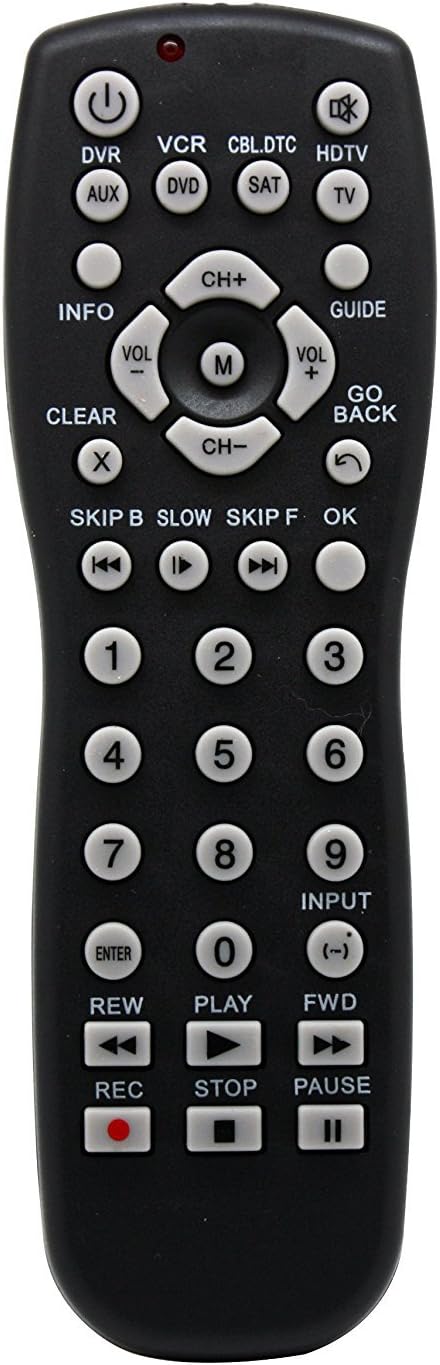
Abbildung 1: Front view of the Vibe Axcess 5-in-1 Universal Remote. This image displays the remote's layout, including device selection buttons (DVR, VCR, CBL.DTC, HDTV, AUX, DVD, SAT, TV), navigation pad, number keys, and media control buttons (REW, PLAY, FWD, REC, STOP, PAUSE).

Abbildung 2: Packaging of the Vibe Axcess 5-in-1 Universal Remote. The packaging highlights the remote's 5-in-1 capability and compatibility with various device types such as DVD/VCR, HDTV, DVD, AUX, and CBL/SAT/CABLE.
3. Einrichtung
3.1 Einlegen der Batterie
- Suchen Sie die Batteriefachabdeckung auf der Rückseite der Fernbedienung.
- Schieben Sie den Deckel nach unten oder drücken Sie den Riegel und heben Sie ihn an, um ihn zu öffnen.
- Legen Sie zwei (2) AAA-Batterien ein und achten Sie darauf, dass die positiven (+) und negativen (-) Anschlüsse mit den Abbildungen im Batteriefach übereinstimmen.
- Bringen Sie die Abdeckung des Batteriefachs wieder an ihren Platz und schieben Sie sie so weit hinein, bis sie sicher einrastet.
Notiz: Verwenden Sie stets neue Batterien und tauschen Sie beide Batterien gleichzeitig aus. Mischen Sie keine alten und neuen Batterien oder unterschiedliche Batterietypen.
3.2 Programmierung der Fernbedienung
To control your devices, the universal remote must be programmed with the correct codes for each device. There are typically two methods for programming:
3.2.1 Direkte Codeeingabe
This method involves entering a specific code from a code list (usually provided with the remote or available online) for your device's brand.
- Schalten Sie das Gerät ein, das Sie steuern möchten (z. B. Fernseher, DVD-Player).
- Drücken und halten Sie die gewünschte Gerätetaste auf der Fernbedienung (z. B. TV, DVD) for approximately 3 seconds until the indicator light (usually red) illuminates and stays on.
- While the indicator light is on, enter the 3-digit or 4-digit code for your device's brand using the number keys.
- If the code is valid, the indicator light will turn off. If the light flashes and remains on, the code was invalid; re-enter the code.
- Testen Sie die Fernbedienung, indem Sie die Taste drücken. LEISTUNG button. If the device turns off, the code is correct. If not, try the next code listed for your brand.
3.2.2 Automatische Codesuche
If you cannot find a code or direct code entry fails, use the auto code search method.
- Schalten Sie das Gerät ein, das Sie steuern möchten.
- Die gewünschte Gerätetaste gedrückt halten (z. B. TV) for approximately 3 seconds until the indicator light illuminates and stays on.
- While holding the device button, press the LEISTUNG button once. The indicator light will start flashing, indicating it is searching for a code.
- Point the remote at the device and wait for the device to turn off. This may take several minutes as the remote cycles through codes.
- Sobald sich das Gerät ausschaltet, drücken Sie sofort die Taste EINGEBEN Drücken Sie diese Taste, um den Code zu speichern. Die Kontrollleuchte erlischt.
- Test the remote's functions. If some functions do not work, repeat the auto search process to find a more compatible code.
4. Bedienungsanleitung
Once programmed, operating your Vibe Axcess 5-in-1 Universal Remote is straightforward.
- Gerät auswählen: Drücken Sie die entsprechende Gerätetaste (z. B. TV, DVD, CBL.DTC) for the device you wish to control. The indicator light will briefly illuminate to confirm selection.
- Ein-/Ausschalten: Drücken Sie die LEISTUNG Taste zum Ein- oder Ausschalten des ausgewählten Geräts.
- Lautstärkeregelung: Verwenden Sie die Lautstärke+ Und vol- Tasten zum Einstellen der Lautstärke.
- Kanalsteuerung: Verwenden Sie die CH+ Und CH- Tasten zum Wechseln der Kanäle.
- Zahlentasten: Use the number keys (0-9) to directly enter channel numbers or other numerical inputs.
- Navigation: Use the directional pad (up, down, left, right) and OK Schaltfläche zur Menünavigation.
- Mediensteuerung: Verwenden SPIELEN, PAUSE, STOPPEN, REW, Frontantrieb, Und AUFNAHME for controlling media playback on compatible devices.
5. Wartung
5.1 Reinigung
To clean your remote, gently wipe it with a soft, dry cloth. Do not use abrasive cleaners, solvents, or harsh chemicals, as these can damage the remote's finish or internal components.
5.2 Batteriewechsel
When the remote's performance degrades or the indicator light fails to illuminate, it is time to replace the batteries. Follow the battery installation steps in Section 3.1. Dispose of used batteries responsibly according to local regulations.
6. Fehlerbehebung
- Fernbedienung funktioniert nicht:
- Prüfen Sie, ob die Batterien richtig eingelegt und nicht leer sind. Tauschen Sie sie gegebenenfalls aus.
- Ensure you have selected the correct device button (e.g., TV for your television).
- Verify that the remote is programmed with the correct code for your device. Re-program if unsure.
- Stellen Sie sicher, dass sich keine Hindernisse zwischen der Fernbedienung und dem Infrarotsensor des Geräts befinden.
- Einige Funktionen funktionieren nicht:
- Some universal remote codes may not support all original remote functions. Try another code for your device brand using the programming steps.
- Ensure the device you are trying to control supports the specific function (e.g., not all TVs have a dedicated 'INFO' button function).
- Kontrollleuchte leuchtet nicht:
- Batterien prüfen und ersetzen.
- Wenn das Problem auch nach dem Batteriewechsel weiterhin besteht, ist möglicherweise die Fernbedienung defekt.
7. Spezifikationen
- Modell: OT795-KO
- Marke: Stimmung
- Produktabmessungen: 10.7 x 4 x 0.8 Zoll
- Artikelgewicht: 4 Unzen
- Batterien: 2 AAA-Batterien erforderlich (nicht im Lieferumfang enthalten)
- Maximale Anzahl unterstützter Geräte: 5
- Konnektivitätstechnologie: Infrarot
- Besonderheit: Universal
8. Garantie und Support
For information regarding warranty coverage or technical support, please refer to the documentation included with your purchase or contact the retailer where the product was acquired. Specific warranty terms may vary.


