Einführung
The JENSEN CD-490 is a portable stereo CD player equipped with an AM/FM stereo radio and an auxiliary line-in. It features a top-loading CD player with an LED track display, skip/search/repeat functions, and programmable memory. The unit includes a telescopic antenna for radio reception, a foldable carrying handle for portability, and a stereo headphone jack. An auxiliary input allows connection of external audio devices such as MP3 players.
Wichtige Sicherheitsinformationen
WARNUNG: Dieses Produkt enthält Chemikalien, von denen bekannt ist, dass sie Krebs, Geburtsfehler oder andere reproduktive Schäden verursachen.
Beachten Sie beim Umgang mit Elektrogeräten stets die grundlegenden Sicherheitsvorkehrungen, um das Risiko von Bränden, Stromschlägen und Verletzungen zu verringern. Bewahren Sie diese Bedienungsanleitung zum späteren Nachschlagen auf.
Im Leistungsumfang enthalten
- JENSEN CD-490 Portable Stereo CD Player with AM/FM Radio
- Netzkabel
- Bedienungsanleitung
Produkt überview
Familiarize yourself with the controls and features of your JENSEN CD-490 unit.
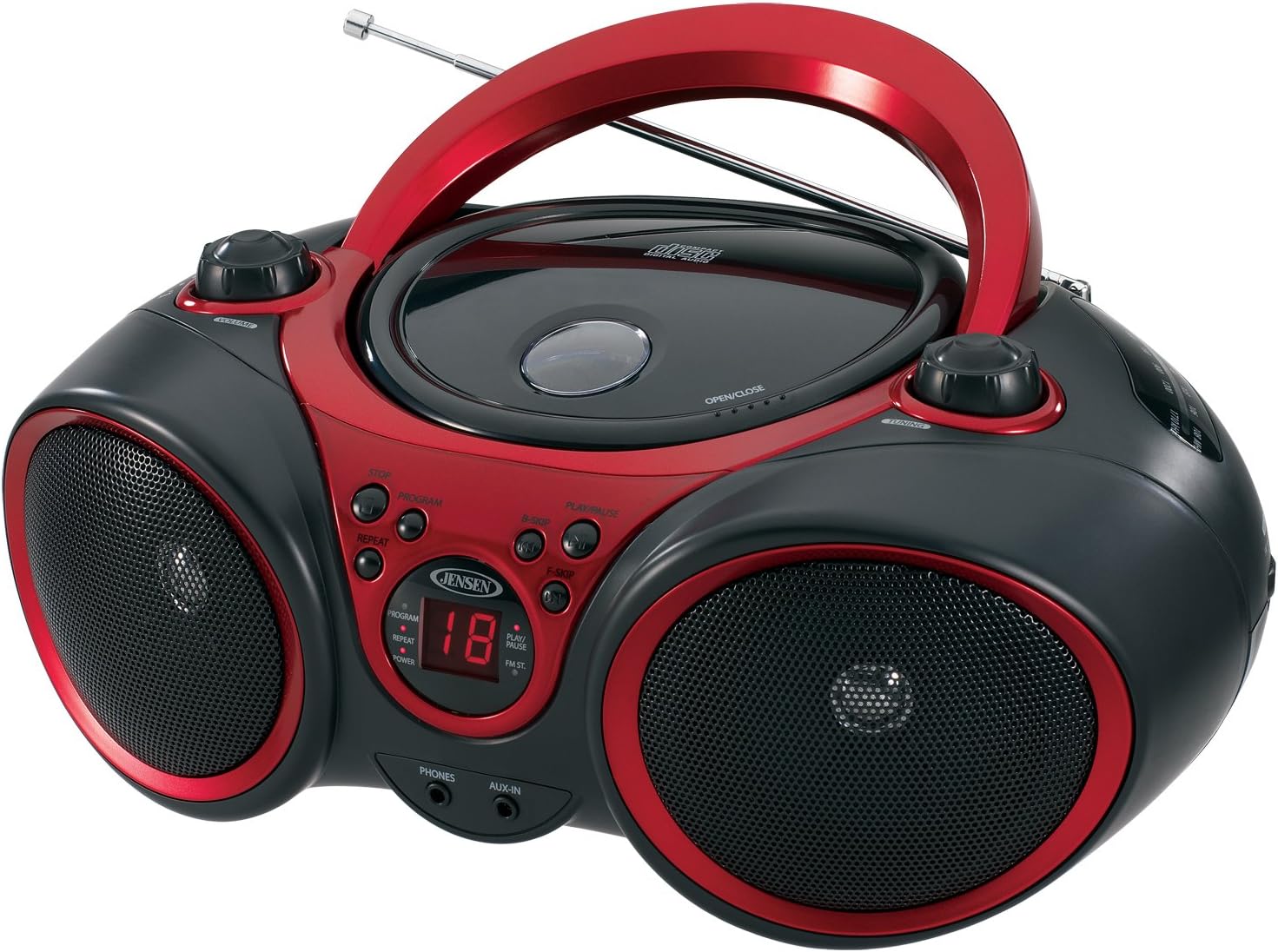
Bild: Vorderseite view of the JENSEN CD-490 unit, showing the CD compartment, speakers, control buttons, and display.
Bedienelemente auf der Vorderseite:
- Lautstärkeregler: Passt den Audioausgabepegel an.
- STOP-Taste: Stoppt die CD-Wiedergabe.
- PROGRAMM-Taste: Wird zur Programmierung von CD-Tracks verwendet.
- REPEAT-Taste: Wiederholt den aktuellen Titel oder alle Titel.
- B-SKIP Button: Skips backward through CD tracks.
- PLAY/PAUSE-Taste: Startet oder pausiert die CD-Wiedergabe.
- F-SKIP Button: Skips forward through CD tracks.
- LED-Anzeige: Shows CD track number and function indicators (PROGRAM, REPEAT, POWER, PLAY/PAUSE, FM ST).
- PHONES-Buchse: Zum Anschluss von Stereo-Kopfhörern.
- AUX-IN-Buchse: Zum Anschluss externer Audiogeräte.
Bedienelemente auf der Oberseite:
- CD-Fach: Top-loading area for compact discs.
- OPEN/CLOSE Latch: Entriegelt den Deckel des CD-Fachs.
- Abstimmungsknopf: Adjusts AM/FM radio frequency.
Bedienelemente an der Seite:
- FUNKTIONSSCHALTER: Selects between RADIO, CD/AUX IN, and OFF modes.
- AM/FM-Bandwähler: Selects between AM and FM radio bands.
Merkmale der Rückseite:
- Wechselstromeingang: Zum Anschließen des Netzkabels.
- Batteriefach: Holds 8 'C' (UM-2) batteries for portable operation.
- Teleskopantenne: Ausziehbare Antenne für den FM-Radioempfang.
Aufstellen
Stromversorgung des Geräts:
The CD-490 can be powered by either AC power or batteries.
Wechselstromversorgung:
- Ensure the unit is in the OFF position using the FUNCTION switch.
- Connect the AC power cord to the AC power input on the rear of the unit.
- Plug the other end of the AC power cord into a standard AC 120V/60Hz wall outlet.
Batterieleistung:
- Stellen Sie sicher, dass sich das Gerät in der AUS-Position befindet.
- Öffnen Sie den Batteriefachdeckel an der Unterseite des Geräts.
- Insert 8 'C' (UM-2) size batteries (not included), ensuring correct polarity (+/-).
- Schließen Sie den Batteriefachdeckel fest.
Antennenaufbau:
For optimal FM radio reception, fully extend the telescopic antenna. For AM reception, the unit has a built-in antenna, so no adjustment is typically needed.
Operating the CD Player
The CD-490 supports standard audio CDs and CD-R/RW discs.
- Set the FUNCTION switch to the 'CD/AUX IN' position.
- Press the 'OPEN/CLOSE' latch to open the CD compartment lid.
- Place an audio CD into the compartment with the label side facing up.
- Close the CD compartment lid firmly until it clicks. The LED display will show the total number of tracks on the CD.
- Press the 'PLAY/PAUSE' button to begin playback. The current track number will appear on the LED display.
- Adjust the 'VOLUME' knob to your desired listening level.
- To pause playback, press the 'PLAY/PAUSE' button. Press it again to resume.
- To skip to the next track, press the 'F-SKIP' button. To go back to the beginning of the current track or the previous track, press the 'B-SKIP' button.
- Um die Wiedergabe zu beenden, drücken Sie die Taste „STOP“.
Wiederholungsfunktion:
- During playback, press the 'REPEAT' button once to repeat the current track. The 'REPEAT' indicator will light up.
- Press the 'REPEAT' button a second time to repeat all tracks on the CD. The 'REPEAT' indicator will flash.
- Press the 'REPEAT' button a third time to cancel the repeat function.
Programmierte Wiedergabe:
- In STOP mode, press the 'PROGRAM' button. The 'PROGRAM' indicator will light up and '00' will flash on the display.
- Use the 'F-SKIP' or 'B-SKIP' buttons to select your desired track.
- Press the 'PROGRAM' button again to confirm the track. The display will show the next program number.
- Wiederholen Sie die Schritte 2 und 3, um bis zu 20 Titel zu programmieren.
- After programming, press the 'PLAY/PAUSE' button to start programmed playback.
- To cancel programmed playback, press the 'STOP' button twice.
Operating the AM/FM Radio
- Set the FUNCTION switch to the 'RADIO' position.
- Select either 'AM' or 'FM' using the AM/FM band selector switch.
- Extend the telescopic antenna for FM reception. Adjust its position for best reception.
- Drehen Sie den 'TUNING'-Knopf, um den gewünschten Radiosender auszuwählen.
- Adjust the 'VOLUME' knob to your desired listening level.
Verwendung des Hilfseingangs
The AUX-IN jack allows you to connect an external audio device (e.g., MP3 player, smartphone) to play through the CD-490's speakers.
- Set the FUNCTION switch to the 'CD/AUX IN' position.
- Connect one end of a 3.5mm audio cable (not included) to the AUX-IN jack on the front of the CD-490.
- Connect the other end of the audio cable to the headphone jack or line-out jack of your external audio device.
- Turn on your external audio device and start playback.
- Adjust the volume on both your external device and the CD-490's 'VOLUME' knob for optimal sound.
Wartung und Pflege
- Das Gerät sollte nicht direkter Sonneneinstrahlung, Wärmequellen oder übermäßiger Staub- oder Feuchtigkeitsbildung ausgesetzt werden.
- Reinigen Sie das Gerät mit einem weichen, trockenen Tuch. Verwenden Sie keine Scheuermittel oder Lösungsmittel.
- To clean the CD lens, use a commercially available CD lens cleaner.
- Wenn Batterien verwendet werden, sollten diese entfernt werden, wenn das Gerät längere Zeit nicht benutzt wird, um ein Auslaufen zu verhindern.
Fehlerbehebung
| Problem | Mögliche Ursache | Lösung |
|---|---|---|
| Kein Strom | Netzkabel nicht angeschlossen; Batterien leer oder falsch eingelegt. | Überprüfen Sie den Netzkabelanschluss; tauschen Sie die Batterien aus oder stellen Sie die richtige Polarität sicher. |
| CD does not play / 'NO DISC' error | CD inserted incorrectly; CD is dirty or scratched; Unit in wrong function mode. | Re-insert CD with label side up; Clean or replace CD; Set FUNCTION switch to 'CD/AUX IN'. |
| Schlechter Radioempfang | Antenne nicht ausgefahren/eingestellt; schwaches Signal. | Extend and adjust FM telescopic antenna; Reposition the unit for better signal. |
| No sound from AUX-IN | Audio cable not connected; Volume too low on external device or unit. | Ensure audio cable is securely connected; Increase volume on both devices. |
Technische Daten
- Modell: CD-490
- Energiequelle: AC 120V/60Hz or 8 x 'C' (UM-2) batteries (not included)
- Ausgangsleistung: 2 x 1.5 W RMS
- CD-Kompatibilität: CD, CD-R/RW
- Radiobänder: AM/FM-Stereo
- Konnektivität: Auxiliary Input Jack, Stereo Headphone Jack
- Abmessungen (L x B x H): 12.7 x 9.1 x 5.8 Zoll
- Gewicht: 3.4 Pfund
- Hersteller: Spectra Merchandising International, Inc.
- Als Erstes verfügbar: 14. Mai 2003
Garantie und Support
Specific warranty information and customer support contact details are typically provided with your product packaging or on the manufacturer's official webBitte konsultieren Sie diese Quellen für die genauesten und aktuellsten Informationen.
Produktvideo
Sehen Sie sich dieses offizielle Produktvideo an, um einen visuellen Eindruck zu erhalten.view of the JENSEN CD-490 Stereo.
Video: Ein überview of the JENSEN CD-490 Portable Stereo CD Player, highlighting its features and design.


